



My AI reads my newsletters before I do.
Every morning, a skill I built goes through my Gmail, pulls out the AI newsletters I subscribe to, and turns them into one short brief. It knows what I care about, skips what I don’t, and links back to each source, so when something looks worth reading in full, I’m one click away from it.
If your inbox has a pile of newsletters you keep meaning to get to, you probably know why that can help you save time.
I think we’re in a transition period right now. For years, getting anything done in an app meant opening it and clicking through it yourself. Now your AI can go into a lot of the apps you use every day and do the reading, searching, and checking for you. What makes that possible is MCP (Model Context Protocol)—or what we know today as connectors. When an app ships an MCP server, your AI agent gets a way in to read what’s there or take actions for you.
Email is one example of something I keep noticing. More and more apps now ship an MCP server.
In April, Salesforce opened its entire platform, Slack included, to AI agents through APIs, MCP, and the command line. Marc Benioff summed it up as “Our API is the UI.”

Two weeks later, Box CEO Aaron Levie took the idea further. Levie’s argument is that as agents become the biggest users of software, every product has to work without its interface, because agents will talk to the APIs and skip the screens.

People who use these tools are saying the same thing from the other side. Engineer Ali Spittel wrote that the point is to have your own agent use a product, without being pushed into the agent the product built for you.

Growth marketer Onur Ozcan was blunter in a note to software owners: there’s no time or patience left for learning one more dashboard, so ship an MCP.

But don’t get me wrong—I don’t think interfaces are going away. Some work still needs a screen in front of you. But for a number of tasks that require me to look things up and verify them, I’d rather send my agent in.
Now, I know what you are thinking. I don’t build software. I write a newsletter. So what does any of this have to do with AI Maker?
A newsletter archive works a lot like software. People come to it to get something done, and the way in is still a screen you scroll through. If people would rather have their agent use a product than click through it, I don’t see why reading would be any different.
So I turned the same question on my own work. Two weeks ago, I built Maker Labs plugin because my skills were scattered across different posts, and you had to find each one and install it by hand. My posts have the same problem. I have 180+ posts on my Substack, and maybe the one you need is in there somewhere, but you have to remember it exists, bookmark it, or dig until you find it.
I find this type of work wastes so much time. And If my agent reads my newsletters for me, why would I expect you to dig through my archive every time you need something from it?
Introducing: AI Maker MCP
AI Maker has 186 posts as of this week. Most of them started the same way: a problem I was trying to solve in my own work, like setting up Claude Code, choosing between two tools, or figuring out what to automate first. Once I figured it out, I wrote down how and shared it with you.
So my archive is really a growing pile of my answers to my own problems. To use one, you have to read it, translate my situation into yours, and work out which parts fit your work. That’s a lot of friction between reading what I wrote and actually applying it to your own case.
My model so far has been simple: write it, publish it, and hope you read it and remember it when you need it. To make that easier, I keep a page where paid members can browse everything. But it’s still a long list, and you have to read through it and hope you land on the right post for your problem. It also has to be updated by hand every time I publish. I don’t always have time for that, and sometimes I just miss it.
Honestly, that kind of work wastes time on both sides. Why? Because more and more of our work runs through our agents (mine already does), so my archive has to be reachable from there too. That way it shows up at the moment you have the problem, and your agent can help you fit my answer to your case.
That’s why I built the AI Maker MCP 🚀
I want to make your life as a paid member easier by letting your agent go through my archive for you. You can still read every post the usual way, of course. Every new post I publish goes into it instantly, so there’s no list for me to keep up with and nothing for you to scroll through.
This doesn’t mean you should stop reading posts, though. You still need to read them to understand them.
Before we go further in exploring what you can do with AI Maker MCP, let me first explain why I’m doing this in the first place so you can get the bigger picture of it all.
What I want AI Maker to become
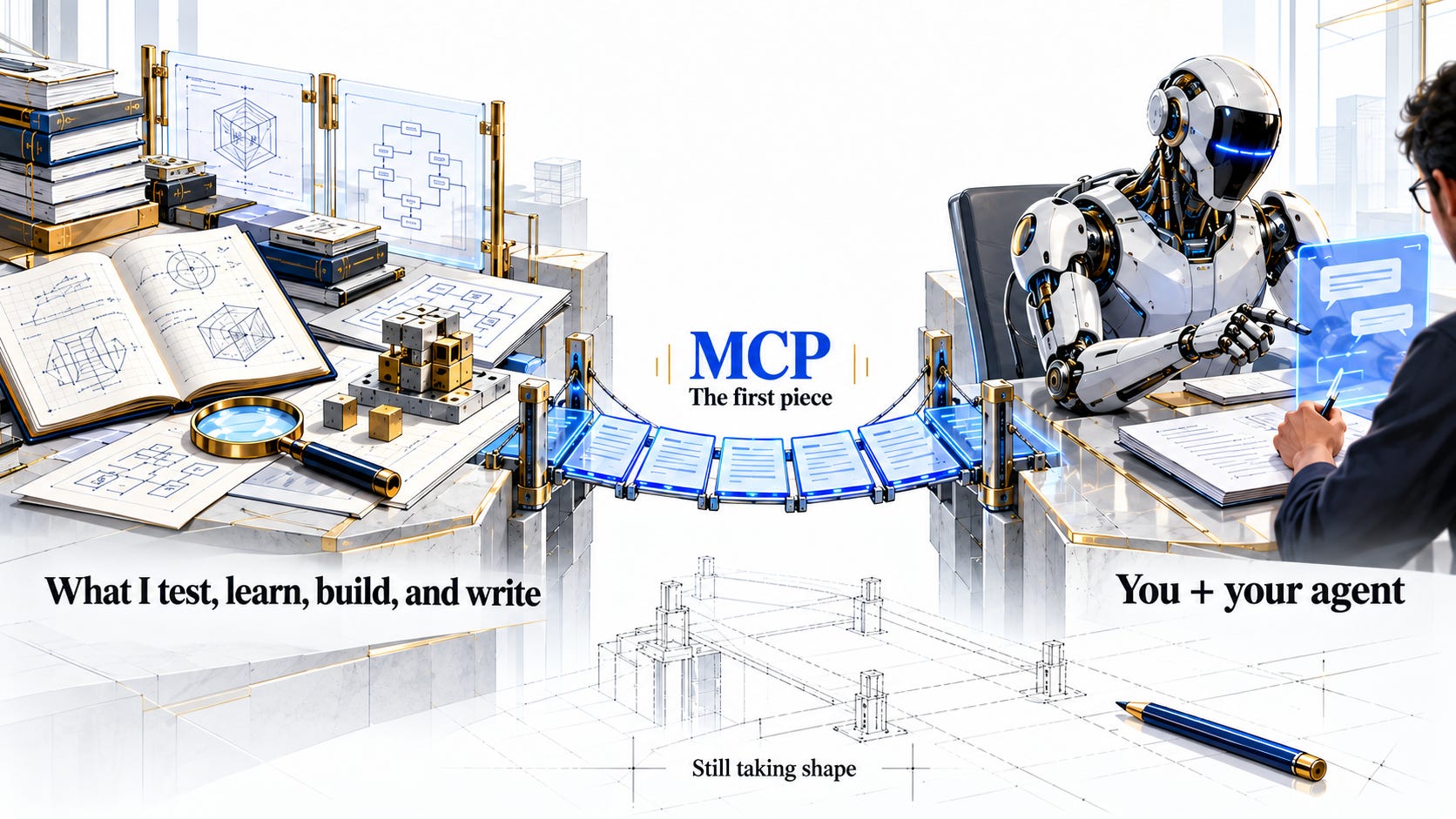
Honestly, this MCP comes from something I’ve been thinking about a lot lately. Every few months, AI gets better at a little more of what I do. And I noticed that if I just keep writing post after post, I start losing track of what AI Maker is actually about, and what I’m really bringing to it.
There’s also a gap I keep feeling, an invisible one between what I write and how you actually work. You probably subscribed to AI Maker because you care about your productivity, you use AI a lot, and you want to get better at it, so a lot of your real work already happens with your agents. The issue is my posts sit outside of that, in your inbox or in your Chrome tab you’ll come back to later. I want what I share to be part of how you work with your agents, and I don’t think writing one more post will close that gap.
So I’ve been trying to see myself a bit differently. I’m a writer, and I’m also the things behind the writing: what I’ve tested myself, how I judge what’s worth your time, what I can build and offer to you, and the skills I’ve picked up because AI made them possible for me. Those are much harder to replace, and they’re what I want to give more of to the people who support me.
And I’ve already started down that path. I enjoy writing this newsletter, but it turns out I also enjoy teaching people how to use AI, so I built Agentic Academy with my business partner Michael.
But, what ties all of it together is the shift I described in the beginning, where more of our reading, searching, and clicking moves into our agents. So whatever I offer, whether it’s the newsletter, the course, the app, or something I haven’t built yet, I want your agent to be able to reach it and use it with you.
The MCP is the first piece of that.
I don’t have this fully figured out yet. I’m sharing it because you might be asking a version of the same question about your own work.
What your agent can do with the AI Maker MCP
Once it’s connected, you talk to your AI the way you normally would. Mention “AI Maker” by name when you want it to look in my archive.
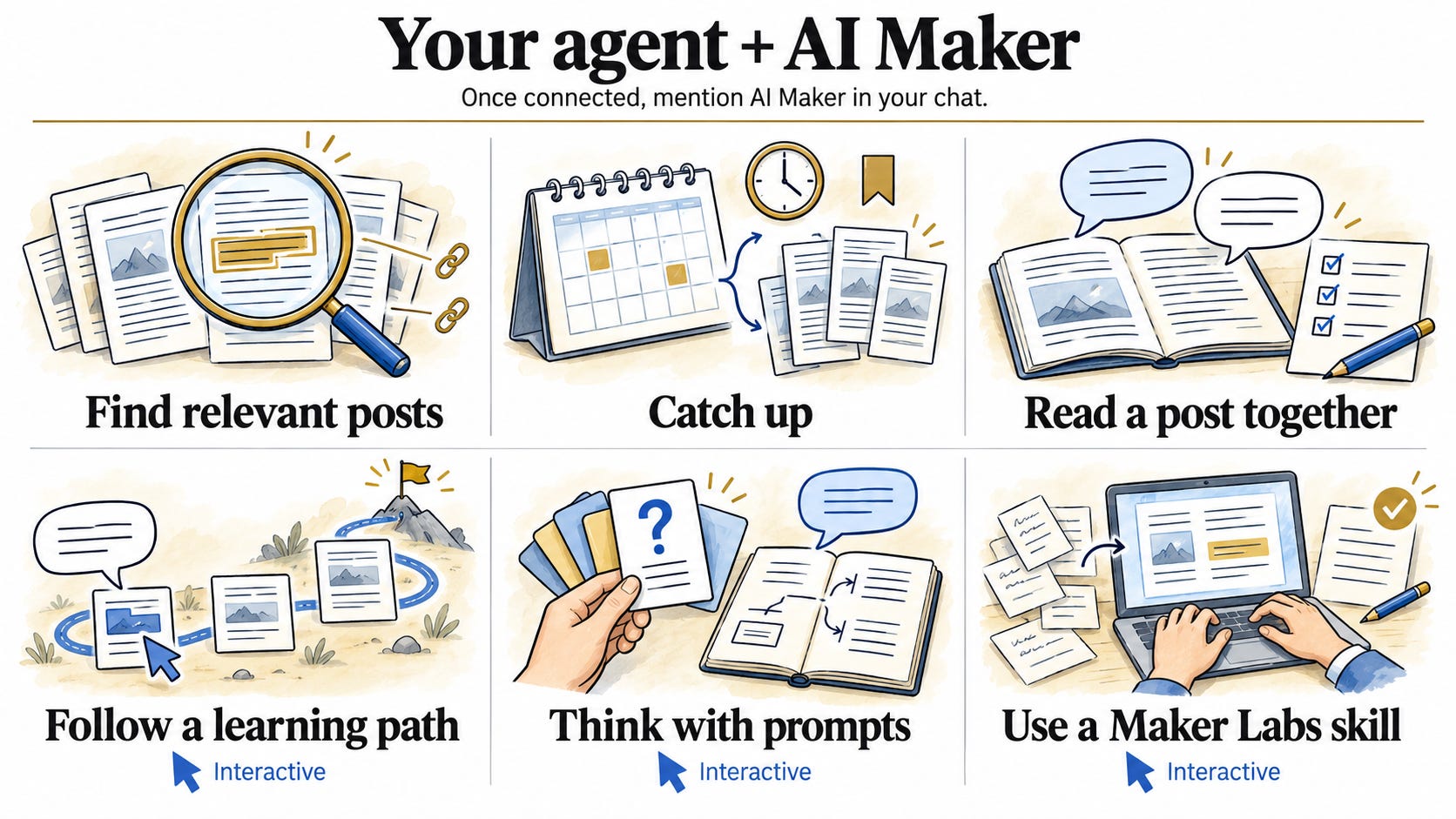
Here’s what it can do so far, including asking questions and clicking through an interactive UI:
Find what I’ve written about something. Ask “What has Wyndo written about using NotebookLM for research?” and it comes back with the posts that’s relevant, the passages that answer your question, and a link to each one.
Catch you up. Ask for my latest posts, everything I published in a given month, or every post on one topic.
Read a post with you. Point it at a post and ask it to summarize it, pull out the steps, or turn it into a checklist for your own situation.
Walk you through a learning path (Interactive UI). I’ve grouped my posts into 12 guided paths. Each one leads to a specific outcome, like Think Better With AI, Build Without Code, or Automate Your Work With Agents. Each path is labeled by level, from “chat apps only” to “Claude Code.” Tell your AI what you want to get better at, and it will pick a path and walk you through it one post at a time, with a prompt to run for each.
Help you think something through, with 120+ prompts (Interactive UI). My whole prompt library is in there: 42 full prompts, 10 playbooks that chain several prompts into one guided session, and 71 one-line questions you can drop into any chat. They’re sorted by what you’re dealing with:
Make a big decision
Get unstuck
Turn an idea into a plan
Learn something fast
Understand your audience
Run your work better
Know yourself
Think more creatively
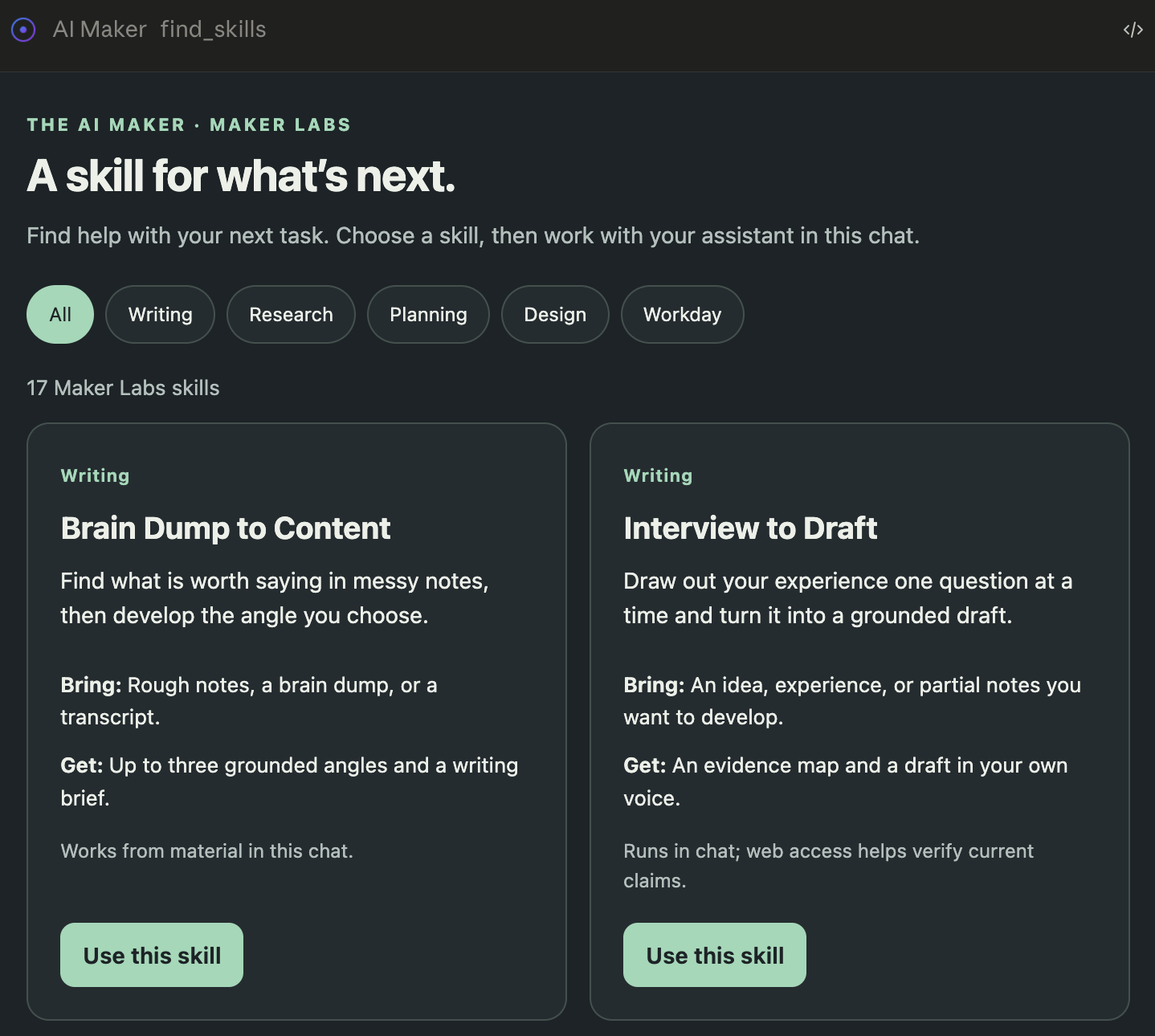
Run my skills, with nothing to install (Interactive UI). All 17 Maker Labs skills are in there too: 6 for writing, 4 for research, 3 for planning, 2 for design, and 2 for your workday. Tell your AI what you’re trying to do, like turning messy notes into a post or reviewing a draft before you publish. It suggests the skill that fits, loads my full instructions into the chat, and runs it with you using whatever tools and connections your AI already has.
The learning paths, prompt library, and Maker Labs skills offer interactive UIs. When you use them inside Claude or ChatGPT, they appear in the chat as clickable elements, and your AI walks you through each step.
One thing to know: paid posts come back as their free section plus a link to the full post on Substack. Your agent can still find a paid post, tell you what it covers, and point you to it. For the full walkthrough, you open it yourself and read on Substack.
Here’s what it looks like when you ask it something
For these examples, I used Claude, but AI Maker MCP also works with ChatGPT and other agent platforms.
I tested it with four questions.
The first one:
“Using The AI Maker, I’m a product manager who’s never used Claude Code. Where should I start?”
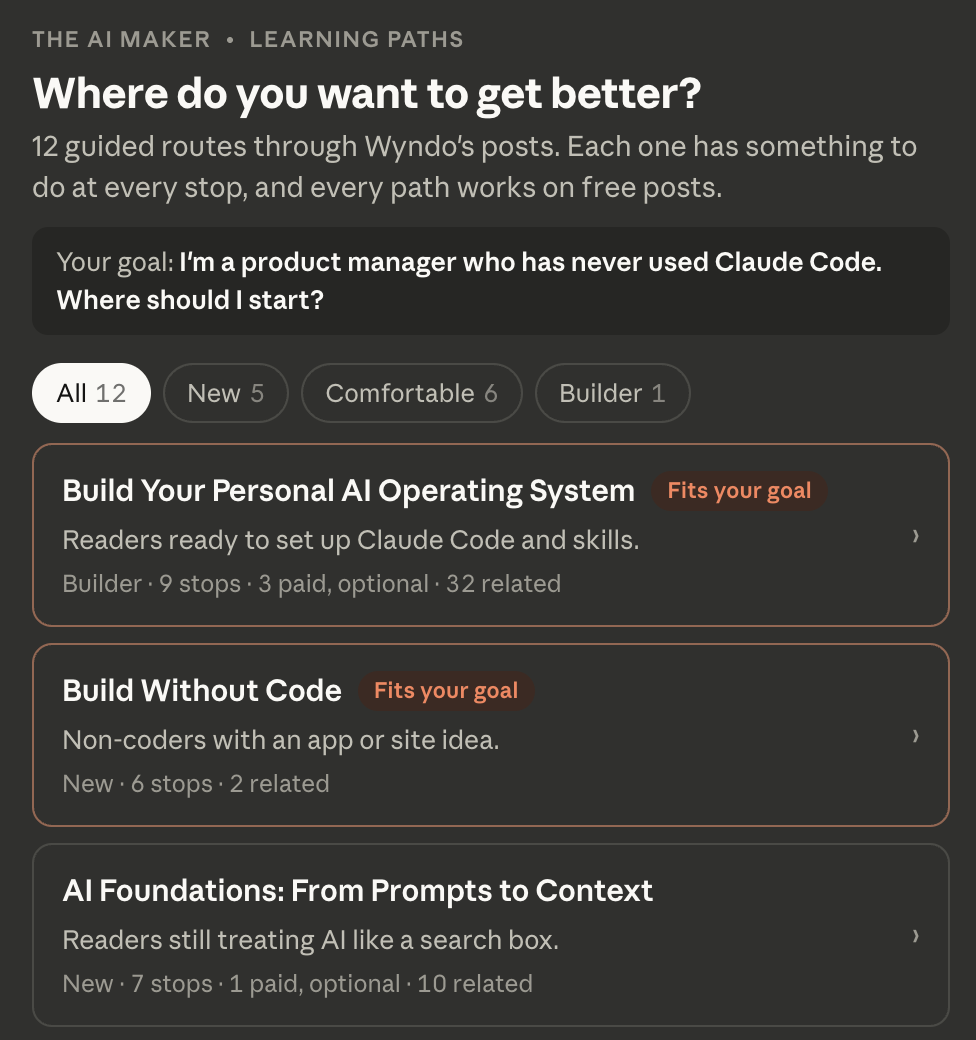
It matched me to two learning paths: Build Your Personal AI Operating System, and Build Without Code in case I’m not ready for the terminal yet. The first stop on the operating system path is a post about systems thinking, about working backward from the outcome you want, and it comes with a prompt to run before you set anything up. The install guide doesn’t show up until checkpoint four. That’s the order I built the path in, and the agent followed it without me explaining anything.
The second one:
“Using AI Maker, I’m deciding whether to launch a paid community for my newsletter or keep everything free. Help me think it through.”
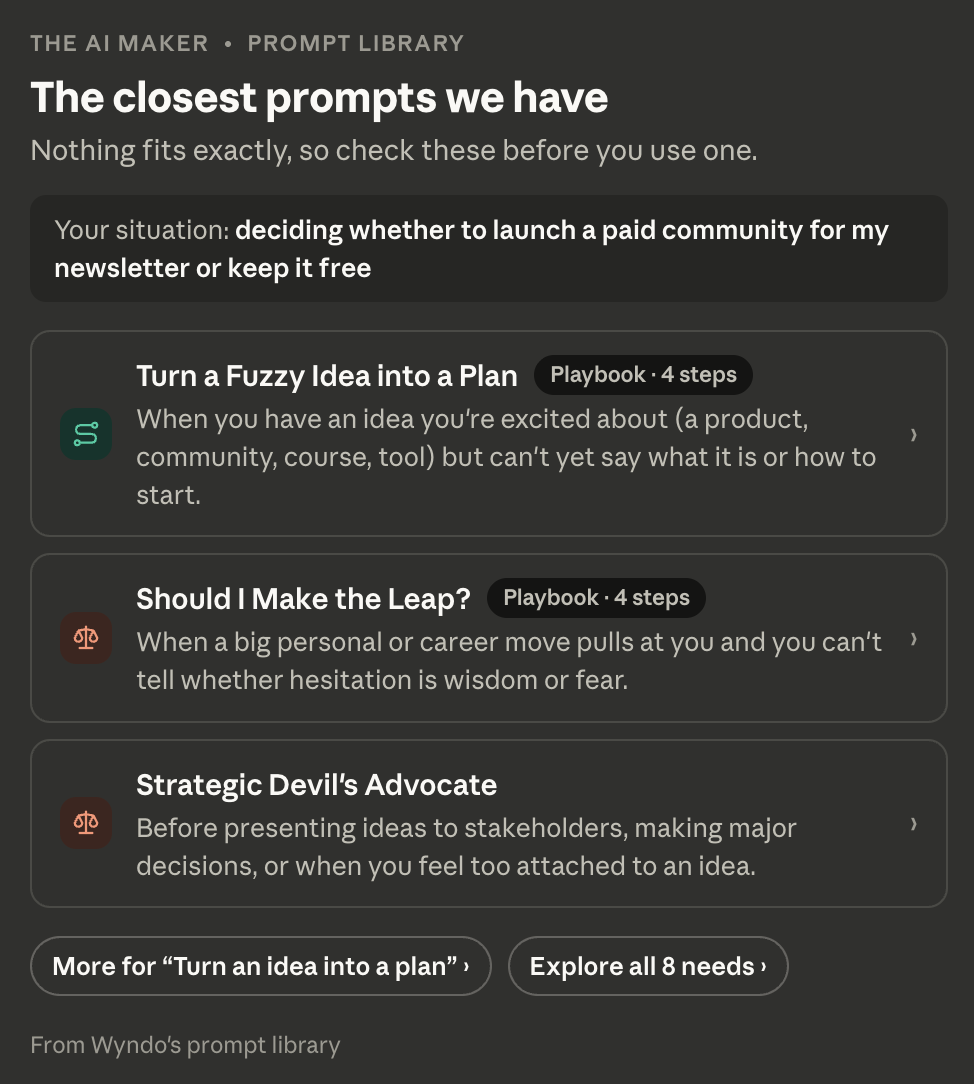
It picked the Turn a Fuzzy Idea into a Plan playbook, four prompts in a row: get clear on the idea, have AI argue against it, design the smallest version, then plan the work. The first prompt tells the AI not to offer a solution yet and to help you understand your own idea first. So before any pros and cons, the first prompt starts with what problem the community would solve and who it’s for.
The third one:
“Show me Wyndo’s prompt library.”
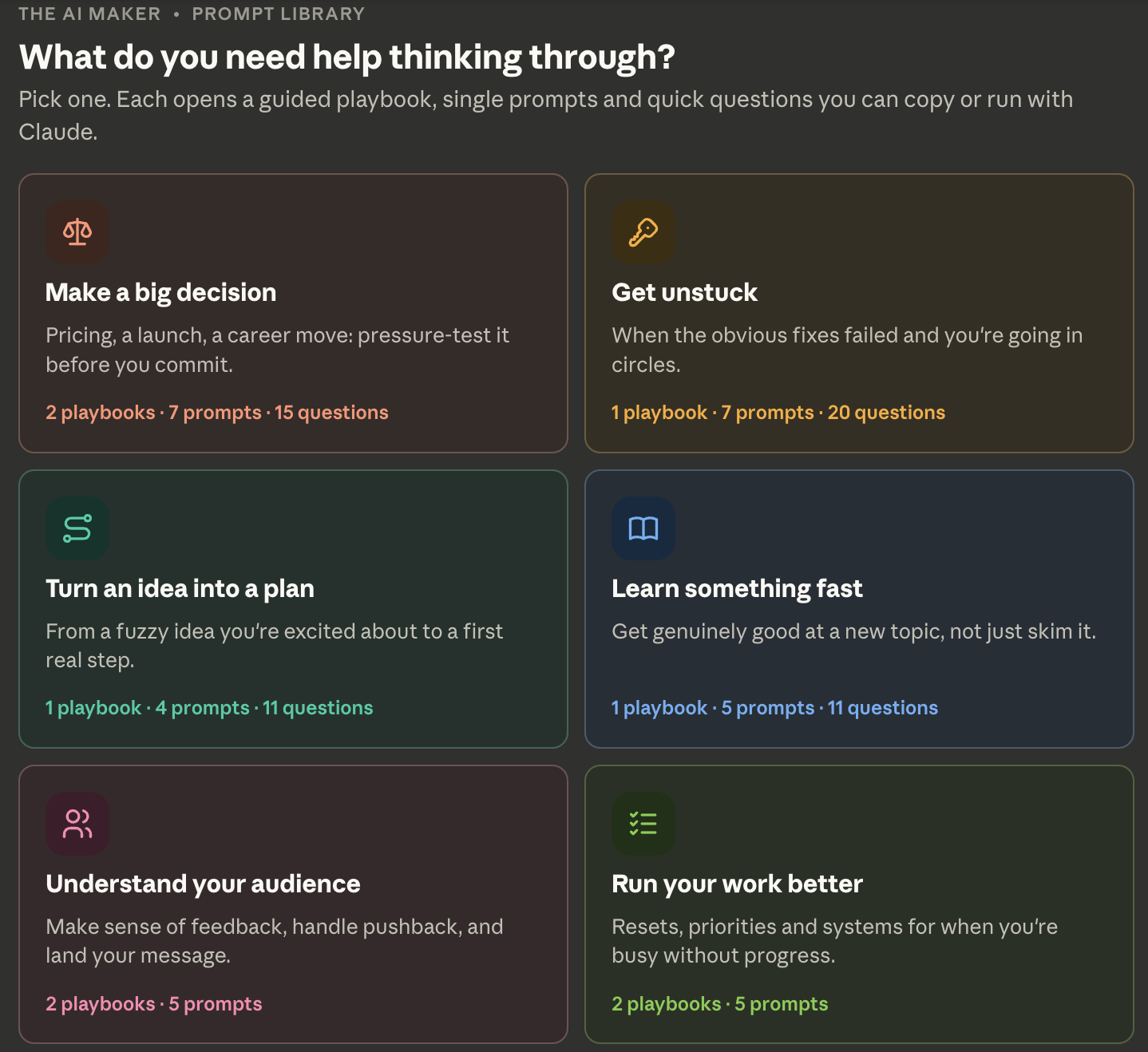
This question will give you eight prompt categories tailored to your needs that you can explore and access directly. As I mentioned, there are 120+ prompts in my library that you can access instantly.
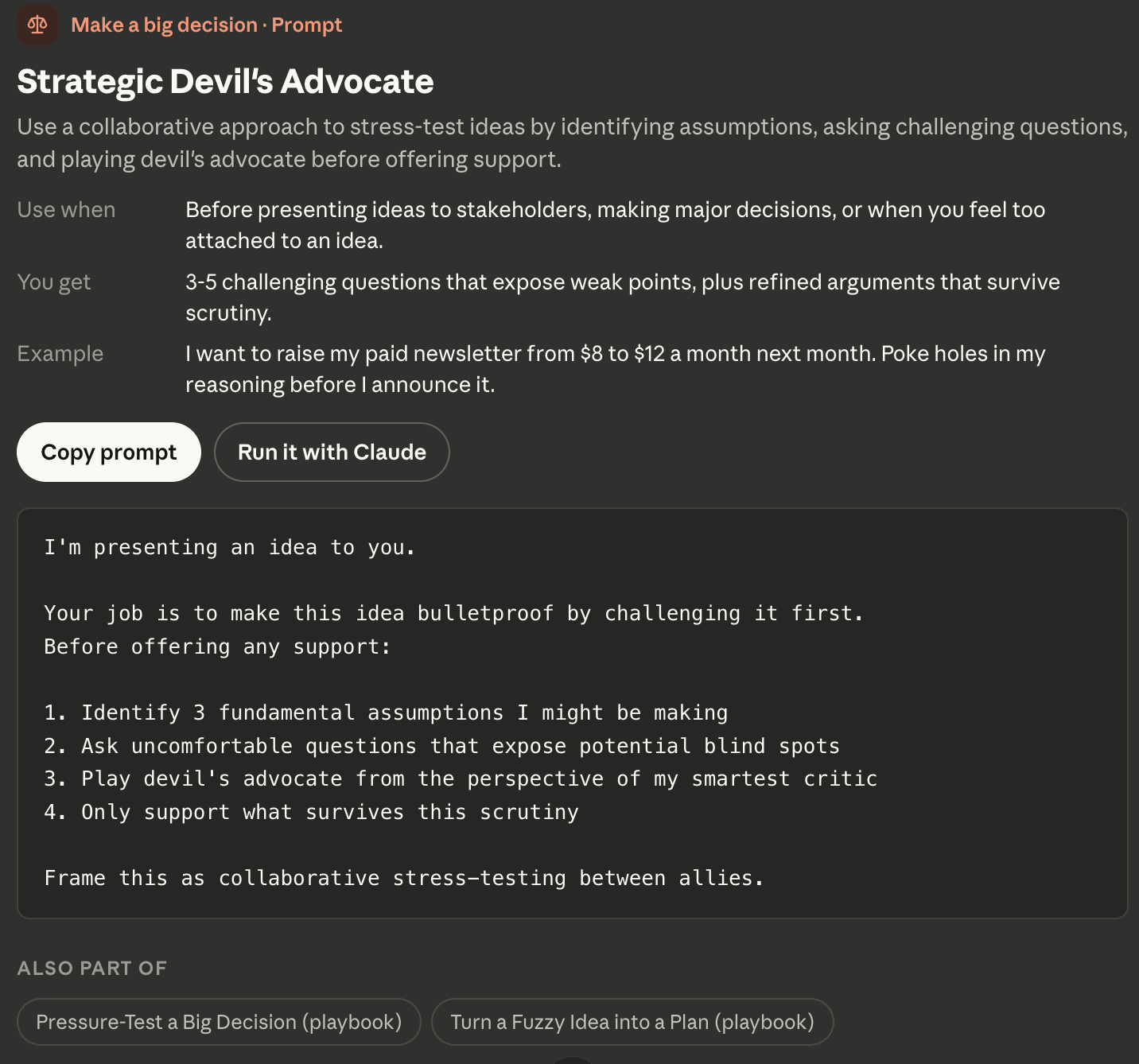
Once I figure out which prompt I’m interested in, I click the “Strategic Devil’s Advocate” and arrive at this interface, where I can see details on when to use it and the prompt itself, which I can easily copy or run directly with Claude.
The last one:
“What skill I can use for building linkedin carousel on AI Maker?”
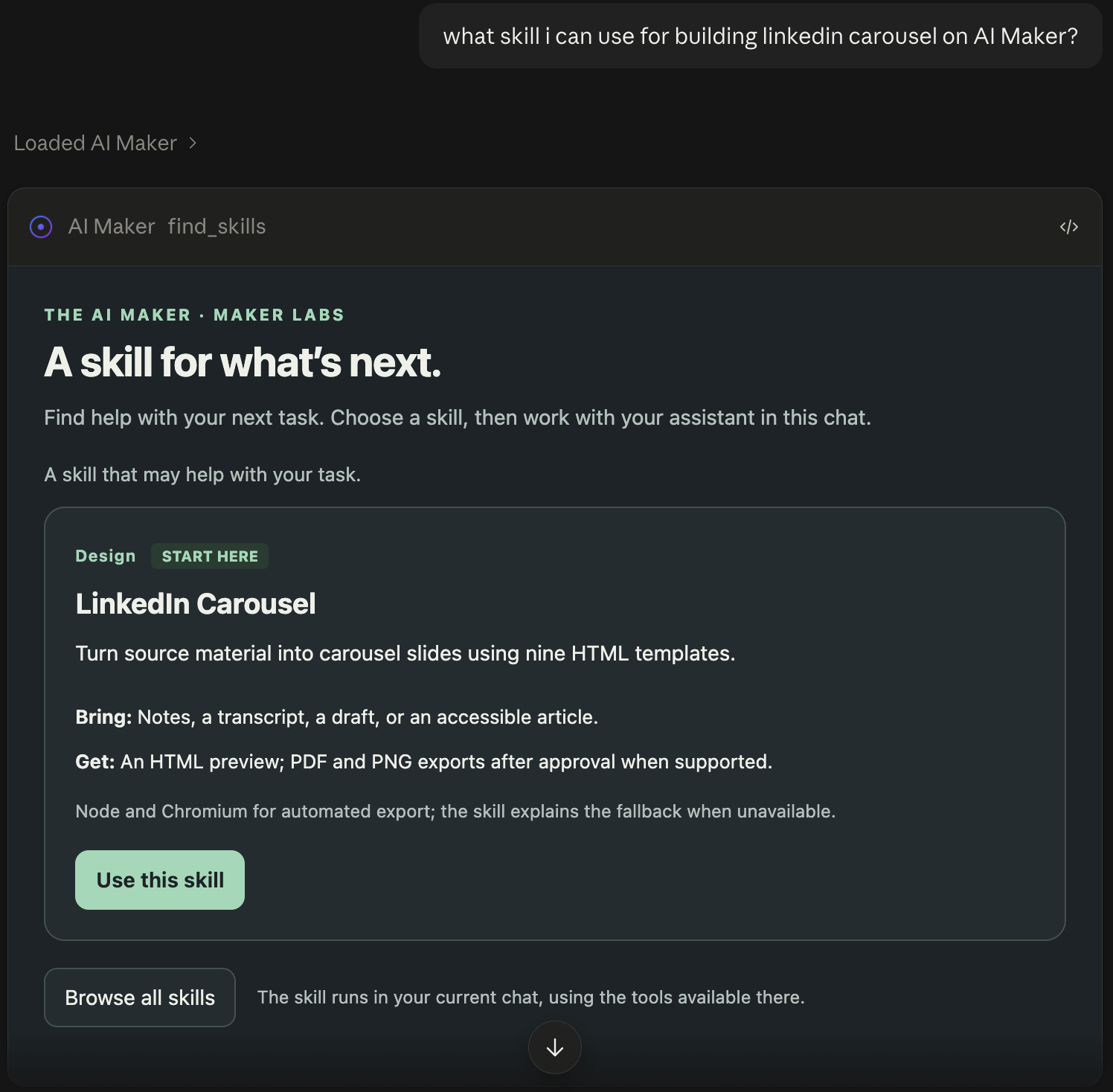
A detailed UI will appear that explains how my LinkedIn Carousel Generator skill works and what you’ll get from it. You can also click Browse Skill to see and access all 17 of my skills inside Maker Labs.
If you’re a paid member of AI Maker, this is all yours 🎁
🚨 Before you connect it
You’ll need an AI app that lets you add a custom connector with a link. I’ve tested it in Claude and ChatGPT. The setup takes only 30 seconds :)
There are two limits to know about: there’s no login yet, and it reads my archive, prompt library, and skills. Soon I’m adding a login capability so these MCPs can only be accessed by active paid subscribers. For now, any paid subscriber can access it, even for those who have cancelled.
If MCP is new to you, this post explains how it works. If you haven’t installed the Maker Labs plugin yet, you don’t need it for this, but you’ll want it for one part of this post.
What’s inside the rest of this post
The AI Maker MCP link and a step-by-step setup for Claude and ChatGPT with three test questions to confirm your AI is actually using the archive.
The questions that work best, grouped by job: catching up on what you missed, finding what I’ve written about a tool, turning a post into a checklist for your own work, and building a reading order for a topic you want to learn. Each one comes with what a good answer looks like and the sign it went wrong.
How to use learning paths with your agent: picking the right path for your level, running the prompts at the stops that have one, and jumping back in at the stop you reached last time.
How to run the prompt library through your agent: going through a playbook one step at a time, or pulling a prompt exactly as written so you can save it and reuse it anywhere.
How to run my 17 skills from the MCP: finding the skill that fits your task, what to bring to each one, and what each needs from your setup to do its full job.
More prompts to explore: some prompts you can use to push what AI Maker MCP can do for you.
By the end of this post, the AI you already use will know where to find everything I’ve written, every prompt I’ve shared, and every skill I’ve built. Next time you’re stuck on an AI workflow, you ask it, and it comes back with the post, the path, the prompt, or the skill that fits what you’re working on, then helps you use it.
Let’s connect it.
Connect the AI Maker MCP
Here’s the link you’ll paste into your AI: