



Lately, I’ve been thinking a lot about my consulting website.
Mostly about how to sharpen the offer so the right person recognizes it’s for them, how to write copy that sounds like me and still sells, and eventually, how to get more of the people who land on that page to actually send the form at the bottom.
If you’ve ever tried to improve a sales page, you probably know where your head goes next. You start thinking about the people who are really good at this. Alex Hormozi on making an offer feel worth more than its price. Seth Godin on knowing exactly who it’s for. David Ogilvy on writing an effective headline that sells. Each of them has a way of reading a sales page that I’d love to borrow for an hour.
But the issue is, I can’t hire these people. If I can’t hire them, can I at least have their way of thinking sit next to me while I read my own page?
So I built it.
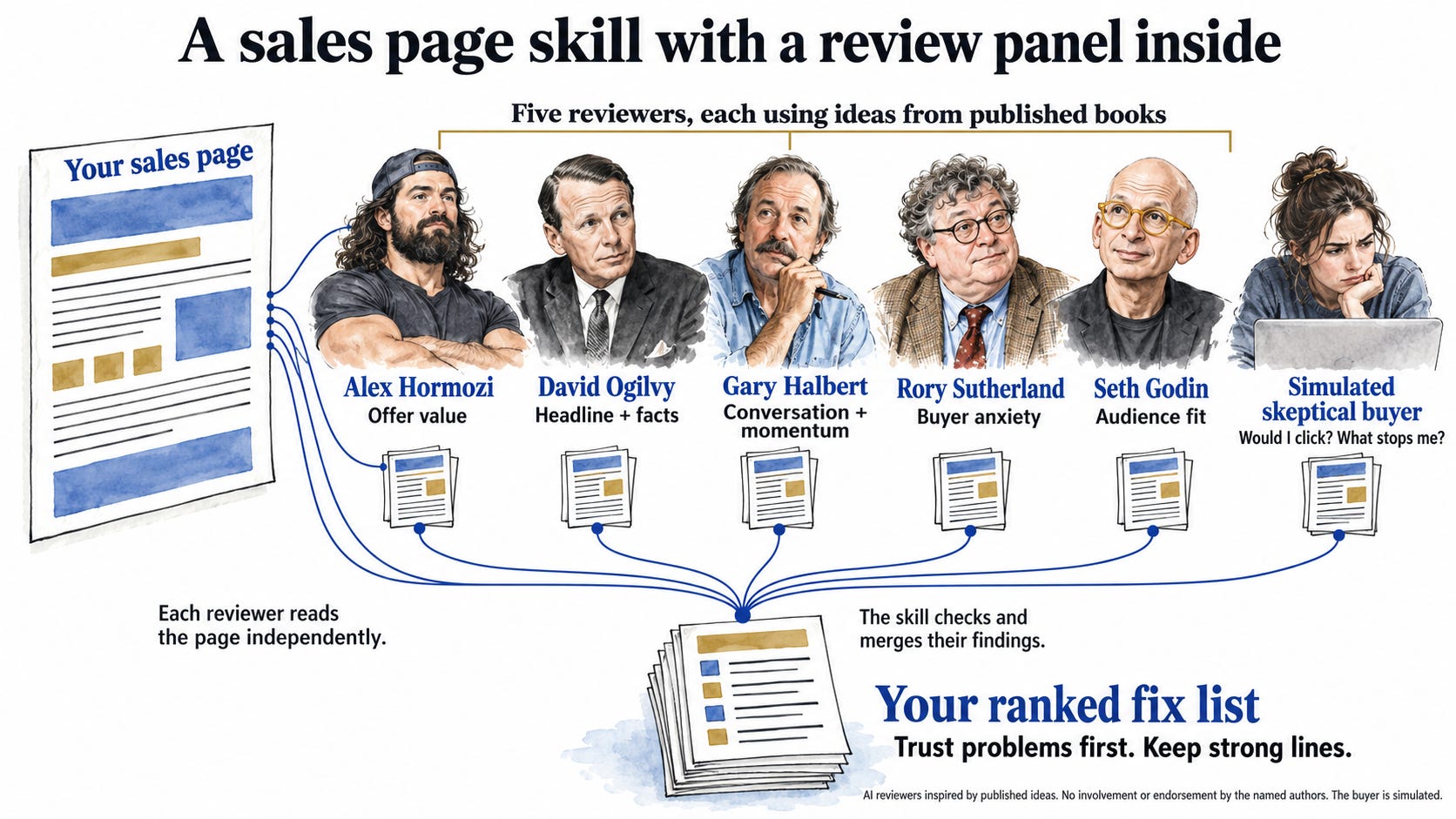
A sales page skill with a review panel inside: five subagent reviewers built from the minds of Hormozi, Ogilvy, Gary Halbert, Rory Sutherland, and Godin, plus a simulated skeptical buyer who reads the page the way a busy visitor would. They read your sales page on its own, then the skill merges what they find into a ranked list of things you can fix on your sales page.
When I ran it on my own consulting page, the simulated buyer read all the way through my FAQ and was ready to act. Then they left. The reason was the page never told them what it cost, and there was no button waiting after the last question. In the buyer’s words, they couldn’t tell if this was “a $500 thing or a $10,000 thing.”
In this post, I’ll show you what the panel caught on my page, the part where it refuses some of its own marketers’ advice, and then the skill itself so you can run it on yours.
Where my page was losing the buyer
Whatever you sell from a page, whether it’s a consulting offer, a course, a template, or a free guide, the page has one job. It takes a stranger from “what is this?” to clicking, without saying anything you can’t back up.
The skill checks every page for problems that experts flag again and again in advice on landing pages. Mine had most of them, so I’ll walk through each one on my own consulting page, comparing the version I had before with the one that’s live now.
Unfortunately, I can’t show you the previous version because it’s buried under recent updates I made.
Here’s the screenshot:

This is the updated version, you can see it live here:
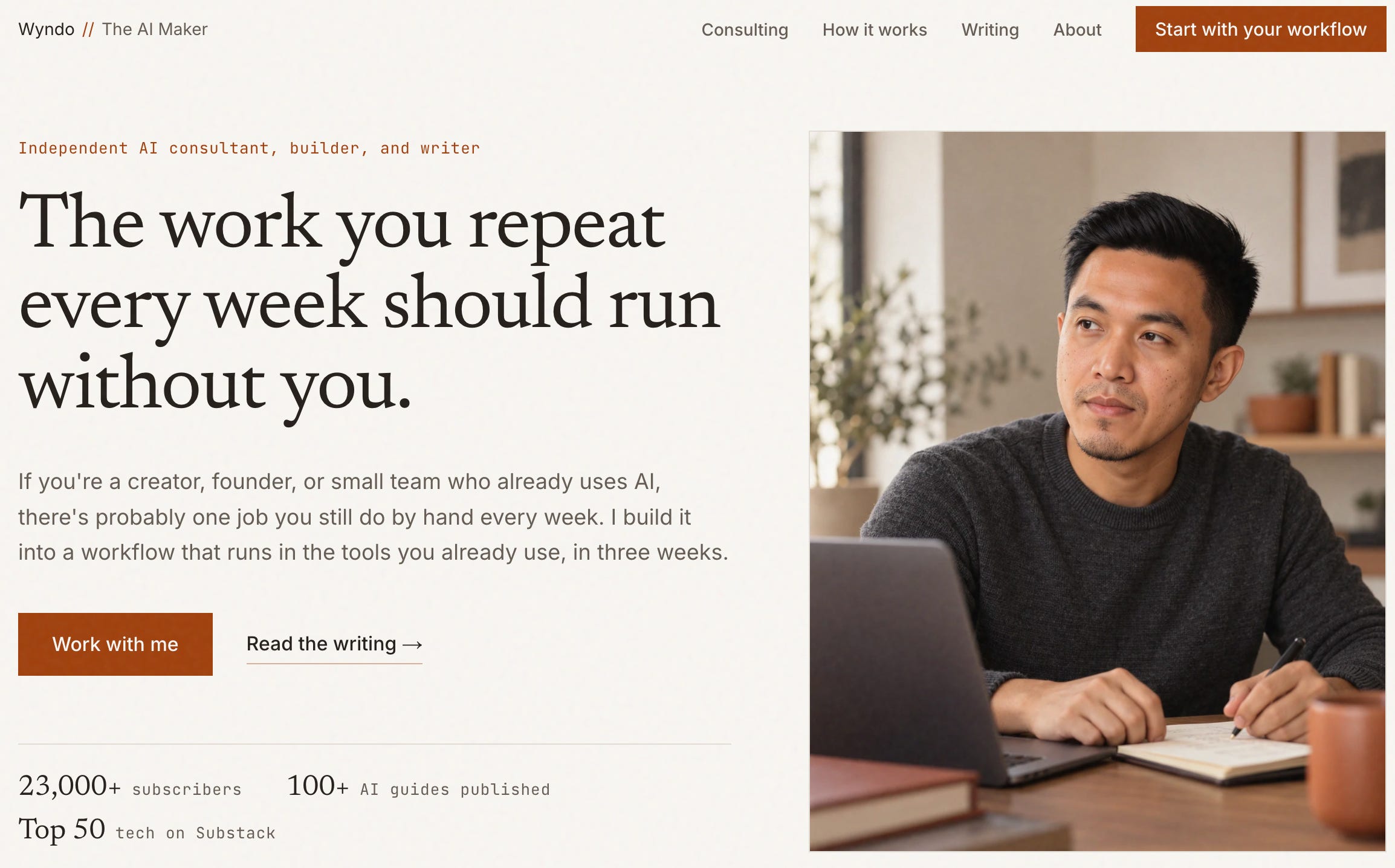
The first thing you’ll notice is that they look nothing alike. That part wasn’t the skill I’m sharing in this post.
The redesign came out of something closer to soul-searching. I wanted to figure out what kind of design and type I actually like, so I spent a while asking ChatGPT about my taste and how I work. ChatGPT has a lot of memories about me—who I am, how I think, etc.—so I threw prompt after prompt at it until we landed on the look you see today.
So to be clear about what you’re getting: the skill doesn’t touch design or vibe. It works on the offer, the copy, and whatever stands between a visitor and the form or CTA (Click to Action).
But my first reaction, putting the two side by side, was how much simpler the new one is. Here’s what changed, problem by problem.
1. A page that doesn’t talk in the buyer’s words.
You know your offer from the inside: the method, the framework, the name you gave the process. The buyer arrives thinking about their own week. My old page opened with “Turn One Repeated Workflow Into a System You Actually Trust,” and a subhead about connecting “the instructions, context, and tools behind one recurring job.”
Reading it now, it’s vague.
Then came a section called “You Are the Middleware” that told visitors they were “the human API.” A visitor had to translate all of that before they could tell the page was for them.
But the live page starts with their situation: “If you’re a creator, founder, or small team who already uses AI, there’s probably one job you still do by hand every week. I build it into a workflow that runs in the tools you already use, in three weeks.”
The problem section now opens with “Maybe one of these sounds like your week.”
This helps describe the day-to-day tasks my buyers experience.
2. Proof about you instead of proof about the offer.
My old page had three client quotes under “Success Stories,” introduced with teams that had “transformed their workflows.” None of them was about what I sell now, a three-week build of one workflow, and the skill flagged that.
Quotes like these tell a buyer that people trust me, but they don’t show whether this specific offer worked for someone like them. It was still too generic.
When you show a testimonial, you want to align the content with what you offer so potential buyers can clearly see how your offer relates to them and the impact it has had on your past clients.
3. A button that leads to a different next step.
There are a few examples of these:
“Book a call” that sends a message instead of opening a calendar.
“Get instant access” that asks them to confirm their email first.
“Download” that lands on a checkout.
This issue might feel small to the person who built the page, but to a visitor it could be enough to make them leave. The skill checks where every button goes against what its label promises. On my page, it caught an arrow icon (↗) on a button that only scrolled down the page, when that icon usually means a new tab.
Now the arrow is gone. The form button now says “Send my workflow,” and the note under it says what happens next: “I read every one myself and reply within 24 to 48 hours with a time for the 20-minute call, fit or not.”
This helps set the expectation that I will always reply, and that it will take at most two days for you to receive a response. This gives potential buyer peace of mind while they wait for my reply.
4. Copy anyone could have written.
I’m sure you’ve read this type of copywriting so many times: “Take your business to the next level,” or “Unlock your full potential.”
The skill runs one test on every line: could a competitor put this exact sentence on their page? It also flags the patterns that make a page read like AI wrote it.
My old page had 21 em dashes and a “work smarter, not harder.” It was clearly generated heavily by AI.
The live page has no em dashes, though a few contrast lines remain, like “You’re buying the three weeks back, not the knowledge.” But it was clearly written by me, in my own voice.
5. Everything that didn’t help someone decide.
My old page carried two teaching frameworks in the middle of the sales page, one on three levels of AI integration and one on six building blocks. None of it helped a visitor decide whether to hire me.
It just stood between them and the form.
The About section also moved from the second section on the page to near the bottom, after the offer, the proof, and the questions.
The reason is that, normally, you want to prioritize your problem statement, offer, and solution first before talking about who you are. That helps the buyer understand your solution before getting to know you. Additionally, the hero section already tackles some of this with a few of my stats and credentials.
Those are just some cases that hurt my sales page, but in the end it depends on what you sell. There are many different types of sales pages you also need to understand, and each of them has a specific question buyers need answered before they act.
Here are some common patterns you can learn from:
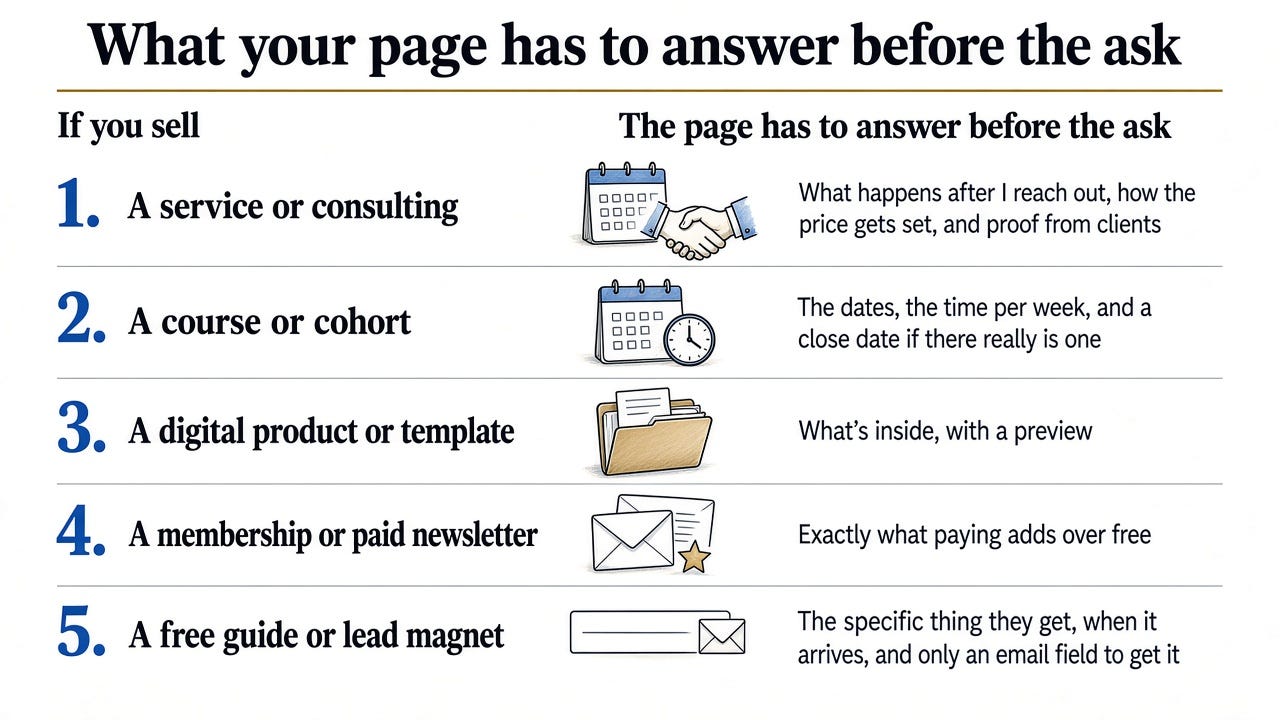
This is also where asking AI to “make my sales page convert better” can backfire. Because the standard conversion advice is to add urgency, testimonials, and specific numbers. If your offer has a real deadline, a real quote, and a number you measured, great. If it doesn’t, the easy way to follow that advice is to fill the gaps with something that sounds right and isn’t true.
That’s the line the skill is built to hold. The sales framework depends on what you sell.
The skill behind the changes
The skill is called /sales-page-builder, and the review panel from the start of this post is built into it. But the skill does beyond just running the review panel, it also does more:
If you don’t have a sales page yet, it will interview you to figure out what you sell, who your audience is, what problem you solve, common objections, and more.
Before it reads anything, it writes down your offer, so every claim on the page has a source.
It also reads your page on a desktop screen and a phone screen, the way a visitor sees it.
If you ask for a rewrite, it writes the new copy using only your facts.
When you run the skill, it leaves you with two things:
Your offer brief: the facts about what you sell, saved in one file. You get it whether the skill is checking a page you already have or interviewing you to write a new one.
The sales review: what the six reviewers found, ranked into one list of fixes. What you do with it is up to you. You can have the skill write the fixes for you, or read the review and make the edits yourself.
You also don’t need a sales page to start. The skill begins by interviewing you about your offer, so it can write a page from scratch from your answers. The panel then reviews that draft, and the skill revises it once before you see it. If you already have a page, it reviews what’s there and rewrites it when you ask.
One thing to highlight is that because this skill enables six reviewer sub-agents to run, it uses much more of your AI’s token usage than a single review. When running this, I’d suggest using Opus 5.5 or Astra 6 with high thinking effort, because you want to leverage the most frontier models available today.
To build the sales page, I’d definitely suggest you use ChatGPT’s Sites feature for this, because it’s much easier to deploy a full end-to-end website from there. But you can also vibe-code this with Claude through Artifact.
🎁 There are two ways to get the skill:
I will share you the download link with a folder you can upload to your AI (Claude/ChatGPT)
If you’ve already connected the AI Maker MCP, you don’t need to download anything: the skill is ready to use. If you haven’t connected it yet, this post walks through the setup.
What’s Inside This Post: Sales Page Builder
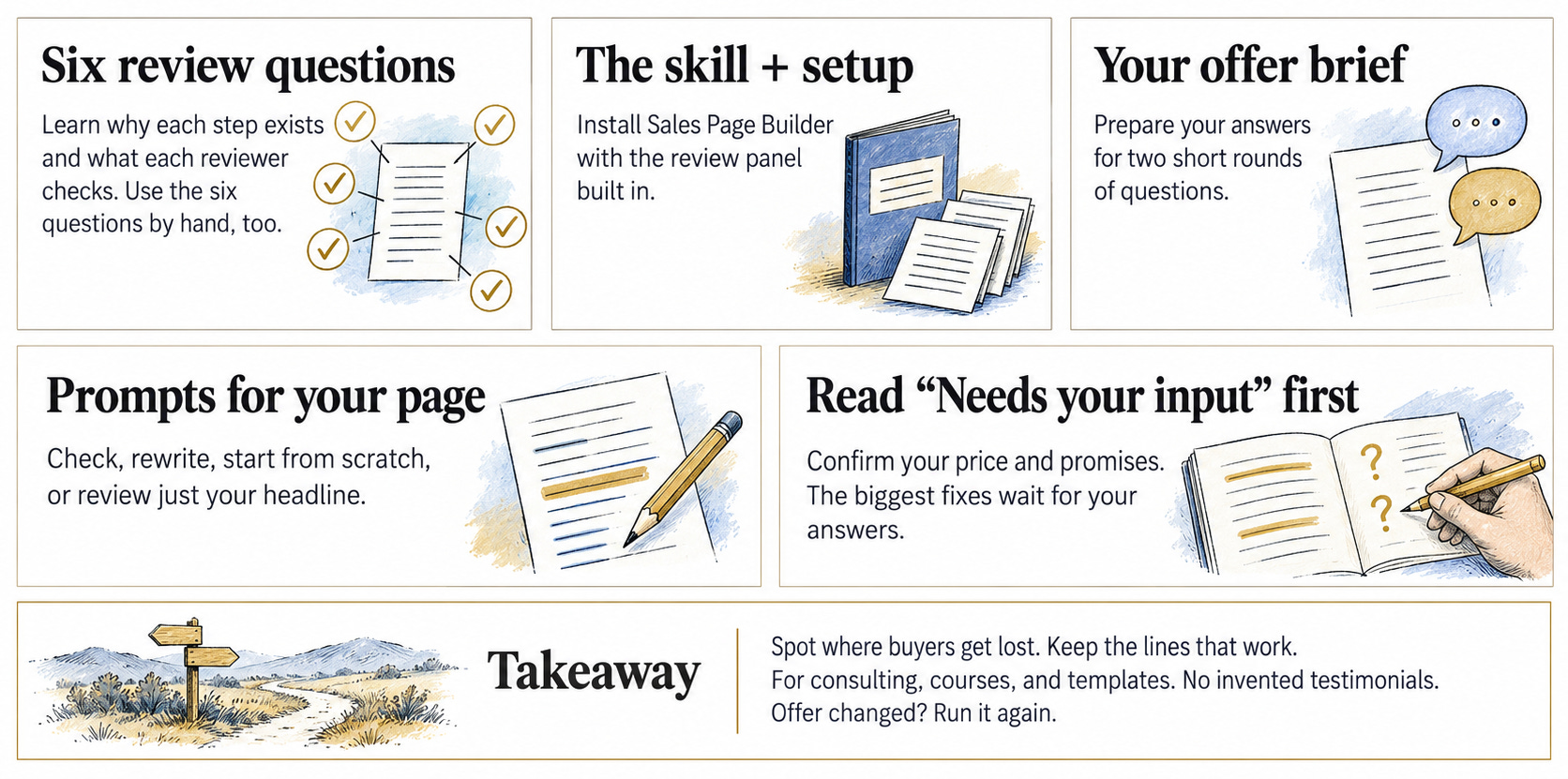
Here’s what you can expect by reading this post:
How the skill works, step by step: why each step exists and the one question each reviewer owns, so you could run the six questions by hand even without the skill.
The skill and its setup: Sales Page Builder with the panel built in, installed and ready to run in.
Your offer brief: what the skill asks you in two short rounds, what to have ready before you start.
Prompts to run it: copy-paste prompts for checking the page you already have, rewriting it, writing a new page from scratch, or checking only your headline.
The part of the report to read first: the “Needs your input” list. These are questions only you can answer, like your price or whether a promise on the page is one you’ll keep, and the biggest fixes wait on your answers.
By the end, you’ll have a panel you can point at any page you sell from, whether it’s a consulting page, a course page, or a template listing. It tells you where a buyer gets lost and which of your lines are already working, and it never makes up a testimonial to fill a gap. Every time your offer changes, you run it again on the new page.
Let’s run it on your page.
How Sales Page Builder skill works
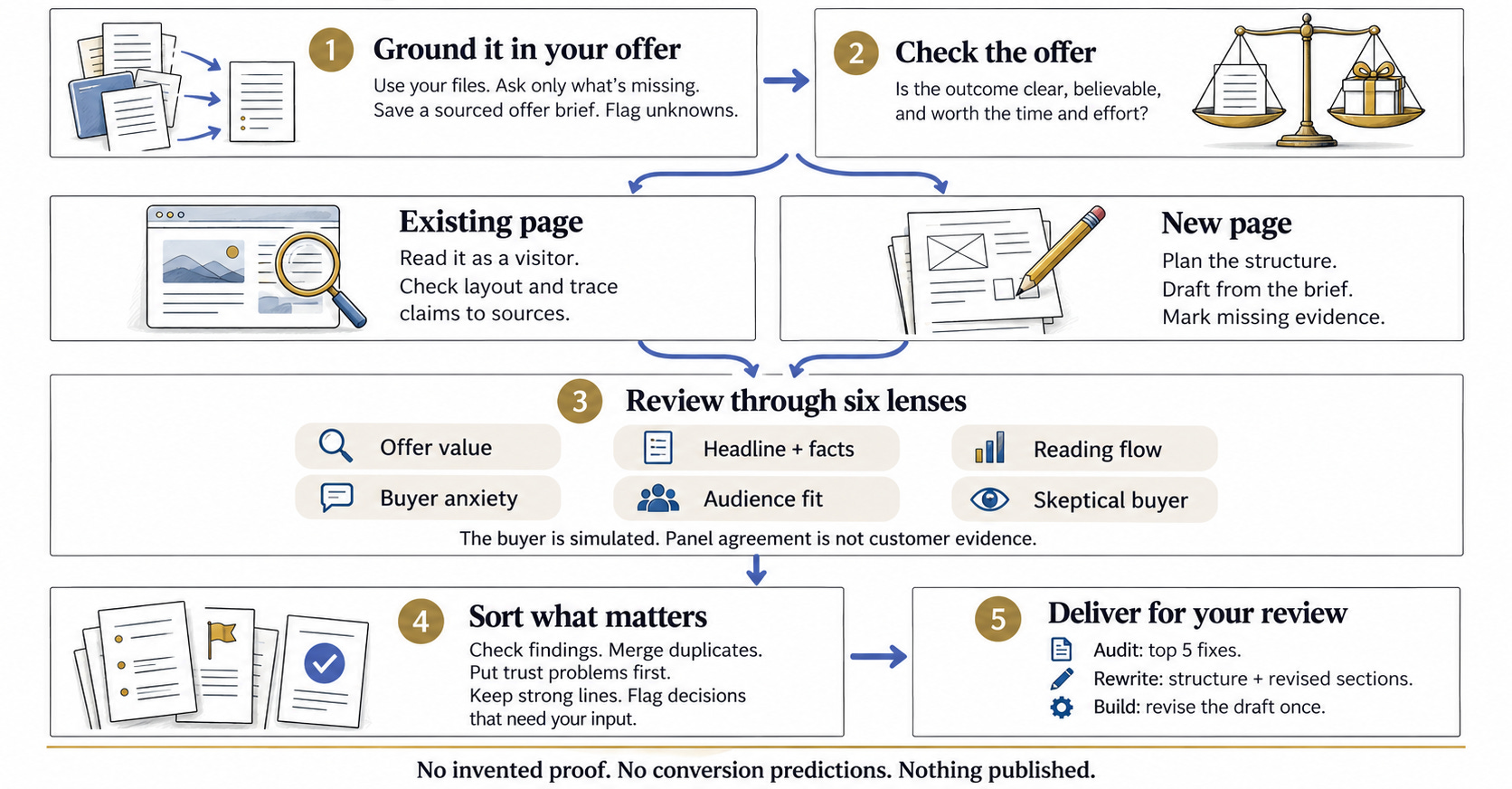
Most of the problems from the start of this post start the same way: sometimes we are not clear enough with what we are offering, to whom, is the messaging clear that reflect to the pain point of our audience, etc.
So this skill is designed to tackle all of those problems: