



Open-weight models have improved a lot over the past few generations. Models such as DeepSeek V4, GLM-5.3, and Kimi K3 are now competitive with models from frontier labs, including Anthropic and OpenAI.
In their developers’ published evaluations, they match or exceed frontier-model results on some coding, reasoning, and agent benchmarks. How close they get still depends on the task and the setup you used.
If you keep hitting usage limits on Claude or ChatGPT, I think these models are worth trying. The same goes if you want to lower the cost of certain tasks you normally do with AI. Some of that work may run well on an open-weight model, giving you another way to keep working while saving your subscription for the tasks where you prefer Anthropic or OpenAI.
That was the reason for Episode 27 of One Shot Show. Dheeraj Sharma showed how to connect Claude Code’s harness to OpenRouter so we could explore other models through the same interface. And we started with a setup that requires no Claude subscription and no OpenRouter credit purchase.
🚨 Important note: By using OpenRouter, you can use its free-model router, such as Gemma 4 and Nemotron. But if you want to use more capable open-weight models such as DeepSeek V4, Qwen, GLM 5.4, or Kimi K3, you might want to buy some API tokens on OpenRouter.
I spoke about this in my Multi-Model Council post to help you build a model council via OpenRouter.
Additionally, in a previous episode of One Shot Show, we talked about how to connect DeepSeek to Claude Code if you want to explore more.
Dheeraj began from a fresh installation and an account with no credits loaded. We worked through the login screen that initially blocked him, connected the free router, and got an answer back inside Claude Code.
Below is the full walkthrough, including that onboarding fix, how to choose a specific free model, and the usage limits that still apply.
Keep Claude Code’s Harness and Change the Model
Dheeraj described it this way: “The car is free and you are paying for the engine.”
The harness is the software around the model. In Claude Code, it manages the conversation, makes tools available, handles file operations, and lets the agent work through a task. The model processes the instructions and decides what to do next.
In the usual Claude setup, the model comes from Anthropic, which includes Sonnet, Haiku, Opus, and Fable. For this walkthrough, we are connecting the harness to OpenRouter and asking OpenRouter to provide a free model instead of Anthropic’s own model.
The connection looks like this:
Your task → Claude Code → OpenRouter → a free model → Claude Code
OpenRouter runs the model through a hosted provider. You don’t have to download its weights or fit it into your laptop’s memory. This means you don’t need to set up your own local computer to run a local model.
But a hosted open‑weight model can cost money. That’s why, for this setup, we specifically select a free endpoint.
Here’s how to set it up:
1. Create an OpenRouter Key Without Adding Credits
Create an account at OpenRouter, then open the API keys page and create a key.
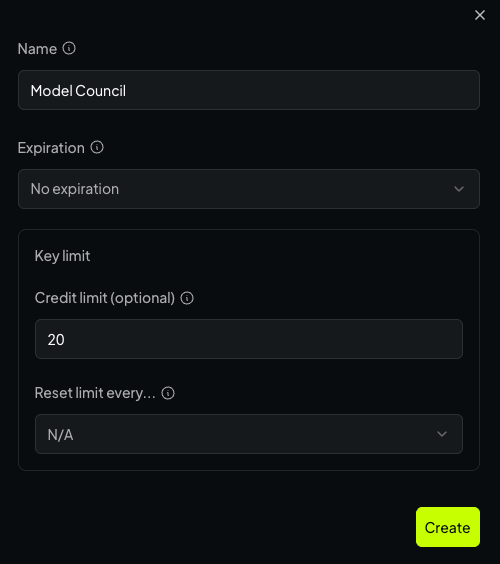
Copy the key when it appears and keep it somewhere private. You will use it in the configuration file below. It gives Claude Code a way to authenticate with OpenRouter.
You can leave the credit balance at zero for this walkthrough. Dheeraj showed his zero balance before starting, and OpenRouter offers free access to eligible models. Its free plan currently allows 50 requests per day, so start with a small task.
For the first connection, we will use:
openrouter/freeThis is OpenRouter’s free-model router. It selects from available free models and filters for capabilities the request requires, including tool calling. The selected model can change between requests. Once the connection works, you can replace this with a specific free model’s ID as you can see in their documentation.
2. Install Claude Code and Check That It Opens
Dheeraj demonstrated the installation on a Mac. Open Terminal and run the official installer:
curl -fsSL https://claude.ai/install.sh | bashThat command also applies to Linux and WSL. On native Windows, use PowerShell instead:
irm https://claude.ai/install.ps1 | iexAfter installation, check that your terminal can find Claude Code:
claude --versionYou should see a version number. If you get command not found, reopen the terminal and try again. If it still fails, follow the installer’s instructions for adding Claude Code to your command path. Anthropic’s installation guide covers the platform-specific fixes.
When Dheeraj first ran claude, he reached the onboarding screen. It offered a Claude subscription login, an Anthropic Console account, or supported third-party platforms. Choosing the third-party option led to services such as Amazon Bedrock, Microsoft Foundry, and Google Vertex AI.
OpenRouter wasn’t listed. He exited the setup and configured the connection directly.
If you see that screen too, close Claude Code for now. We will add the OpenRouter settings first.
3. Point One Project at the Free Models
Dheeraj recommended starting with a single project folder. That lets you test the connection without changing the model provider for everything else you do in Claude Code.
Create a new folder for the experiment. Inside it, create a folder named .claude, then a file named settings.local.json inside that folder. The folder structure should look like this:
free-model-demo/
  .claude/
    settings.local.json
Open settings.local.json in a plain-text editor and paste this configuration:
{
  "env": {
    "ANTHROPIC_BASE_URL": "https://openrouter.ai/api",
    "ANTHROPIC_AUTH_TOKEN": "YOUR_OPENROUTER_API_KEY",
    "ANTHROPIC_API_KEY": "",
    "ANTHROPIC_MODEL": "openrouter/free",
    "ANTHROPIC_DEFAULT_OPUS_MODEL": "openrouter/free",
    "ANTHROPIC_DEFAULT_SONNET_MODEL": "openrouter/free",
    "ANTHROPIC_DEFAULT_HAIKU_MODEL": "openrouter/free",
    "ANTHROPIC_DEFAULT_FABLE_MODEL": "openrouter/free",
    "CLAUDE_CODE_SUBAGENT_MODEL": "openrouter/free"
  }
}
Replace YOUR_OPENROUTER_API_KEY with the key you created. Make sure to keep the quotation marks around it. Save the file.
The first three settings establish the connection:
ANTHROPIC_BASE_URLsends requests to OpenRouter.ANTHROPIC_AUTH_TOKENcarries your OpenRouter key.ANTHROPIC_API_KEYstays empty so a direct Anthropic key doesn’t conflict with it.
These are the connection settings in OpenRouter’s Claude Code guide.
The remaining settings allow you to select the main model and redirect the named model roles and subagent default. Subagents are separate AI agents that Claude Code can start for parts of a task. Here, their default also points to the free router.
As you can see, based on these settings, you can swap four Anthropic models for any open‑weight models you want. In this example, we’re only using OpenRouter’s free models, but you can replace each one with whatever you prefer, whether that’s Kimi, DeepSeek, or even frontier options such as OpenAI, Gemini, or Grok. The possibilities are endless.
Now, keep this file private because it contains your key. If you use Git, add .claude/settings.local.json to .gitignore before committing the project. If a settings file already exists, merge the new entries into its env object instead of replacing the whole file.
In case you’re unsure how to do this, just copy and paste this setup section into your AI and ask it to create a more detailed walkthrough for you.
4. Get Past the Login Screen if It Still Appears
🚨 Before we dive in, Step 4 is an extra setup for onboarding workarounds for those who don’t want to pay for another Claude subscription. If you already have a subscription, you can ignore this workaround and go straight to Step 5 to check the OpenRouter connection once you’ve updated the local settings in Step 3.
This was the part Dheeraj wanted to make sure we saw.
He had installed Claude Code and saved the OpenRouter configuration, but starting Claude Code still brought him back to onboarding. The project settings alone hadn’t gotten him through the first-run login flow.
His fix was to close Claude Code and edit a different file in his home folder:
~/.claude.jsonThe ~ means your user home folder. On Windows, look for .claude.json inside your user folder, typically C:\Users\YourName. This is separate from the project’s .claude/settings.local.json file.
Make a backup copy of .claude.json, then open the original in a plain-text editor. Add or update the top-level property "hasCompletedOnboarding": true inside the existing JSON object. Preserve the other entries, and use a comma between neighboring properties. Save the file.
Dheeraj emphasized the comma because invalid JSON would create a new problem before the connection could even start.
When he reopened Claude Code, the onboarding screen was gone. This workaround is also recorded in a Claude Code issue report. It is an internal onboarding setting, so use it when you encounter the same problem; a version that already accepts the gateway configuration may not need it.
If you previously signed in with a Claude account and now get an authentication conflict, run /logout inside Claude Code, exit, and relaunch it with the OpenRouter settings. That clears the saved login; the empty ANTHROPIC_API_KEY entry addresses the separate credential conflict.
The OpenRouter key still authenticates your requests. The onboarding change simply lets this setup get past the screen that blocked Dheeraj’s fresh installation.
5. Check the Connection and Give It a Small Task
Open a terminal inside your free-model-demo folder and run:
claudeIf Claude Code asks you to trust the folder, review the prompt and accept it for the demo folder you created. Dheeraj also saw a prompt about importing a parent CLAUDE.md file, but that came from his own computer’s setup. Your prompts may differ.
Inside Claude Code, run:
/statusCheck for the OpenRouter base URL, authentication through ANTHROPIC_AUTH_TOKEN, and openrouter/free as the selected model.
He then asked for the best AI tools for 2026. The agent attempted a web search and eventually returned an answer. It also described information available in his project. The connection had reached the point where the model was responding through Claude Code.
Web search was less clear. I asked whether the agent had actually used Anthropic’s search feature. We initially thought it had, but a later response said it couldn’t provide current information without web access.
For your first test, try a small task using a file you provide:
Read the notes.txt file in this folder and create a summary.md file with the three main points. Use only the information in notes.txt.
This is a suggested test for your setup. Check that the agent actually reads the file, writes the summary, and preserves the meaning. Then open OpenRouter Activity to confirm which model handled the requests and what they cost.
In my own setup, I use Tavily through MCP/CLI or its command-line tool to let models execute web searches. You can add that later if your work needs it, but for now you just have to make sure the free model actually works for the task you have in mind.
Choose a Specific Free Open-Weight Model
Once the connection works, you may want the same model to handle each request. Dheeraj showed how to copy a model ID from OpenRouter and use it in place of openrouter/free.
For example, OpenRouter listed this free Gemma endpoint:
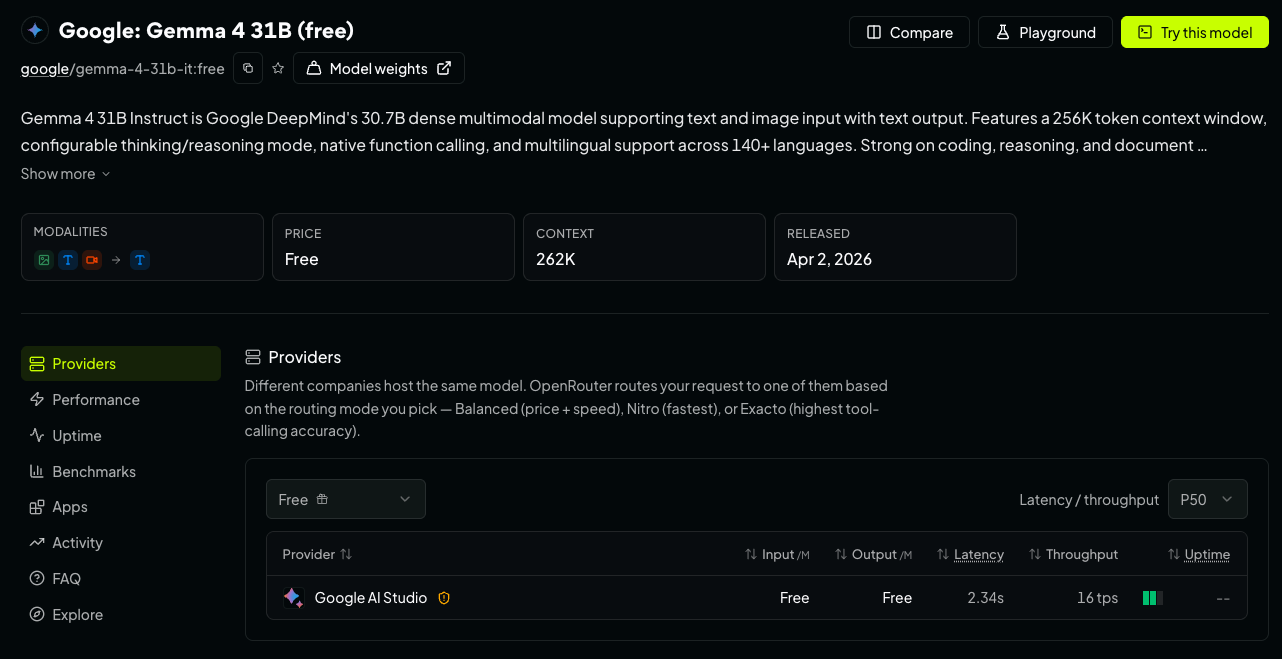
google/gemma-4-31b-it:freeIts listing and public model catalog show zero input and output token pricing and support for tool calls.
To try it, replace the six openrouter/free values in the JSON configuration on Step 3 with that exact ID, save the file, and restart Claude Code.
Dheeraj also browsed NVIDIA’s Nemotron models. Since the selection of free models can change, you’ll need to check the current free-model catalog before copying an ID.
And keep the distinction between openrouter/free and openrouter/auto clear. The free router selects free endpoints. The auto router can select paid models and charges according to the model used. Use the free router or a verified :free endpoint for this walkthrough if you don’t want to pay anything.
Apply the Setup to Other Projects When You Need It
Dheeraj covered three places you can put the connection settings:
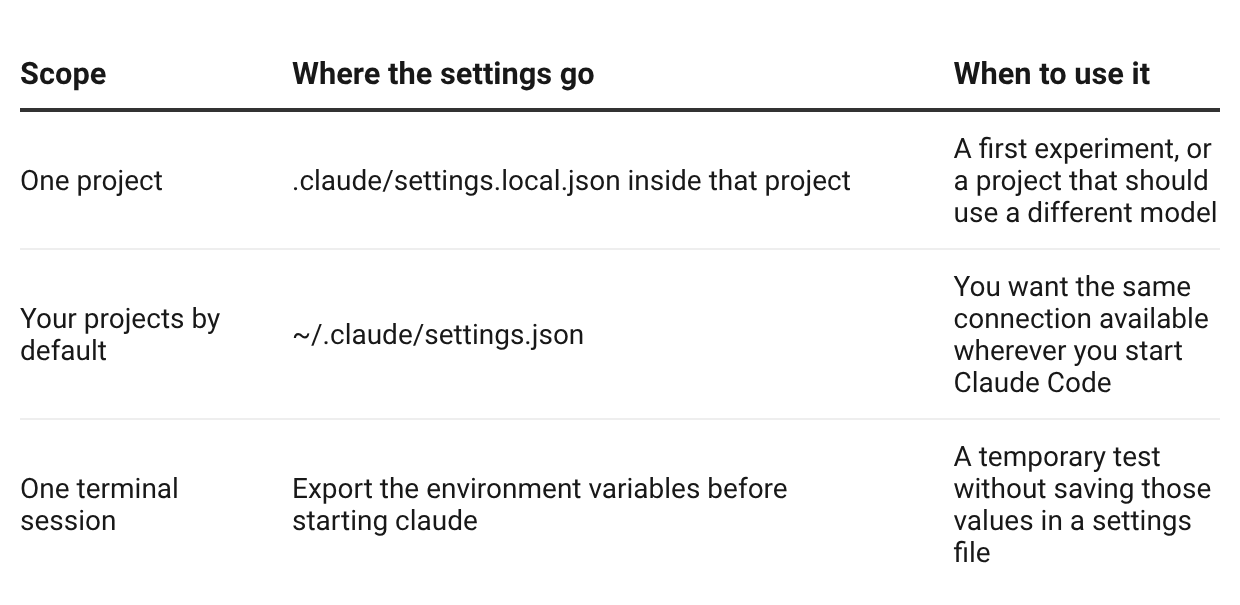
If you ask me how I apply open‑weight models in my current AI workflow, I’d say I only use them for a few specific projects. I have a handful of project folders that each use different models. I don’t think I’d ever use open‑weight models as the default; I’d only use them in folders and tasks where I know an open‑weight model can handle the job well.
For bigger tasks that require higher‑intelligence models, I rely on frontier labs such as OpenAI and Anthropic.
What You Can Do for Free, and Where It Stops
At this point, you can use AI without a Claude subscription or purchasing OpenRouter credits. A free model handles your requests, while Claude Code provides the interface and surrounding tools.
But, your main constraint is usage. OpenRouter’s free-model limits are 20 requests per minute and 50 per day for accounts below the qualifying credit-purchase threshold. Purchasing at least $10 in credits raises the daily free-model allowance to 1,000 requests, while the per-minute limit stays at 20. That purchase is optional and separate from a Claude subscription.
A request is an API call, so a single task can consume several as the agent reads files, calls tools, and continues working. Fifty requests won’t necessarily give you fifty completed tasks. Start with short jobs and watch the activity log before trying a long agent run.
The model also determines the quality of the work. During the session, I mentioned that some of my model council runs using open-weight models had cost less than $2. That was my experience with particular paid runs, and it is a separate option if you later want to explore more models. You don’t need to make that decision to try the free setup here.
For now, give it one task you already understand well. Read the output, check the tool actions, and see whether it does the job. That gives you a concrete reason to keep using the setup, or a specific limitation to work on next.
Show Details
Show: One Shot Show
Episode: 27
Hosts: Wyndo and Dheeraj Sharma
Timestamps
00:00: Episode 27 introduction and why we are exploring open-weight models
01:00: Wyndo’s experience with model council costs
02:46: Dheeraj introduces the fresh-install walkthrough
04:08: The harness and model explained as the car and engine
05:15: Create an OpenRouter key and inspect the zero-credit account
07:25: Browse free models and discuss local memory limits
09:37: Wyndo discusses paid API costs
11:02: Fish Audio and voice workflow examples
11:48: Install Claude Code and troubleshoot command availability
14:53: The first-run login screen and its available options
17:52: Cached login troubleshooting
18:40: Configure one project with settings.local.json
19:54: Connection credentials and model-role settings
21:52: How openrouter/free selects a model
24:41: Wyndo discusses simpler tasks and subagents
27:34: The onboarding screen returns despite the project settings
28:07: Two proposed onboarding workarounds
29:14: Edit hasCompletedOnboarding in the home configuration file
30:24: Restart, folder trust, and the connected session
31:52: Verify the OpenRouter connection with /status
33:35: First prompt and attempted web search
35:54: Discussion of search access and Tavily
38:49: Des’s question and Dheeraj’s experience with other models
41:00: Hosted usage, subscriptions, and local Ollama alternatives
43:34: Apply the connection through user settings
45:03: Terminal-only configuration and the command-not-found problem
46:56: Which settings take priority
48:54: Free routing versus auto routing
49:53: Free request limits and the optional credit purchase
52:52: Copy a specific free model ID
53:56: Gemma, Nemotron, local Qwen, and hardware constraints
56:46: Des shares local model choices; memory and privacy discussion
57:24: Wyndo’s separate Mac mini experiment
58:38: The proposed next session on ChatGPT Sites
59:08: Invitation to suggest future topics
Resources Mentioned
Claude Code: The harness Dheeraj installed and connected to OpenRouter.
OpenRouter: The model gateway both hosts discussed. Its API keys, model catalog, free router, auto router, and usage records are the main resources for this setup.
Gemma: Google’s model family, discussed by Dheeraj as a free hosted option. The specific example above is Gemma 4 31B.
NVIDIA Nemotron: Free alternatives Dheeraj browsed, including Nemotron 3 Ultra and Nemotron 3.5 Lightning.
Qwen: Discussed by both hosts as an open-weight option.
DeepSeek, GLM, and Kimi: Model families discussed as alternatives.
Ollama: Discussed by both hosts and viewers as another route for models, including local use and hosted options.
Anthropic’s Claude models: Opus, Sonnet, Haiku, and Fable were referenced in the discussion of model-role substitutions.
Anthropic Console: The separate API billing route visible during onboarding. We used OpenRouter for this demo.
Amazon Bedrock, Microsoft Foundry, and Google Vertex AI: Third-party options Dheeraj saw in the onboarding menu.
Tavily MCP and CLI: Wyndo’s separate web-search connection; Dheeraj also described models using his Tavily CLI.
MCP, skills, and CLAUDE.md: Tool connections, reusable instructions, and project guidance discussed as parts of the harness setup.
Model council skill: Wyndo’s workflow for getting multiple models to review research, writing, or a decision.
Terminal, PowerShell, and curl: The command-line and installation tools referenced in the setup discussion.
MacBook M1, Mac mini, and an M2 Max Mac: Hardware mentioned by Dheeraj, Wyndo, and Des respectively while discussing local experiments.
ChatGPT and OpenAI models: Wyndo discussed his existing usage, API-cost experience, and a separate Mac mini experiment.


