



This week’s One Shot Show (episode 29) tackled a question I think most people skip when they research a topic on the internet: are people actually talking about this right now?
Most of the research tools we’ve covered on the show help you understand a topic. You ask a question, the agent searches the web, and you get a cited answer. That’s useful once you know what you want to write about—but it doesn’t reflect how people are reacting to that topic.
So Dheeraj Sharma walked us through last30days, an open-source skill that searches Reddit, X, YouTube, Hacker News, Polymarket, GitHub, TikTok, and more for what people said about a topic in the last 30 days. It ranks what it finds by how people reacted: upvotes, likes, views, and real money on prediction markets. The repo sits at about 62,800 GitHub stars. I think this number shows how popular it is and how widely it’s being used.
This post covers two things from the session.:
How to use
last30daysto check whether a topic is actually valuable based on what people on the internet are talking about and reacting to—before you spend a week writing about it.How Dheeraj turns his huge raw output into short, angle-specific briefs using a set of commands he built around this skill, helping you customize the output into something directly applicable to your research or learning process.
Before we dive in, let’s explore what the last30days skill is, how it works, and how it can fit into your daily AI research workflow.

What is the last30days skill, and how does it work?
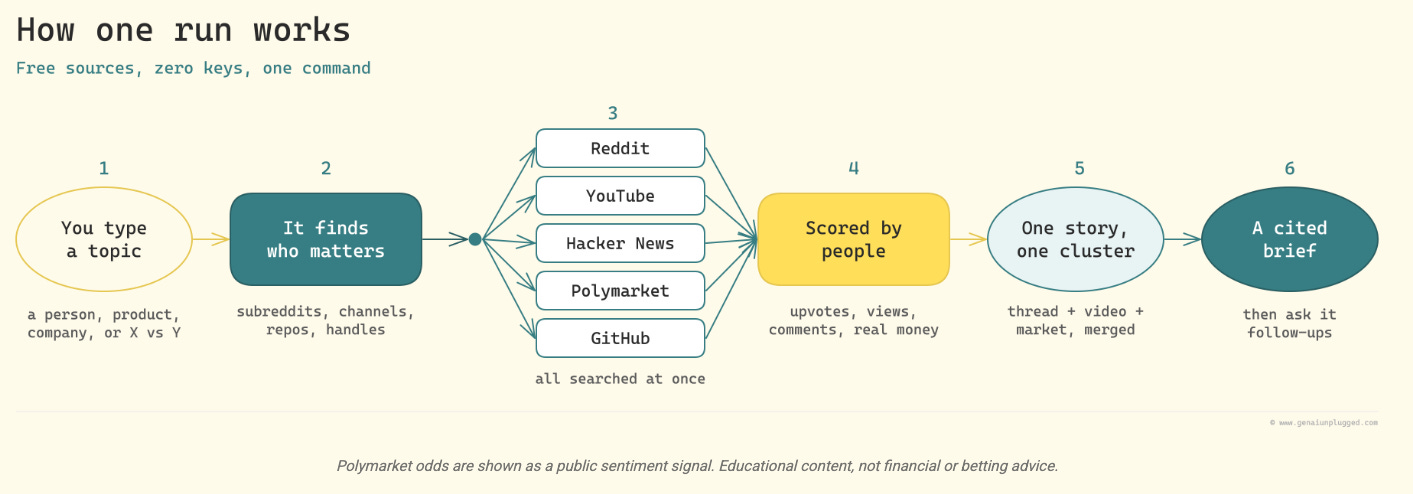
last30days is a research skill you install in your AI agent—whether you use Claude Code, ChatGPT/Codex, Cursor, Grok Bot, or anything else. You give it a topic, such as a person, product, company, or comparison, and it guides the agent through researching recent conversations about it. The default window is the last 30 days, but you can shorten it when you want to focus on the past week or day.
This skill pinpoints the right communities, accounts, and search terms, then queries all the sources wired into your agent in parallel. It ranks results by how relevant they are and by engagement signals like upvotes, likes, and views, then connects related insights across platforms such as GitHub, X, Reddit, and Hacker News. In practice, it replaces the manual slog of opening each site, scrolling through what people are saying and reacting to, and then stitching everything together yourself.
Your agent then turns those findings into a short brief with links to the original sources. You can quickly see which sources contributed, and open the full research whenever you want to go deeper.
Three research tools that do three different jobs
Dheeraj then laid out how last30days compares with Claude’s built-in research and with the kind of research agent we’ve built on earlier episodes, one that uses Tavily, Perplexity, or Firecrawl.
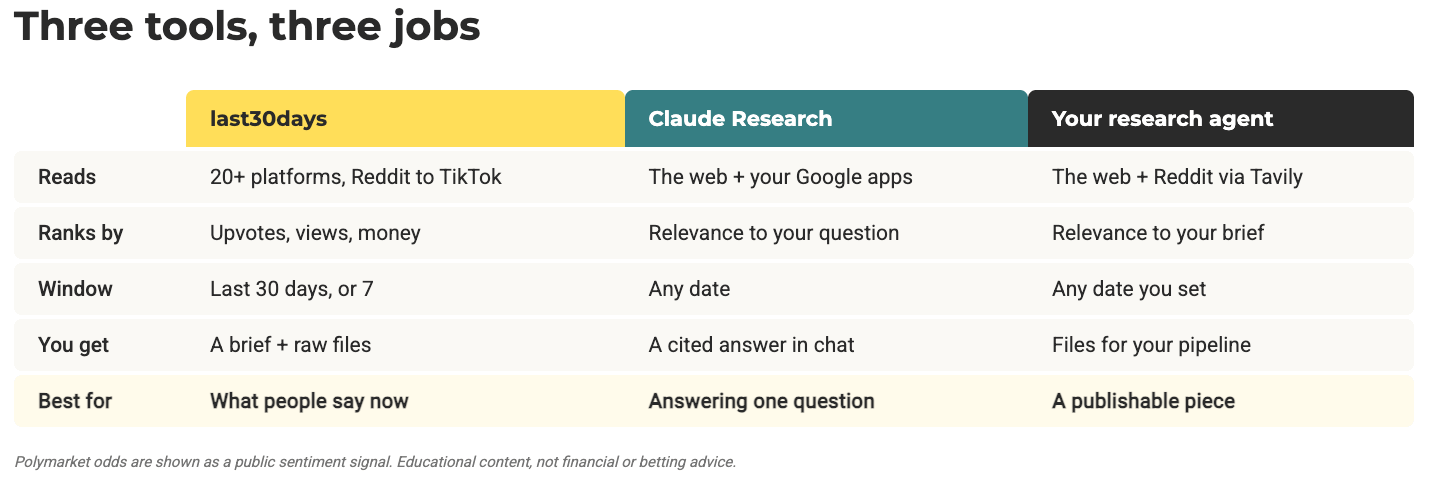
The ranking row is what differentiates last30days from any other type of research. It comes from popular topics that contain many reactions from real people: whether it’s working for them, what’s frustrating them, and how they feel about it. last30days ranks by those reactions, so the brief gives you that signal. This is the part I wanted to emphasize on the show.
On the other hand, built-in web search in Claude or ChatGPT gives you a general sense of a topic from blogs and websites, but you don’t get what people are really saying about it or how they feel.
One of audience also asked in the chat how last30days compares with Perplexity or Firecrawl. From what I saw in our run, it didn’t use either. It reached YouTube through a Python package called yt-dlp, X through browser cookies, and TikTok and Instagram through ScrapeCreators.
But should you use additional tools like Perplexity or Firecrawl to research on the internet? My answer is: sure, you can—if you’re fine with the extra cost.
And that’s what I suggested as well during the session.
I’d use last30days as the baseline, since it gets direct access to X, YouTube, Reddit, Instagram, and Hacker News. On top of that, I’d add Tavily/Perplexity/Firecrawl for web search or deeper research, and another workflow that reads the newsletters you subscribe to through your Gmail. Then compile everything together.
This is how you can make your research more powerful.
For this walkthrough, though, start with one topic and one brief. You can decide which extra sources you need after you’ve seen what comes back.
What a run on Jev actually brought back
For the live demo, Dheeraj ran last30days on Jev, the model from TypeSafe AI that was getting a lot of attention last week.
Dheeraj said a run usually takes five to six minutes. This one came back about ten minutes later, while we talked through the config. It had:
23 Reddit threads with around 11,000 upvotes
45 posts from X
15 YouTube videos, only 2 of them with transcripts
13 Hacker News stories
34 GitHub items with about 180 reactions
The summary said developers were treating Jev as a routing and gating step inside their apps rather than as a replacement for an LLM.
Then the skill suggested what to do next: verify whether the measurement claims actually hold up, sketch how Jev might sit as a tool-routing gate inside a Claude Code agent workflow, and compare Jev with open-weight models you can run locally. As Dheeraj noted, this is the point where the brief starts to plug directly into your own work.
But, there’s one thing you need to consider: the brief doesn’t know what matters to you
This was the point I pushed on during the session.
Dheeraj ran last30days in a new project folder with none of his own context in it. The brief could tell him what people thought about Jev. It couldn’t tell him whether Jev mattered for his work, because it knew nothing about him.
Over the past few weeks on the show, we’ve talked a lot about building research agents that know who you are and what you think is important. last30days on its own doesn’t have that. When you run this skill, you need to supply that information too: what you’re working on, what you’re trying to decide, and what would make a finding useful.
If you’ve already built the YouTube research agent or Content Radar, you can explore adding last30days there. But you can also start with a new folder and a short file about your priorities. I’ll show you that smaller version below.
Dheeraj’s custom commands add another piece: they tell the agent what to do with the research. His “just dropped” command, for example, asks for a Reaction section covering what people love, what they complain about, and an unanswered question from the research. That gives you a specific way to interpret the response to a new AI tool launch, or any type of launch you want to understand.
What’s inside this post: Running last30days Skill
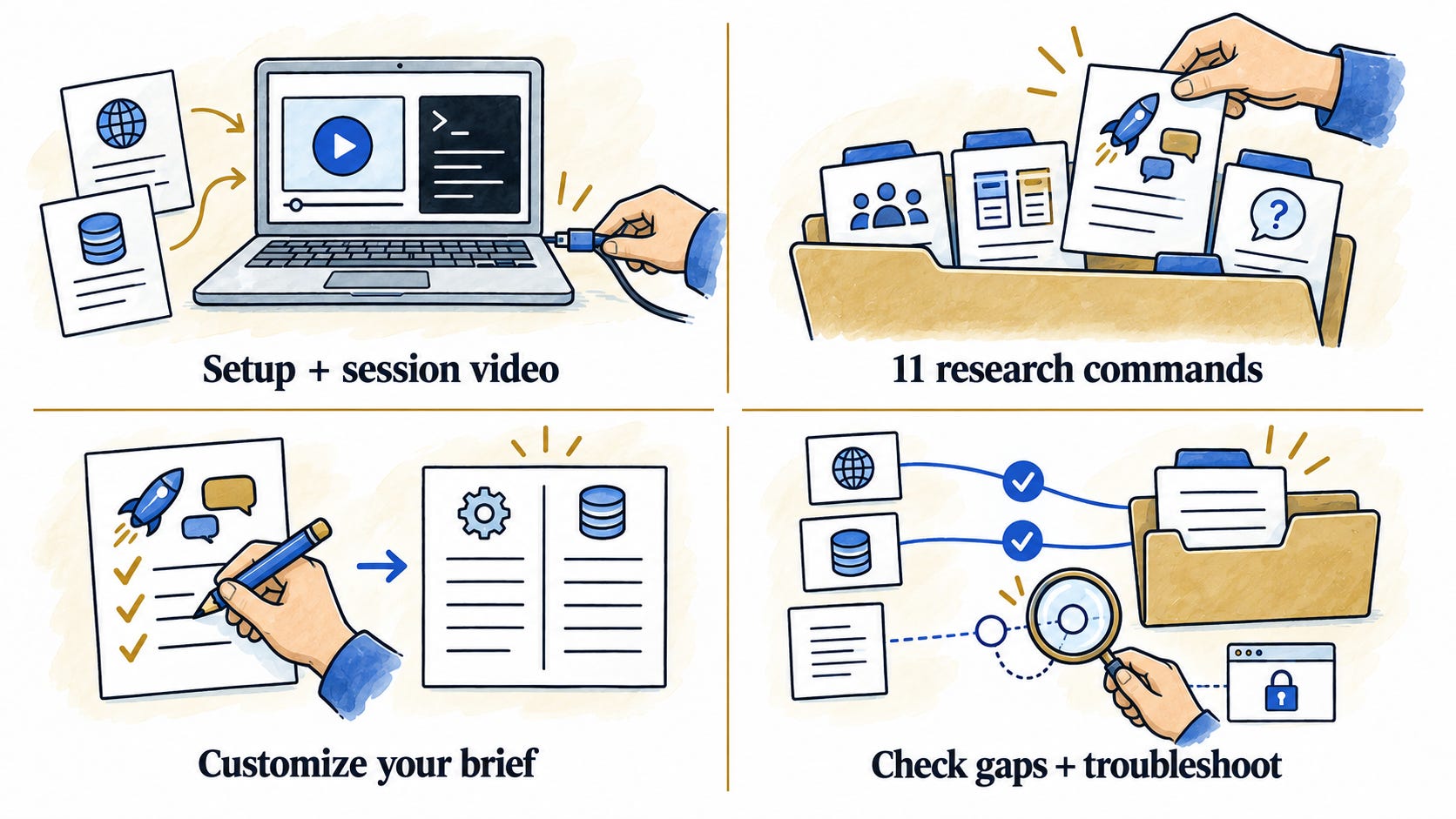
Here are things you are going to learn in this post:
The installation walkthrough and session video. Follow the setup in Claude Code, connect the sources you need, and run your first topic search.
A downloadable folder with 11 research commands. Adapted from Dheeraj’s examples, these commands help you prepare for meetings, compare tools, understand launch reactions, find audience objections, and more. Choose one for the task you’re working on, then customize it to shape the research into a brief you can use.
A complete customization example. Add your priorities, write a command that asks for a launch-reaction brief, then change it into a comparison you can use when evaluating two tools.
Help with incomplete results and setup problems. Check which sources actually returned information, find your saved brief, and work through the YouTube and browser-login problems we encountered or discussed.
This tutorial uses Claude Code and its custom-command format. You’ll need Claude Code installed and working on your computer. You can also use Claude Code on the desktop app. The skill allows you to connect to ScrapeCreators to access TikTok or Instagram, but it’s not required if you don’t want to. You’ll still be able to pull information from other social and community platforms as well.
By the end, you’ll have a way to return to a topic, choose the kind of brief you need, and give the agent the priorities it should consider. When a new tool or idea catches your attention, you can ask for the reactions and questions that help you decide what to investigate next.
Let’s build it.
Step 1: Install last30days in your research folder
I’m going to share step-by-step instructions on how to install the last30days skill. But if you’d rather skip the process and let your AI agent handle it, simply download Dheeraj’s presentation slides below and ask your agent to do it for you.
Here’s the file to download:


