



There is a scene in Moneyball where a room full of experienced baseball scouts keeps debating the wrong problem.
The Oakland A’s have lost three important players. The scouts are sitting around a table discussing who could replace them. They talk about individual players, their strengths and weaknesses, and whether they have what the team needs.
Until Billy Beane pulls them back with a simple question: “What’s the problem?”
What’s hilarious to me is that every answer sounds reasonable. They’ve lost good players, so of course they need to find replacements. That’s what the scouts are there to do.
But, the real problem is that Oakland can’t afford to compete with other teams that have far more money. They could spend the whole meeting arguing about the best players and still end up with options they can’t afford.
So the question becomes: how can they build a team that wins with the money they actually have?
This is where Peter Brand’s way of thinking becomes interesting. With money as the constraint, he works backward from what the team needs to achieve. Oakland needs wins, which means it needs to produce runs. And one of the things that helps produce runs is getting players on base.
Once they start looking at it that way, players who were previously overlooked become worth considering. They may have weaknesses that put other teams off, but they can still contribute to the result Oakland needs.
This scene closely resembles how people use AI, because it’s easy to get caught up in a similar discussion. Which model is better? What agent I need to build? Which tools should I connect? Which Skills should I install, and what tasks should I automate and how? You can spend a lot of time learning what each option is good at and where it falls short—debating them endlessly.
But when you sit down to build something, there’s still a question those comparisons haven’t answered: what do you actually want AI to do for you?
For example, I’ve spoken to a lot of people who want to build their own agent, but they don’t know where to start. The part to get there is often still unclear.
And I think the simplest place to start is to imagine a specific piece of work you’d like it to handle.
Maybe you want a brief in your inbox every morning that helps you prepare for the day. What would need to be in that brief for it to be useful? Where would that information come from? How should the agent decide what deserves your attention?
Now you have something you can work backward from. The brief helps you figure out which information the agent needs and what it has to do with that information before sending it to you.
The more I use AI, the more I notice how useful this way of thinking becomes. People who can see the process behind the result have a clearer starting point for building something that works.
Elizabeth Stone, Netflix’s Chief Product and Technology Officer in conversation on Lenny’s Podcast, made a similar point: “We need more systems thinkers in a world with AI.”
She was discussing the people Netflix needs as agents work across different systems. I think the same thinking is useful at a smaller scale, when you’re figuring out how an agent should handle your own work.
Once you master this, it opens up more possibilities for how you can automate your work with skills, routines, or automations—and eventually build your own personal agent, whether you use Claude, ChatGPT, Grok Bot, OpenClaw, Hermes, or any other agent.
That’s what I want to explore in this post: how to develop that skill in your own work, starting with the outcome you want and figuring out what needs to happen to produce it.
The output is your starting point
In a typical day to day knowledge work, we often describe our work with words like a report, a presentation, a strategy, or a project plan. Those words feel specific because we already have some idea of what goes into making them.
When you ask an experienced colleague to prepare a report, for example, you probably don’t explain every decision they need to make. Depending on how long you’ve worked together, they may already know who will read it, which sources to trust, and what needs more attention. You can leave things unsaid because you share an understanding of the work.
It’s easy to carry that same expectation into a conversation with AI. You ask for a report and provide some material, but leave out why the report exists or how you would decide what belongs in it.
The result may have the right sections and read well while still missing the point. If the report is supposed to help your team decide whether to continue a project, a summary of everything that happened may not contribute anything meaningful to help your team decide what to do next.
To explain the task more clearly, you need to look at what happens before the output is finished.
Break the work into input, process, and output
I came across a useful way of looking at this in Michael Simmons’s article about software and knowledge work. His argument is that knowledge work already follows the basic shape of software: we take in information, do something with it, and produce a result.
Think about preparing a report. You gather information, decide what matters, compare what you’ve found, and put together an explanation someone else can use. Much of that process may happen in your head, but you can still examine how it works.
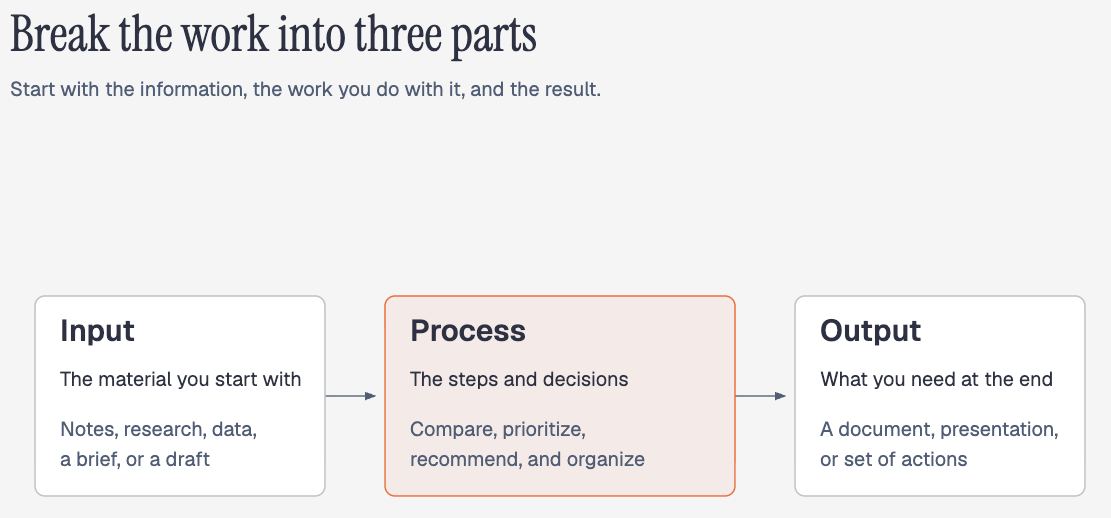
We can break it into three components:
Input → Process → Output
The input is the material you start with. That might be meeting notes, research, a spreadsheet, a brief, or a draft. It includes the information you need to do the job, which may come from several places.
The process is what you do with that material. You might compare sources, identify the most important points, make a recommendation, and organize the explanation. This includes decisions you make almost automatically because you’ve done the work before.
The output is what should exist at the end. It could be a document, a presentation, or a set of actions. Being clear about the output means describing what it needs to contain and what makes it ready to use.
Above those three components, put the goal. A report exists for a reason, and that reason should guide what goes into it and how you produce it.
Once you can see the parts, look at how they connect. If your output needs to compare three options, your inputs need enough information about all three, and your process needs a way to judge them on a fair basis. Missing information about one option affects the comparison you can make.
This is a starting map. Research and creative work can send you back to gather more information or reconsider your direction. Human review gives you a chance to decide whether the result is useful, and what you learn from that review can improve the next attempt.
Context shapes every part of the process
You can give two people the same material and ask them for a presentation, and they may produce very different things. One might prepare an explanation for beginners. The other might prepare a recommendation for someone who already understands the subject.
Both could be reasonable, depending on the situation.
This is where context comes in. Who is the work for? What do they already know? What happened before this task began? Which constraints and standards do you need to follow?
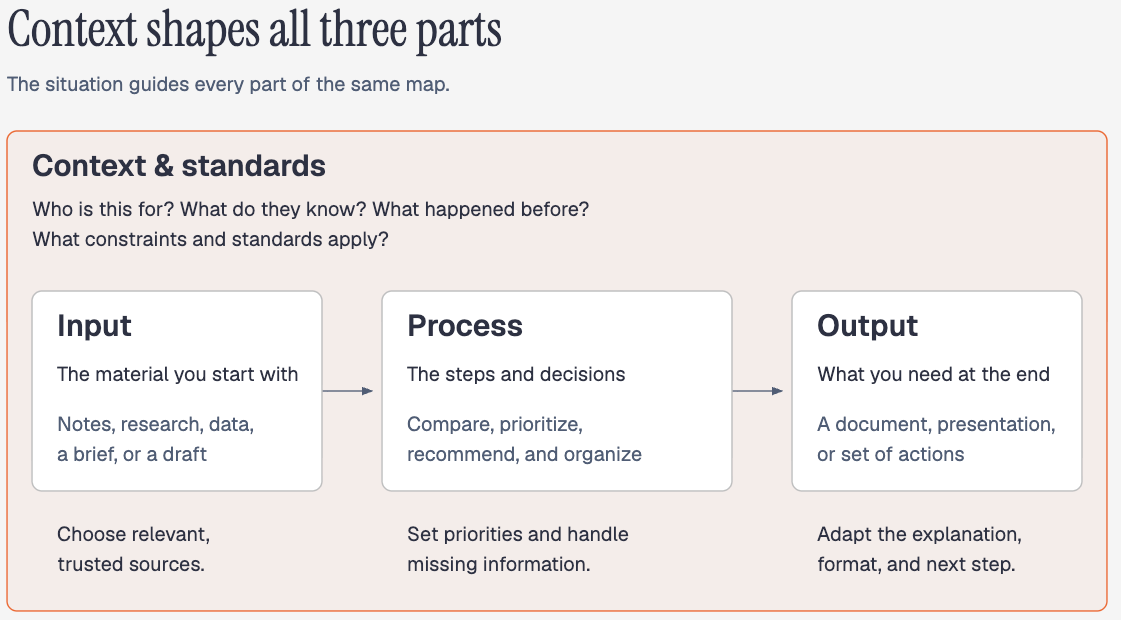
Those details affect all three components. At the input stage, context helps you decide which sources are relevant and which ones to trust. During the process, it guides what you prioritize and how you handle missing information. At the output stage, it shapes the level of explanation, format, and final next step.
So when you map a task, keep context alongside the whole process. Include the rules that define what makes the work acceptable, such as using approved evidence or asking for a decision when information is missing.
How a systems thinker actually generates a useful output
Let’s walk through an example. Imagine you’ve finished a client meeting and want to use AI to help prepare a proposal. Here’s how you could map that work before asking it to draft anything:
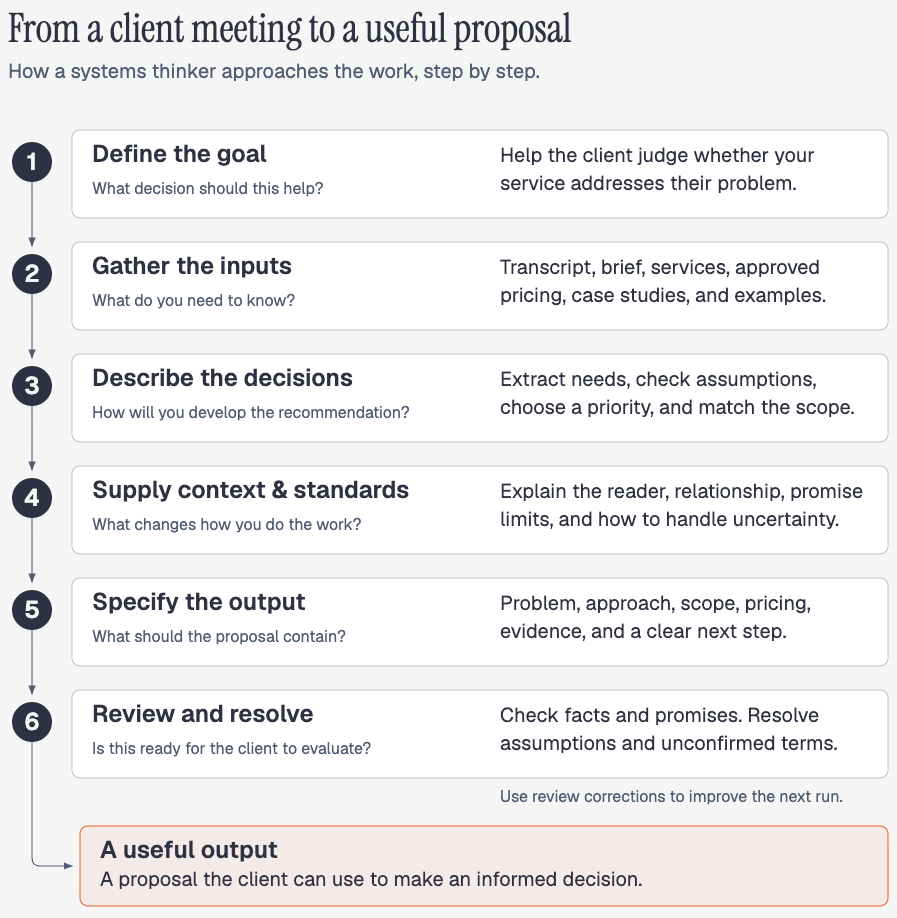
1. Define the goal
The proposal should help the client decide whether your service addresses the problem discussed in the meeting. You need to know who will make that decision and what they need to understand before moving forward.
At this point, choose the deliverable that will support that decision: a document they can review or a presentation you’ll discuss together. You can refine its contents once you’ve worked through the information and recommendation.
2. Identify the inputs
The meeting transcript is one input. You may also need the client’s brief, information about your services, approved pricing, relevant case studies, and previous proposals you’re happy with.
Each source contributes something different. The transcript describes the conversation. Your service information defines what you can offer. A previous proposal might demonstrate the structure you like, but its client details and commercial terms may not apply.
List what’s missing, too. If nobody discussed the budget or deadline, that’s something to clarify or leave open for review.
3. Describe the process
You could break the work into these steps:
Extract the client’s stated problems and desired outcomes.
Separate confirmed information from assumptions.
Identify the priority the proposal should address, with supporting reasons.
Match the service and proposed scope to that priority.
Structure the explanation around what the client needs to understand.
Check the claims against the source material and flag unresolved questions.
The sequence matters. Choosing the scope depends on understanding the need. Writing the argument depends on knowing what you’re recommending. You may want to review those decisions before AI continues to the full draft.
4. Supply context and standards
Explain the client relationship, who will read the proposal, and any limits on what you can promise. Include guidance on tone, evidence, and how to handle uncertainty.
For example, a requested deadline should stay a request until you approve it. If an older proposal uses different pricing, specify which current source controls the price. These details help the AI to generate the output that follows your context and standards.
5. Define the output
Decide whether you need a document for the client to review or a presentation you’ll talk through together. Specify the sections, level of detail, and next action the proposal should include.
For this example, you could ask for the client’s problem, the proposed approach, scope, pricing, supporting evidence, and a clear next step. Leave unconfirmed terms marked for your review.
6. Review the result
Before sending it, check the client details, scope, pricing, evidence, and promises yourself. Resolve any assumptions the recommendation depends on.
This review can also show you what to change in the process. If the proposal included an unsupported claim, investigate which source or instruction allowed it through before using the same process again.
What you can build once you understand the process
Once you’ve mapped a task like this, you can start deciding how you want to use it with AI. You might turn the process into a Skill you can ask for again, set up a routine that runs on a schedule, or make it one of the jobs a broader agent handles. The better you understand this, the more possibilities you can explore—and the more an agent can do for you:
1. Turn the process into a Skill
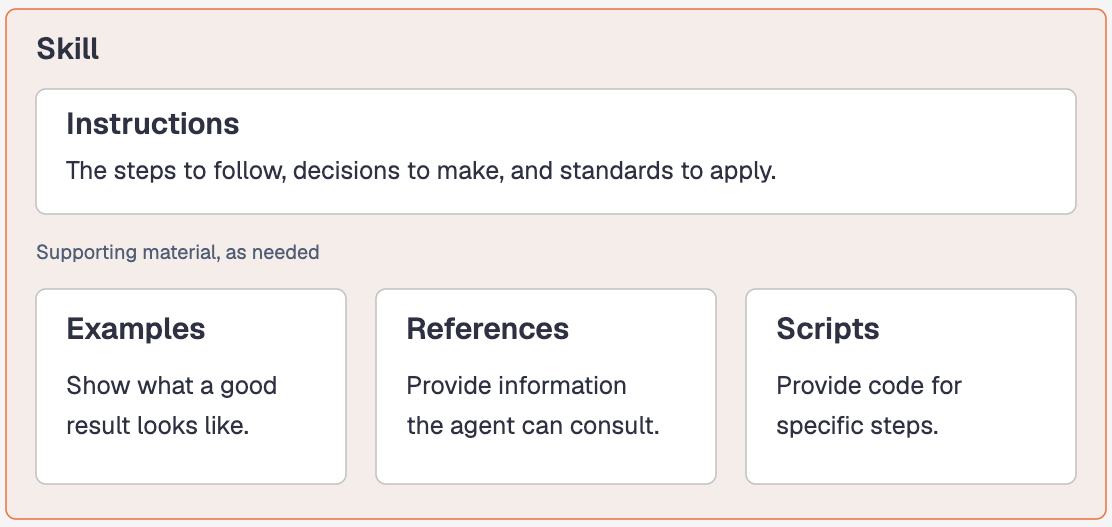
A Skill packages instructions for a particular kind of work, along with supporting material such as examples, references, or scripts. You can use it to give the agent a way to approach a task without explaining that approach from scratch every time.
Take the proposal we just mapped. Each new client brings a different conversation, different needs, and different constraints. But you probably want the agent to follow the same basic process: understand the need, check what you can offer, develop the recommendation, and prepare a proposal for review.
That’s why understanding the process matters before you package it. An instruction like “write a great proposal” leaves you having to explain what great means each time the result falls short. When you’ve thought through the work, you can describe the actual decisions and standards you want the agent to follow.
The next time you need a proposal, you can ask the agent to use that Skill with the new client’s information. You still review the result, and the corrections you make can help you improve the instructions for the next one.
This reminds me with a recent tweet from Garry Tan.


His point is to put work that involves interpretation and judgment into Skills, and operations that need exact, repeatable behavior into code. Understanding the process helps you decide which parts need each approach and which decisions you still need to make yourself.
This connects to what I’ve realized after using agentic AI for about a year: for recurring work, Skills give me a way to preserve the instructions and standards I’ve developed. I can explain those things in a conversation, too. A Skill makes them easier to reuse the next time I ask for the same kind of job.
I’ll talk more about Skills next week because I believe they’re a powerful way to store our judgment so AI can follow it. That’s also why I share so many Skills you can use if you are a member of AI Maker Lab.
2. Set up a routine that runs while you’re away
Several AI agents already let you schedule work. Claude Cowork has scheduled tasks, Claude Code has Routines, ChatGPT Work supports scheduled tasks, and Grok Bot has Routines.
The available triggers and app connections can be different, but you still need to understand the work you’re asking them to run. A schedule tells an agent when to start. You need to define what it should do once it starts and how the result will reach you. That’s where the process you’ve mapped becomes useful, whichever agent you use.
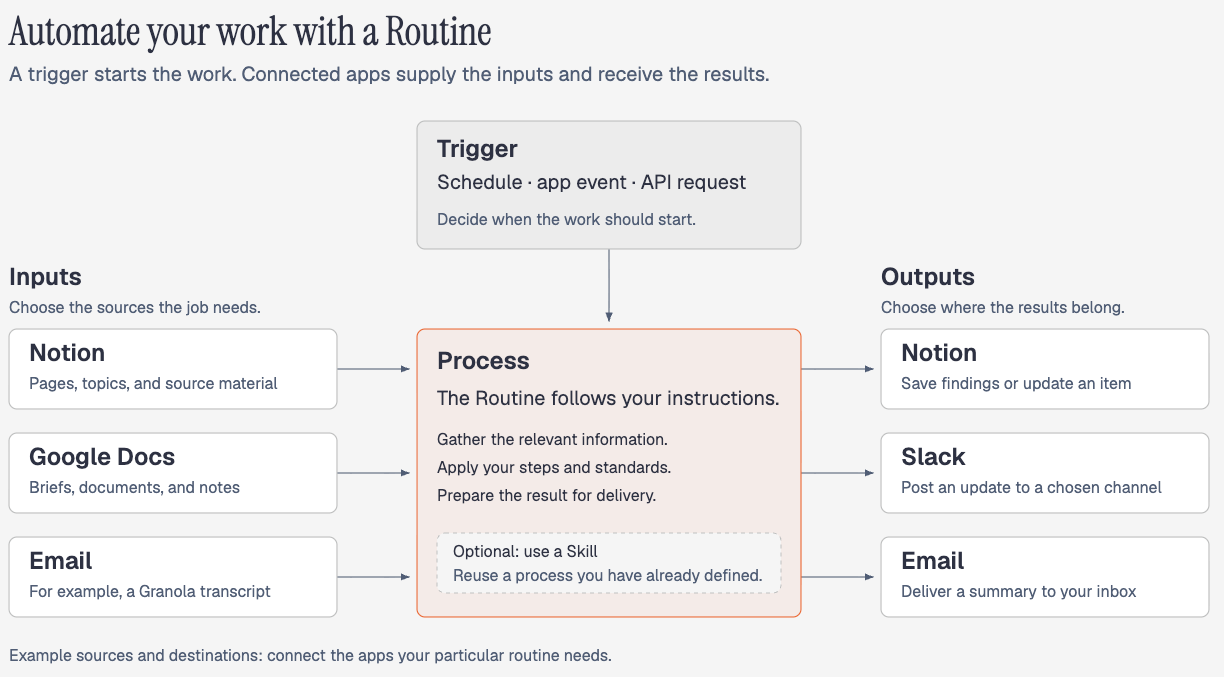
In my post about Claude Code Routines, I shared how I use them to start work without opening my laptop and prompting the agent myself. One example begins when I change a topic’s status to Research in my Notion content calendar.
That change passes through Make.com, which sends a request to start my Claude Routine. Claude researches the topic, saves the findings back to the right Notion item, and emails me a summary. I can start the work from the place where I’m already deciding what deserves more research.
Then you need to decide what information arrives with the request and where the agent should look for the rest. Your inputs might live in email, your calendar, Notion, or Slack. Be specific about which messages, events, pages, or channels matter, and make sure the routine has the connections it needs to reach them.
You can also combine a routine with a Skill. The trigger starts the work, and the instructions can tell the agent which Skill to use for the process you’ve already defined. In Claude Code, that Skill needs to be available in the project the Routine runs. Anthropic’s documentation explains how Routines use project Skills and connectors.
Finally, decide where you want to consume the result. You might want an email, a Slack message, a Google Doc, a Google Slides presentation, or an update in Notion. That choice tells you which delivery tools the setup needs and how the output should be prepared. Specify the actual destination, so a useful result doesn’t end up somewhere you never check.
This is why mapping the process helps you see more possibilities. You can connect an event in one app to a process the agent knows how to follow, then have the result arrive where you’ll use it.
3. Build an agent around the jobs you need done
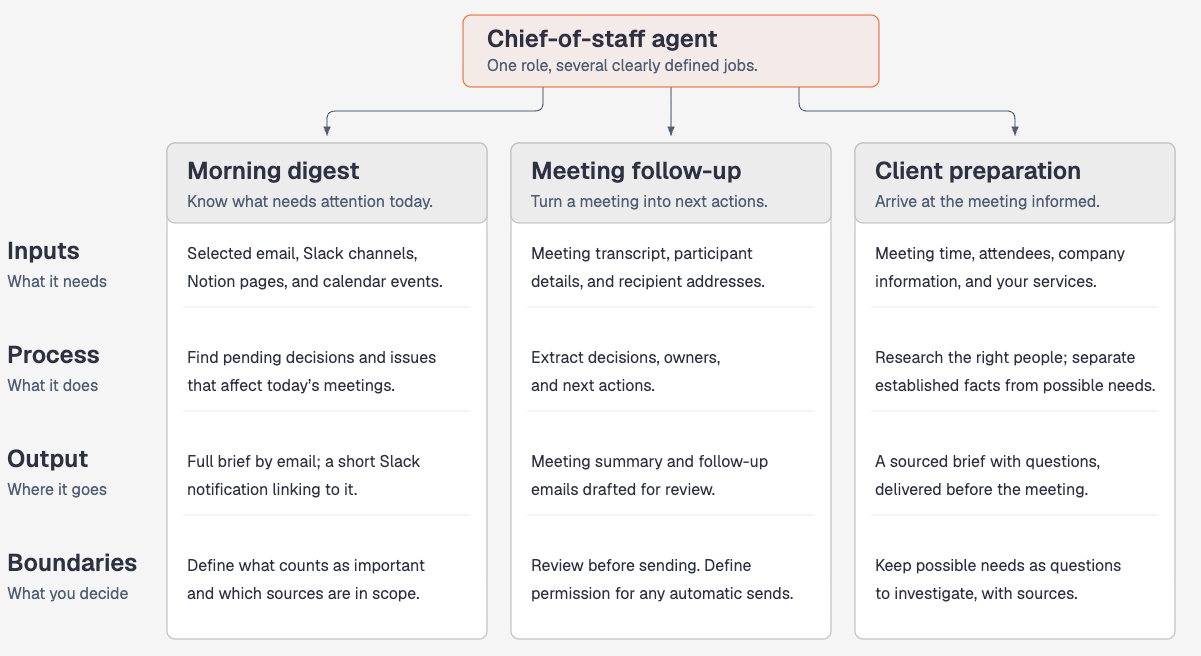
The same thinking helps when you want to build something broader, like a chief-of-staff agent.
“Chief of staff” gives you a general idea of the role. But you still need to work out what you want it to do during your day. Preparing a morning digest, following up after meetings, and helping you prepare for a new client are different jobs with different requirements.
Say you want a morning digest that tells you what needs your attention today. Some of that information may be in your email, some in Slack, and some in Notion. Your calendar adds another piece: what’s happening today that you need to prepare for?
Now you can start deciding which apps the agent needs access to and what it should look at inside them. You may only need certain Slack channels or Notion pages. You also need to explain what “important” means for you, such as a decision someone is waiting on or an unresolved issue affecting today’s meeting.
You might choose to receive the full brief by email, with a short Slack notification linking to it.
Meeting follow-up introduces another set of requirements. If your transcripts live in Granola, for example, you need a supported way to make the relevant transcript available to the agent. It also needs the participant details and guidance on extracting decisions, owners, and next actions. A transcript alone may not tell it everyone’s email address or which parts of the conversation belong in a follow-up.
You can have it prepare the summary and draft the emails for review. If you later want it to send certain follow-ups automatically, define when it has permission to do that and which situations still need your approval.
Client preparation works backward from a different moment: you want to arrive at the meeting already informed. The agent needs the meeting time, attendee names, and enough company information to research the right people. Your service information helps it identify possible connections between their business and what you offer.
Once you’ve described these jobs, choosing connections and setting up the agent becomes more concrete. You can explain which information each job needs, what should happen to it, where the result belongs, and where you want to remain involved.
A 15-minute systems-thinking exercise
You may already have an idea for a Skill, a routine, or an agent you want to build. Choose one task you’d like it to handle, and let’s work backward from the result you want.
Give yourself 15 minutes to make a first map:
What goal does this task support?
What should exist at the end, and who will use it?
What information do I need before starting?
What steps and decisions turn that information into the output?
What context changes how I do the work?
What standards must the result meet?
What do I need to review or approve myself?
What correction from the last attempt should I include this time?
Draw the connections between your inputs, process, and output. Explain the decisions you would normally skip over, as if someone capable were doing the task your way for the first time. If you’ve written “choose the best option,” explain what makes an option suitable.
Try the process with AI, then choose one correction to investigate. Work out whether the missing piece was information, an unclear step, or a standard you hadn’t explained. Save a specific change with the process and check whether it helps on the next attempt.
💡 If you want more practical steps on how to do this, you might want to read my beginner-friendly series on agentic workflows here:
The Complete Guide to Building Your First Agentic System (That You Can Actually Trust)
From Blank Folder to Working System: How to Set Up Any Project in Claude Code
How an Agent Harness Made My Claude Code Setup 10x More Reliable
The Complete Guide to the Context Folder That Changed How I Work With AI Agents
The Complete Guide to Build Your Personal AI Operating System With Claude Code
Once that small process is useful, you can decide whether to package it as a Skill, put it on a schedule, or make it one of the jobs your agent handles. You’ll have an actual process to build from and a clearer idea of what it still needs from you.
AI makes it easier to automate a process, but that also means we can automate a bad one much faster. The real advantage is knowing how to diagnose the work before you hand it over: what outcome matters, what inputs are trustworthy, which assumptions need testing, and where human judgement still belongs. Systems thinking enables us to think ten steps ahead which prevents us from scaling the wrong solution.
Very useful article. It seems like common sense, but it turns out it's very uncommon.