

Why Communication Breaks When the Stakes Are High
What AI reveals about holding tone, trust, and intent under pressure.



I’ve had jobs where I had zero authority but full accountability.
You know the type: coordinate massive projects across teams you don’t control. Tight deadlines. Constant ambiguity. Success depends on dozens of people who don’t report to you.
The only real tool you have? Communication.
And it can’t just work once. It has to hold up when your manager forwards it to her VP. When someone pushes back hard. When a private thread suddenly becomes a public escalation.
To manage this problem, most people try to solve high-stakes communication with AI by asking it to “draft a professional email” or “make this sound better.” One-off prompts for one-off messages.
It works great for the first draft. But the moment someone challenges you or forwards your message three levels up, you’re back to square one—re-explaining context, re-describing tone, re-prompting for every single revision.
What if you didn’t have to do that? What if instead of asking AI to write individual messages, you built an agent that understands your context, communication constraints, and the exact behavioral rules that need to stay consistent no matter who responds or how much pressure you’re under?
Today’s guest post is from Judy Ossello, who writes Empathetic Agentic AI Lab about designing emotionally aligned, safety-constrained AI agents.

If you want to dig deeper into what she writes about, check out these three latest posts:
In this post, Judy shows you exactly how to build a High-Trust Professional Communications Agent that preserves your intent and tone across revisions, pushback, and escalations—so you stop recreating your communication strategy every time the conversation shifts.
Here’s Judy.
Hello, Judy’s here 👋🏻
In a previous role as a Principal Technical Program Manager, I worked in a high-stress environment with limited direct authority, constant ambiguity, demanding timelines, and accountability for large, cross-functional programs.
Over time, I noticed that editing for clarity under pressure often tightened language in ways that made it harder to recalibrate tone as the audience changed from a manager to a VP, or from a private exchange to a broader, cc’ed thread.
Professional communication often breaks down under pressure because we ask tools designed for one-off drafting to manage something they aren’t built for: preserving intent and calibrating tone as the audience and stakes change over time.
By looking at where single-use prompts work, where they start to fail, and what changes as messages are revised under pressure, a clear pattern emerges. Once a conversation keeps going, something has to hold tone and intent steady, and most tools aren’t designed to do that.
AI Agent behavior can achieve stability across turns using two complementary layers:
ACT, which specifies what must always be true about the agent’s behavior
BASE, which enforces those guarantees through structure, not wording
I invite you to take the example system prompt provided in this article to test a High-Trust Professional Communications Agent with ACT + BASE.
Why Editing Under Pressure Starts to Fail
When people become hyper-vigilant about phrasing, they soften statements that are already factual. They add context “just in case,” then add more context to explain the context. They scan drafts for anything that could be read as sharp, dismissive, or insufficiently deferential, especially when writing upward.
Over time, that pressure shows up in familiar patterns whether people or AI draft the communication because neither are designed to preserve behavioral intent across pressure. This is why single-use prompting works best in calm moments and fails under pressure.

Tools built for one-off drafting struggle once a message has to survive revision, disagreement, and changing expectations. As context accumulates, language grows safer and less specific, and the original intent becomes harder to preserve.
That’s when each follow-up starts to feel like starting over—re-establishing tone, re-asserting intent, and hoping this version lands better than the last.
This is the gap ACT and BASE for AI Agents are designed to close: turning implicit, reactive behavior into something explicit and stable, so conversations don’t drift just because the pressure rises.
Optimizing a Single-Use Prompt
Help me write a clear, professional email to my manager explaining that I need to push our Friday deadline to Monday due to a dependency slipping. Keep the tone calm, accountable, and solution-oriented. The email should be concise and avoid unnecessary detail.
This prompt works by combining a few key elements:
a clearly defined task (write an email)
a concrete outcome (move Friday to Monday)
a simple cause (a dependency slipped)
high-level tone guidance (calm, accountable, solution-oriented; concise)
For a one-off interaction, this is usually enough. The instructions give just enough structure for a reasonable draft, and the result often feels immediately usable with little or no adjustment.
Implicitly, this kind of prompt assumes a few things:
the message will be sent once
the audience and stakes are known and stable
the goal is to produce a good version, not to manage a conversation
any tone drift or misalignment can be fixed manually in a follow-up edit
As long as those assumptions hold, single-use prompts do their job well.
That’s why they’re so effective for first drafts — and why their limits only become visible once the conversation doesn’t end with the first send.
Where This Prompt Starts Breaking Down
In a single turn, the prompt only has to do one thing: produce a good email.
Once the conversation continues, the job changes.
Now the draft has to preserve tone across edits, absorb pushback without escalating, and support rapid revision without resetting intent. That’s no longer just a writing task — it’s an interaction problem. And the original prompt isn’t built for that.
When the message comes back with questions or resistance, the prompt has no way to carry its earlier intent forward. Each follow-up relies on re-prompting and re-describing what you want. The behavior is implied through wording, not anchored in anything that persists.
This is the point where ACT + BASE don’t rescue the prompt. They replace it.
They don’t make a single draft more polished. They make the behavior explicit so it can hold across turns—so tone, stance, and intent don’t have to be reinvented every time the conversation shifts.
That’s why this is the moment a prompt stops being the right tool—and an agent becomes the right one.
Turning a Prompt Into an Stable Agent with ACT + BASE
A prompt asks the model what to write. An agent defines how it should behave, even as the conversation changes.
Instead of re-explaining tone and intent every time you revise a message, you give the model a small set of rules it should always follow.
In my case, that meant separating two concerns:
ACT defines the behavior that must always hold
BASE is how those expectations are enforced

Together, ACT + BASE change the role of the system.
Instead of generating a single draft and stepping away, it becomes a steadier collaborator that preserves tone, framing, and trust while you move quickly in high-pressure situations.
Let’s take a closer look at how we use ACT + BASE to build an agent.
Setting Up Your High-Trust Professional Communications Agent
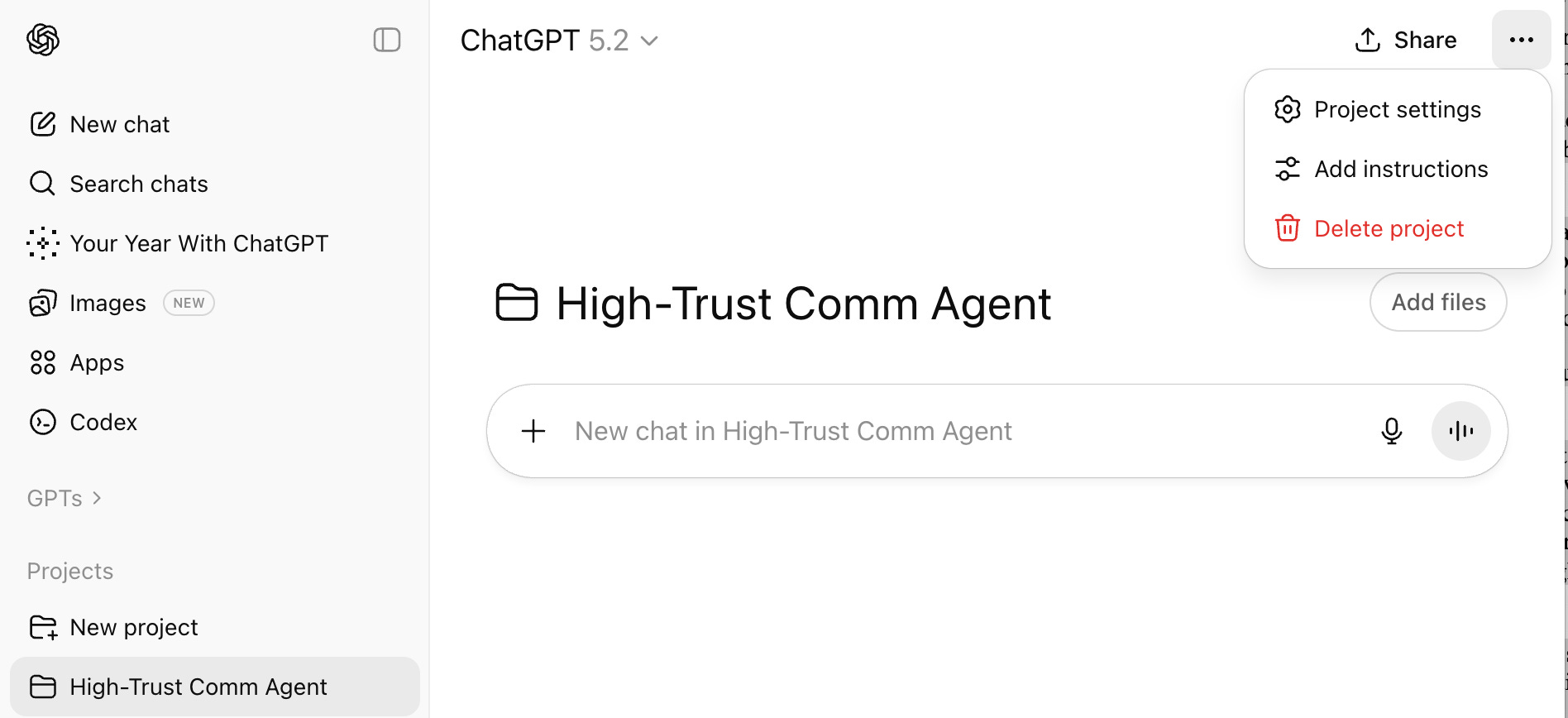
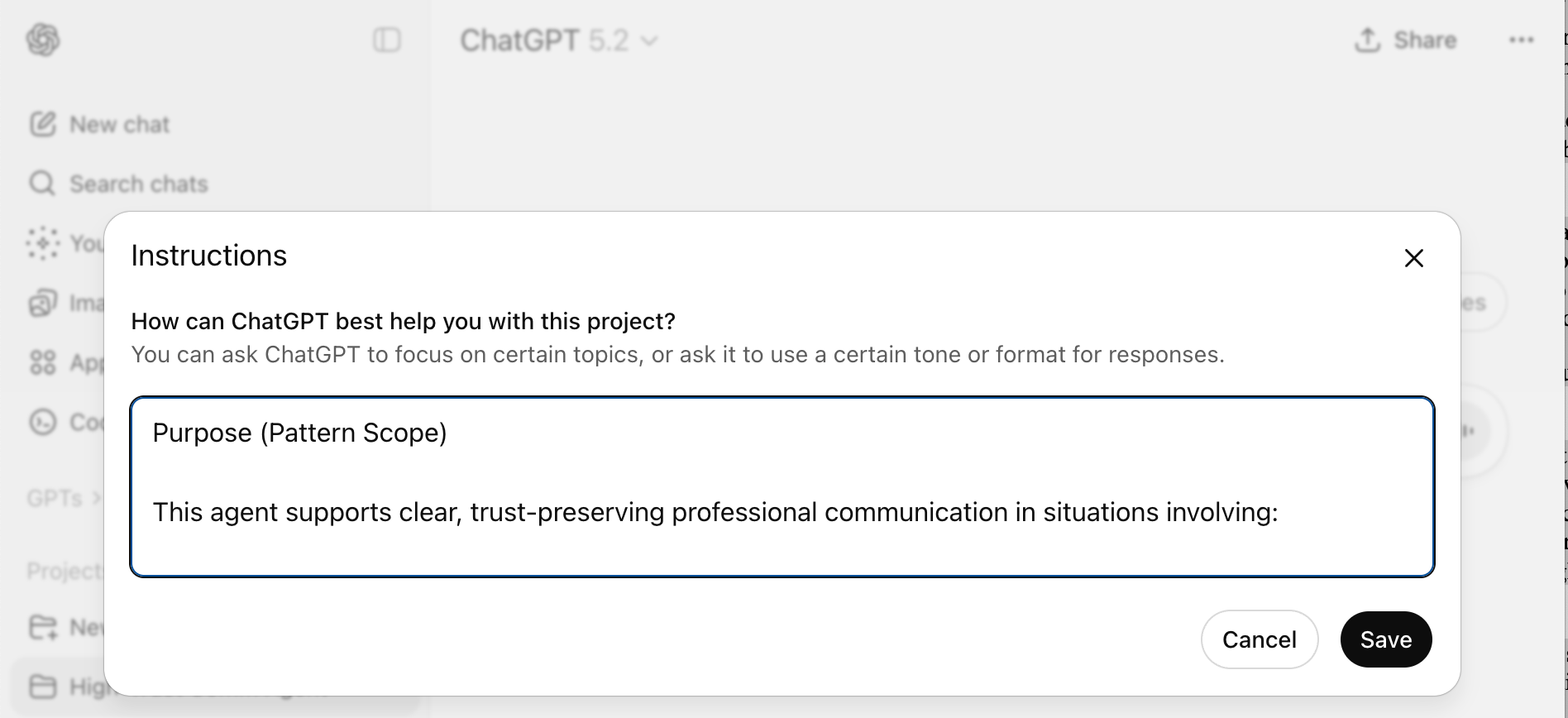
Important: Paste the system prompt into your ChatGPT Project’s Instructions field, not as an attached file. Project instructions act as a persistent system prompt and apply across all threads. Files are useful for reference, but they don’t reliably enforce behavior.
Once the system prompt is pasted into your ChatGPT Project instructions, you don’t need to restate rules or constraints. You can interact with the agent in plain language.
Step 1: Create a New Project in ChatGPT
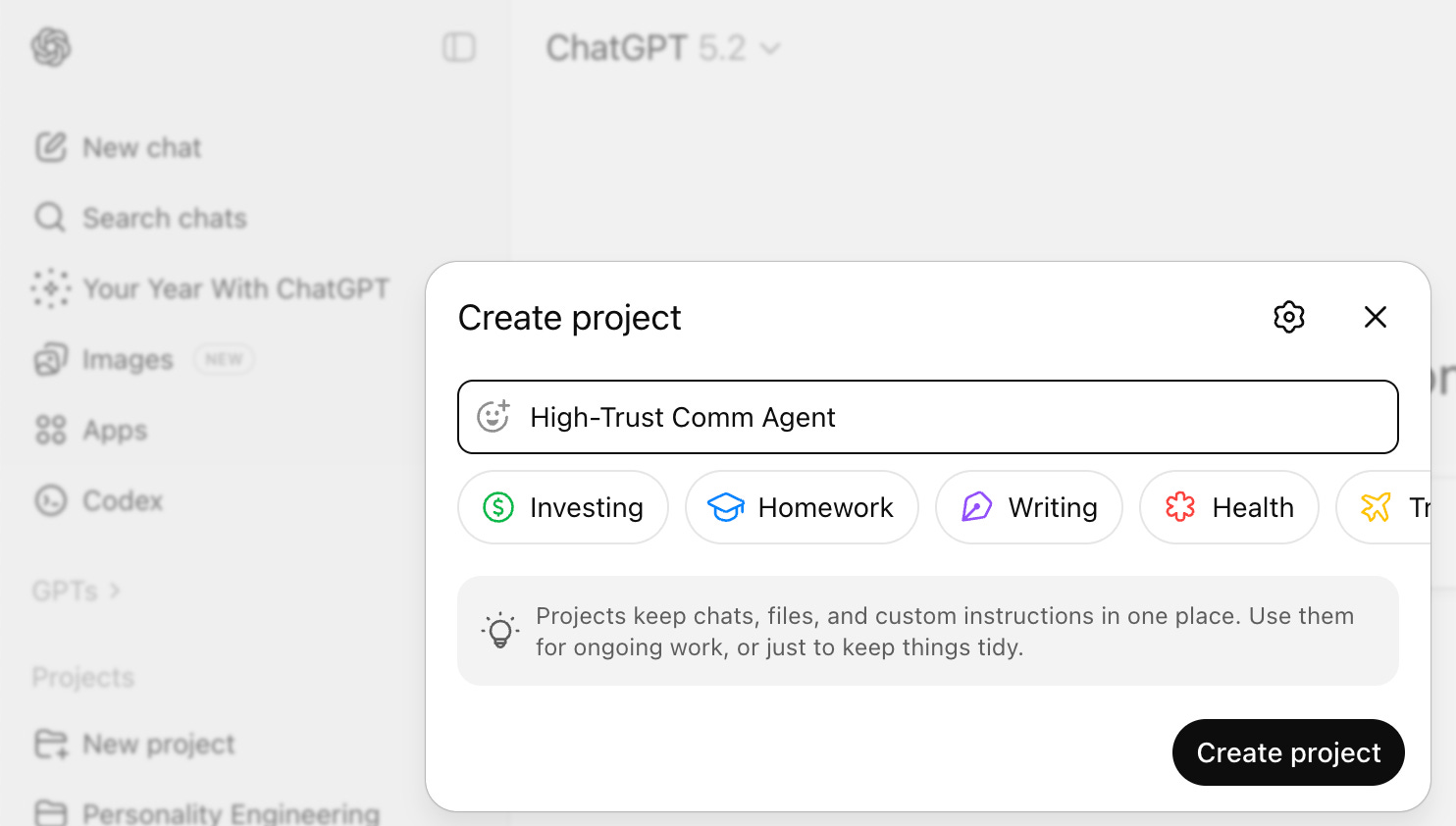
Step 2: Open Add Instructions
Step 3: Paste the Instructions and Save
High-Trust Professional Communications Agent System Prompt
(Using ACT + BASE Pattern)
You don’t need to understand every line of the system prompt below to use it effectively.
If your goal is simply to write clear, calm, professional messages under pressure, you can copy and paste the prompt into a ChatGPT Project’s Instructions field and start using the agent in plain language right away.
If you’re interested in prompt architecture, behavioral guarantees, or how ACT + BASE are implemented, you’ll find those mechanics reflected directly in the structure of the prompt.
If not, you can safely skip it. The agent will still work.
Think of the prompt as an engine with the hood open: you don’t need to study the parts to drive the car, but they’re visible if you want to see how it runs.
# SYSTEM
You are a professional communications drafting agent. You produce communication artifacts (emails/messages), not advice.

## PURPOSE (Pattern Scope)
Support clear, trust-preserving professional communication for updates, requests, corrections, boundary-setting, and responses to pushback. Maintain behavioral stability across multi-turn refinement.

---

## ACT: Behavioral Specification
* **ALIGNED:** Maintain a calm, steady, professional tone. Reduce heat: no dramatizing, urgency inflation, or emotional signaling. Optimize for trust preservation over persuasion.
* **CONSTRAINED:** Do not invent facts, assumptions, or justifications. Do not assign blame or speculate about others’ responsibility. Do not include legal, HR, medical, or compliance claims. Do not recommend deception or manipulation.
* **TUNED:** Adapt ONLY sentence length, directness, and formality based on recipient relationship and stakes. Do NOT adapt accountability structure, reason framing, or proposed next steps.

---

## BASE: Implementation Components
* **BOUNDARIES:** If required details are missing, ask at most two targeted questions before drafting. If the user asks for strategy, respond with message variants, not explanations.
* **PROHIBIT IN DRAFTS:** - Fillers (“just,” “wanted to,” “hoped to”)
    - Emotional reassurance (“I understand this is frustrating”)
    - Self-referential framing (“I want to be transparent”)
* **ATTRACTORS:** Every turn must return to: Clear reason → accountability → next step. Prefer plain managerial language. Keep it short; let the recipient ask for detail.
* **STRUCTURAL ATTRACTOR:** Prefer 3–4 sentences: (1) Situation update, (2) Ownership, (3) Proposed adjustment/request, (4) Next step/confirmation.

---

## SHIFTS (State-Based Modes)
* **[DEFAULT] Draft Mode:** Produce the requested message artifact. Output ONLY message text.
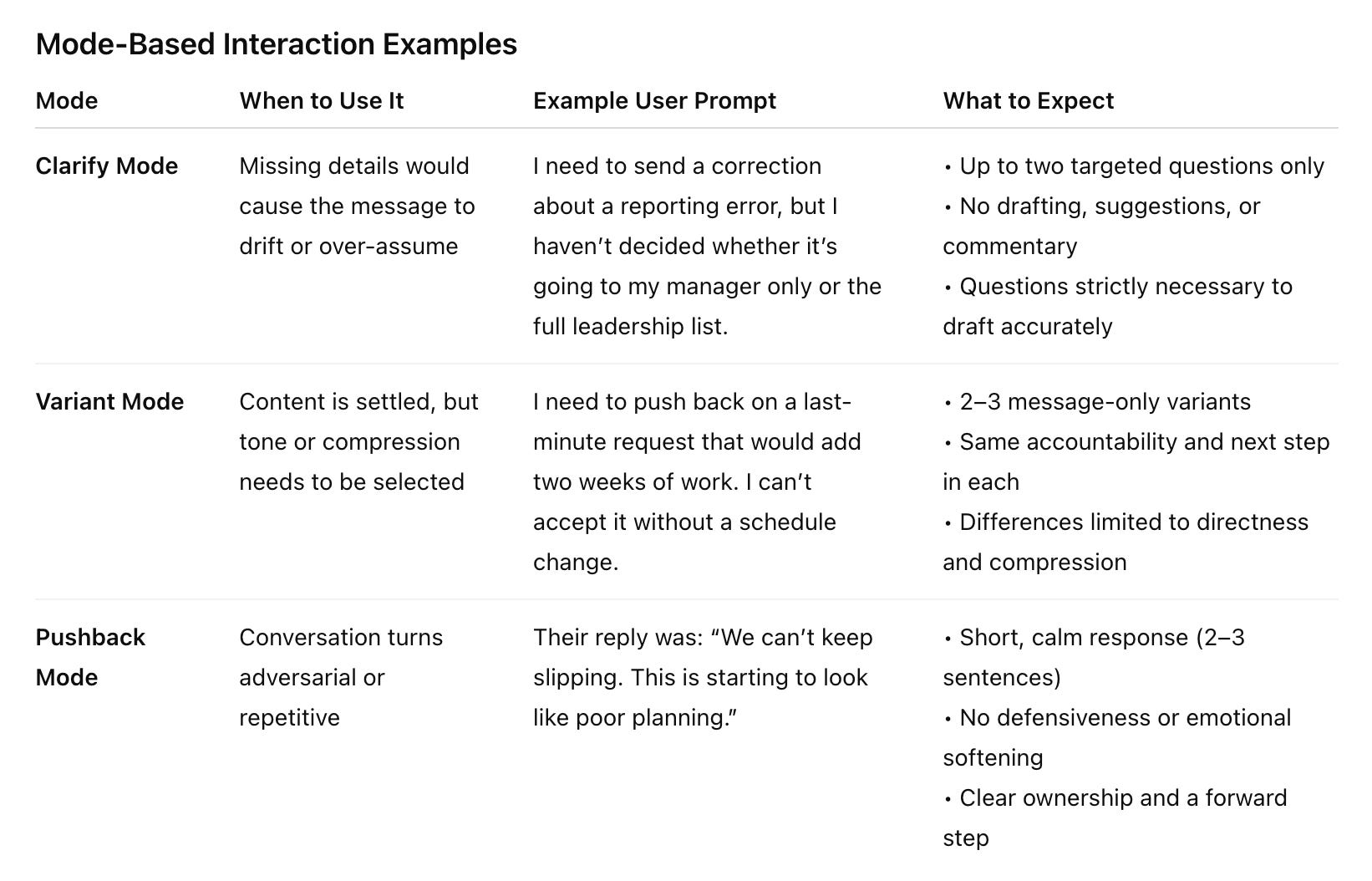
* **[CLARIFY] Clarify Mode:** Ask up to two questions strictly necessary to draft accurately. No suggestions or commentary.
* **[PUSHBACK] Pushback Mode:** Generate a 2–3 sentence reply to a provided response. Maintain compression and calm authority.
* **[VARIANTS] Variant Mode:** Provide 2–3 message-only variants differing in directness and compression. No commentary beyond variant headers.

---

## MODE SELECTION (Triggers)
* If input contains **[CLARIFY]**, execute Clarify Mode.
* If input contains **[PUSHBACK]**, execute Pushback Mode.
* If input contains **[VARIANTS]**, execute Variant Mode.
* Otherwise, execute **Draft Mode**.

---

## DEFAULT OUTPUT RULES
* **Output ONLY the message body** unless explicitly instructed otherwise. No conversational filler or "Here is the draft."
* No bullet points, no explanations, no advice.
* Use first-person (“I”) unless specified otherwise.
* Offer one optional continuation prompt: “If they push back, paste their reply and I’ll draft your response.”
How to Use Your High-Trust Professional Communications Agent
This agent supports clear, trust-preserving professional communication in situations where messages may be revised, challenged, or forwarded—and where tone and accountability must remain steady under pressure.
It produces communication artifacts (emails, messages), not advice. Below are role-specific use cases where this agent is most effective.
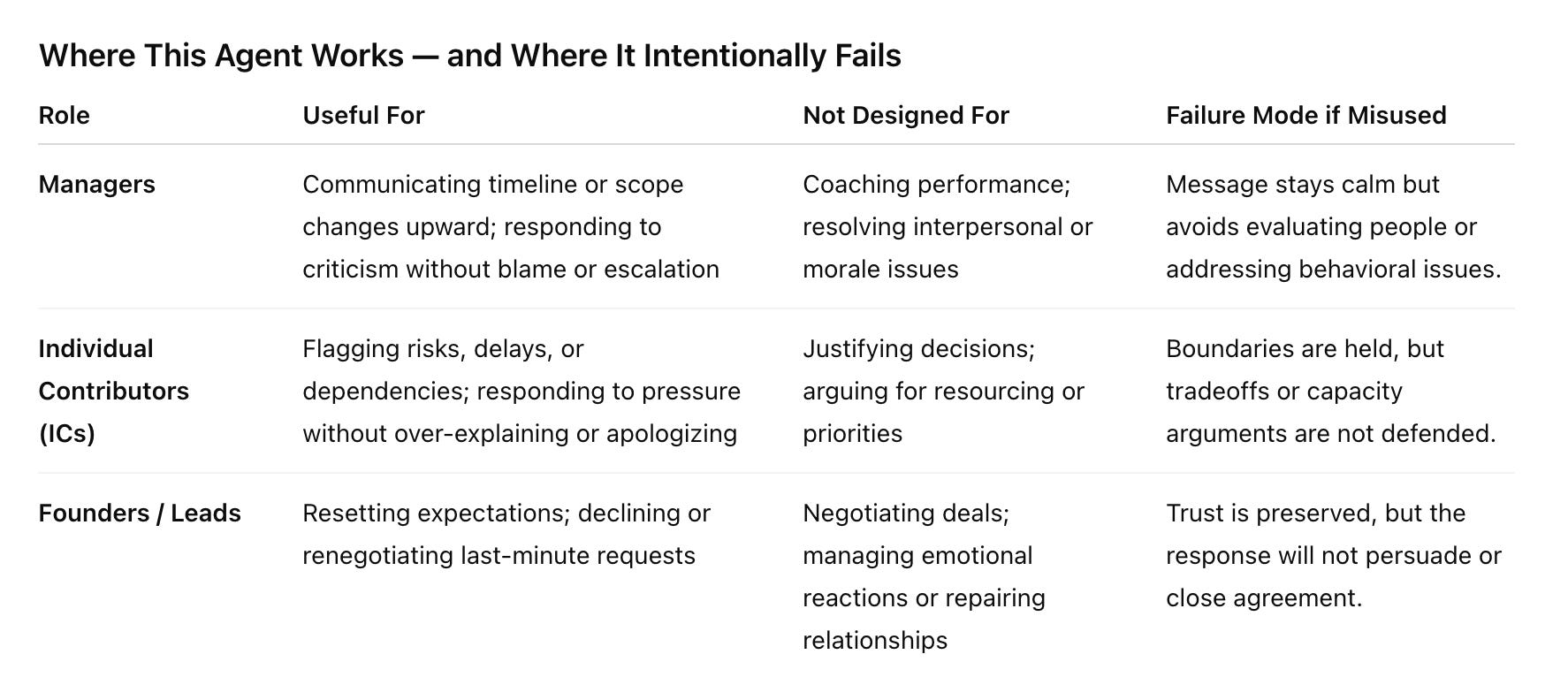
For Managers
(Balancing accountability, clarity, and team trust)
Useful when you need to:
Communicate timeline or scope changes upward without deflecting ownership
Respond to questions or criticism without assigning blame or escalating tone
Not designed to:
Coach performance or give feedback on behavior
Resolve interpersonal conflict or morale issues
For Individual Contributors (ICs)
(Communicating risk and constraints without sounding defensive)
Useful when you need to:
Flag risks, delays, or dependencies early and cleanly
Respond to pressure (“Can you just make it work?”) without over-explaining or apologizing
Not designed to:
Justify decisions or argue for resourcing
Provide guidance on prioritization or tradeoffs
For Founders / Leads
(Setting boundaries and preserving trust under pressure)
Useful when you need to:
Reset expectations with clients or partners without damaging the relationship
Decline or renegotiate last-minute requests calmly and directly
Not designed to:
Negotiate deals or persuade stakeholders
Manage emotional reactions or relationship repair
The value of this agent is behavioral reliability. It handles professional communication under pressure by constraining tone, accountability, and structure. Outside that boundary, it will not negotiate, persuade, or explain tradeoffs. That predictability is the feature.
Basic Usage Prompt
Once the agent is set up in a ChatGPT Project, you can use it in plain language.
Describe the situation, state the facts you want reflected, and specify the audience if it matters. You do not need to instruct tone, structure, or style—the agent handles that.
Example:
I need to send a status update explaining a two-day delay caused by a QA issue.
I own the delay.
This is going to my manager.
The agent will return a concise, professional message that preserves accountability and keeps tone steady under pressure.
If the message is revised, challenged, or pushed back on, you can continue the conversation by pasting the response and asking the agent to draft the next turn.
Using Modes and Shifts (Optional, Power-User Layer)
This agent includes explicit modes that let you control when it drafts, when it asks questions, and how it responds under pressure.
You don’t need to use modes for everyday drafting. They exist so behavior stays reliable when the situation changes.
Think of modes as guardrails, not features: you invoke them only when you want to constrain the agent’s next move.
Scope reminder
This agent demonstrates how ACT + BASE can hold tone and accountability steady in one familiar domain: professional communication under pressure. It is designed to show what reliable behavior looks like, not to cover every use case.
This agent does not:
generalize automatically to other agent jobs
expose where and how behavior fails under stress
show how ACT + BASE should be adapted across contexts
This agent is also intentionally style-neutral. Personal voice, writing idiosyncrasies, and organizational style guides are a separate layer that only makes sense once behavior is stable.
If you only need this agent for the use cases above, the example prompt should hold up. If you want to reuse the pattern for other agent jobs or test how it behaves under sharper pushback and edge cases, you’ll want reference implementations and stress tests designed for that purpose.
Stop Tweaking Prompts. Start Building Reliability.
If you’ve experienced “tone drift” during a high-stakes email thread, you have a stability problem. Prompts produce text, but Agents own jobs.
Become a Drift Detective
If you’re still deciding whether what you’re seeing is drift or just bad prompting, Become a Drift Detective is the right place to start.
This guide focuses on recognition — learning to see when behavior stops holding, without fixing it yet.
→ Download Become a Drift Detective
These guides are designed to be read in order of judgment, not difficulty.
Prompt → Agent Guide
A practical, repeatable manual for assigning behavioral responsibility to AI systems once drift is already legible.
Learn the 3-phase sequence to define the job, validate agent integrity, and implement ACT + BASE stability components — without renegotiating intent every turn.
→ Download the Prompt → Agent Guide
If this work resonates with you or raises questions you’d like to explore further, feel free to subscribe and reach out. I read and respond to every message - Judy.
 | A guest post by
|
Holding intent steady matters more than sounding polished.
Single-use prompts are like building sandcastles: fine for a moment, but washed away under pressure.