

How I Expanded My AI Second Brain With QMD, Readwise, X, and Podcasts
Inside my seven-stage AI workflow to capture, reflect, and create.


My post about taking Andrej Karpathy’s LLM Wiki idea and turning it into an AI Second Brain inside Obsidian has become one of the most popular posts I have published for paid subscribers.
A lot of you found that framework useful. You downloaded the starter kit, copied the structure, changed the categories, and started building LLM wikis around the things you care about. I loved seeing that because the original setup solved a problem I had struggled with for years. It gave all those articles, notes, and ideas somewhere to go, then let Claude build the connections I rarely had the patience to maintain myself.
I have been using my own version for a while now. The more I use it, the more I notice where the first version starts to break down. Here are three problems that kept appearing:
Problem 1: My Inputs Were Scattered Before They Reached the Wiki
The first limitation appears before anything reaches my wiki pages.
Every time I find something interesting on the internet, it never arrives through one neat input; it’s all scattered:
I find things on X and save them to my bookmarks.
I have articles and videos sitting in Readwise.
I watch long podcast conversations that contain five ideas I want to remember, plus a guest I will probably come across again.
Then I have my own scattered thoughts. Some are developed enough to save. Others need a conversation before I even understand what I am trying to say.
The original system could ingest a URL and generate connected wiki pages. But, it needed better ways to handle all these other inputs without forcing me to process each one manually.
So I started adding new paths into the Second Brain.
Podcasts now have their own flow. I can save a transcript through Obsidian, run one command, and let Claude identify the show, host, guest, and durable ideas before adding them to the wiki.
X bookmarks and Readwise saves go through a filter first. The system reads what I saved, compares it with what the wiki already knows, and helps me decide whether I should read it, think about it, ingest it, or let it go. If you’ve been using X and Readwise to save insightful content, you’re going to like this new workflow.
On the other hand, my own thoughts have a different path. I can use a Reflect command that asks me questions one at a time. It waits until I have worked through the thought before turning it into a page. The reason I do this because a personal reflection should sound like something I actually believe, not a polished lesson Claude invented from one unfinished sentence.
Then I ran into a second limitation as the wiki grew.
Problem 2: The Wiki Became Harder to Search as It Grew
I had given Claude a folder full of pages, but whenever I asked it questions about my second brain, it still depended on whether it could retrieve the right context at the right moment.
In the first version, Claude started with index.md, guessed which page titles looked relevant, and used tools like Grep to search for matching words. Grep is a command-line tool used to search for specific text patterns within files. It can tell the agent which files contain a given string, but it does not tell the agent which five passages matter most to the question.
That difference becomes expensive once the wiki reaches 100 pages or more. Claude can open a large pile of files and spend more tokens reading them, or it can make an argument from the smaller set it happened to find. A page can also use completely different words from my question, leaving Grep with nothing useful to match.
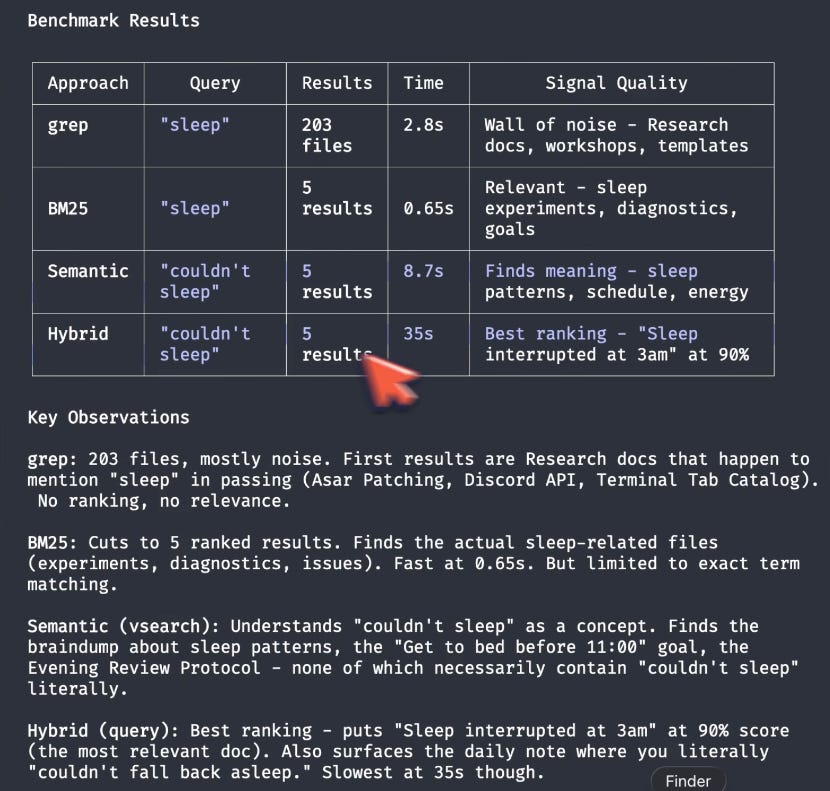
Artem Zhutov's QMD breakdown helped me put this problem into clearer words. In his demonstration, Claude's normal file search took around three minutes and returned 300 files. QMD returned a much smaller, more relevant set almost immediately.
I learned about QMD through Tobi Lütke, the CEO of Shopify. He built QMD, a local search engine for notes, documents, transcripts, and knowledge bases, using Qwen3 with LoRA.


QMD ranks exact keyword matches, finds ideas expressed in different words, and reranks the candidates before Claude opens the files. The search models run locally on my computer. Claude can search the wiki, the original sources, and full podcast transcripts, see a short list of promising passages, then read only what it needs.
This is how the architecture looks:
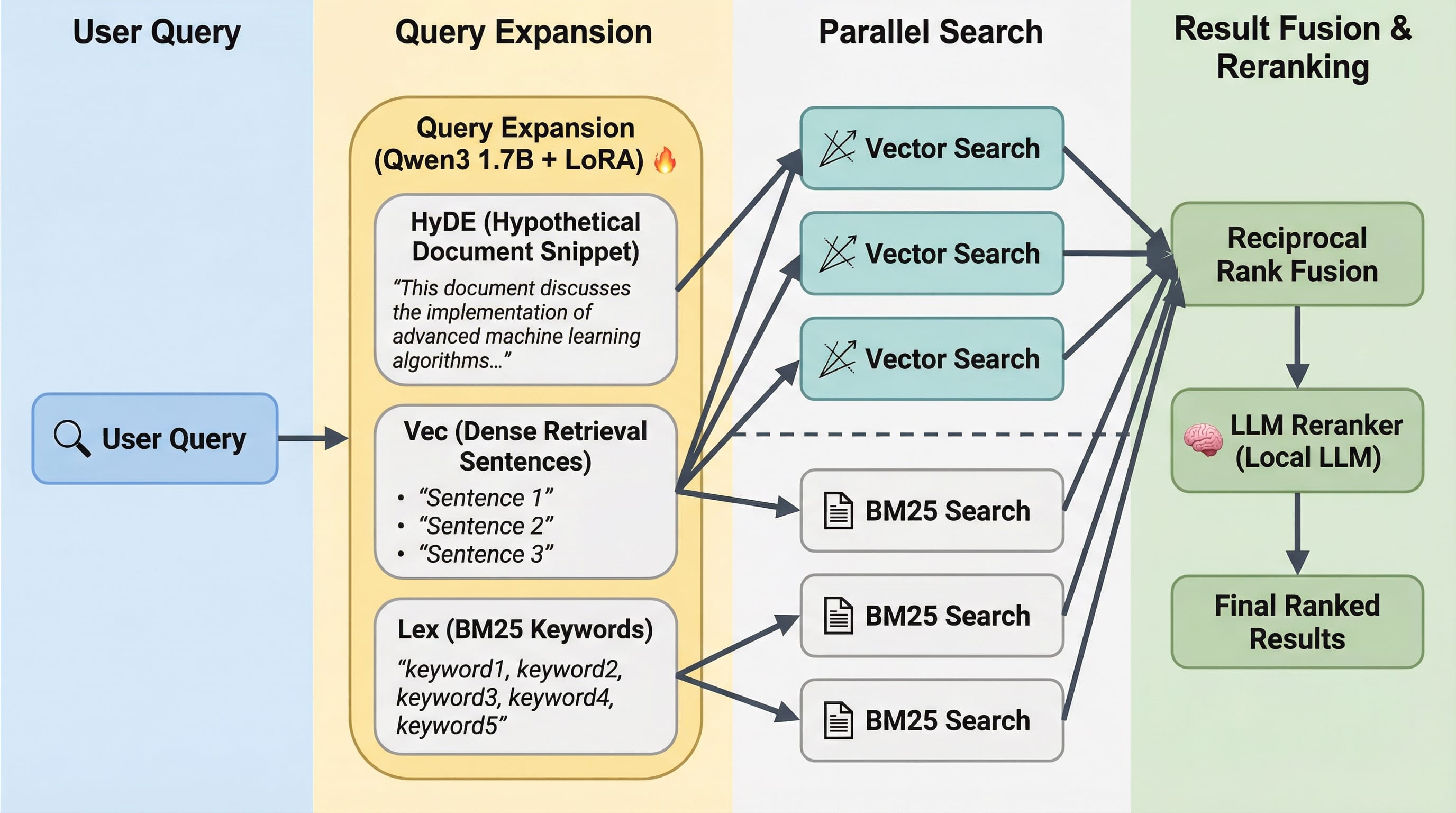
This gives Claude a more practical form of memory. It spends fewer tokens opening weak matches and has a better chance of finding the page I forgot existed. The underlying notes and local index can also keep working if I use another agent later.
But the goal I want in this battle of Grep vs QMD is to give the agent a much better starting point than simply guessing from an ever‑growing index.
Problem 3: What Was I Going to Make From All of This?
Once I had captured all this material, filtered it, connected it, and made it searchable, what was I going to do with it?
I didn’t want the Second Brain to become another place where all my lessons and insights from the information I’ve consumed waste away. I wanted it to bring old ideas back, help me work through tensions in my own thinking, and eventually give me something I could use.
That led to the final pieces of the upgrade:
A Weekly Review command resurfaces older connections I did not remember to search for.
A Draft command searches what the wiki already knows, gathers the evidence and counterarguments, shows me what is missing, and helps me turn the material into a writing brief. It only writes the draft after I approve the direction.
The full system now follows this path:
Saved material -> Filter -> Ingest -> Retrieve -> Resurface -> Reflect -> Write
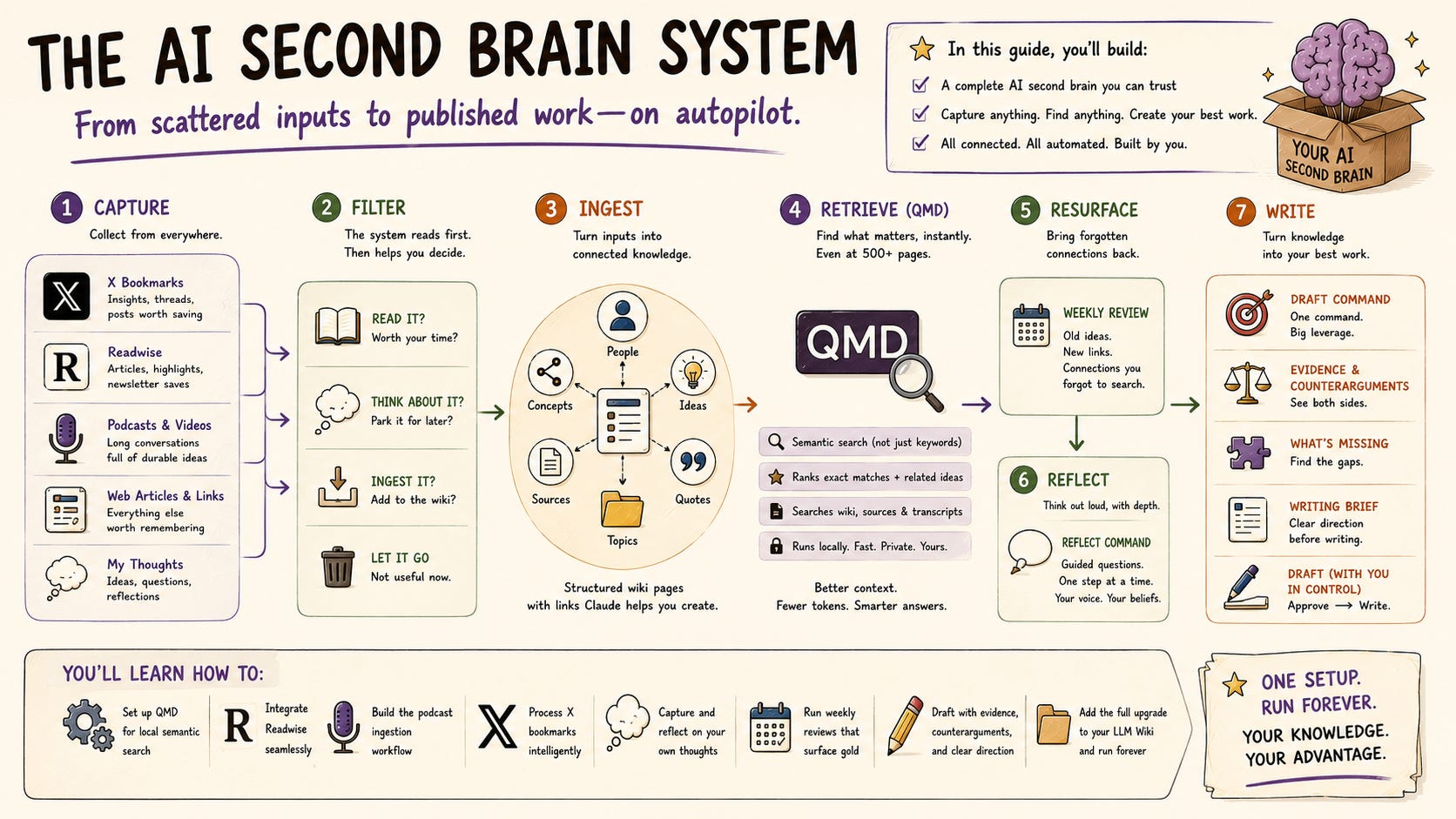
In this post, I am going to show you how each stage works, how to set up QMD and Readwise, how the podcast, X bookmark, reflection, and drafting commands fit together, and how to add the whole upgrade to the LLM Wiki you already built.
By the end of this post, you’ll have a complete second-brain folder that you can either use as-is or modify for your topic of interest. It contains all the custom commands I use and cover in this post.
Whether you run this on Claude Code, Cowork, or ChatGPT Work, it will work.
I’m convinced this might be the most comprehensive post on building your AI second brain at an advanced level, and I’m sharing it all right here in this post.
So buckle up—this is going to be a long one! 🔥
Saved Material Starts Where My Attention Already Goes
As I mentioned earlier, my old AI second brain workflow was limited to capturing only URLs from information I found on the internet, usually online articles, because Claude could fetch them easily.
But the way I consume information is scattered.
I hear something during a podcast. I bookmark a post while scrolling through X. I send a long article to Readwise because I want to read it later. Then a thought comes to me while I am walking, having dinner, or talking with someone.
Each one contains a different kind of material. They also need different treatment before they belong in the Second Brain.
These are the four entry points I use now.
1. Podcasts Through Obsidian Web Clipper
Podcasts have become one of my biggest sources of ideas. A good two-hour conversation can introduce me to a new person, challenge something I already believe, and give me several threads I want to explore later.
Saving the episode link is rarely enough. By the time I return to it, I have forgotten which part actually important. A title like “14 Patterns Behind the World’s Greatest Minds” tells me almost nothing about the specific idea I wanted to keep or where it appeared in the conversation.
Obsidian Web Clipper gives me a better starting point. When a podcast has a transcript available, I can save the full transcript into the Clippings/ folder in my Second Brain. That folder now works as a visible queue. Anything sitting at the root is waiting to be processed. Once an episode has been handled successfully, it moves into Clippings/ingested/.
I can open the folder and immediately see whether I have a podcast waiting. I do not need another tracker to remember what I have processed.
The transcript also preserves the original conversation. Later, when Claude creates a condensed source note or a wiki page, I can still trace an idea back to the timestamp where the guest said it.
But you don’t need to use Obsidian Web Clipper if you don’t want to, you can also use Readwise Reader, which supports videos, to access the podcast, as we’ll get into soon.
2. The Things I Bookmark on X
X is where I come across many of the new tools, arguments, experiments, and workflows I want to look at again.
Bookmarking takes less than a second. I save it and keep moving.
The problem usually appears later. My bookmarks contain everything together: long X Articles, thoughtful threads, product launches, short opinions, AI tutorials, and posts full of hype that promise nothing tangible.
All these become wasted if I don’t have a way to process them together.
This is where the new upgrade comes in. It gives those bookmarks a path into the Second Brain without requiring me to copy every link into Obsidian or Claude manually.
Claude can pull a recent batch, read the complete post or article, and compare its actual claim with the pages already in my wiki.
I will show you that command in the next section. The important part here is that X remains where I discover and save things. The Second Brain handles what happens after the save.
3. Articles, Videos, and Newsletters in Readwise
Readwise is a slightly different input because it already contains more information about how I consume information on the internet.
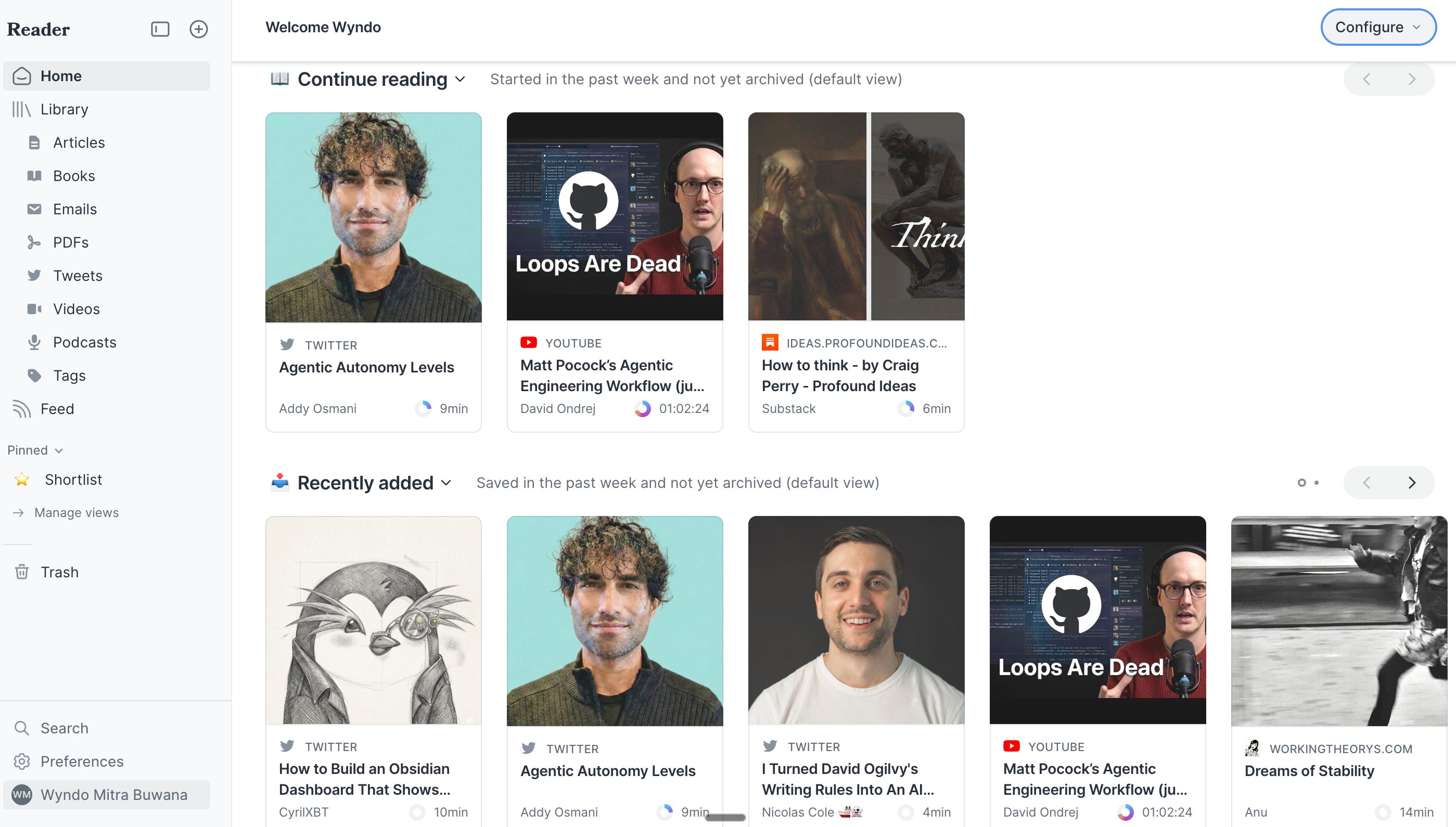
It knows what I saved, whether I opened it, how far I read, and which passages I highlighted. In fact, Readwise tracks my reading progress and provides clues about what I found useful. And the best thing about Readwise is that it handles multiple content formats—whether it’s articles, videos, podcasts, tweets, PDFs, emails, etc.
I might have a long article sitting unopened in my Reader inbox. That does not mean Claude should immediately summarize and ingest it for me. Sometimes the best next step is for me to read it first. If I have already read most of it and highlighted three sections, the system can pay attention to those passages when deciding how the document relates to the wiki.
The new Readwise connection lets Claude read the inbox and the full documents without moving or deleting anything. Readwise stays as my reading and saving tool. The Second Brain helps me decide which documents deserve more attention and what they might add to the ideas I already have.
Later in this post, I’m going to show you how you can connect your agent to the Readwise CLI.
4. My Own Scattered Thoughts
The final input does not come from the internet at all.
Sometimes I have a developed thought I can write down clearly. Sometimes I only have one sentence or short aphorism, like “hard work is overrated” or “AI is a reflection of its human.”
I know something is there, but I have not worked out the argument yet.
I can drop the thought into inbox/ folder without choosing a category, adding tags, or formatting it. The folder is designed for quick capture. Claude can help classify and process those notes later.
For thoughts that feel more personal or unfinished, I can start /reflect instead. Claude asks me one question at a time and follows what I actually say. Nothing becomes a wiki page until I tell it that the insight is ready to save.
To do this, you’ll need to use Obsidian Sync for $5/month so you can start capturing your fleeting thoughts on mobile and have them sync instantly to your local computer. Then, once you’re in front of your computer and ready to think deeper, you can start the ingesting process.
You can watch my recent One Shot Show session, where I demonstrated how /reflect works.
That gives my own thinking a proper place beside articles and podcasts. The wiki can contain what other people taught me, alongside the beliefs, questions, and experiences I am still working through myself.
The four paths now look like this:
Podcast transcript -> Clippings/
X post             -> Bookmarks
Article or video   -> Readwise Reader
Personal thought   -> inbox/ or /reflect
I built all these paths systematically before ingesting them into wiki pages. But all these processes come from the natural way I consume information, so it doesn’t really add more work for me. I can just live my life normally, and every once in a while during the week, I only need to process the new information in my Obsidian into something worth saving—something that gives me more insight into any information I consume.
A saved item is a signal that something caught my attention. The next stage helps me decide what kind of attention it deserves.
Filter What Each Save Deserves
In the first version of my Second Brain, I made the important decision before I ran the command.
I chose an article because I had already read enough to know it belonged in the wiki. Then I copied the URL and asked Claude to ingest it.
X bookmarks and Readwise changed that.
Saving something in either tool is fast. Sometimes I save because the idea is genuinely important. Sometimes the title catches my attention and I want to investigate it later. Sometimes I am simply curious for five seconds.
Those are all valid reasons to save something. They are not equally good reasons to turn it into permanent knowledge.
I needed a decision layer between saving and ingesting.
The filter asks one question about every item:
“Does this contradict, complicate, or add meaningful evidence to something already in my Second Brain?”
That question creates four possible outcomes:
Drop: The item adds nothing useful. It might repeat an idea I already captured, announce a tool with no deeper argument, or point to something too thin to preserve.
Read: The material looks substantial, but I have not read it yet. The honest next step is for me to read it before Claude turns someone else’s argument into part of my knowledge base.
Think: The item touches something I am already working through. It might challenge one of my pages or open a personal question that deserves reflection.
Ingest: The source contains a developed argument with enough substance to add to the wiki.
The filter process only recommends the next step; it doesn’t automatically create a reflection page or generate a new wiki page. I still decide what I want to do with it.
That boundary is important to me because I want the Second Brain to help me make better choices without quietly making those choices for me.
To put it simply, I want to make sure that I’m still sitting in the driver’s seat, not my AI. I want to make the whole decision so it sharpens my thinking instead of dulling it over time.
Filter My X Bookmarks With /triage-bookmarks
Let’s dive into how my X bookmarks and ingest process, which is called /triage-bookmarks actually work.
🚨 X setup required: I already wrote a complete guide to connecting X with Claude Code through the X API and MCP. Follow that setup first, then come back here to add the Second Brain command.

Once X is connected, I can run:
/triage-bookmarks 20The number is optional. It tells Claude how many recent bookmarks to review. I used 20 for my first live test. You can also say something like “last week” or “the last 7 days.”
The command starts by checking a small ledger of bookmarks it has already judged. Every X post has its own ID, so Claude can skip anything from an earlier run instead of spending time debating the same bookmark again.
It then pulls the new bookmarks and reads the actual content.
For every bookmark it can read, Claude turns the post into a plain-language claim and searches my Second Brain with QMD. It looks for the pages most likely to relate to that claim, then checks the relationship.
Does the post repeat something I already know? Does it sharpen an existing page with a more useful mechanism? Does it pull against one of my beliefs? Does it introduce a substantial new argument? Or did I bookmark a product announcement that will probably mean nothing to me in two weeks?
This is where the command became more useful than a normal bookmark summary.
A summary would organize all 20 posts and make the pile bigger. /triage-bookmarks is allowed to say that most of the pile does not deserve another step.
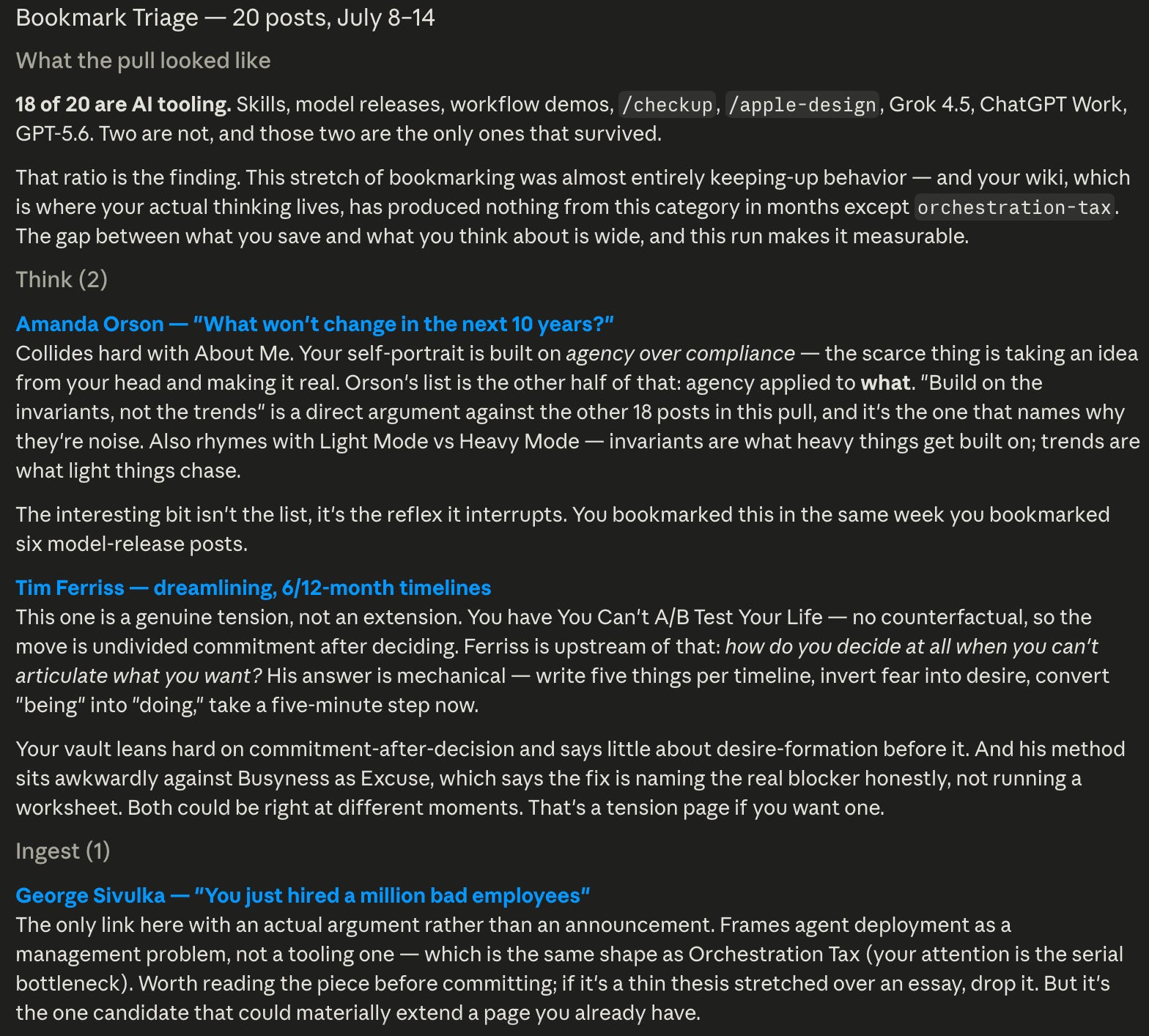
Here is what happened when I ran the triage bookmark on my latest 20 bookmarked posts on X:
20 bookmarks reviewed
17 dropped
2 marked Think
1 recommended for Ingest
Eighteen of the 20 bookmarks were about AI tooling. Model releases. New skills. Product demonstrations. Claude commands. ChatGPT Work. Grok 4.5. GPT-5.6. Motion graphics. Design tools.
My bookmarks showed a week of trying to keep up with what was changing. My wiki showed something different. Almost none of those tool updates had contributed to the ideas I was actually developing.
That gap became the real finding. The things that catch my attention while scrolling and the things that deepen my thinking overlap much less than I expected.
Only one of the 18 AI-related bookmarks survived, and it survived because it contained a real argument rather than another announcement.
The Two Posts That Made Me Think
The first Think result came from Amanda Orson. Her post asked a simple question: what will remain true over the next ten years?

That collided directly with my About Me page. A lot of my thinking is built around agency, taking an idea from your head and making it real. Amanda’s post added another question: where should that agency be directed?
Her advice to build around things that do not change also connects with my page about Light Mode and Heavy Mode. Heavy work is usually slow and deliberate, such as writing books or building companies. Light work is fast and iterative, such as tweets, short-form content, or hot takes. Here’s the Light vs Heavy Mode that my page referred to:

The second Think result was an old Tim Ferriss post about dreamlining.

This one found a genuine hole in my wiki.
I already had a page called “You Can’t A/B Test Your Life.” The central idea is that life cannot be run in parallel. Once you make a decision, the useful move is to commit instead of constantly comparing it with the paths you left behind.
Ferriss starts one step earlier. What happens when you cannot clearly articulate what you want in the first place?
His method is mechanical. Write down five things you want across a six or twelve-month timeline. Turn vague states like “being confident” into something you can do. Then take one small step now.
My wiki had a lot to say about commitment after making a decision. It said very little about how we form the desire before that decision.
That’s why the command suggests that I think about this if I want to add it as part of my wiki pages, so it can complement or add tension to my existing pages.
The One Ingest Candidate

The only Ingest recommendation was George Sivulka’s “You Just Hired a Million Bad Employees”.
The post framed large-scale agent deployment as a management problem. That put it in direct conversation with my existing page about the Orchestration Tax, where I argue that human attention becomes the serial bottleneck when too many agents need review.
The command did not treat the shared topic as enough. It recommended reading the full piece before committing it to the wiki. If the article contained a developed argument about defining work, evaluating agents, and managing the system, it could materially extend the existing page.
Ingest is a recommendation to inspect the source more closely. It is not automatic approval.
What Got Dropped
The 17 drops fell into a few clear groups.
Model and product announcements: ChatGPT Work, Grok 4.5, GPT-5.6, Claude
/checkup, HeyGen motion graphics, and Open Design. Useful updates, but mostly changelogs.Skill releases: Apple design, animation-improvement skills, and another skills tutorial. These might be useful to install or test. They gave me little to think about.
Lists for someone else’s situation: executive AI questions, build lists, and generic resources without a developed argument.
Pointers and reactions: quick demonstrations, reactions to product news, and posts pointing toward someone else’s work.
The filter also surfaced one decision that was harder to make.

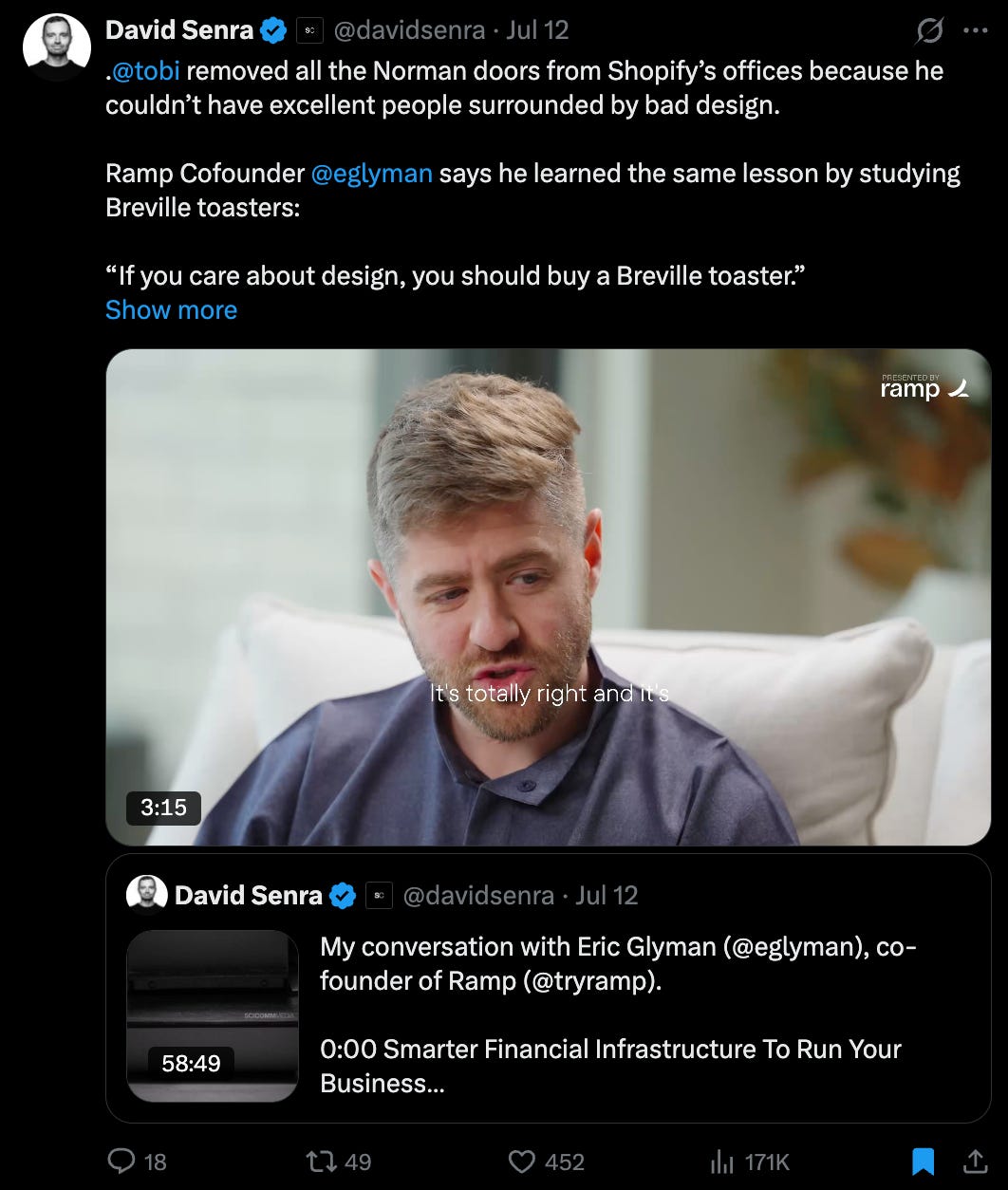
I had saved a David Senra post about Breville’s “A Bit More” button. The design principle was genuinely useful: observe what people repeatedly do, then design around that behavior instead of relying only on what they say.
David already had a page in my wiki, but the idea collided with nothing else. I had no active product-design or customer-research thread for it to sharpen. Creating a link through the author would have made the wiki look more connected without adding more value to the topic I care about.
The command dropped it and flagged it as the arguable call. I could loosen the rule later and allow a strong new idea to start its own thread. For this run, I kept the bar where it was.
After reporting the results, the command records every verdict in inbox/x-bookmarks-processed.md:
Date | Post ID | Author | Verdict | WhyThat file is working state. QMD does not index it, and Claude does not treat the verdicts as knowledge. It exists so the next run knows what has already been reviewed and, over time, I can see which bookmarks actually became reflections or wiki pages.
Filter My Readwise Inbox With /triage-readwise
Readwise needs a slightly different filter because it knows more about what I did after saving something.
When I run:
/triage-readwise yesterdayClaude pulls unjudged documents from my Reader inbox. With CLI connection, it can see the document type, reading time, how far I progressed, and any highlights I created. The command then reads the full source before deciding what deserves another step.
The extra signal here is my reading behavior, because Claude can see how far I’ve progressed on specific content formats. Since Claude can read the entire piece, it can compare my progress against completion. In the end, it can suggest that I either read it to the end or drop it entirely if I already have a sharper page in my Wiki instead.
My first live run found only three saves, all from July 21, 2026:
3 documents reviewed
2 dropped
1 recommended for Read
0 completed
The one survivor was the only piece I had not opened.
Read: “Dreams of Stability” by Anu.
The essay argues that stability has become a status symbol in tech. As AI makes skills easier to replace, the fallback options that once made risk feel survivable may be disappearing.
That challenges my existing page on Uncertainty Tolerance.
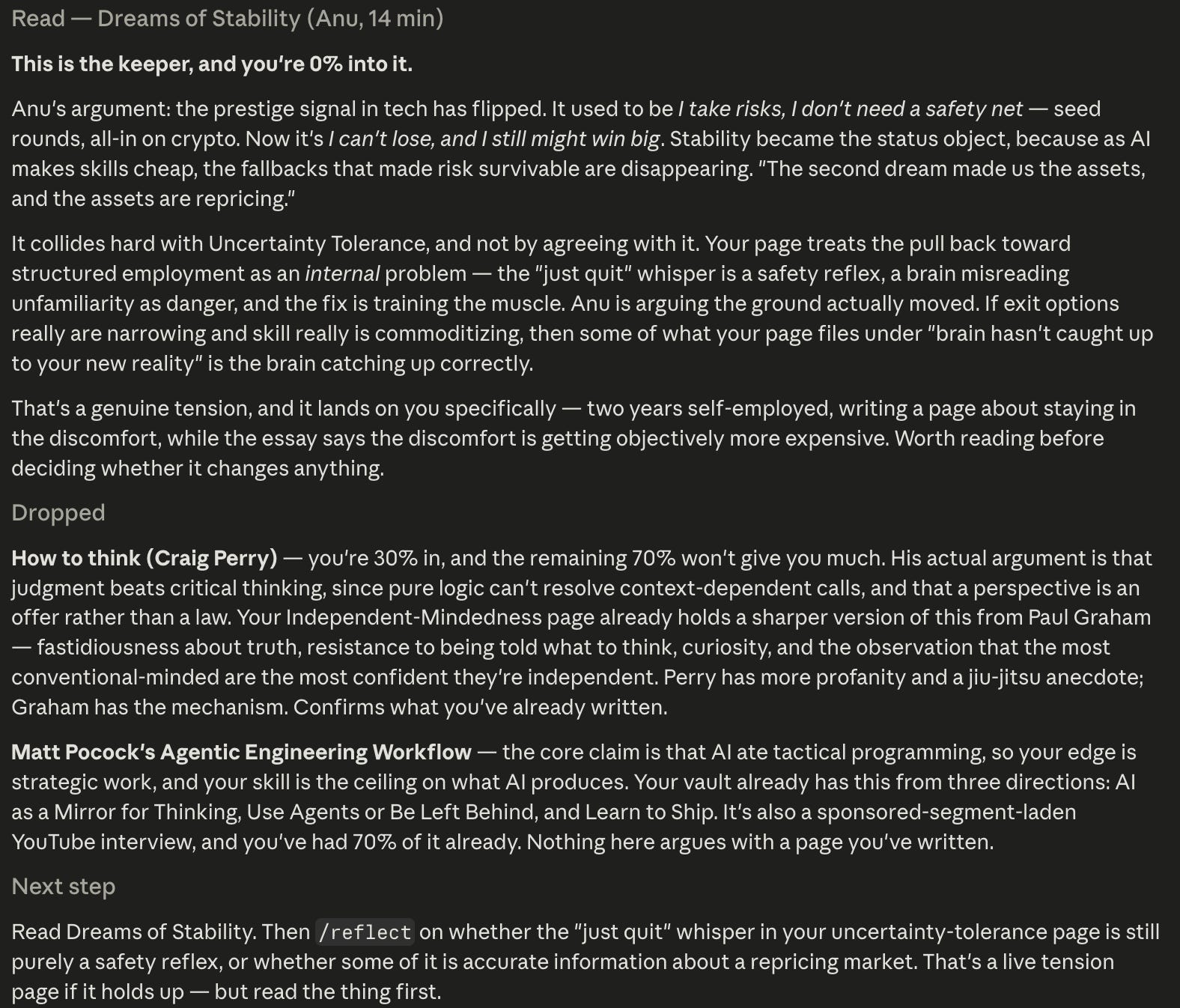
But I was still at 0 percent on the essay. The right next step was to read it, then use /reflect to decide whether it changes my view. Ingesting it first would have left me with a neat summary of an argument I had never formed an opinion about.
The two drops were quicker calls:
“How to think” by Craig Perry: I was 30 percent through it. Its argument about judgment and context was already covered more sharply in my Independent-Mindedness page through Paul Graham’s work.
Matt Pocock’s Agentic Engineering Workflow: I was 70 percent through the video. Its main claim, that AI handles more tactical programming while human skill sets the ceiling, already appeared across AI as a Mirror for Thinking, Use Agents or Be Left Behind, and Learn to Ship.
Two of the three saves were about AI and tech, and both were dropped. That does not mean the filter penalizes AI. It means my Reader inbox was drifting toward the same topic, while my wiki already held stronger versions of those ideas.
This tiny first run showed why the Read verdict matters.
The command records every verdict in inbox/readwise-processed.md so it does not review the same documents next time. It also leaves Reader untouched. Nothing is archived, moved, tagged, deleted, or marked as seen.
Now that you’ve seen how many filters I had to put on my saved materials before they deserve their own place as wiki pages in my second brain, you can see why I’m so selective. I don’t want to include anything I don’t fully understand, so these filters are a required part of the whole system.
Every saved material needs to go through a review, but only the useful ones continue. Some deserve a dedicated wiki page. Others deserve my attention first.
Now, let’s dive into how to install Readwise CLI and connect it to your agent.
How to Set Up Readwise
Readwise is the only new source in this workflow that needs its own connection. I use the official Readwise CLI mainly for two reasons:
It is more token-friendly. Claude can request a short list of documents first, then open the full text only when it needs to judge a specific item.
It connects directly to the Readwise API. Once I log in, Claude can retrieve my Reader documents, reading progress, and highlights through specific commands. That connection also remains useful when I want the agent to do something outside the main second-brain workflow in this post.
Install the Readwise CLI
Open your terminal and run: