

Before You Try Another AI Tool, Ask These 7 Questions
A practical framework for deciding which AI tools deserve your time, money, and attention.



Last month, I shared the AI tools I actually use to build and grow AI Maker. Writing that post forced me to admit something: choosing the tools was harder than finding them.
There is always another AI tool that looks promising. I have tested plenty that seemed useful for a day, then quietly disappeared from how I work. I have also paid for tools I barely used, then switched when something else fit the job better. The difficult part is deciding which ones deserve a real place in your work.
That is why I invited Nick Woodford back. His previous guest post, The Future of Writing Is Perspective, explored how writers can use AI without losing what makes their work worth reading.

Over at Market Smarter with AI, he puts that thinking into practice by showing how he uses Claude as an editor, why he asks a chatbot to write his design briefs, and how he turns long talks into useful infographics. He starts with the work, then decides how AI should help.
In today’s guest post, Nick shares seven questions he uses to evaluate a new AI tool. He shows what passed, what did not, and how he chose between Claude, ChatGPT, and Gemini. I like this framework because it gives you permission to move on when a tool no longer earns its place.
If your AI setup keeps growing but your work is not getting easier, this is a useful filter.
Here’s Nick.
Hello 👋🏻
Back in November 2022, I opened ChatGPT for the first time and genuinely didn’t know what to do with it.
Within weeks it had become one of the first tabs I opened each morning. I couldn’t imagine working without it.
I can’t remember the last time I logged in.
That isn’t a criticism of ChatGPT. It’s just what happens when you treat AI tool adoption as a process rather than a commitment. Your needs shift. Better fits emerge. You move on.
The problem most marketers face isn’t finding AI tools. There are thousands of them. The problem is having a reliable way to work out which ones deserve your time and which ones are just noise.
After three and a half years of testing, I’ve landed on a framework that takes most of the guesswork out of it.
The Seven-Question Tool Evaluation Framework
Run any new AI tool through these questions before it earns a place in your workflow.
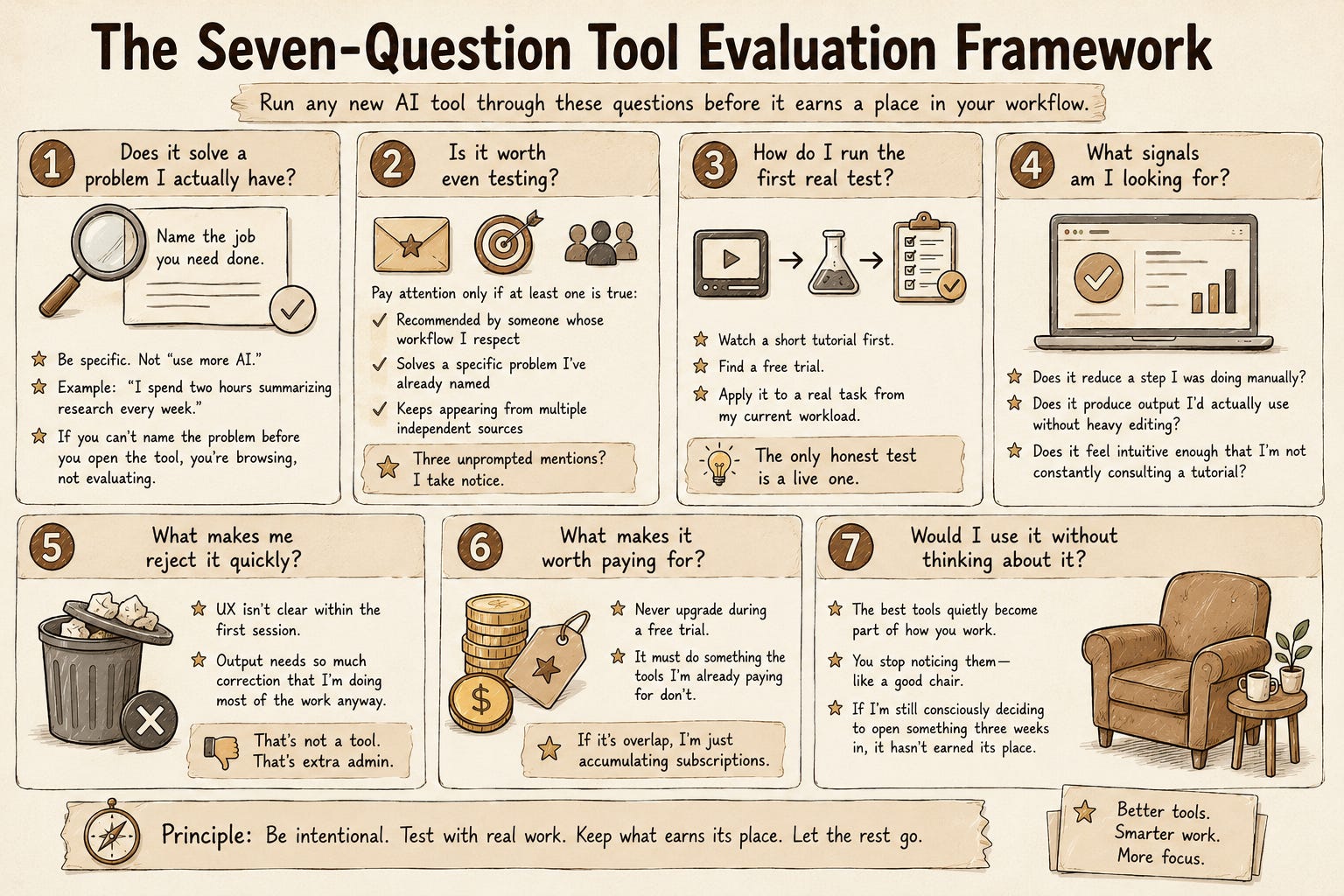
1. Does it solve a problem I actually have?
Before you test anything, name the job you need done. Not “I want to use more AI” but something specific: I spend two hours summarizing research every week and it’s killing my Friday afternoons. I need a better way to repurpose webinar recordings. My slide decks take forever and always look the same.
If you can’t name the problem before you open the tool, you’re browsing, not evaluating. Browsing is how you lose an afternoon.
2. Is it worth even testing?
Not everything that lands in your inbox deserves a trial. I only pay attention to a tool when at least one of these is true: it comes recommended by someone whose workflow I respect, it solves a specific problem I’ve already named, or it keeps appearing from multiple independent sources. If three different people mention the same tool unprompted, I take notice.
That last point only works if your sources are worth trusting. I used to follow dozens of accounts and newsletters and retained none of it. Now I rely on a small handful:
Superhuman newsletter: a daily AI digest without the noise. The only newsletter I read every weekday.
Matt Wolfe (YouTube): weekly roundups aimed at people who use AI but aren’t developers. He tests tools live on screen, which beats someone just describing them. I watch at 1.5x.
The Verge: not AI-specific, but when something genuinely gains traction they cover it with more scrutiny than most.
Word of mouth: still works. Three unprompted mentions and I take notice.
The goal isn’t to catch everything. It’s to catch the things that matter.
3. How do I run the first real test?
I watch a short tutorial first, usually on YouTube, to understand how the tool actually works before I touch it. Then I find a free trial and immediately apply it to a real task from my current workload, not a made-up scenario designed to make any tool look good.
The only honest test is a live one.
4. What signals am I looking for?
In that first session, I’m asking one question: did this make something genuinely easier, faster, or better? Not in theory. Right now, with real work.
The signals I’m watching for: does it reduce a step I was doing manually, does it produce output I’d actually use without heavy editing, and does it feel intuitive enough that I’m not constantly consulting a tutorial to move forward.
5. What makes me reject it quickly?
If the UX isn’t clear within the first session, I move on. I don’t have the patience to decode complex tools, and I’ve learned that anything genuinely useful shouldn’t require a learning curve just to get started.
I also walk away fast if the output needs so much correction that I’m doing most of the work anyway. That’s not a tool. That’s extra admin.
6. What makes it worth paying for?
I never upgrade during a free trial. I only consider paying once a tool has already proven its value in real work, and even then, it needs to clear one more bar: does it do something that the tools I’m already paying for don’t?
If the answer is yes, it’s worth it. If I’m paying for overlap, I’m just accumulating subscriptions.
7. Would I use it without thinking about it?
The tools that genuinely stick are the ones that quietly become part of how you work. You stop noticing them, the same way you stop noticing a good chair. If I’m still consciously deciding to open something three weeks in, it hasn’t earned its place.
One Tool That Passed. One That Didn’t. One That Won a Straight Fight.
Passed: NotebookLM
I had a specific problem: too many long documents, not enough time to read them properly before meetings or projects. NotebookLM’s ability to ingest multiple sources and let me ask questions across all of them directly addressed that. The first real test took about twenty minutes and produced something I actually used. I’ve never considered dropping it.
Didn’t pass: a browser extension I tested earlier this year
I won’t name it because the category has several versions and this isn’t a verdict on all of them. The promise was AI-powered page summarisation and research support while browsing. In practice, the summaries were shallow, the interface kept pulling my attention away from the actual page, and after four days I realised I’d gone back to doing the same task manually without noticing. That’s the clearest rejection signal there is: you forget to use it.
A straight fight: Claude vs ChatGPT vs Gemini
This one didn’t start with a new tool. It started with a problem I’d been quietly tolerating.
Most of my week is writing. Articles, newsletters, emails, YouTube descriptions, Instagram captions, website copy. Copywriting is the thing I’m actually good at, which makes it an awkward job to hand over. I don’t need something to write instead of me. I need something that helps me write more of what I’d have written anyway, faster.
So I gave the same real task to all three: one live piece, same brief, same source notes, same deadline. No test prompts, no clever benchmarks. Just the thing I actually had to write that week.
The signal I ended up watching for wasn’t quality in the abstract. It was how much of me survived the draft. ChatGPT was fast and reliable and flattened everything into the same reasonable, faintly corporate register. Gemini was strongest at pulling research together and weakest at holding a thread once the piece got long. Claude read more like an editor than a replacement: it kept my voice, pushed back when something was weak, and left me with a draft I was editing rather than rewriting.
Nothing failed on question five. The UX was fine everywhere. It came down to question four, and specifically to the version of it that matters if writing is your craft rather than your chore: does the output need so much correction that I’m doing the work anyway?
Then question six finished it. Paying for all three would have meant paying for overlap, so I cancelled the other two rather than quietly stacking subscriptions. Three weeks later I noticed I’d stopped choosing, which is question seven answering itself.
When tools are genuinely close, the framework stops being a pass/fail gate and becomes a tiebreak. And the tiebreak is almost always fit, not features.
What’s Currently Making the Cut
A framework is only convincing if it produces something. So here’s what has actually survived mine right now, with what each one is for. This is a snapshot, not a permanent list. Ask me again in a year and it’ll look different, which is rather the point.
Claude: writing and thinking. Replaced ChatGPT and Gemini in my daily work not because it’s dramatically different, but because it suits the way I write. Sometimes adoption really does come down to fit.
Claude Design: turning rough ideas into visuals and prototypes without leaving the tool I’m already thinking in. It’s become a daily habit rather than an occasional one.
NotebookLM: reading across long documents before meetings, when there’s more to get through than time to do it.
Descript: video and audio editing, without needing a video editor’s brain to use it.
Canva: quick visual design and social assets when I don’t need to start from scratch.
Apple Voice Memos: recording meetings and letting it auto-transcribe them, filed by date and location. I read back through, then drop the notes into Claude to draft follow-ups, pull out the interesting points, or tidy them up for colleagues.
Notion: notes and knowledge management, the place everything eventually lands.
LMArena: comparing how different models answer the same prompt, useful when I’m deciding which one to trust for a task.
One final thing
There’s a strange guilt that comes with dropping a tool you once liked. You invested time learning it. You might have recommended it to someone. Moving on can feel like admitting something.
It isn’t. Your workflow will keep getting better if you let it.
 | A guest post by
|
I really enjoyed this. It's a useful framework for evaluating which AI tool to use once you've decided technology is the right path.
Where my thinking differs is that I believe there's an earlier decision most people skip: Does this problem require technology at all? Sometimes the better answer is to simplify the process or simply leave it alone.
That said, your framework gave me a few ideas for refining the tool-evaluation stage of my own process. Thanks for sharing it.
Loved collaborating again, thanks for the opportunity!