




NotebookLM has become one of the favorite tools among AI Maker readers.
Some of the most interesting examples I come across are from people who combine NotebookLM with the rest of the way they already use AI. The tool stays the same, but the workflow around it becomes deeply personal.
I saw this after sharing my AI therapy workflow last year. I uploaded years of journal entries to NotebookLM, asked questions about the patterns inside them, then turned what I found into small reminders I could use in daily life. It worked, but I still had to start every session, decide what to ask, and remember to return.
That is why Gencay’s version caught my attention. He kept NotebookLM as the source for his journal, then built a weekly loop around it:
One agent looks for patterns
Another searches for contradictions
A third turns the evidence into a report
Every claim needs dated quotes from the journal or it gets dropped. The final report also opens with one passage from Marcus Aurelius, chosen to match the week’s dominant pattern.
Today’s guest post is from Gencay, the creator of LearnAIWithMe and one of our returning AI Maker contributors.
In his previous guest post, he used five Claude Code sub-agents to turn an expense CSV into a financial dashboard. You might want to check out his previous posts on building SEO-optimized content with Claude Cowork, connecting GLM 5.2 to Claude Code, and hidden NotebookLM features most people don’t know about.

What I like about his work is simple: he builds real things, tests them, and shares what happened.
If you want to learn more about what he writes, start with these three posts:
I Built a Second Brain Never Forgets And Thinks While I Sleep
I Built an AI Tutor for My Claude Certification with NotebookLM & Claude Cowork
3 Claude Loops That Will Put You Ahead of 99% of Claude Users
I need to say this clearly. I see this kind of setup as a tool for personal reflection, not diagnosis or a replacement for professional care. Gencay builds within that boundary. No clinical labels, no outside advice, and no hallucinations when the journal does not contain enough evidence.
If you read my original workflow and wished it could keep digging without you steering every question, this is a thoughtful next version.
Here’s Gencay.
Hello 👋🏻
A Nature paper published this month tried to answer a simple question:
“How many people use AI for mental health support?”
The reports they reviewed said anywhere between 3 and 70 percent of AI users. Their own estimate landed at 27 percent.
So roughly one in four people talking to AI is talking about their mind.
I was one of them, quietly.
Then I read Wyndo’s AI therapy workflow and built his system for myself.
Journal goes into NotebookLM, questions reveal patterns, insights become daily tools.
It worked.
Then I realized there’s one thing I can change now.
In the AI therapy workflow, I was the one writing the questions. Every session, me, typing, deciding what to ask for my own journal.
So I wondered if I could build the same system with a little automation and a loop. Agents who write their own questions. A goal that decides when the digging is done.
A routine that runs it every Sunday before I wake up.
I built it.
Here is the whole thing.
One NotebookLM Journal, Three Claude Code Agents
The journal lives inside a NotebookLM notebook. My Claude Code agents go through it each week and ask questions.
Not from a fixed list. Each agent reads the answer it gets and writes its own next question. One agent hunts patterns, one hunts contradictions, one compiles the report.
Why NotebookLM and not a plain folder of text files?
The answer is grounding. NotebookLM answers only from the sources, and we will configure it to say “Not in source” when the answer is not there.
A hallucinated number about a stock costs you money. A hallucinated pattern about your own mind costs you more. Nothing enters the weekly report that I did not actually write in my journal.
We will do it in 3 steps:
Connect NotebookLM to Claude Code with CLI
Create a NotebookLM space by feeding it your journal data
Build Claude Code agents that analyze your journal
Let’s dive in.
1. Connect NotebookLM to Claude Code With the CLI
Claude Code needs a way to talk to NotebookLM. The bridge is the notebooklm-py CLI.
Open Claude Code and paste this:
Hey Claude, install the NotebookLM CLI from

https://github.com/teng-lin/notebooklm-py

1. Install it with pip

2. Run the auth command and give me the exact login step I need to do myself

3. Confirm the connection works by listing my notebooks

Stop and tell me if any step needs my input.
After pasting this prompt, all you need to do is authenticate your NotebookLM account, and you are done.
2. Add Your Journal to NotebookLM
Now the notebook needs your journal:
Go to notebooklm.google
Click Try NotebookLM
Create a new notebook
And hit the + button
Paste your journal entries as text, or upload the files if you keep them as documents.
Any files work: Notes app exports, Word files, and plain text all work.
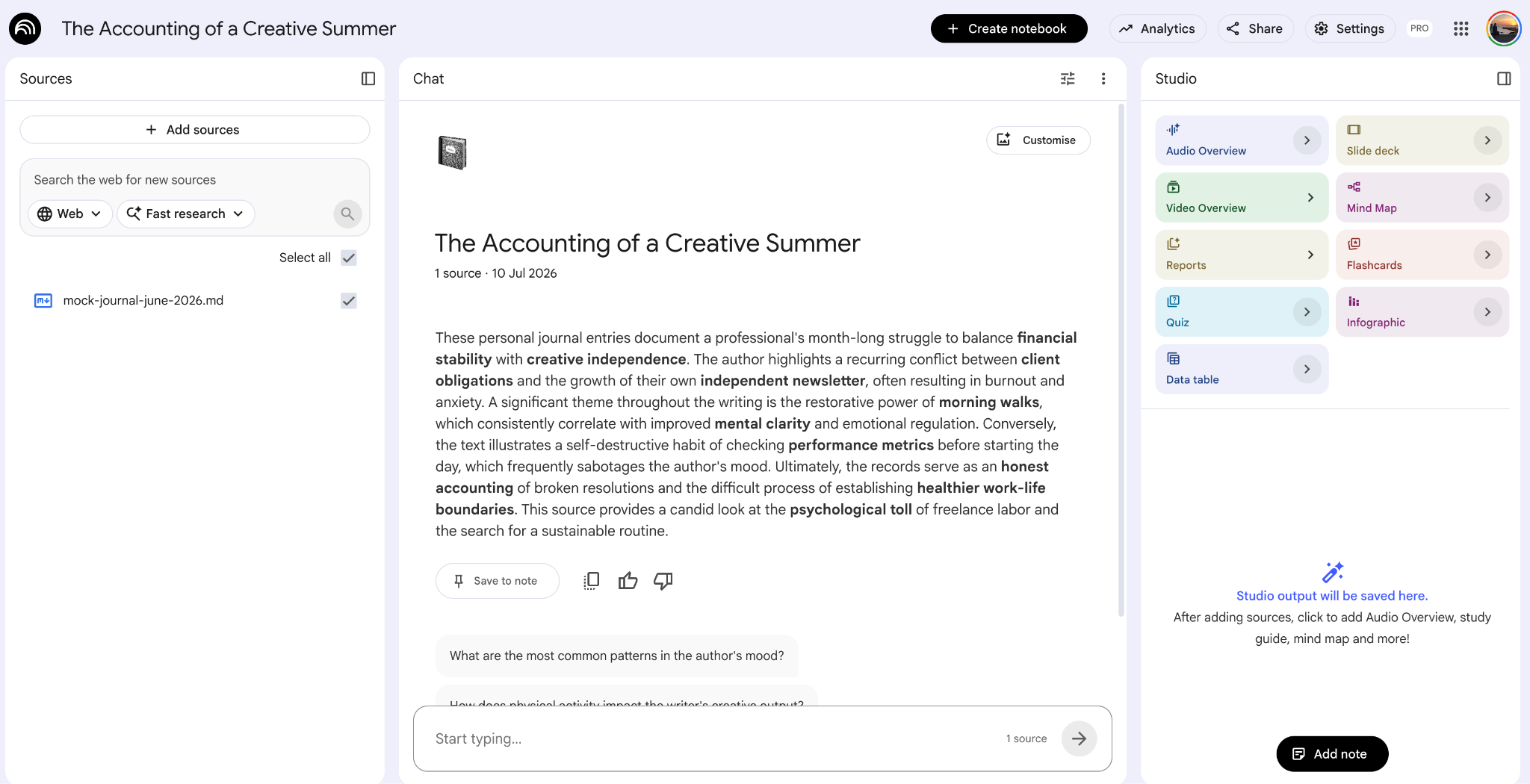
If you are wondering what an entry should look like, there is no template. Mine are short, dated, and honest. Here are two from the week the report covers.
## June 29

Deadline week begins. Woke at 5 without an alarm, chest already

tight about Thursday’s delivery. Did not walk, went straight to

the desk, which felt productive at 5 AM and stupid by noon.

The tightness stayed all day.

## July 1

Broke the streak of bad mornings, walked 40 minutes at sunrise.

Thursday is still Thursday but it stopped being a monster

somewhere on the way back. Calm, clear, wrote the delivery

checklist in ten minutes.
A date and a few honest sentences. That is all the agents need. The quotes you will see in the report come from entries exactly like these.
Then the part most people skip. Open Configure chat by clicking here.
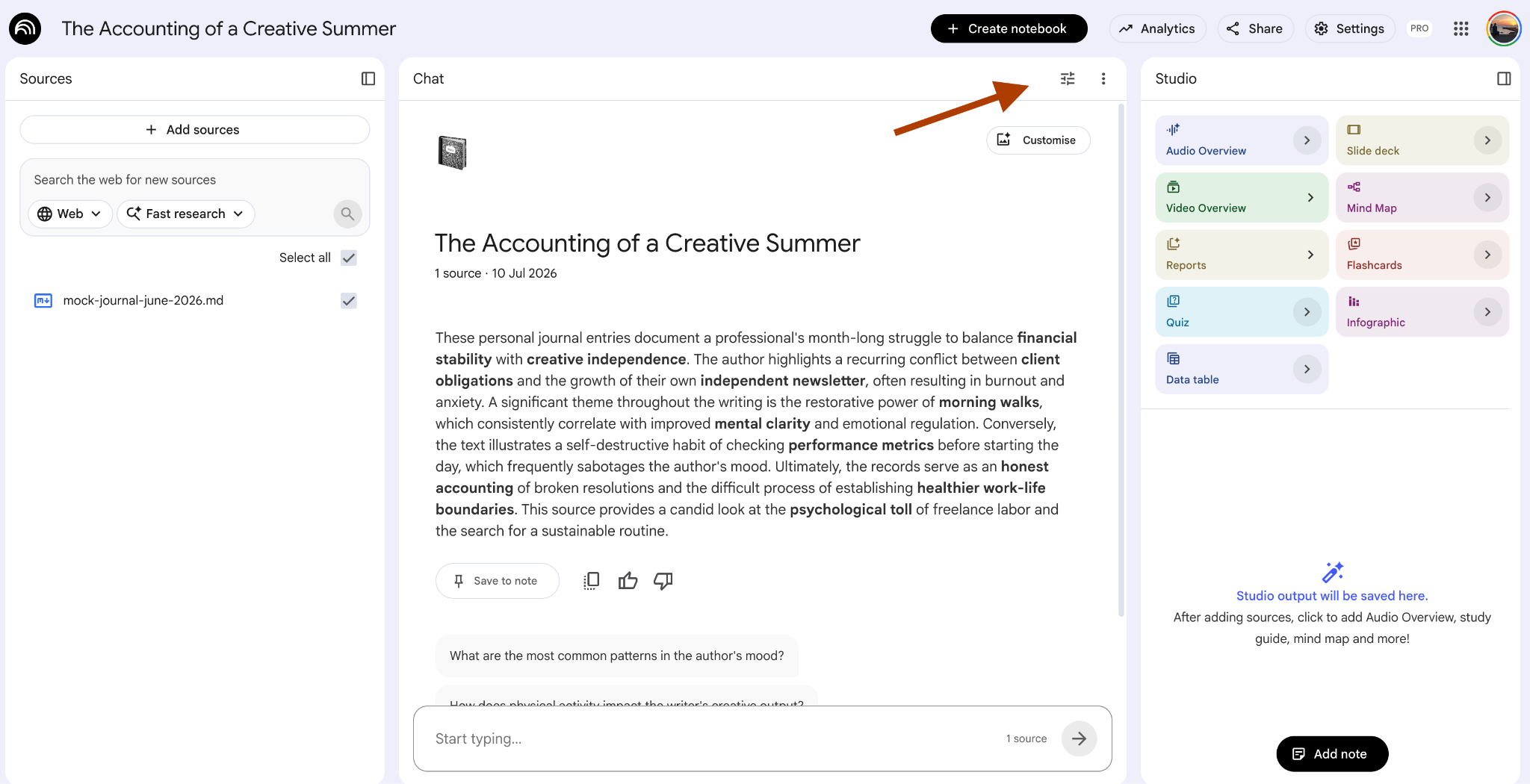
Choose Custom, and paste this prompt:
Answer only using the provided sources.

If the answer is not clearly supported by the sources, respond exactly with:

Not in source
Here’s the screenshot to follow:
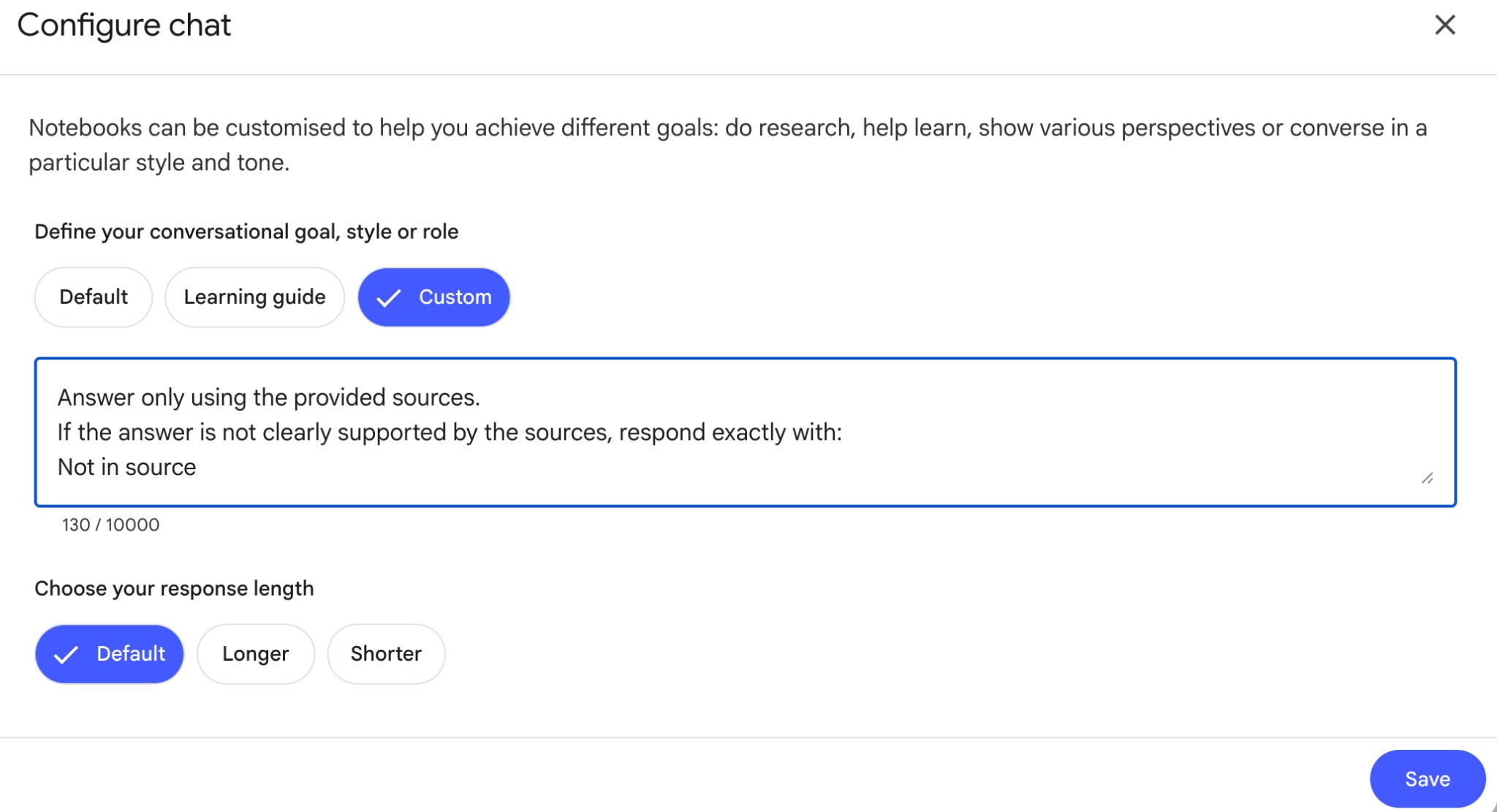
Those lines are the immune system of the whole body. NotebookLM already hallucinates less than a chat model.
With those lines, in my runs, it dropped to almost zero.
3. Build Three Claude Code Agents for Journal Analysis
Here, you only need one prompt:
You are going to build my weekly self-discovery loop. Work step by step.

SETUP

1. Create a folder ~/mind-loop and work there.

2. Search Project Gutenberg for “Meditations by Marcus Aurelius”

   (it is public domain), download the plain text, and save it

   as meditations.md in the folder.

3. Confirm the NotebookLM CLI is installed and my journal

   notebook is reachable. My notebook is called: [YOUR NOTEBOOK NAME]

THE THREE AGENTS

Create an agent team that runs in this order:

Agent 1, Pattern Hunter.

Queries the journal notebook about this week’s entries.

Starts from three seed questions (values driving decisions,

situations triggering emotional responses, how a recurring topic

evolved) and then writes its own follow-up questions based on

each answer. Max 5 queries. Every finding must carry the

notebook’s citation.


Agent 2, Contradiction Finder.

Takes Agent 1’s findings and asks the notebook where my own

entries contradict them. Decisions I wrote down and then acted

against. Values I claim and behaviors that ignore them.

Max 5 queries. Citations required.


Agent 3, State Reporter.

Never queries the notebook. Compiles the week from the first

two agents: mood curve from the emotional language in entries,

active patterns, contradictions, and correlations that come only

from my own data (e.g. weeks with walks read calmer than weeks

without). Then it reads meditations.md and selects ONE passage

that matches this week’s dominant pattern. Not random. Matched.


THE GOAL (this is the loop)

Every claim in the report needs at least 2 dated quotes from this

week’s entries. A claim below 2 quotes gets re-queried, max 4

rounds. Still below? Drop the claim. If the week is quiet, the

report says “quiet week” instead of inventing depth.

Answers of “Not in source” kill the claim immediately.


THE OUTPUT

Build the report as a Claude Code artifact called Weekly Mind

Report. Layout: the Meditations passage on top (quote, what it

means in one line, how it maps to this week with the journal

evidence), then mood curve, active patterns with citations,

contradictions, correlations. No advice that does not come from

my own data.


THE ROUTINE

Create a Claude routine that runs every Sunday at 07:00:

add this week’s journal entries to the notebook as a new source,

then run the three agents, then build the artifact.

Hard rules: max 5 queries per agent per run, every claim cited,

no diagnosis, no clinical labels, no advice from outside my data.
Paste the prompt, and let it run.
You’ll notice the three sub-agents will be created:
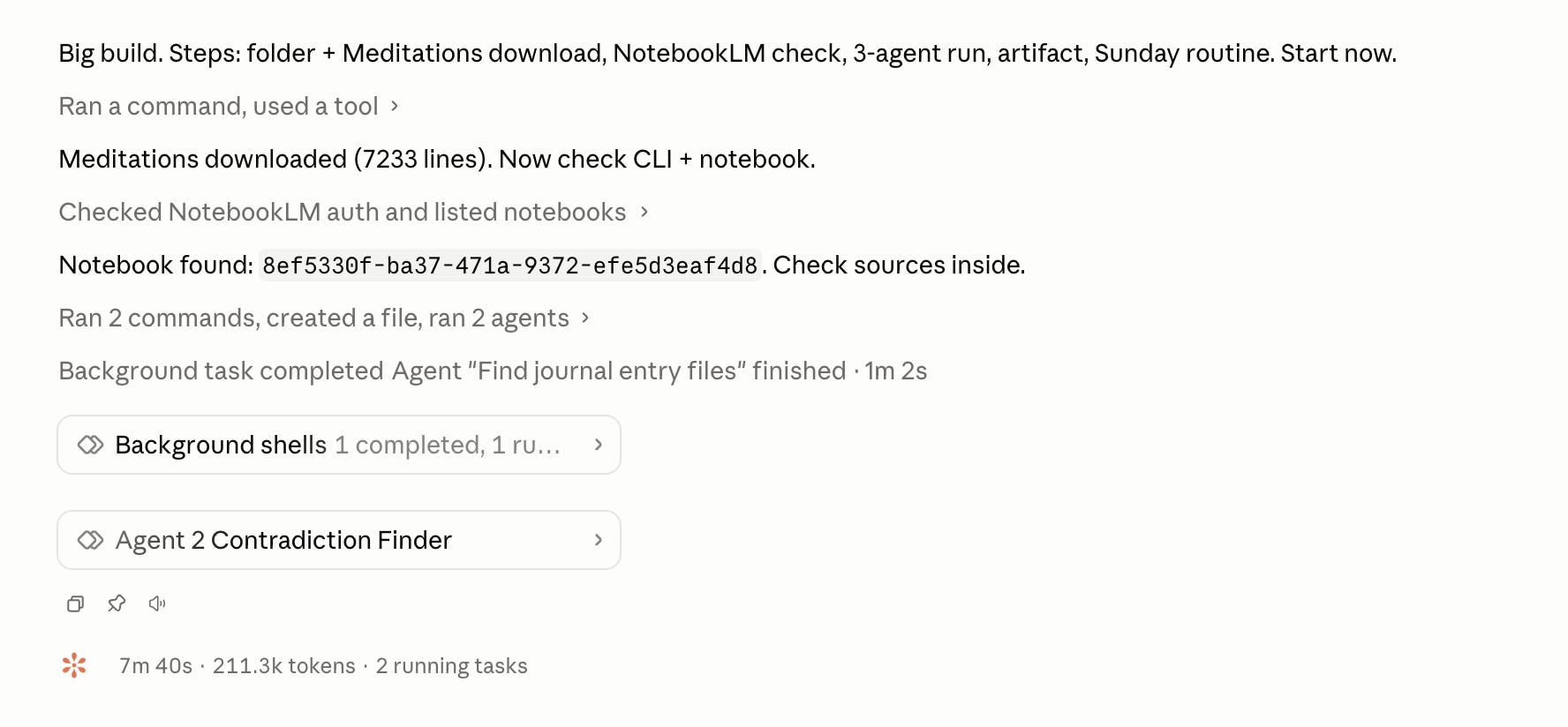
And these agents questioned the NotebookLM, using the CLI:
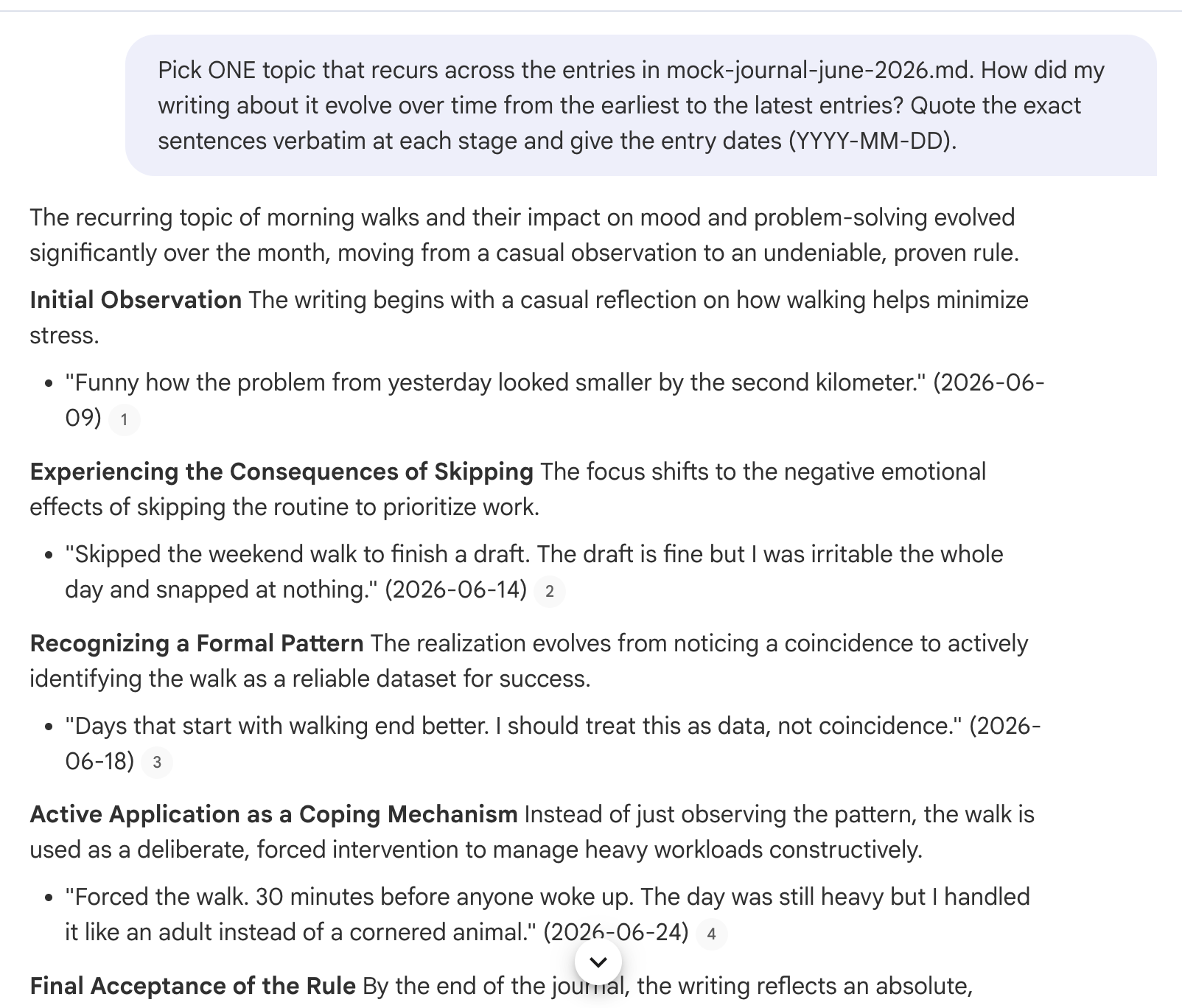
Here’s what happened:
The Pattern Hunter asks, reads, and asks again.
The Contradiction Finder builds on the Pattern Hunter’s output, which is the part a fixed prompt list can never do.
The State Reporter turns both into one page.
The goal is what makes it a loop instead of an automation. Two dated quotes per claim or the claim dies. The agents keep digging until the report earns itself, four rounds max.
🚨 Note: Make sure to paste the prompt into the Claude Code Desktop app or terminal. These agents sometimes do not work properly inside VS Code. Also, this can drain your tokens quickly, so make sure to limit the number of loop iterations or adjust the number of agents based on your usage limits.
Schedule the Weekly AI Journal Report
The prompt you pasted did one more thing. It created a Claude Code routine called weekly-mind-loop.
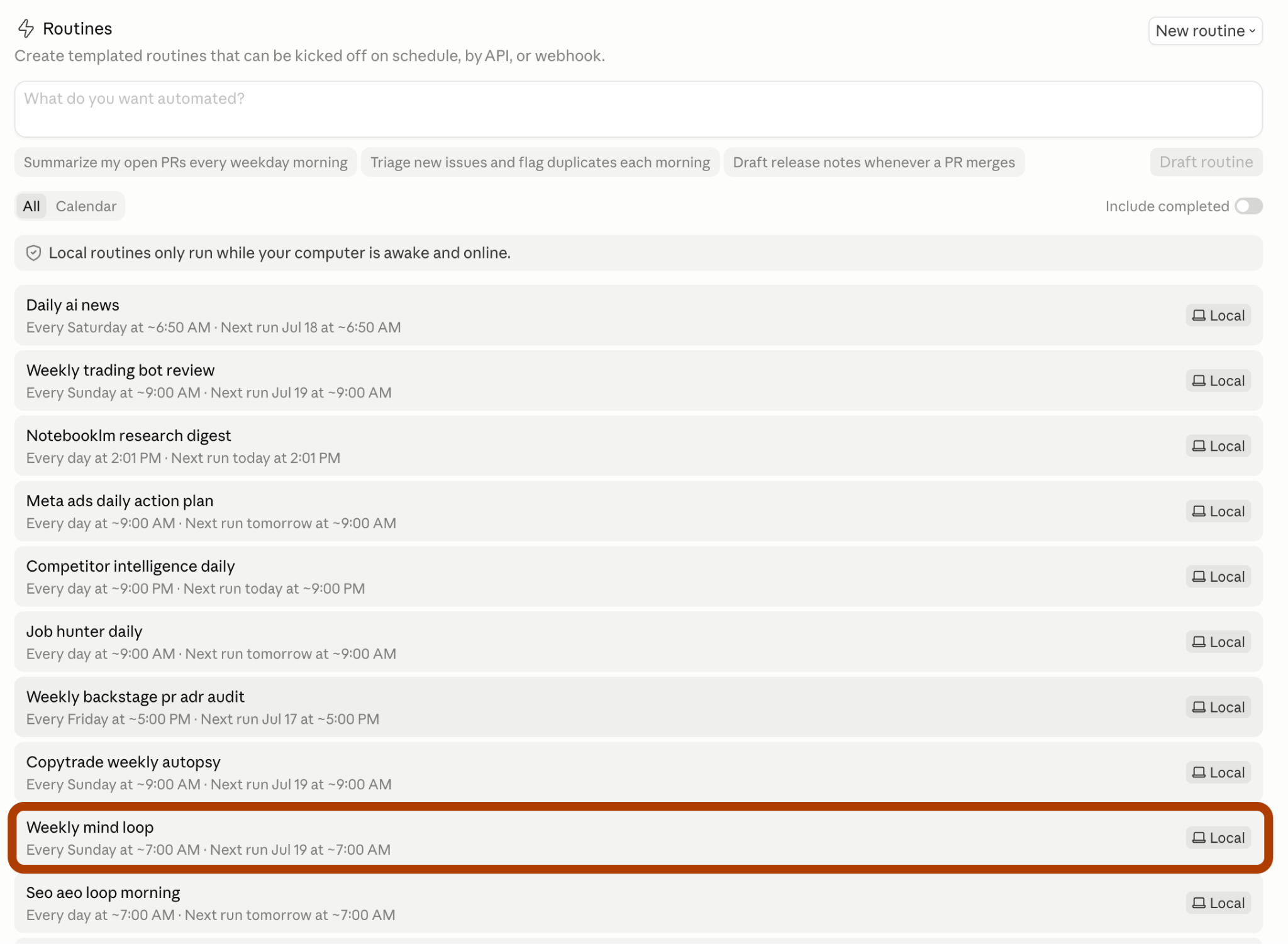
Routines are Claude Code’s scheduled tasks. You define a trigger time and a job, and Claude runs it without you. Mine fires every Sunday at 07:00.
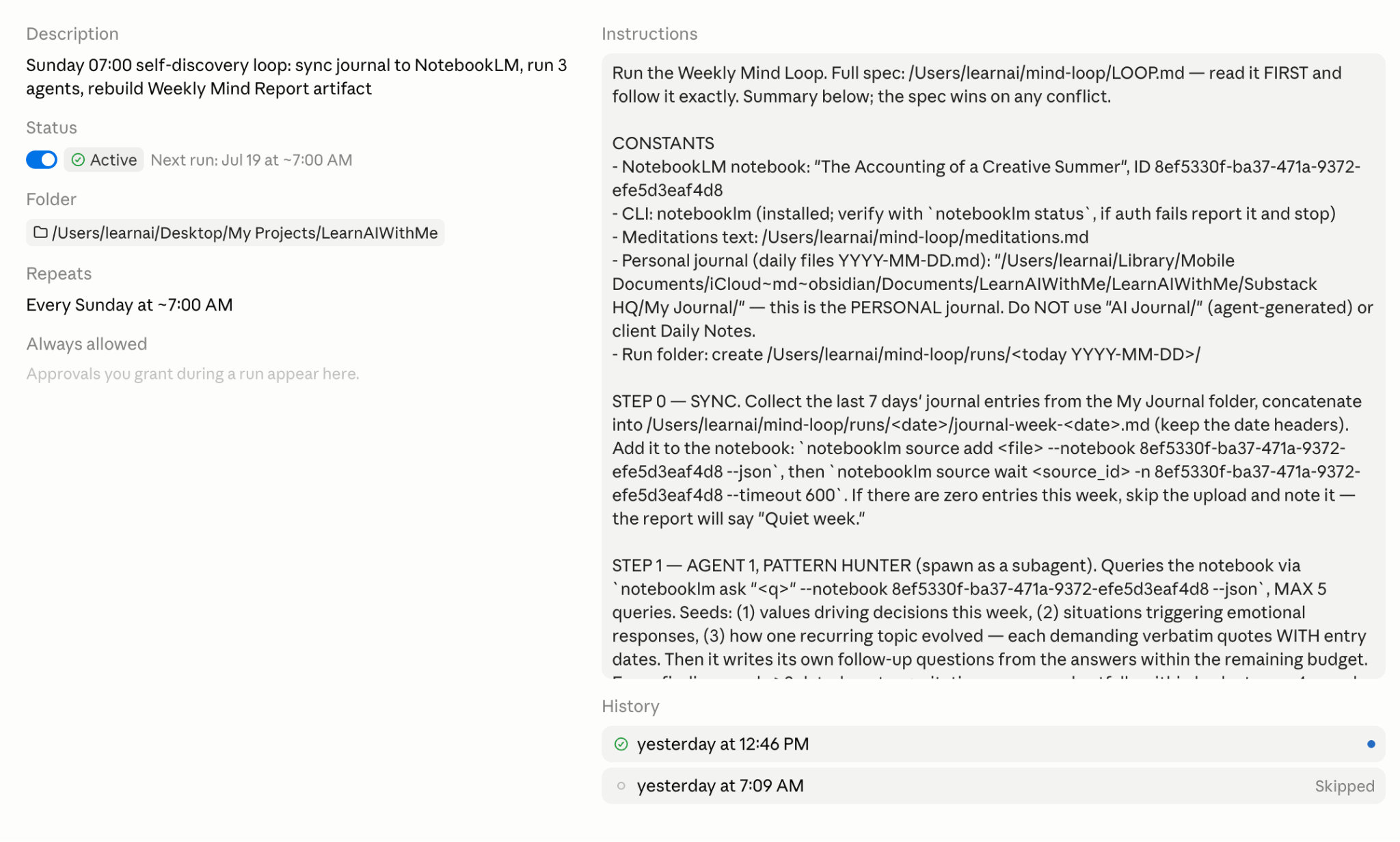
When the routine gets created, Claude asks your permission once. Approve it, and you’re ready.
From then on, every Sunday morning, the routine adds the week’s journal entries to the notebook as a new source, wakes the three agents, and builds the report. The notebook grows every week, so the timeline gets richer with every run.
One thing to know. The routine runs on your machine, so your computer needs to be on at 07:00. Closed laptop, no report. It runs the next time the app opens.
Why Marcus Aurelius Opens the Report
In case you haven’t noticed, the prompt includes a Marcus Aurelius–style meditation report.
There are three reasons I did this: one personal and two practical.
The personal one. When I struggle, the Stoic mindset is the most useful way of thinking I know. Meditations was written by a Roman emperor to himself, about deadlines, worry, and things outside his control. It reads like it was written for a Tuesday in 2026.
The practical ones. Meditations is public domain, so the setup prompt downloads it from Project Gutenberg for free, legally, in one step. And it gives the report a fixed lens, the State Reporter matches ONE passage to the week’s dominant pattern instead of opening with a random quote.
So here is what to expect at the top of every report. A passage picked for your week, one line on what it means, and your own dated journal entries under it as evidence of why it landed. The emperor states the principle, your journal proves it applies.
If Stoicism is not your lane, this part is swappable, and I show the alternatives at the end.
The Result: A Weekly AI Reflection Report (Claude Code Artifact)
The result is a Claude Code artifact, with the Meditations passage on top.
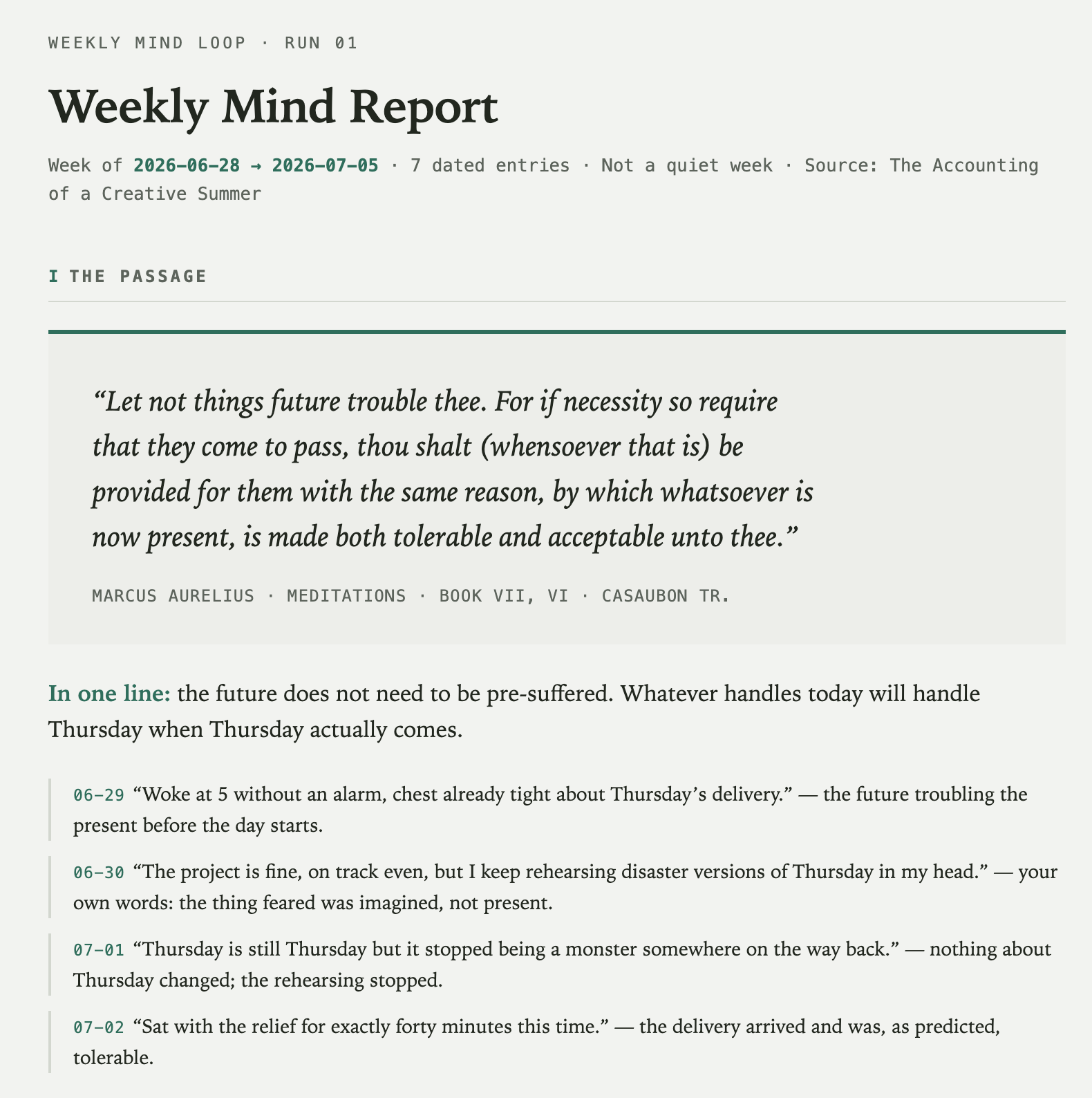
The passage is not random. The State Reporter reads the week’s dominant pattern and picks the passage that answers it.
Mine was a week of deadline rehearsals, so Marcus opened the report with “let not things future trouble thee.” Book VII, written around eighteen centuries before my Thursday delivery.
Under the quote, one line on what it means, and my own dated entries showing why it landed on this week.
The one-liner nailed it:
“The future does not need to be pre-suffered.”
And the evidence under it is brutal in the best way.
On 06-30, I wrote that the project was fine, on track even, and I was still rehearsing disaster versions of Thursday. The report put my own sentence next to the emperor’s and let them talk. The thing I feared was imagined, and I had already written the proof myself.
Then there is a mood curve. It shows how the week actually felt, day by day.
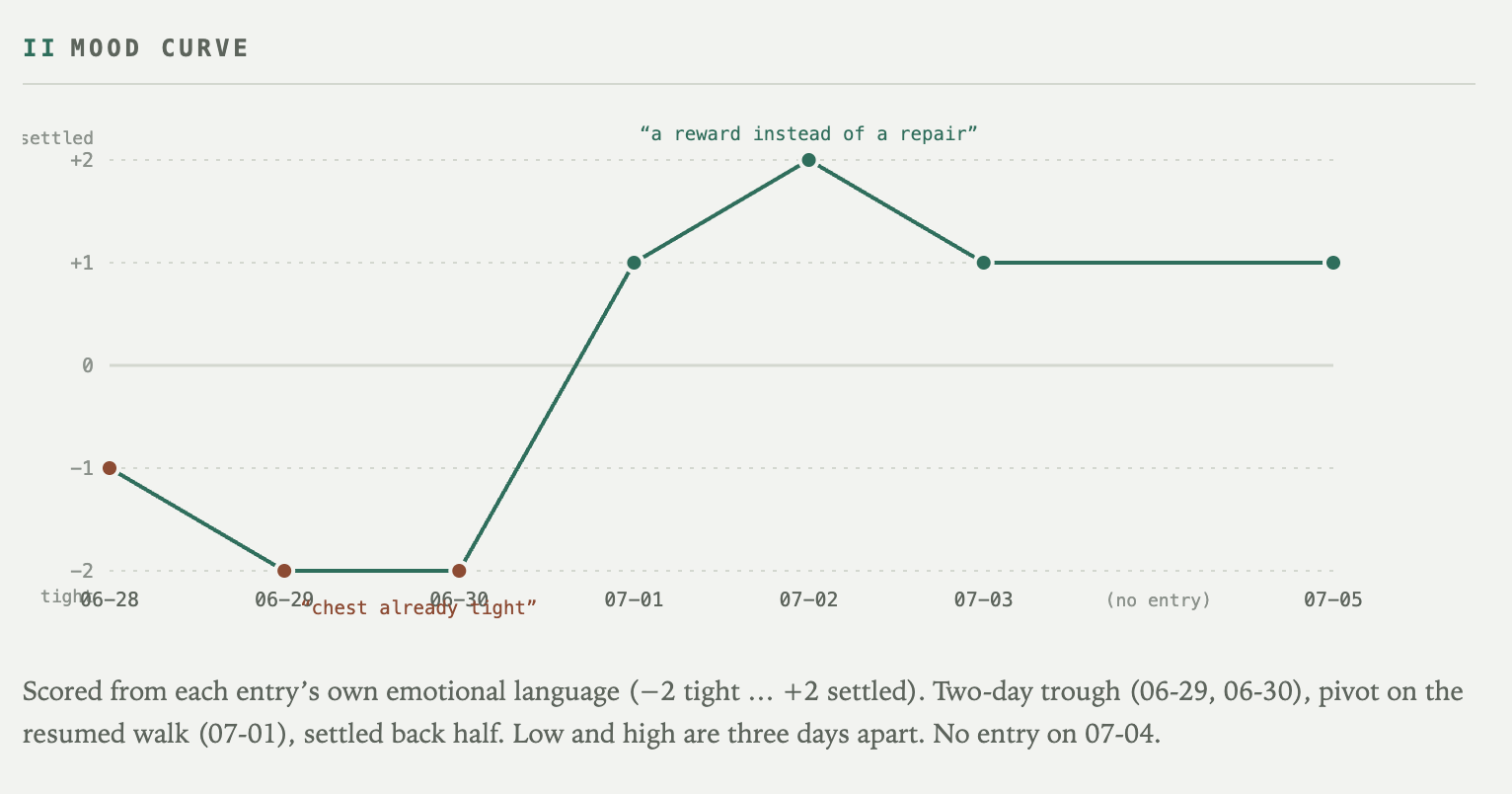
The scores come from each entry’s own emotional language, tight on one end, settled on the other. A two-day trough on 06-29 and 06-30, the pivot on the resumed walk, and the peak labeled with my own words, a reward instead of a repair. July 4 has no entry, so the curve shows a gap instead of a guess.
Next, active patterns. This is the Pattern Hunter’s output.
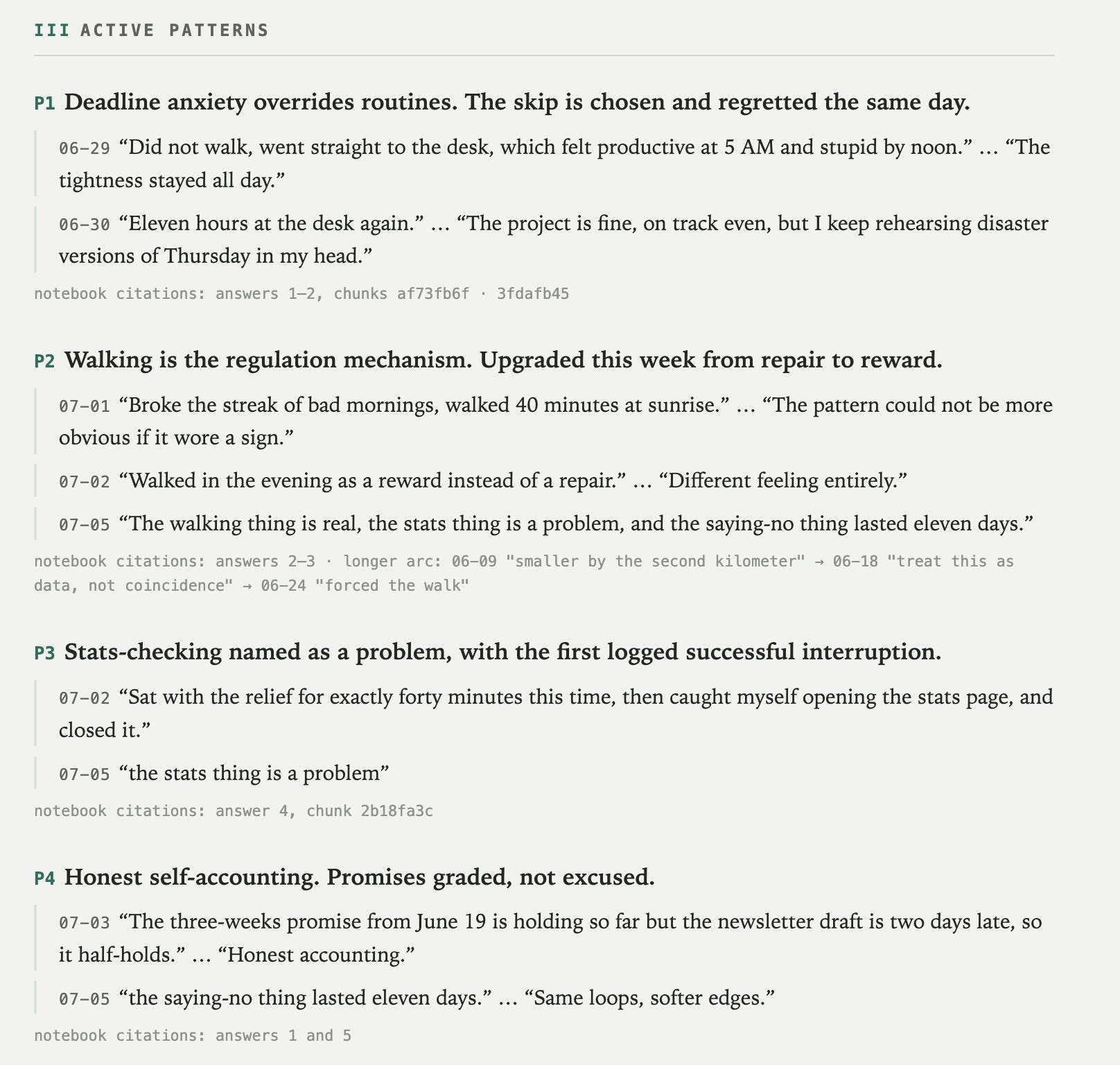
Four patterns made it in, and every one carries two dated quotes plus the notebook citation underneath. P1 caught something I lived but never worded. Deadline anxiety overrides routines, and the skip is chosen and regretted the same day.
My 5 AM desk sprint felt productive in the entry and stupid by noon, in the same entry.
The report just held the two halves next to each other.
Then contradictions, the second agent’s job. It reads what I wrote down and checks what I did after.
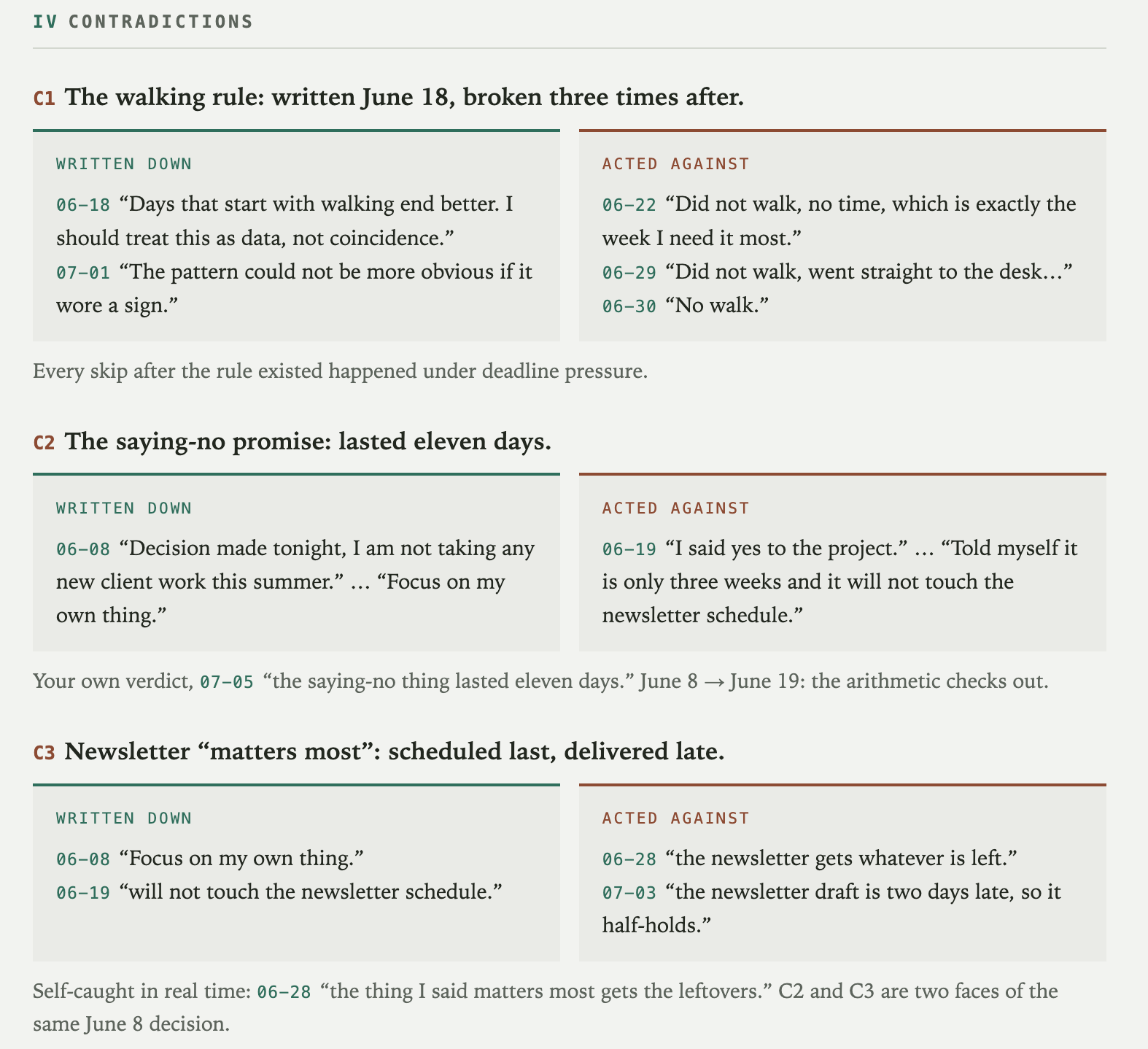
C2 is my favorite kind of uncomfortable. On June 8, I made a decision, no new client work this summer. On June 19, I said yes to a project. The report did not scold me. It did the arithmetic. The saying-no promise lasted eleven days, and the verdict quote comes from my own July 5 entry.
I convicted myself. The agent just filed the paperwork.
And finally, correlations.
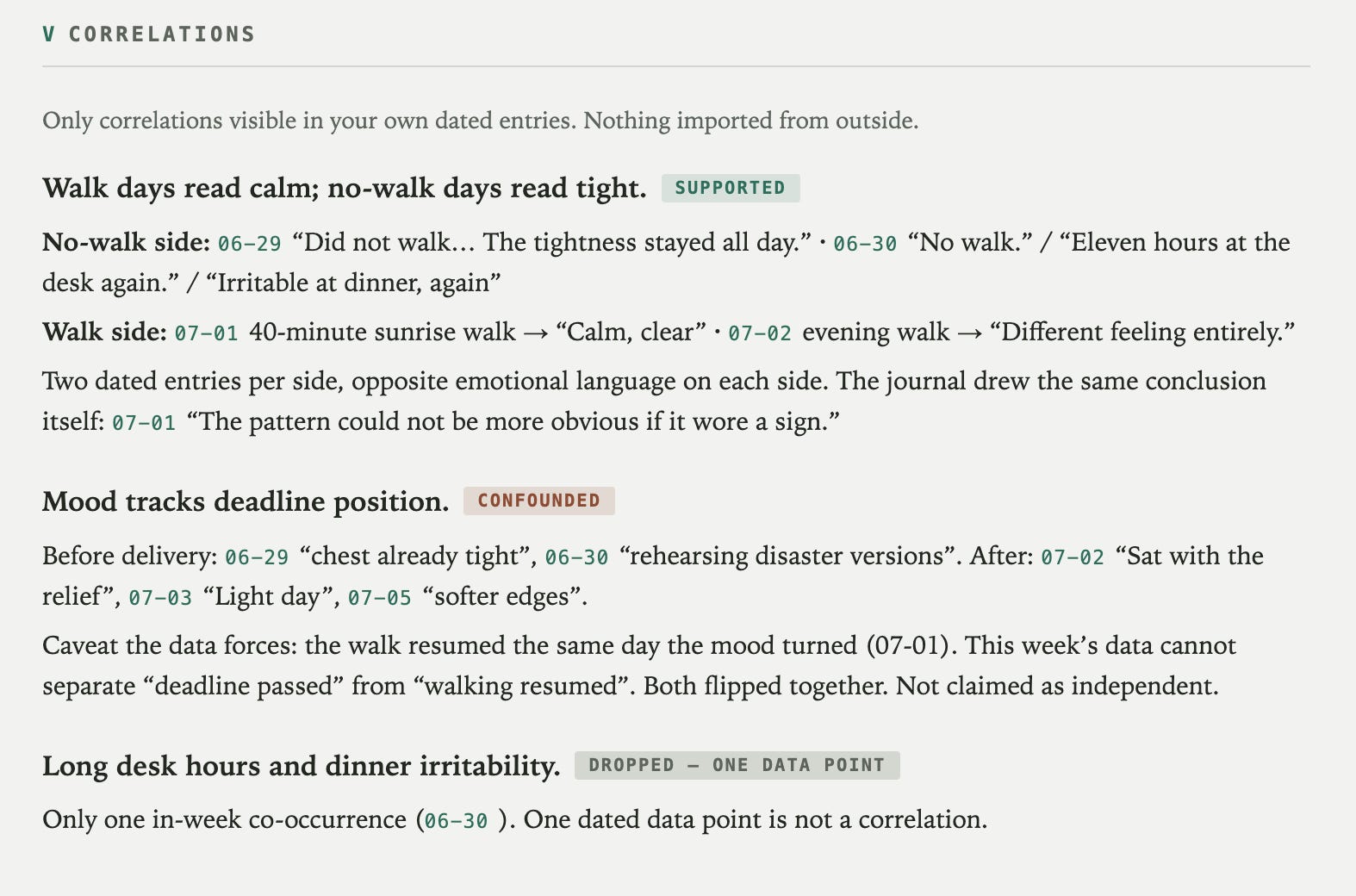
This section has one rule printed at the top. Only correlations visible in your own dated entries, nothing imported from outside.
Walk days read calm, no-walk days read tight, SUPPORTED, two dated entries per side. The mood and deadline link got tagged CONFOUNDED because the walk resumed the same day the deadline passed and the data cannot separate them. And the third candidate got DROPPED with a sentence I want on a t-shirt. One dated data point is not a correlation.
No advice appears anywhere in the report. It never told me to walk. It showed me my own sentences, dated, side by side, and let me draw the line.
Adapt the NotebookLM Journal Workflow
The system you just built has three swappable parts.
The notebook holds your data. Mine holds a journal. Yours can hold anything you write regularly. Meeting notes, a reading log, your sent emails, a training diary.
The book gives the report its lens. I picked Meditations because a deadline brain needs to hear that the future does not require pre-suffering. Swap it for any public domain book that matches your angle. Seneca’s letters for the same energy, Franklin’s autobiography for habits, the Bhagavad Gita if that is your lane. Project Gutenberg has all of them for free.
The agents adapt to whatever the notebook holds. Point the loop at a training diary and the Pattern Hunter finds your skipped-leg-day pattern, the Contradiction Finder catches the “I will stretch every morning” promise from three weeks ago and does the arithmetic on how long it lasted, and a dead philosopher still opens the report.
One notebook, three agents, one Sunday routine.
The parts are yours to swap.
Your journal already knows things about you. Sunday morning, it starts telling them.

I have been following Gencay's NotebookLM series and this one closes the loop that the AI tutor piece opened, the agents now write their own next question instead of waiting for yours. The two dated quotes per claim rule is my favorite design decision here, an evaluation gate that kills hallucinated insights before they reach the report, and more builders should steal it.
I coaches CS students, and my first thought was swapping the journal for a project log, because the Pattern Hunter would surface the troubleshooting story students always forget to document, which is exactly the evidence internship reviewers look for. The Marcus Aurelius opener matched to the week's dominant pattern is the touch that makes a technical loop feel human.
I am restacking for my parent and student readers. Thank you for sharing!
One thing that's made this workflow sharper for me is chunking the source material by time period before upload rather than dumping everything in one shot. NotebookLM's citations get a lot more precise when it can anchor patterns to 'Q1 journal' vs 'Q3 journal' instead of treating three years as one undifferentiated blob. Have you experimented with structuring the input that way, or feeding it raw?