

How I Am Testing Perplexity Computer Without Replacing Claude Code
A practical look at scheduled runs, app connectors, and multi-model judgment.


I thought Claude Code had become the center of my AI work.
For most of what I do, it still is. My drafts live there. My archive lives there. My writing rules, content ideas, review process, research notes, and performance data are close enough that Claude can read them, reason over them, and create the next thing in the right place.
That already solved a big problem for me. But the more I used it, the more I noticed a different ceiling. Some work should not wait for me to open my laptop.
Every morning, there are already signals I want to see before I start writing or planning. My calendar has changed. Emails have come in. New AI announcements dropped overnight. My Substack Notes have fresh analytics. A few topics might be gaining traction. A few things might look urgent but not actually matter.
Claude Code can help me think through all of that when I ask. But in my current setup, it still depends on me sitting in front of my laptop first. That is the part I have been testing with Perplexity Computer.
Yet, that is where my confusion started.
Because I already use Claude Code. So when I first looked at Perplexity Computer, I kept asking:
“Where does this actually fit? Why do I need another agentic tool? What can Perplexity do compared to Claude Code?”
The answer became clearer only after I stopped comparing them as if they were doing the same job.
💡 A quick related note…
Ruben runs one of the largest AI education newsletters in the world. Two emails a week, each one a step-by-step workflow with screenshots you can use the same day.

Three of his posts I keep coming back to:
What Perplexity Computer Is
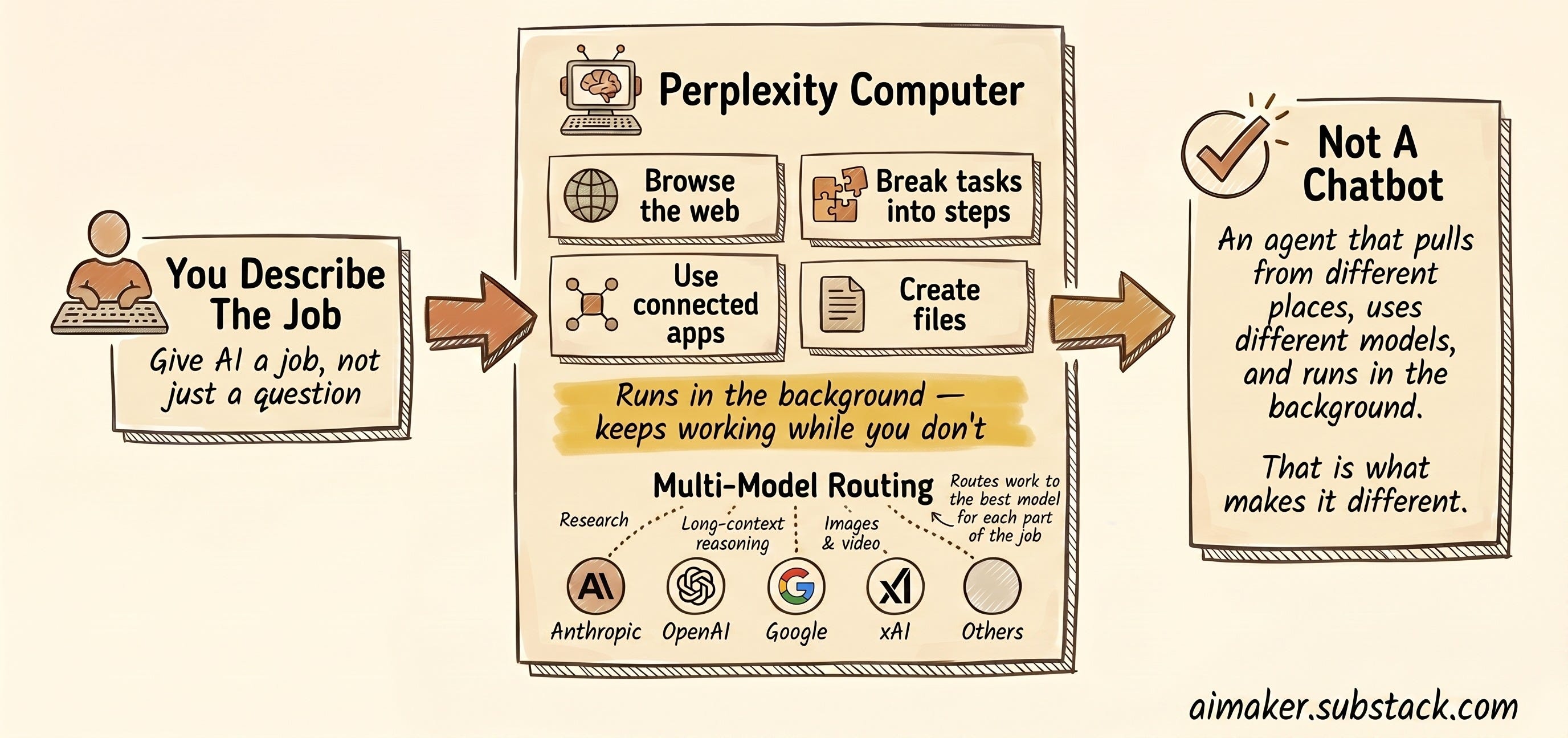
Perplexity Computer is Perplexity’s agentic tool for giving AI a job instead of just asking it a question.
The simple version: you describe what you want done, and Computer can break the task into smaller steps, browse the web, use connected apps, create files, and keep working in the background.
The feature people talk about most is the multi-model part.
Perplexity Computer can route work across different AI models from companies like Anthropic, OpenAI, Google, xAI, and others. One model might be better for research. Another might be better for long-context reasoning. Another might be better for images, video, or critique.
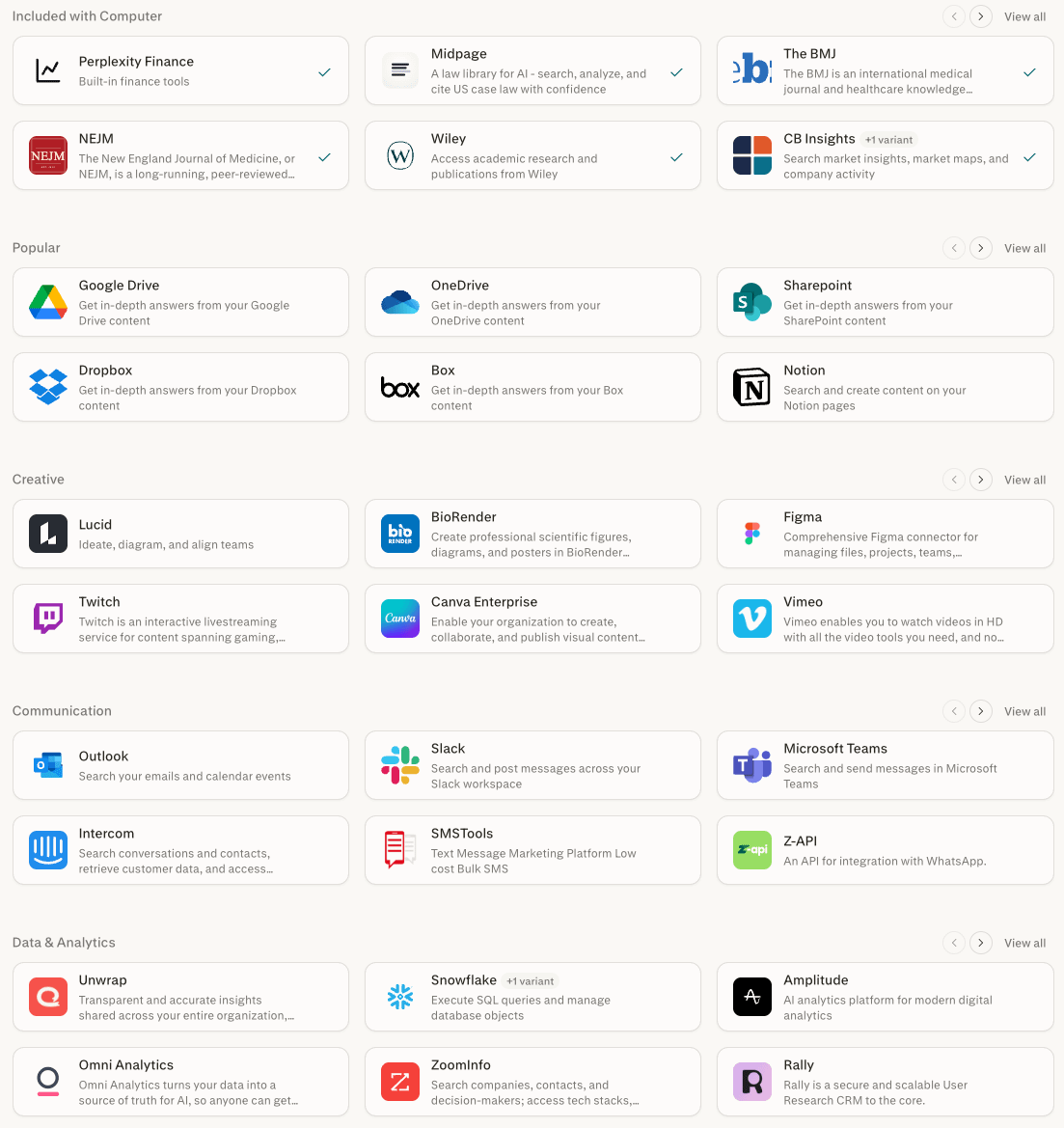
Perplexity also says Computer connects to 400+ applications. This matters if your work lives across tools instead of inside one folder. Connecting to those apps is also easy with a simple click. This opens up access for non‑technical people to start using it right away, without the complexity of configuring MCP servers.
In addition, Perplexity has a workflow template feature which allows user to input their request and let Perplexity runs everything automatically across marketing, creative, research, product, and more.
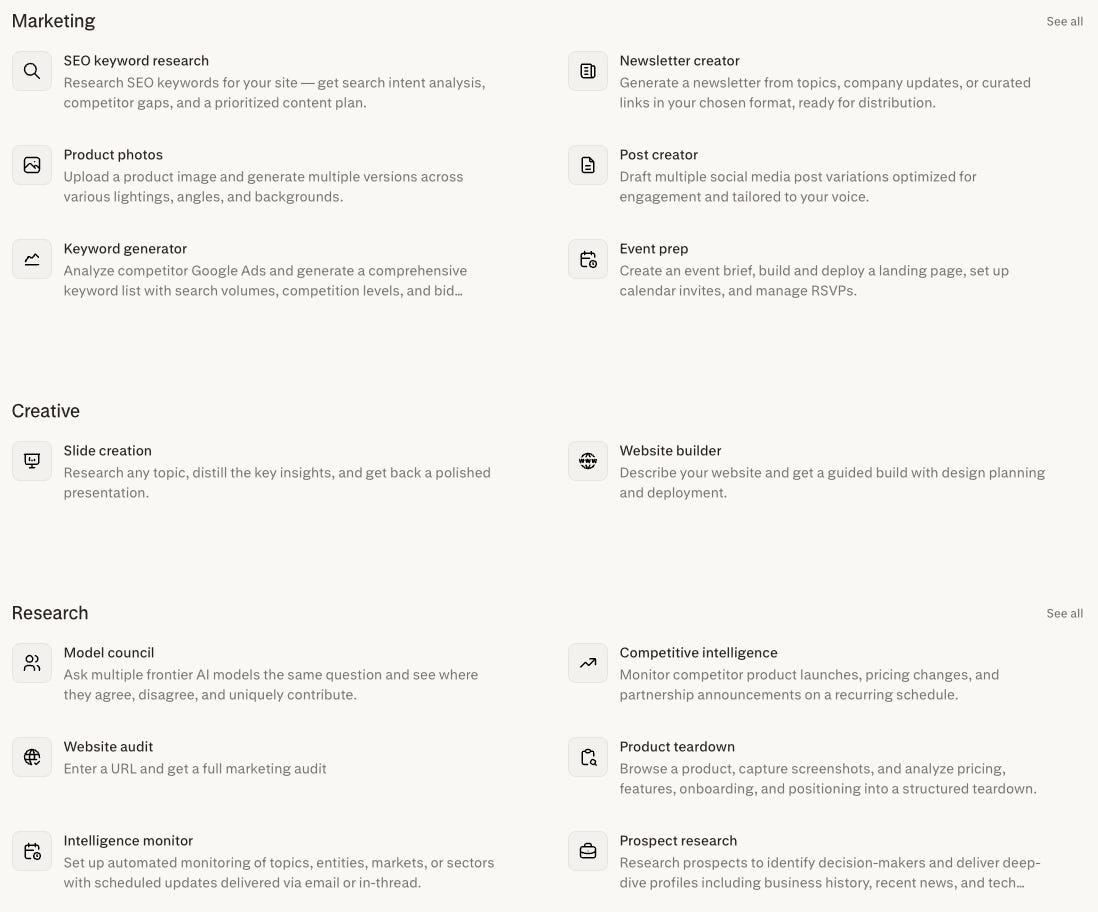
With all these capabilities, Perplexity Computer makes my work easier by letting an agent run in the background, pull from different sources, and use different models for different parts of the job.
That is where it starts to feel different from a normal chatbot.
When Perplexity Computer Actually Makes Sense
Now you might be thinking: where does Perplexity Computer fit into your workflow if you’ve been using Claude Code or Codex most of the time, right?
That was the exact question I had when I first tried to make sense of it.
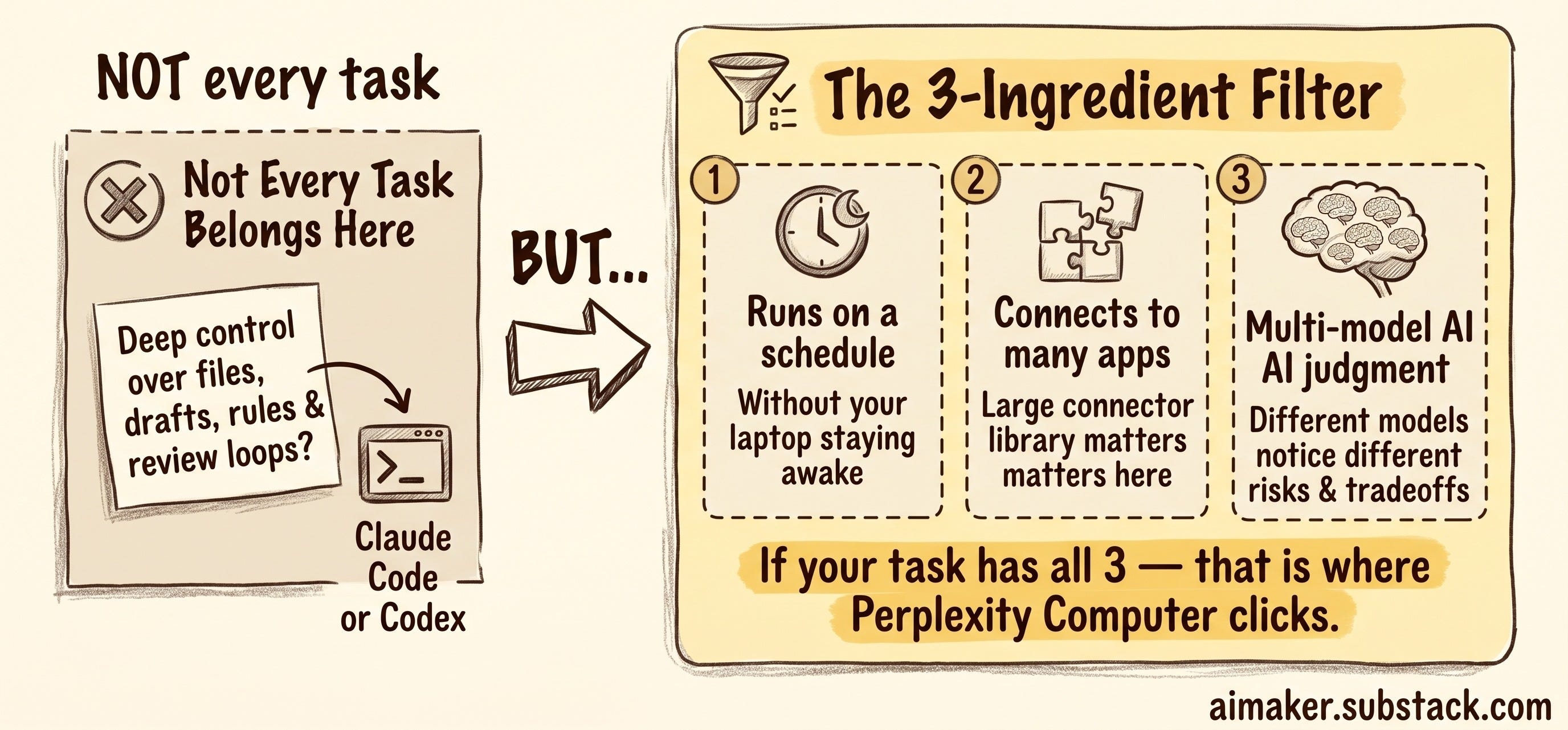
If I need deep control over files, drafts, rules, and review loops, I still want Claude Code or Codex. Dheeraj Sharma also agreed with me on this, even after his experiment with Manus.
But Perplexity Computer becomes interesting when the task has three ingredients:
It needs to run on a schedule, without requiring my laptop to stay awake.
It needs to connect to many apps, which is where Perplexity’s large connector library starts to matter.
It benefits from more than one kind of AI judgment, especially when different models may notice different risks or tradeoffs.
That is the filter I am using right now. And that is where Perplexity Computer started to click for me.
I realized that the work I tend to avoid isn’t about thinking, it’s about collecting data or doing administrative tasks that could be automated.
Opening the analytics tab. Checking the right spreadsheet. Looking at yesterday’s Notes. Reading AI news without getting distracted. Comparing what happened against what my readers care about. Looking at my calendar and asking what actually needs preparation.
That is the layer I want Perplexity Computer to handle.
That is why the three use cases I am testing are not random automations. They are all versions of the same pattern: measure what changed, decide what matters, and stress-test an important decision.
A Substack Notes analytics logger.
A daily brief clash agent.
An AI model council for deciding between tools I want to use.
So, we’re going to deep dive into how I tested Perplexity Computer with these three use cases to fully understand its capabilities, as well as measure its cost, which is one of the most important aspects when expanding to more AI tools.
Based on my experiment, I think Perplexity Computer is quite an expensive platform to use. Some of my runs can burn through 100 to 300 credits depending on the task, and doing that every day adds up quickly, considering that 100 credits cost $1.
But the direction feels worth testing, because I want an agent that can do the work while I’m sleeping.
Now, let’s dive in.
Use Case 1: Substack Notes Analytics Logger (Cost: 200 Credits)
The first workflow I tested was not very fancy.
I wanted Perplexity Computer to update my Substack Notes analytics sheet every morning.
That is it.
But this is exactly the kind of work I keep avoiding because it is small, repetitive, and annoying. I post Notes often, but I do not always go back and check which ones are getting impressions, likes, comments, or follow-up energy.
The data exists, but I just don’t want to collect it manually every day.
So I gave Perplexity Computer a simple recurring job: every morning at 9:00 AM, open my Substack profile, find the Notes I posted yesterday, collect up to five of them, check the stats, and update my Google Sheet.
The sheet has a few basic columns:
Date
Note
Impressions
Likes
Comments
Note URL
Here’s the prompt I use:
Collect my Substack Notes analytics and update my Google Sheet.

Substack profile:
https://substack.com/@wyndo

Google Sheet:
[INSERT LINK]

Sheet tab:
[INSERT TAB NAME]

Required columns:
Date, Note, Impressions, Likes, Comments, Note URL

Tasks:
1. Open my Substack profile and go to the Activity tab.
2. Find Notes posted yesterday based on Asia/Jakarta time.
3. Collect up to 5 Notes from yesterday.
4. For each Note, capture:
   - Date posted
   - Full note text
   - Note URL
   - Likes
   - Number of comments
   - Impressions
5. To get impressions, open each Note URL and click “View stats”.
6. If “View stats” is not visible, note that owner login is required.
7. Use the Google Sheets connector to update the sheet.
8. Match existing rows by Note URL first to avoid duplicates.
9. If the Note URL already exists, update Impressions, Likes, and Comments.
10. If the Note URL does not exist, append a new row.
11. Do not use the browser to edit Google Sheets. Use the Google Sheets connector.
12. If Substack only shows fewer than 5 yesterday Notes because of a login wall, collect whatever matching Notes are visible.
13. Do not ask for Substack credentials. If owner-only stats are unavailable, write “Owner login required” in the Impressions column.

Run this every day at 9:00 AM.
It works. I’ve been running this for a few weeks without having to manually update the data in Google Sheets.
But there is also one annoying limitation.
To get impression data, Perplexity needs access to the logged-in Substack view. Public Notes can show likes and comments, but impression data is only visible to the owner. In my setup, that means I need the Perplexity Comet installed so the browser can log in to my Substack account.
When it’s working, Perplexity can browse your Notes, open each one, click “View stats,” collect the impression count, and send the data to Google Sheets through the connector. But the computer needs to stay on, because it requires Comet access.
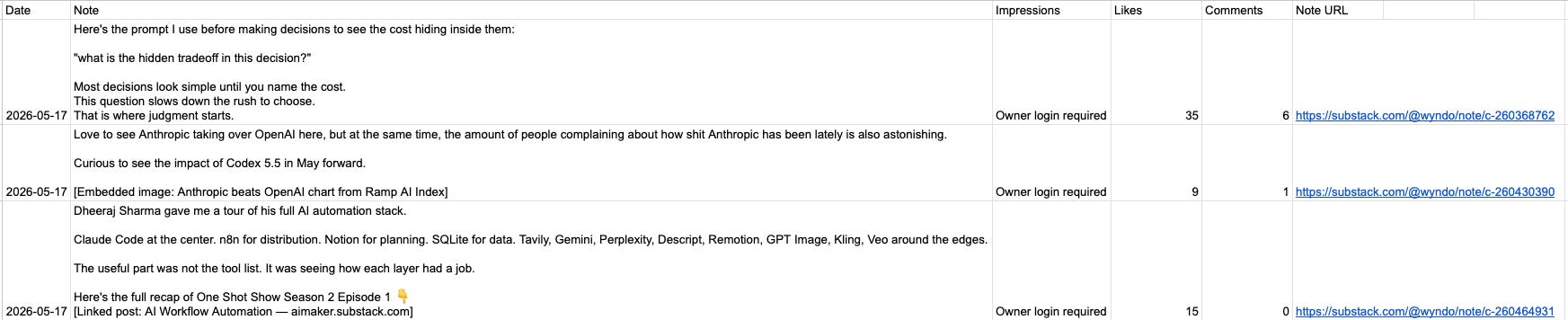
When it cannot access the owner-only stats, it should just write “Owner login required” in the impressions column and move on.
There’s one more consideration you should know. This process costs me about 200 credits for each run using GPT 5.5. If I have to do it for a month, you can imagine it might cost around 6,000 credits. However, you could reduce the cost by 30–50% if you switch to Sonnet 4.6.
Once the sheet has a few days of Notes data, in addition, you can run another workflow that reviews the week and asks better questions:
Which Notes got the most impressions?
Which openings seemed to get more attention?
Which topics kept showing up in stronger posts?
Which Notes are worth expanding into a newsletter?
Which ideas looked promising but did not get much response?
But I don’t do this with Perplexity Computer. I use Claude Code to analyze it for me because it has access to my whole newsletter project, and I don’t think I want to add more cost here.
So in this case, I use Perplexity Computer only to gather data, while I use my primary agent, Claude Code, to analyze it and make something out of it.
Perplexity Computer saves me time, while Claude Code saves me money. Both work together.
Use Case 2: Daily Brief Clash Agent (Cost: 300 Credits)
The second workflow is the one I am most excited about.
I already have ways to track AI news. The harder part is deciding what is worth saying about it.
A new model launch, founder post, or AI tool update only matters to me if it connects to something my readers actually feel: tool overwhelm, workflow confusion, a repeated mistake, a decision they need to make, or a small behavior change that makes AI easier to use.
So I built this workflow around four roles.
Here’s the prompt I use:
Every morning, create a social content angle brief for The AI Maker.

The goal is not to write full posts. The goal is to find bite-sized, thought-provoking angles I can turn into:
- Substack Notes
- LinkedIn posts
- Twitter/X posts

Use current AI news, product updates, founder posts, AI creator discussions, and any connected sources that help you understand my current writing priorities.

Run this as four roles:

1. News Scout
Find 5 to 8 important AI events, product updates, or conversations from the last 24 hours.

For each one, include:
- What happened
- Why people are talking about it
- Source links
- Who seems to care about it
- Whether it feels overcovered, undercovered, or misunderstood

2. Audience Fit Critic
Review each item against The AI Maker audience:
- Knowledge workers
- Creators
- Managers and leaders
- Entrepreneurs
- Regular AI users trying to build repeatable workflows

Be strict. Do not recommend something just because it is trending.

For each item, ask:
- Would my readers actually care?
- What practical tension does this reveal?
- What workflow, decision, or repeated frustration does it connect to?
- Is this too technical, too abstract, or too obvious?

3. Social Angle Critic
Turn the best items into small social angles.

I want angles that are:
- Bite-sized
- Thought-provoking
- Easy to understand quickly
- Curious enough to make someone stop scrolling
- Specific enough to avoid generic AI commentary
- Useful for Substack Notes, LinkedIn, or Twitter/X

Avoid:
- Full newsletter outlines
- Generic AI news summaries
- Tool hype
- Big future-of-work claims
- “Here are 5 tools” style content
- Overly polished expert takes

Look for:
- A surprising mistake people are making
- A small behavior change
- A tool-selection rule
- A workflow tension
- A question people are asking wrong
- A useful “I thought X, but now I think Y” realization
- A reason to ignore something everyone is chasing

4. Angle Synthesizer
Find the clash between:
- What is trending
- What my readers actually need
- What I could say from a practical builder point of view
- What would work as a short social post, not a full essay

Return 10 social content angles.

For each angle, include:

1. Angle title
A short internal title.

2. Best platform
Choose one:
- Substack Note
- LinkedIn post
- Twitter/X post
- Works across all three

3. Hook draft
Write one opening line that creates curiosity.

4. Core idea
Explain the point in 1 to 2 sentences.

5. Why this fits The AI Maker
Explain why my audience would care.

6. Source or trigger
Link to the news item, post, launch, or conversation that triggered the angle.

7. Content shape
Choose one:
- Hot take
- Question flip
- Personal realization
- Mini framework
- Tool-selection rule
- Workflow observation
- Contrarian note
- Short story prompt

8. What to avoid
Name the obvious version of this angle that would be too generic.

9. Confidence score
Rate from 1 to 5.

End with:
- The 3 strongest angles for today
- Which platform I should post each one on first
- One sentence explaining why each is worth trying

Do not write the final social posts yet. I only want the angles, hooks, and reasoning.
Allow me to explain the prompt.
The first role is the News Scout
It scans the last 24 hours of AI news, product updates, founder posts, and creator discussions. For each item, it captures what happened, why people are talking about it, who seems to care, and whether the topic feels overcovered, undercovered, or misunderstood.
The second role is the Audience Fit Critic
This is the strict filter. It reviews each item against The AI Maker audience: knowledge workers, creators, managers, entrepreneurs, and regular AI users trying to build repeatable workflows.
It asks:
Would my readers actually care?
What practical tension does this reveal?
What workflow, decision, or repeated frustration does it connect to?
The third role is the Social Angle Critic
This role turns the strongest items into small social angles for Substack Notes, LinkedIn, or Twitter/X. It looks for a surprising mistake, a tool-selection rule, a workflow tension, a question people are asking wrong, or a reason to ignore something everyone is chasing.
The fourth role is the Angle Synthesizer
This is where the clash happens. It compares what is trending against what my readers need, what I can say from a practical builder point of view, and what would work as a short social post.
The final output is 10 social content angles.
For each one, I get:
Angle title
Best platform
Hook draft
Core idea
Why it fits
Source or trigger
Content shape
What to avoid
Confidence score
Then it chooses the three strongest angles for the day.
By default, that output lives inside the Perplexity app, so I still need to open the app and review it there.
But this is where the connected-app side becomes useful. You could also send the result somewhere else: Gmail, Slack, Google Docs, Notion, or wherever you already check your work in the morning.
That might sound like a small detail, but it matters.
Overall, this is the output I actually want in the morning. Not a full post, but a sharper starting point.
I still make the final call, but the workflow gives me angles that already passed through the questions I would normally ask manually.
That is where Perplexity Computer starts to feel useful.
One last thing to be noted this process can cost me about 200–300 credits for each run using GPT 5.5.
So make sure you calculate each cost properly and understand the ROI of this process.
Use Case 3: AI Model Council (Cost: 300 Credits)
The third workflow is different from the first two because sometimes I do not want Perplexity Computer to run a recurring brief. Instead, I want it to help me make a better tool decision.
Recently, I wanted to compare OpenClaw and Hermes Agent from a specific perspective: newsletter creator who wants to boost productivity.
I could have asked one model for a recommendation. But that is not really what I wanted. I wanted to know where different models agreed, where they disagreed, and what each model noticed that the others missed.
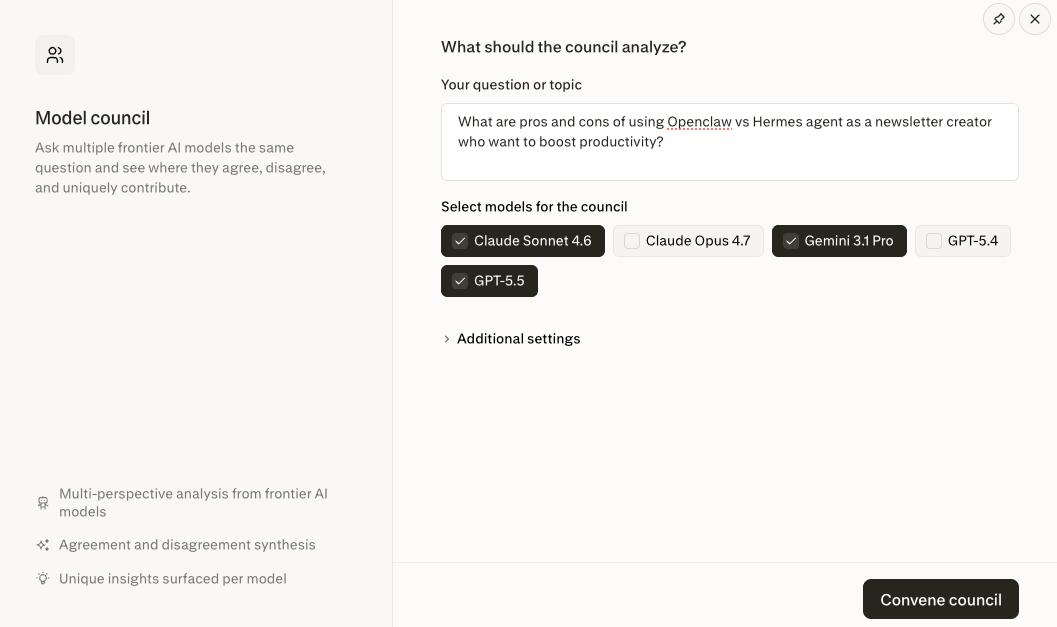
So I ran the comparison through an AI model council workflow template using GPT 5.5, Claude Sonnet 4.6, and Gemini 3.1 Pro.
The result was much more useful than a normal “which tool is better?” answer.
All three models agreed on the big picture:
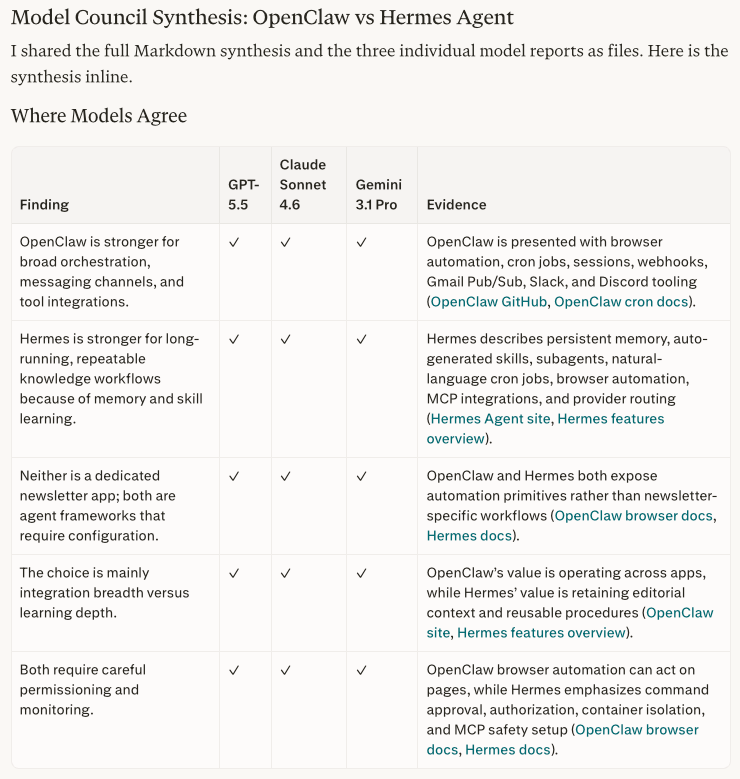
OpenClaw is stronger for broad orchestration, messaging channels, browser work, scheduled jobs, webhooks, and tool integrations.
Hermes Agent is stronger for long-running knowledge workflows because of memory, repeatable skills, subagents, and learning over time.
Neither tool is a dedicated newsletter app. Both are agent frameworks that need setup, permission boundaries, and monitoring.
The real tradeoff is integration breadth versus learning depth.
That shared agreement was useful.
But the disagreement was even more useful.
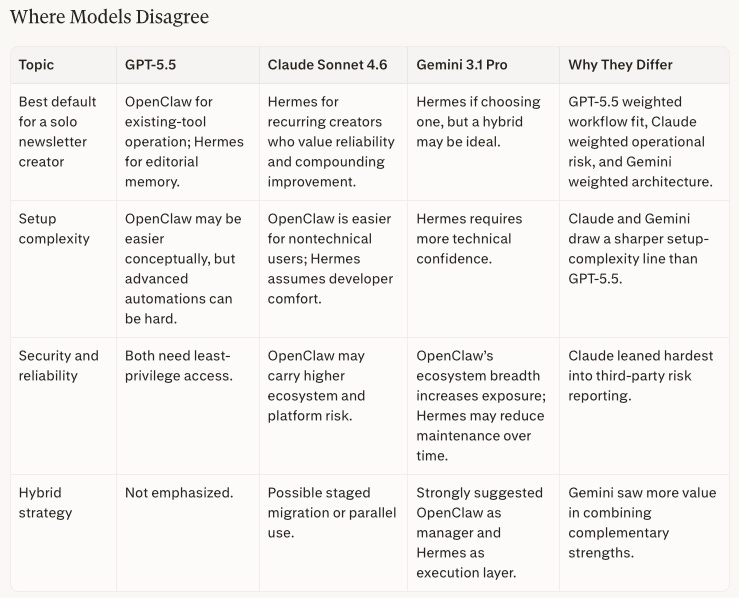
GPT 5.5 leaned toward OpenClaw when the job was operating across existing tools, but still saw Hermes as stronger for editorial memory.
Claude Sonnet 4.6 leaned more toward Hermes for recurring creator work because it put more weight on reliability, compounding improvement, and operational risk.
Gemini 3.1 Pro suggested a possible hybrid: OpenClaw as the integration manager and Hermes as the research and drafting executor.
That is the part I would have missed from a single-model answer.
The final synthesis gave me a cleaner decision rule:
✅ Choose Hermes if the productivity gain depends on research memory, voice consistency, repeatable drafting, and compounding improvement.
✅ Choose OpenClaw if the productivity gain depends on broad tool operation across chat, browser, inbox, calendar, and publishing workflows.
This analysis gave me more confidence in my decisions by offering multiple perspectives I might have missed if I had only run it with a single model. The analysis cost me about 300 credits for one run.
The practical takeaway for you is simple: use the AI model council when the decision has a real switching cost.
For example:
Which option gives me the most upside without adding too much maintenance?
What hidden cost might show up only after I commit?
Which path creates the least regret if my assumptions are wrong?
Which option is best if I care about speed, quality, cost, or control?
For a small decision, one model is probably enough.
These three use cases are different on purpose.
The first one is about removing a repetitive task I kept avoiding.
The second one is about turning noisy updates into better content decisions.
But the third one is not about asking more models for more opinions. It is about using disagreement to make a decision sharper.
That is why Perplexity Computer started to make more sense to me. It really helps with tasks that need preparation, context from multiple places, or judgment from more than one AI angle.
How I Would Think About Perplexity Computer
If you want to try Perplexity Computer, I think you need to be precise about what work actually belongs there.
Because if you already use Claude Code or Codex, a lot of tasks may look similar on the surface. Adding Perplexity Computer can also increase your cost quickly if you use it for work another tool could handle more cheaply.
So the question I would ask is:
What can Perplexity Computer do here that my other agents cannot do as well?
For me, the answer comes back to the three benefits I covered in this post:
It can run in the cloud.
It has access to many app connectors.
It can use multiple AI models in the same workflow.
That is where this kind of tool starts to make sense. My answer showed up in three places.
First, analytics. I had useful Substack Notes data, but I did not want to collect it manually every day.
Second, content angles. I had plenty of AI news, but I needed a stricter way to turn the news into something my readers might actually care about.
Third, tool decisions. I could ask one model whether OpenClaw or Hermes Agent was better, but I wanted to see where several models agreed and disagreed before I chose what to test.
Your version may look different.
Maybe you need a weekly customer-reply review. Maybe you need a daily sales lead scan. Maybe you need a Monday morning project brief from Slack, email, calendar, and documents. Maybe you need a multi-model council for a hiring, buying, or strategy decision.
I would look for three signals:
The task repeats often enough that manual effort is annoying.
The useful context lives across more than one app, source, or model.
The output helps you make a decision, not just collect more information.
If a task does not have those three things, I would probably skip Perplexity Computer. Instead, I use:
Claude Code or Codex when the work belongs close to your files, repo, rules, and review process.
Make or n8n when the workflow is simple, predictable, and cheaper to automate there.
I would only use Perplexity Computer when the task needs background execution, connected sources, and judgment across AI models.
And start small:
One low-risk workflow.
One data source if possible.
One output you can review before anything gets sent, posted, or changed.
Then watch the cost.
That is the part I am still figuring out too. Some Perplexity Computer runs are useful, but they can become expensive over time. If a task costs hundreds of credits every time, it needs to save real time, improve a real decision, or create a result you would not have produced otherwise.
That is my current rule.
Perplexity Computer is not where I want all my AI work to live.
But it is becoming useful for the work that should begin before I show up: collecting data, preparing the first draft, and making decisions based on the clash between models.
That feels like the next layer I want to keep testing.
Would you give Perplexity Computer a try after reading this?
Let me know in the comments.
The real shift is building systems where AI can actually operate with the right context and constraints
You're really speaking to my heart here with the cost-conscious framing.