



My fellow Substack creator Dheeraj Sharma and I just launched something new — One Shot Show.
It’s a live series on Substack where AI builders walk through real AI systems they’ve built — how they work, why they’re structured that way, and how you can build your own. No slides. No theory. We break down what actually works.
For our first episode, Dheeraj walked through a content research agent he built with Claude Code. The kind that takes a topic, scrapes competitor content, pulls research from multiple sources, and delivers a complete research brief with content angles, SEO gaps, and strategic recommendations.
A system that turns 3 hours of manual research into a 4-minute run costing less than $0.10.
Before we get into the details, Dheeraj writes about building AI automation systems for Solopreneurs. You might want to subscribe to his newsletter to learn more.

Now, here’s what I learned to during the conversation — and what I think matters way more than the agent itself.
The Real Difference Between a Chatbot and an Agent
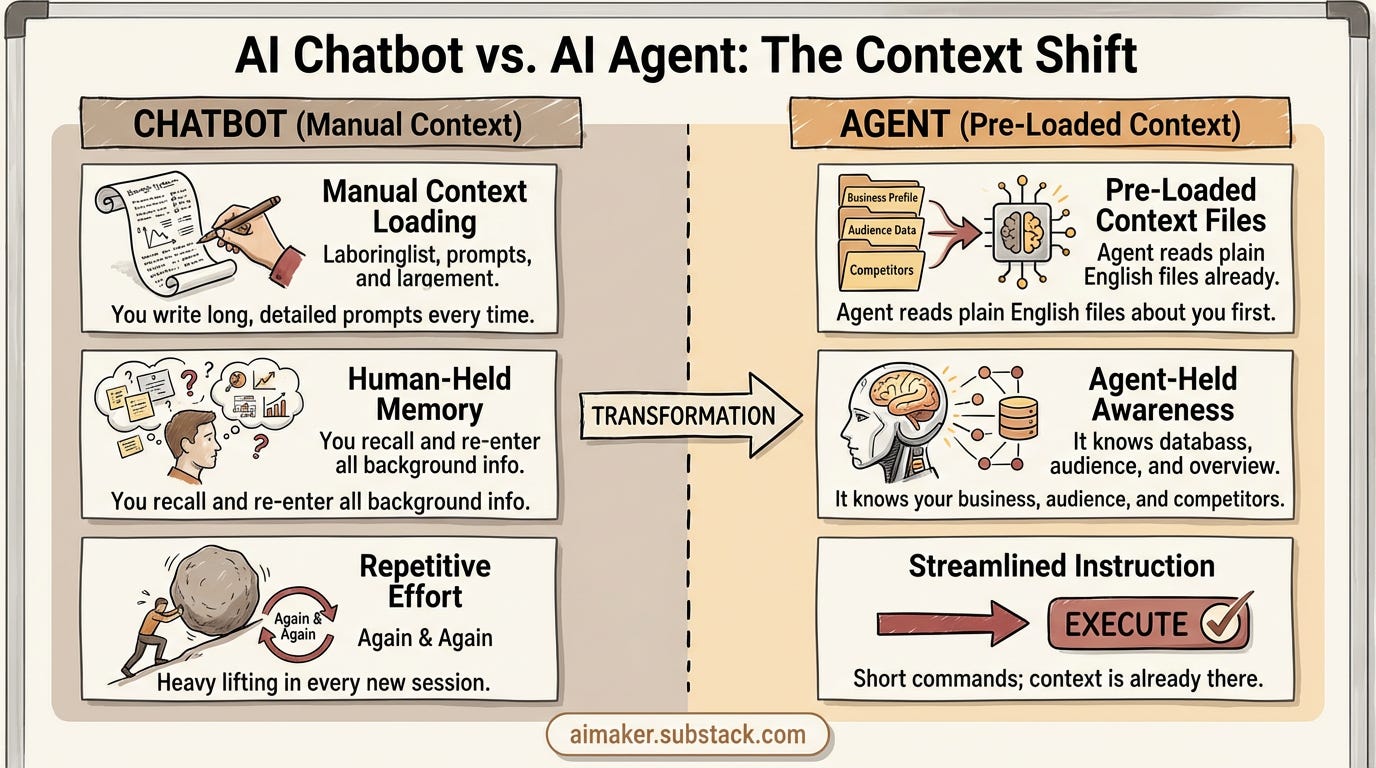
Most people doing research with AI right now are using it like a chatbot.
You know the pattern: open ChatGPT or Claude, write a long detailed prompt explaining who you are, what your business does, who your audience is, what kind of research you need, what format you want the output in... and then hit enter.
Every. Single. Time.
And it works. Kind of. But you’re doing all the heavy lifting in that prompt. You’re the one holding all the context in your head and translating it into instructions every time you start a new session.
What Dheeraj showed during the stream was fundamentally different. His agent reads a set of context files before it does anything. These files tell the agent who you are, what your business does, who your competitors are — all written in plain English, not code.
So when you tell the agent “run research on [topic],” you don’t need a long prompt. You just need a short instruction. The context is already there.
That’s what makes it an agent instead of a chatbot. The agent has memory. It has awareness. It knows who it’s working for before you even ask it to do anything.
And the way Dheeraj structured this is worth breaking down.
The Three-Layer Architecture
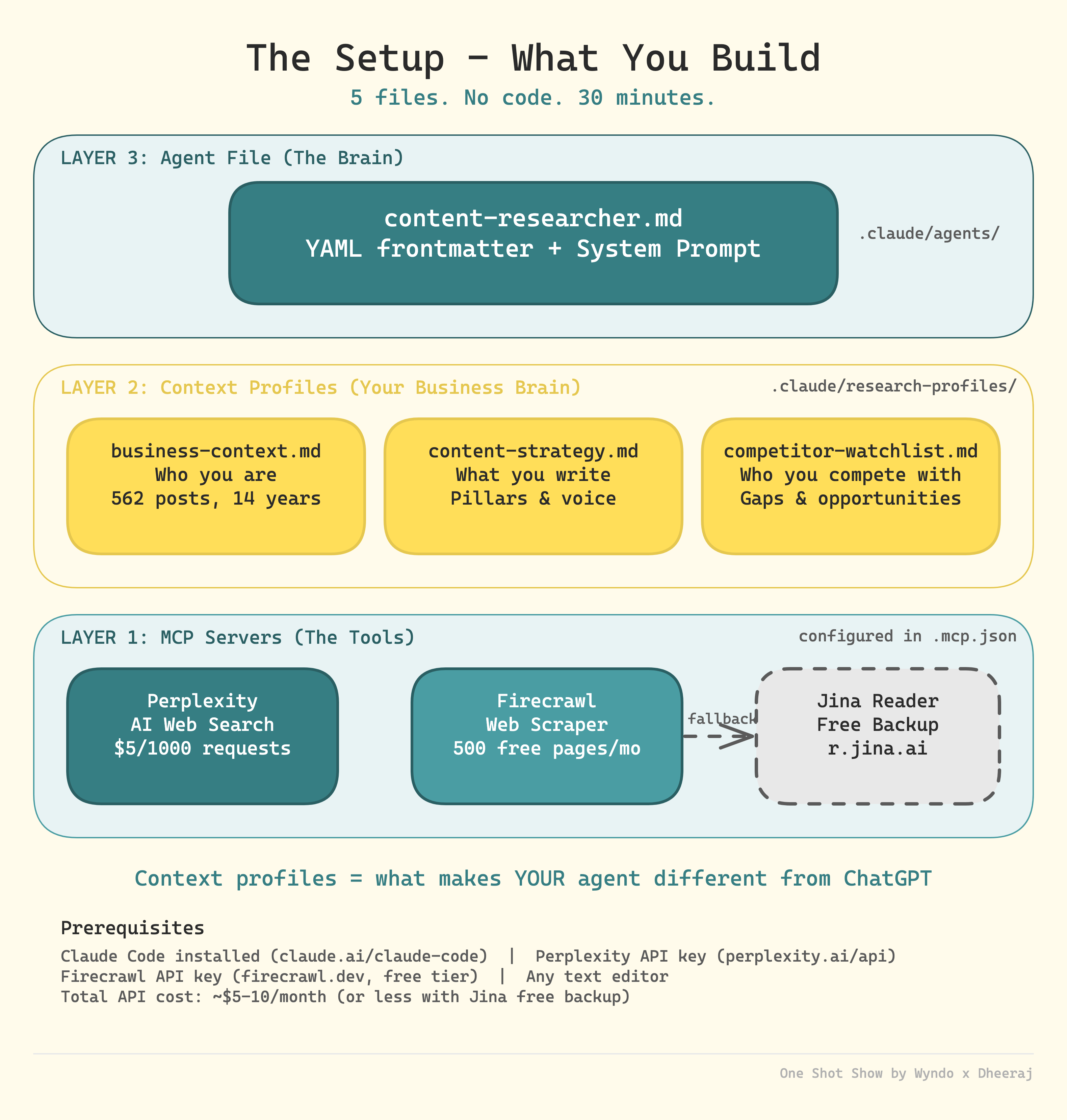
During the stream, Dheeraj broke down the full structure of his agent. I think this is worth walking through because it makes the whole thing feel less abstract and more like something you could actually set up yourself.
Layer 1: The Tools (MCP Servers)
This is the agent’s hands — what it uses to go out and find information. Dheeraj connected three tools:
Perplexity for AI-powered web search ($5 per 1,000 requests)
Firecrawl for scraping competitor pages (500 free pages per month)
Jina Reader as a free backup when the other credits run out
All three are configured in a single .mcp.json file. The smart move here is having Jina as a fallback — the agent doesn’t just stop working when your paid credits dry up.
Layer 2: Context Profiles (Your Business Brain)
This is the layer I keep coming back to. Three markdown files stored in .claude/research-profiles/:
business-context.md— who you are, your content history, your audiencecontent-strategy.md— your pillars, your voice, what you write aboutcompetitor-watchlist.md— who you’re tracking, gaps you can fill
This is the layer that makes YOUR agent different from anyone else’s. Same tools, same agent file — but different context profiles produce completely different research. That’s the whole point.
Layer 3: The Agent File (The Brain)
One markdown file — content-researcher.md — that lives in .claude/agents/. It has YAML frontmatter and a system prompt that tells the agent how to behave, what tools to use, and how to structure its output.
This is the part that ties everything together. The brain reads your context profiles, uses the tools, and delivers research that’s actually tailored to your business.
Five files total. No code. Dheeraj estimated about 30 minutes to set up from scratch.
Two Details That Separate Builders from Tinkerers
Beyond the context files — which honestly, that insight alone is worth the whole session — two things stood out to me about how Dheeraj approaches building:
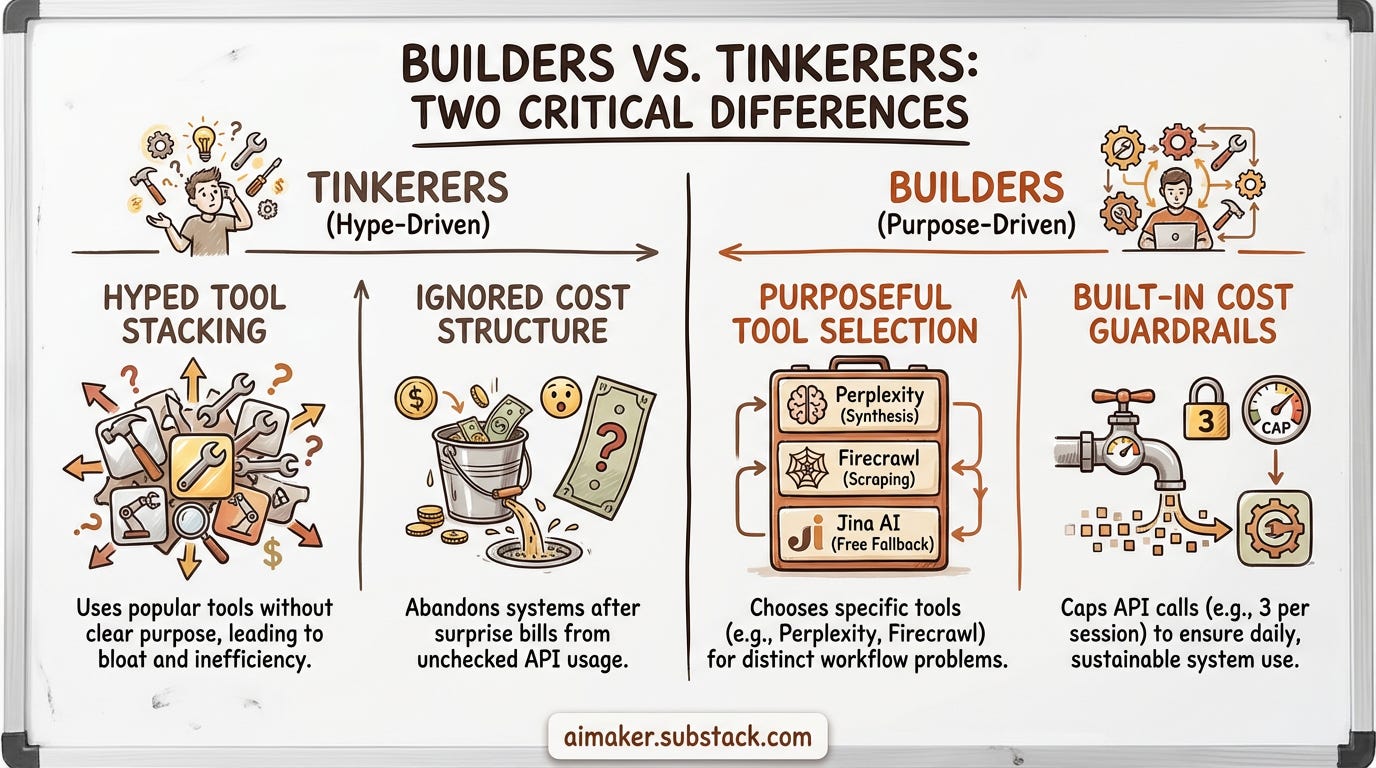
He picks tools with purpose, not hype
Dheeraj’s research layer uses three tools: Perplexity for multi-source synthesis, Firecrawl for competitor page scraping, and Jina AI as a free fallback when credits run out.
What I liked is that each tool has a specific job. He’s not stacking tools because they’re popular. He’s choosing them because they solve a particular problem in his workflow. And having a free fallback (Jina) so the agent doesn’t just stop when paid credits run out — that’s the kind of thinking you only get from someone who actually uses their own systems daily.
He builds in cost guardrails from day one
Dheeraj has a rule in his agent that caps Perplexity API calls at three per research session. Not because three is a magic number — because he already burned through credits figuring out where the waste happens.
Nobody posts about this on social media. But this is the difference between a system you actually use every day and a cool demo you abandon after a week because the bill surprised you.
Why This Matters for You
Here’s the takeaway I keep coming back to:
If you’re still writing long prompts every time you use AI for research, you’re working harder than you need to. The shift from chatbot thinking to agent thinking is really just this — write down your context once, save it as files, and let the AI read those files every time it works for you.
You don’t need to build exactly what Dheeraj built. But you can start with the foundation today:
Write your business context in a simple markdown file. Who are you? Who’s your audience? What do you do?
Write your content strategy. What topics do you cover? What’s your voice? What do you avoid?
Write your competitor watchlist. Who are you watching? How are you different?
Three files. Plain English. That’s your starting point for any AI agent you build from here.
Watch the Full Episode
This was Episode 1 of One Shot Show, Season 1 — and we’re going live every Wednesday at 10:00 AM EST.
Here’s what’s coming this season:
✅ Build a Content Research Agent with Claude Code (this episode)
2️⃣ How to Repurpose Your Newsletter Using Google Opal (vs n8n vs Make)
3️⃣ Substack Competitive Analysis Using Claude Cowork
4️⃣ n8n vs Claude Code — Which One Is Better?
5️⃣ TBD
6️⃣ TBD
7️⃣ TBD
8️⃣ TBD
Eight episodes with real systems that you can apply in your workflow.
Jump to a specific section:
(00:00) Introduction — What is One Shot Show
(04:36) Today’s topic: Building a content research agent with Claude Code
(07:00) The three-layer architecture explained
(10:02) Layer 1: Setting up MCP servers (Perplexity, Firecrawl, Jina)
(13:35) Why Perplexity and Firecrawl over Claude’s built-in tools
(18:50) Layer 2: Building your business context profiles
(25:54) Content strategy and competitor watchlist files
(33:42) Layer 3: The agent file — plain English, no code
(43:05) Live demo: Running the agent on a real topic
(48:05) Chatbot vs. agent — why you don’t need long prompts
(51:07) Reviewing the research output
(56:01) Q&A: How does this compare to deep research in ChatGPT/Gemini?
(01:00:01) Q&A: Firecrawl vs. Apify for scraping
(01:03:06) Wrap-up and what’s coming next
Read Dheeraj’s full technical breakdown — he documented the complete architecture, MCP server setup, and configuration files so you can build this yourself:
👉🏻 How to Build an AI Content Research Agent Using Claude Code
Subscribe to both our newsletters so you don’t miss next Wednesday’s episode.
See you in the next one.


