

How I Use /goal To Stop Babysitting AI Agents
A practical framework for turning vague tasks into work the agent can finish.


I keep running into the same annoying problem with AI agents.
I give the agent a real task. Not a tiny prompt like “rewrite this paragraph” or “summarize this file.” A real task.
Research this topic and turn it into a brief. Build this app and check that it works. Take these newsletter posts and turn them into a batch of social posts.
The agent starts working. It makes progress. Then it stops and waits for me.
So I type something like: “Continue, please.”
Then it works again. Then it stops again.
So I type: “Keep going.”
After a while, I realize I am not really delegating the work. I am sitting there like a tiny project manager for a machine that keeps needing permission to take the next obvious step.
That’s the part that feels weird, because I still can’t see the promise of AI fully offloading my work.
As agentic models, Claude Code and Codex are clearly getting smarter. They can handle more work than they could even a few months ago: research, writing, file edits, debugging, batch processing, and longer project tasks.
But that creates a new problem. The agent can execute more steps now, but it still does not always finish the job end to end. It might move the work forward, then stop. It might complete the obvious part, but skip the check. Or it might say the task is done before it has shown any real proof.
And honestly, I don’t see this as delegation at all. Complete delegation means I’m no longer the bottleneck between AI and my work.
I want to give it the job, walk away for a bit, and come back to one of three things:
The finished work.
A clear blocker.
A short report showing what happened.
That sounds simple, but this is where the real shift happens.
For small tasks, prompting is enough. You ask, it answers, you respond, and the loop works fine.
But long-running work is different. If the job needs several rounds of work, checking, fixing, and retrying, the agent needs more than another instruction.
It needs a finish line.
The question changes from “What should I ask next?” to “What does done look like, and how should the agent prove it?”
The Two Ways AI Quits On You
When you give an agent a bigger task, I think there are two common ways it can fail:
1. Fake done
The agent says the work is finished, but when you check it, the source links are missing, the file count is wrong, the page does not render, or half the batch never got processed.
This is the one that makes you lose trust.
2. Undefined done
The agent can move the work forward, but it does not know what the finished version should look like, how to check its own work, or what boundaries it should respect along the way. So it guesses. Sometimes that means it stops too early. Sometimes that means it keeps trying more things. Either way, you are still the person deciding whether the job is actually finished.
This is the one that keeps you as the bottleneck.
At first, I blamed the agent for both. I thought the model was being lazy when it stopped early.
But the more I used these tools, the more I started to think the real issue was the finish line I gave it.
I was giving instructions without giving evidence.
There is a difference.
The Developer Hack: Ralph Wiggum Loop

Developers saw this problem earlier because code gives agents a clearer finish line.
A bug fix can pass or fail. A test can run. A file can change. A terminal can show an error.
So when coding agents started stopping too early or calling work done too soon, developers had an obvious question:
“How do we keep the agent working until the check actually passes?”
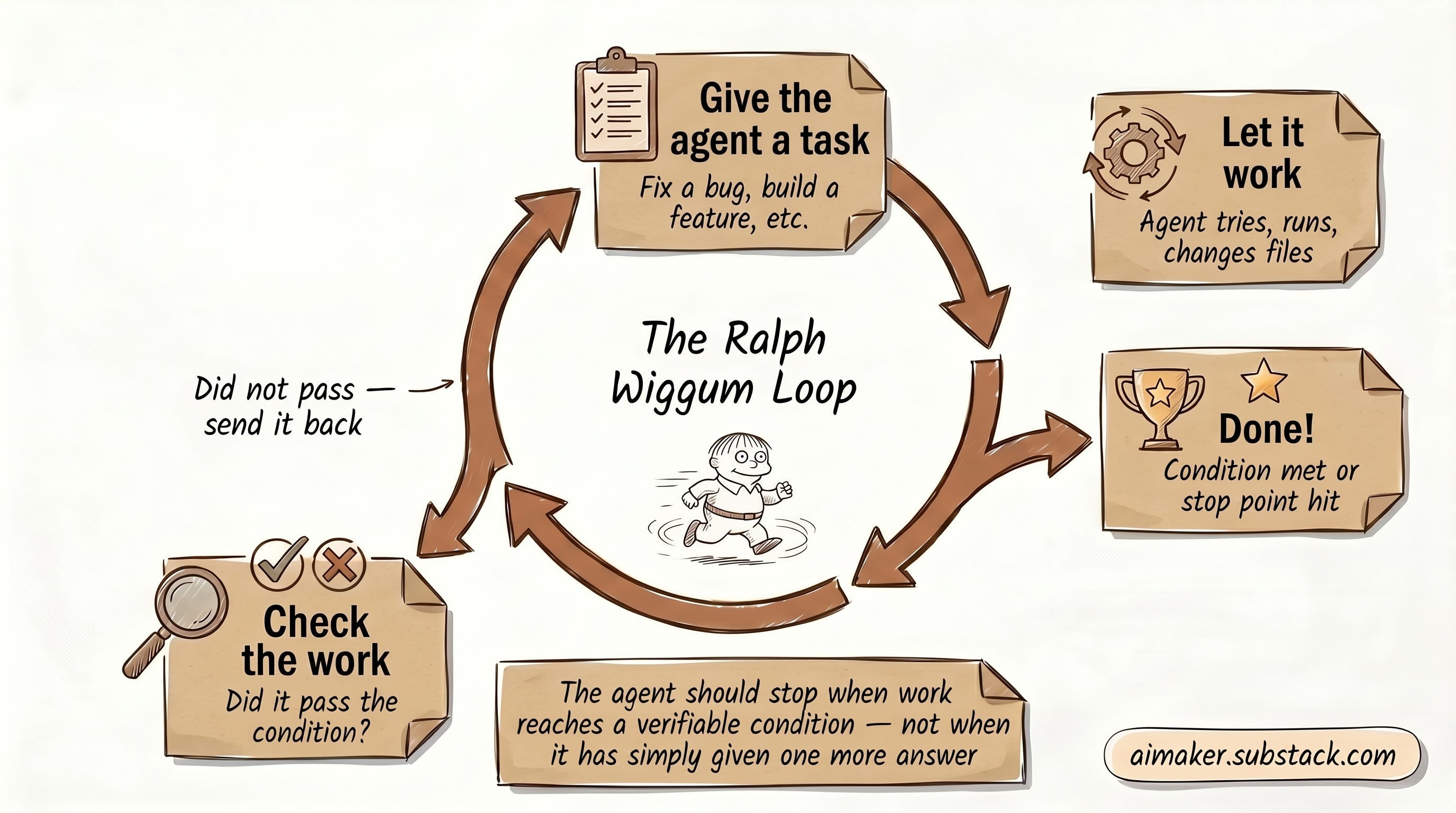
One workaround became known as the Ralph Wiggum loop. The basic idea is pretty simple:
Give the agent a task.
Let it work.
Check whether the work passes.
If it does not pass, send it back in.
Keep looping until the condition is met or the process hits a stop point.
In fact, Anthropic team shipped it as plugins. The Ralph Loop became really hyped earlier this year. And I like the idea because it points at the right problem: the agent should be able to finish the work according to your instructions and stop when the work reaches a condition you can verify, not halfway through.
But the Ralph Wiggum version still feels very developer-centric for me. Because it involves with scripts, terminal commands, task files, test suites, and some kind of loop wrapper. That makes sense if you are shipping code. It feels much harder if the job is research, writing, inbox cleanup, campaign planning, content repurposing, or a messy project backlog.
Most knowledge work does not have a neat test suite. That does not mean it has no finish line. It just means we have to write the finish line differently.
Why /Goal Mode Matters

This is why I think goal modes in tools like Claude Code and Codex are worth paying attention to.
I think this is the evolution of the Ralph Loop. The pattern is moving from a developer hack into the agent itself.
The way it works is pretty simple.
You type /goal and describe the condition you want to be true when the work is done:
In Claude Code, that condition starts the work. After each turn, a smaller evaluator checks the conversation and asks: has this condition been met? If yes, the goal clears. If no, the evaluator gives a short reason, and Claude starts another turn with that reason in mind.
Codex treats the goal in a similar way. The goal text becomes both the starting instruction and the completion criteria. Codex keeps that objective attached while it works, and uses it to decide what to do next, whether the task is finished, or whether it needs more input.
Regardless of which agents you use, the core function of the /goal is the same:
Instead of asking the agent to do one thing and waiting for it to stop, you define an outcome and success criteria. Then the agent keeps working across turns until it has evidence that the goal has been met, or until it needs to stop and report what blocked it.
That changes the job of the human. You are defining the finish line clearly enough that the agent can work toward it instead of micromanaging every next step.
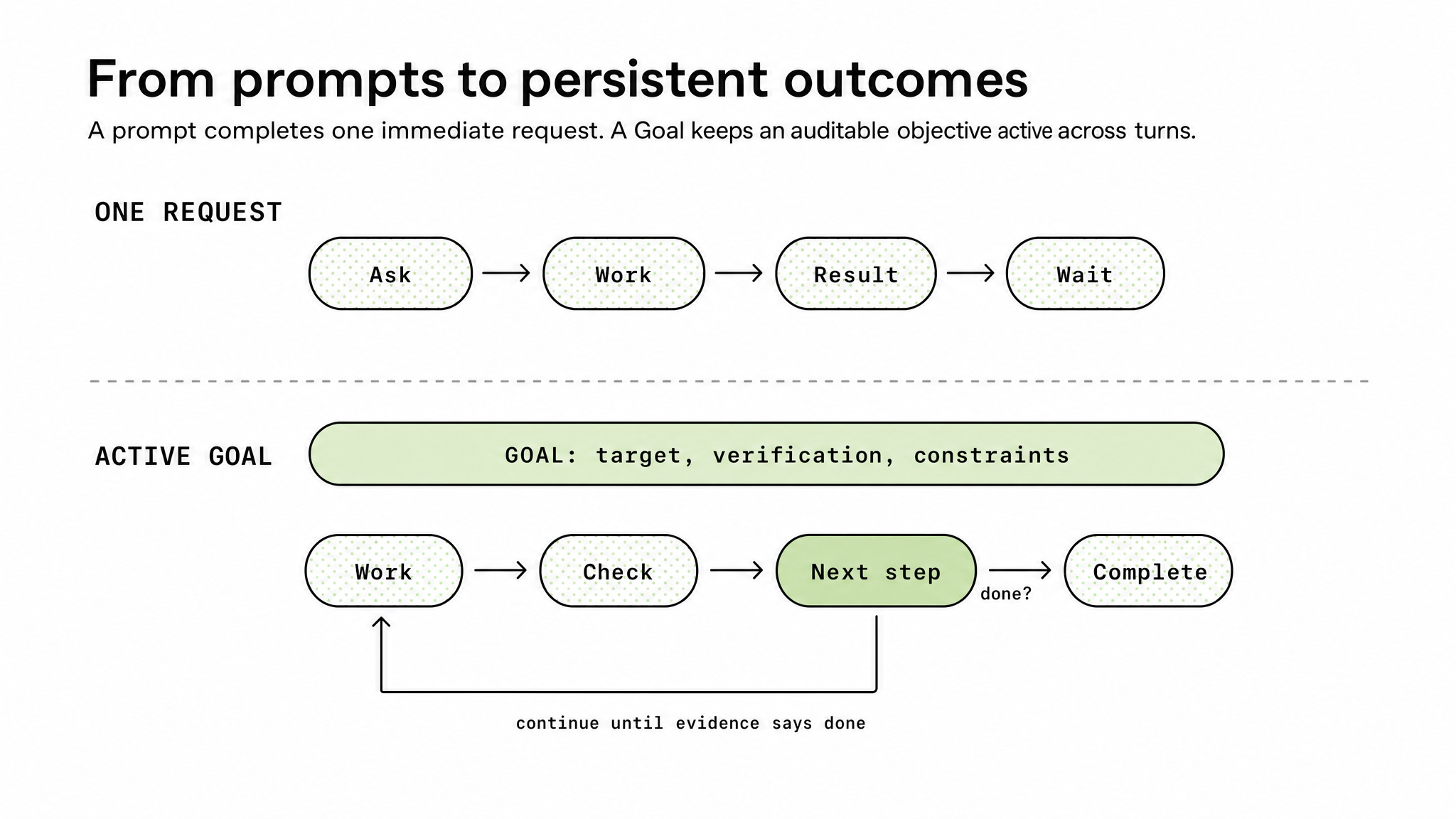
This is a different skill from prompting.
A prompt usually says, “Do this.”
A goal says, “This is what should be true when the work is done, this is how you prove it, and this is when you stop.”
The goal can’t be vague, because if it is, the agent has to guess what it means and you’ll end up with an output you don’t really want.
For example:
“Organize my files” sounds helpful, but what does organized mean?
“Research this topic” sounds normal, but how many sources count? Which questions need answers? What should happen if something cannot be verified?
“Repurpose these posts” sounds clear in your head, but does that mean 5 posts, 50 posts, every post in a folder, or only the ones that match a certain topic?
The agent cannot grade what you never defined. And this is the part I think matters most: The agent can only be judged on evidence it surfaces.
If it says, “I checked everything,” that is a claim. If it shows the list of files it processed, the sources it used, the tests it ran, the pages it rendered, the links it could not verify, and the blockers it hit, that is evidence.
A good finish line is built from evidence, not vibes.
How I Used Goal To Build A Landing Page
The easiest way to see this is with a real task.
I tested this by asking Claude Code to build a landing page for a free download called the Claude Code Goal Kit.
The job was not just “make me a landing page.”
That would have been too vague.
I wanted a single-page responsive index.html that captured an email in exchange for the kit. I wanted it to follow a direct-response structure. I wanted the claims to stay specific. And I wanted the agent to prove the page met the bar before it called the job done.
The prompt I used didn’t just tell the agent to build a page; it also told the agent what the page was for, what structure to follow, where to deploy, what kinds of claims were allowed, what proof to show, and when to stop.
The result was a landing page that was deployed instantly on Vercel, with no back-and-forth at all: https://goal-kit-landing.vercel.app/
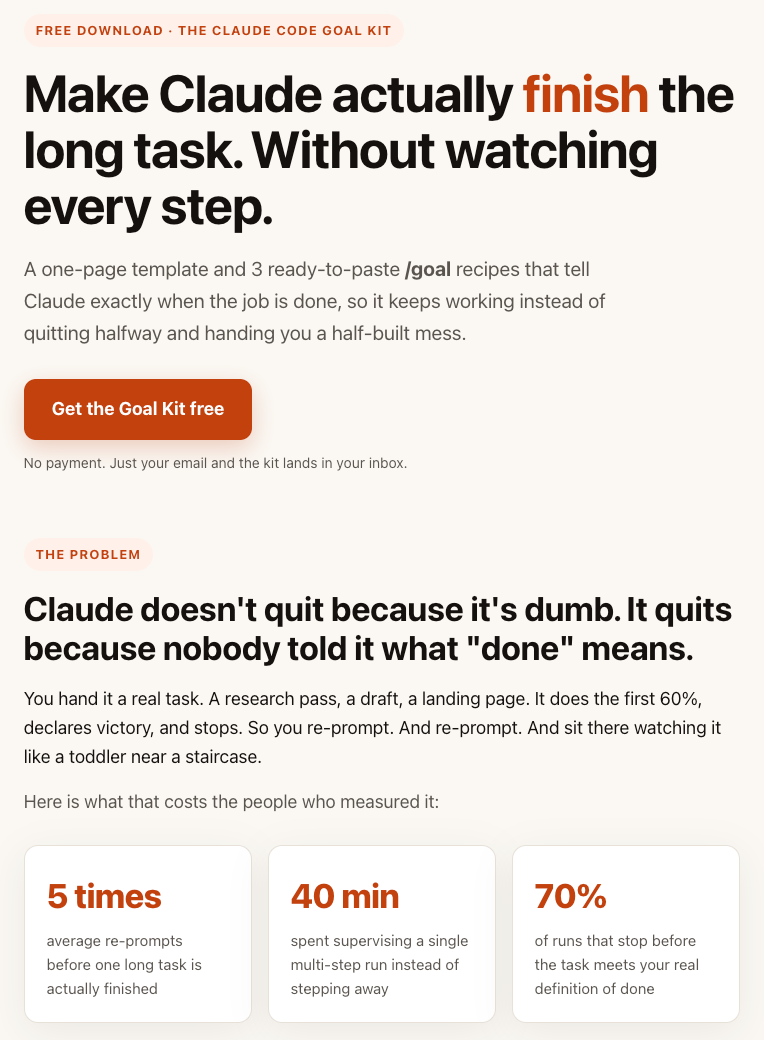
The page contains specific numbers as I put in the prompt, which is important, because this shows that the agent has to follow my specific inputs and verify the numbers before it can say the job is done.
It also followed the seven sections of what makes a landing page good for boosting conversions. It included the problem and proof sections. It gave the CTA a benefit. It built the page as a real artifact instead of only giving me copy in a chat window.
This is exactly what I wanted from an agent: I can ask it to do something, walk away, and by the time I get back, the work is done.
What We Are Building
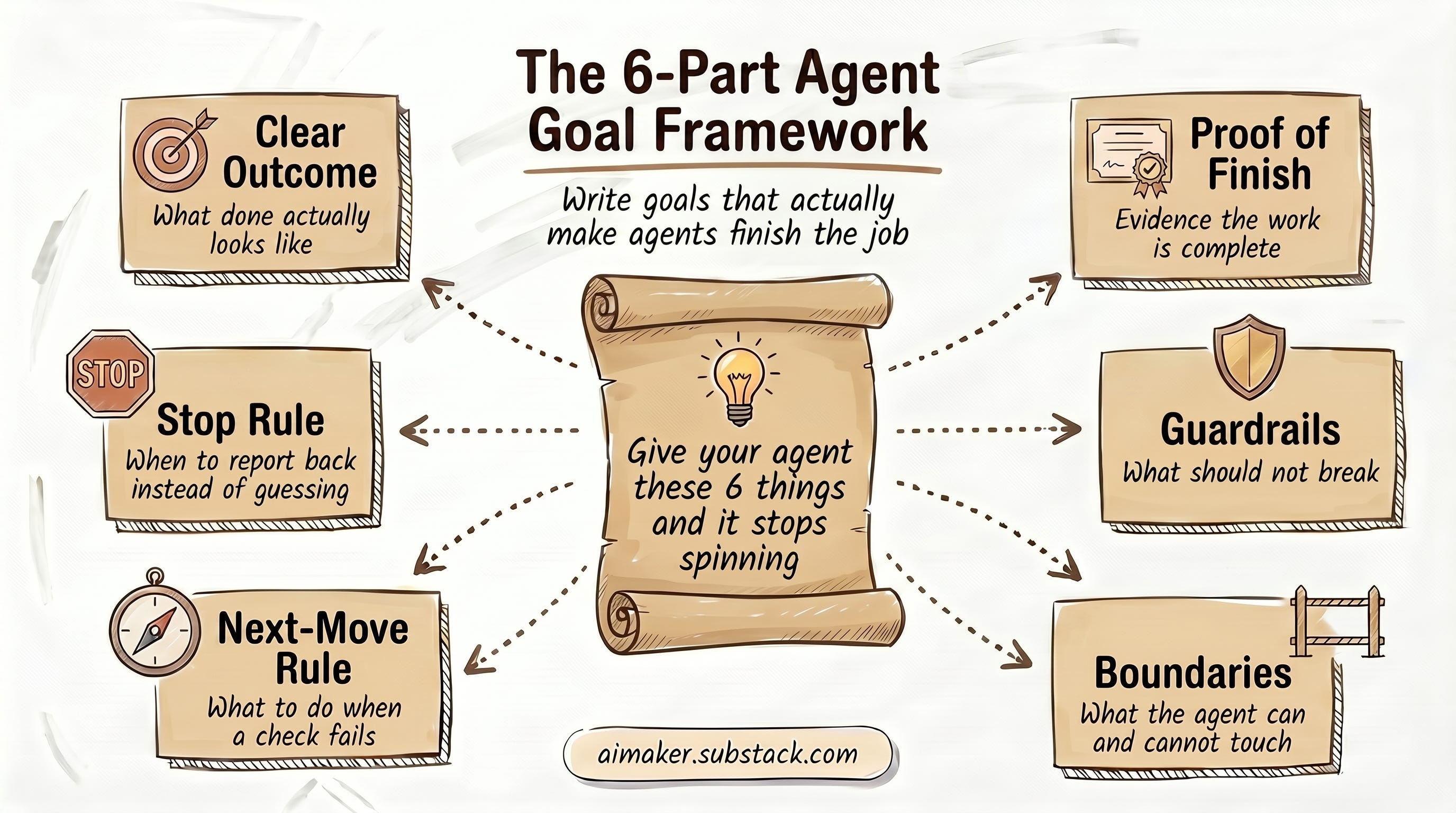
Here comes the most important part of this post: how to replicate what I’ve learned so you can apply it on your own, regardless of what tasks you want the agent to do.
By the end, you should be able to write a goal that gives the agent six things:
A clear outcome.
Proof that the work is finished.
Guardrails for what should not break.
Boundaries for what the agent can touch.
Next-Move rule that tells the agent what to do after a check fails.
A stop rule for when it should report back instead of guessing.
That is the framework.
Then we are going to apply it to three different jobs:
A company research goal, where the finish line is a Google Sheet filled with one brief per company from a source list.
A landing page goal, where the finish line is a rendered page with the right sections and checks.
A repurposing goal, where the finish line is a completed batch with every source accounted for.
I think those three examples well represent the variety of things you can do with /goal. They show three different kinds of “done”: a verified answer, a working artifact, and an empty queue.
After that, the goal is to make this usable beyond my examples.
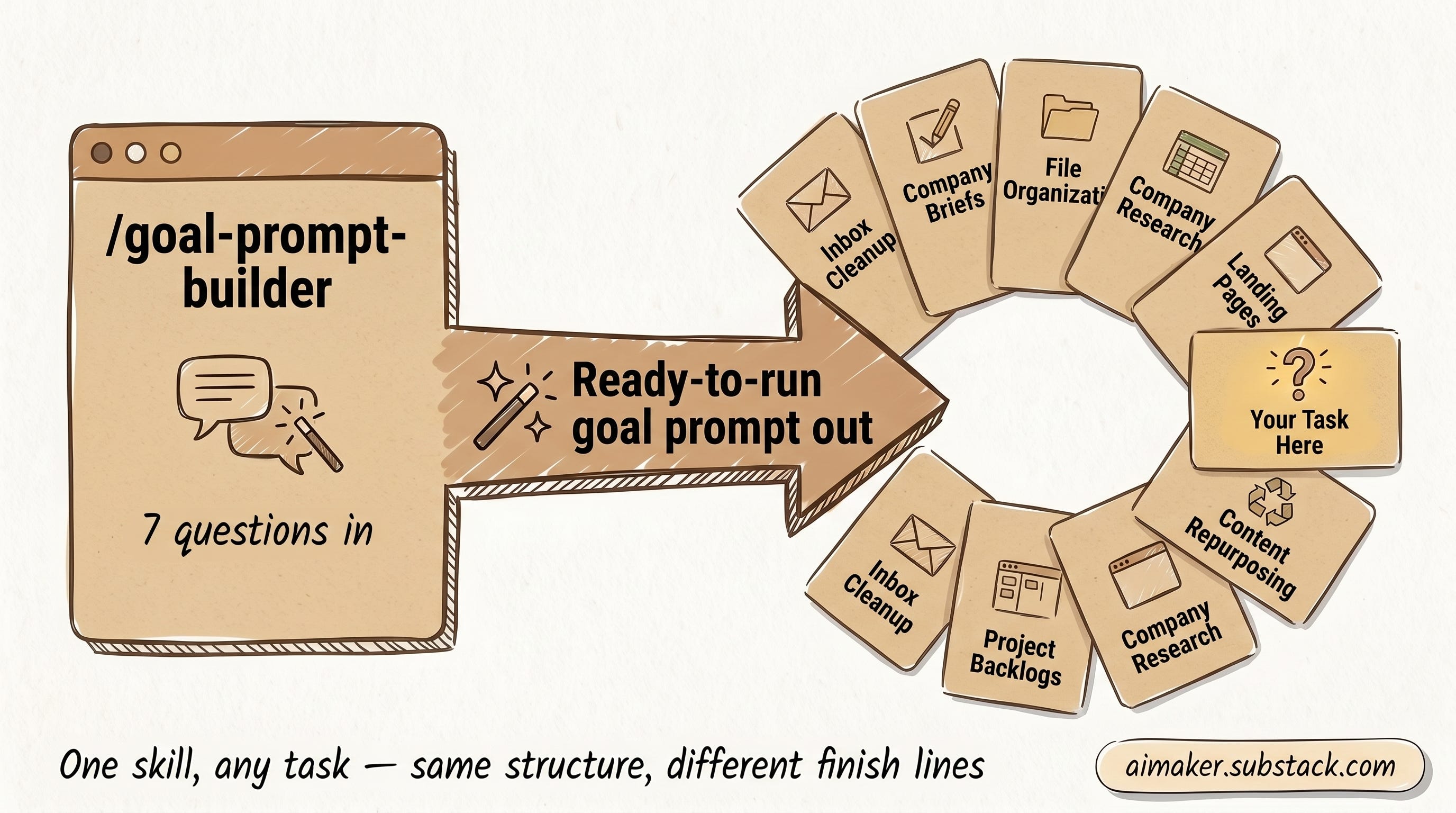
So we are also building a small interview skill called /goal-prompt-builder. You tell it what you want the agent to do, what proof should count, what boundaries matter, and when the agent should stop. Then it gives you a ready-to-run goal prompt for your own task.
That means the framework is not locked to research, landing pages, or repurposing. You can reuse the same shape for inbox cleanup, project backlogs, company briefs, draft checks, file organization, or any long-running task where the agent needs to work, check, fix, and report back.
That is what I want from agent work: an agent that knows the finish line, shows its proof, and tells me when it cannot get there.
Now, let’s dive into the six frameworks for building effective goals.
The Six-Part Framework For A Goal That Actually Finishes
The landing-page example worked because the goal had more shape than a normal prompt.
If I want an agent to run for longer without me hovering over it, I need to give it that shape on purpose.
This is the six-part framework I am using to turn a vague task into a goal an agent can actually finish:
Outcome.
Proof.
Guardrails.
Boundaries.
Next-move rule.
Stop clause.
Each part prevents a different kind of agent failure.
1. Outcome
The outcome is the end state in one sentence.
This is where you describe what should be true when the job is finished. Not every step the agent should take. Not every possible detail. Just the result you want to come back to.
Weak outcome:
“Research this topic.”
Better outcome:
“Read the company list from this spreadsheet, research each company, and write one completed row per company into a Google Sheet with columns for what the company is, the problem it solves, the product it sells, who it serves, source links, and anything that could not be verified.”
The better version gives the agent a target. It does not just tell the agent to start moving.
2. Proof
Proof is what the agent has to show before it can call the work done.
This is the part most people skip.
They ask the agent to finish the task, but they do not ask it to surface the evidence. Then the agent says “done,” and now the human has to inspect everything manually.
For company research, proof might mean:
Every company from the source sheet has a completed row in the output sheet.
Each row includes company overview, problem, product, target customer, and source links.
Anything unverifiable is marked clearly instead of guessed.
For a landing page build, proof might mean:
The page renders successfully.
The expected sections are present.
The agent reports anything that still looks rough.
For a batch job, proof might mean:
Every input file has a matching output.
The final count is shown.
Failed items are listed separately.
The point is simple: do not let the agent grade itself with a sentence. Make it show the receipts.
3. Guardrails
Guardrails tell the agent what must not break while it works.
This is important because agents can sometimes technically satisfy the outcome while damaging something else.
If the goal is to clean up a batch of drafts, a guardrail might be: