



This week on One Shot Show, Dheeraj Sharma and I were joined by Hodman | How To Build With AI.
This session was a little different from any other show we’ve done, because we didn’t talk about new AI features you need to test. Instead, we focused on the process you can follow to work with AI to get a better result.
Hodman is a data scientist and the founder of Asaura AI, an orchestrated AI system that helps high performers manage focus and information intake when execution friction gets in the way.
On Substack, Hodman writes Between Thinking and Doing about structured AI systems for people with ADHD-style friction and initiation problems, and The Data Letter, where she helps managers, operators, and technical builders build with AI.
Hodman came with a feature idea that seemed to fit that goal: add a short breathing exercise before users started a task.
The reasoning sounded solid because she had read a study about meditation and ADHD in children. Meditation had also helped her manage ADHD, anxiety, and stress in her own life.
But if the idea was wrong, she could lose a month building it and frustrate the same beta testers she wanted to help.
So, Hodman asked Claude a harder question: assume six months had passed, the decision had failed, and then explain why.
That was the pre-mortem.
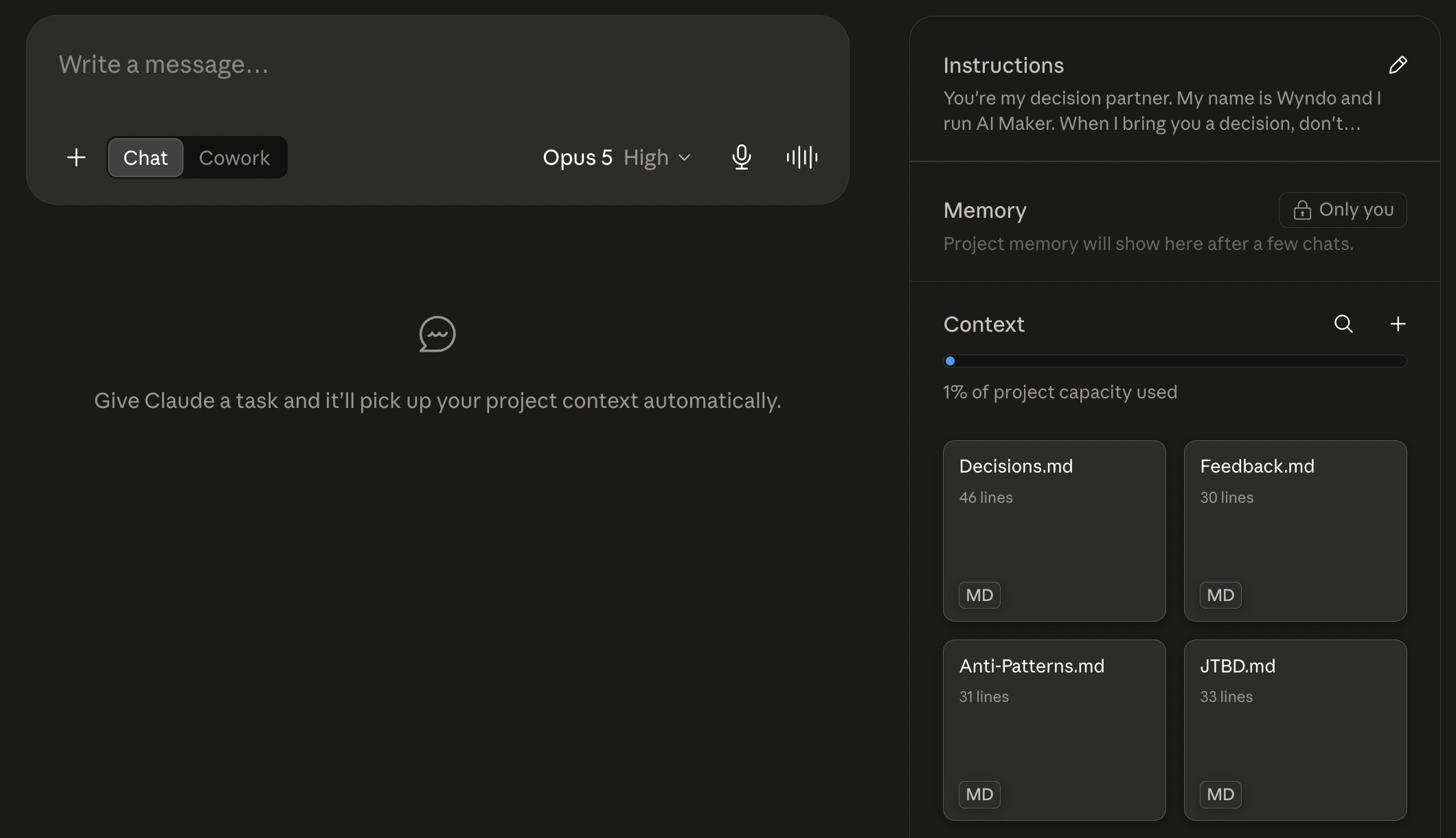
She ran it inside Decision Studio, a Claude Project she had built to challenge product decisions before she committed to them. Its first instruction was blunt: “Don’t cheerlead.”
But, before the analysis was executed, Hodman filled in five fields on her prompt:
Decision: Add a breathing exercise before any task in the Asaura beta

Why now: A study on meditation for children with ADHD, plus her own positive experience

Evidence for: The study and her personal use

Evidence against: None that she was weighing at the time

Cost of being wrong: A month of build time and disappointed beta testers
Then Claude produced three things: a ranked pre-mortem, a red-team memo arguing against the feature, and a one-page decision memo with a recommendation and stopping rules.
For the demonstration, Hodman reused a real decision from an earlier Asaura beta so she could compare Claude’s analysis with what had actually happened.
Let’s dive in.
The Pre-Mortem Found Three Problems
The first problem was immediate drop-off.
Asaura’s users opened the product because they were already struggling to start their work. Since a breathing exercise was placed as another step between them and their task, it predicted that some people would close the app at the overlay screen.
Hodman’s feedback supported that risk. One beta tester had told her:
Every time you put something between me and my task, I close the app.
Another said:
Please skip the wellness stuff.
The second problem was what Hodman’s anti-patterns file called the “works for me” fallacy. The breathing exercise helped her personally, but Claude warned that she might remain the only person in the beta who valued it. As builders, we often overestimate the impact of what we want to create while overlooking the potential issues it might cause for others. This leads to building features that are useful to us but not to anyone else.
The third problem was the evidence itself. The study involved children practicing meditation in a supervised setting. Asaura served adults using a self-serve productivity product. The research supported meditation as an intervention, but it did not show that people wanted a breathing exercise placed before every task.
All these insights make her realize that the priority for building her next features is to help people begin their work as soon as possible, not to add more friction that might prevent them from doing the work.
Claude Turned the Idea Into a Smaller Test
Then, Claude recommended her against shipping the breathing exercise as proposed. But it did not end with “no.”
It suggested three steps Hodman could take first:
Interview five heavy users about what they need immediately before starting a task.
Read three studies about adult, self-serve mindfulness tools and task initiation.
Prototype a version that appears after the user has already taken the first step.
Out of these three suggestions, the prototype is the one that might be easiest to build.
If Hodman still wanted to test it, Claude recommended a two-week opt-in experiment using task-start rate as the main measure. It also gave her three reasons to stop it so she doesn’t have to dwell on this for long period of time:
The task-start rate dropped by more than 5% over 14 days
More than three people complained about added friction without being prompted
Hodman’s own use remained the only positive signal
This is what makes a pre-mortem so helpful: you get a clearer view of how your idea might fail and how to avoid wasting your time chasing it.
Four Files Made the Analysis Specific
Before you can run the pre-mortem analysis, you need to set up the project instructions. In the demo, we used Claude Cowork.
Hodman’s project instructions begin with a clear role:
You are my decision partner. When I bring you a decision, don’t cheerlead. Surface failure modes I haven’t seen and make the case for positions I have dismissed.
That instruction tells it what kind of help she wants. It allows the interaction to spark a disagreement.
Then she gives it four files:
Job To Be Done: What users hire the product for, what alternatives they have tried, how they measure success, and what they do not want.
User feedback: Exact quotes from interviews, support tickets, and messages, recorded with a date, source, and consistent tag.
Decision log: The decision, original verdict, kill criteria, reasoning, 30-day outcome, and lesson worth remembering.
Product anti-patterns: Rules created from earlier mistakes, including the incident or evidence behind each one.
The instruction asks Claude to disagree. The files give it a reason.
Without those files, Claude could still produce a generic list of risks. It might mention adoption, technical problems, or user confusion. Those answers can sound sensible while missing the specific decision in front of you.
Hodman built her own version so it could connect the feature to the user’s real goal, surface the feedback that challenged it, flag the “works for me” bias, and question whether the research matched the product.
If you want to get the same quality of results as hers, you might want to fill in the files that align with what you do and the kind of product or business you’re running. We’ll get to that tutorial later in this post.
But, Pre-Mortem Can Make Everything Look Scary
There’s one thing I want to highlight about the side effect of running a pre-mortem with AI.
When Dheeraj first used a pre-mortem skill, almost every idea came back looking dangerous. The analysis made him want to stop launching anything. I also have a similar experience on this.
He eventually changed how he used it. Instead of treating the output as a final go-or-stop decision, he used it to identify risks, mitigations, and things he should watch during a real test.
Hodman agreed. She has continued testing ideas even when Decision Studio advised against them. But what makes it different is that she understands all the risks that might happen and builds a plan to mitigate them.
After all, a pre-mortem is supposed to make you feel more prepared by understanding the bad things that could happen, rather than preventing you from making that decision.
How to Build Your First Pre-Mortem Agent
Building a full-fledged pre-mortem agent can be time-consuming and requires a lot of files about your product or business to give you a complete 360° analysis of your decision.
So, I wouldn’t go that far if this is your first time building it. Instead, start with these:
Evidence: Give Claude the user need and the feedback you already have.
Decision: Write down what you are considering, why now, and what being wrong would cost.
Challenge: Run the pre-mortem, red-team review, and decision memo.
Follow-up: Check what happened and save the lesson for the next decision.
That is the whole system.
Start by creating a Claude Project called Decision Studio. Open the Project’s custom instructions field and paste Hodman’s instruction:
Replace the two bracketed fields with your own details, then save the instruction. It will guide Claude in every new decision chat you open inside the Project.
During the Q&A, someone in the audience asked why this belongs in a Claude Project instead of a one-off chat. The answer was simple: because you want to keep repeating this process for any decisions you make in the future. If you don’t build context on the project, you’ll have to re-explain everything every time you want it to run a pre-mortem analysis. And that is time-consuming.
For the smallest version, start with the two files Hodman recommended:
A Jobs To Be Done file explaining who you serve, when they use the product, and what success looks like
A feedback log containing dated evidence from interviews, support requests, surveys, or user behavior
Your decision history can begin as an empty file. It becomes useful as you save decisions and return later to record what happened.
Before running the review, describe the decision in five fields in your prompt:
Decision:
Why now:
Evidence for:
Evidence against:
What happens if I'm wrong:
Hodman shared the complete Decision Studio template she demonstrated during the show. The download contains five files:
A setup guide with the project instructions, five-field decision input, master prompt, and 30-day check-in
A Job To Be Done template
A user feedback log
A decision log
A product anti-patterns template
These are Hodman’s blank, reusable templates. Now, let’s explore on how to customize it for you.
Customize the Templates With Claude Cowork
You can fill in the four knowledge files manually. If you are unsure what belongs in them, Cowork can turn the setup into a guided interview.
Download and unzip the templates into a dedicated folder. Open Cowork in the latest Claude Desktop app, connect only that folder, and paste the prompt below:
This gives you a customized starting point while keeping the evidence honest. Once the four files look right, follow README.md to create the Claude Project and run your first decision.
Run the Pre-Mortem, Red Team, and Decision Memo
Once your files are customized and uploaded to the Claude Project or Cowork, open a new chat inside Decision Studio.
The prompt below uses a dummy product decision. Replace the example in the first five fields with your own information, then send the whole prompt:
The three parts serve different purposes:
The pre-mortem finds plausible failure modes.
The red-team memo makes the strongest case against your current thinking.
The decision memo turns both into a recommendation, a test, and conditions for stopping.
Treat the result as a way to support your decision‑making process. Review the output and make sure everything is grounded in real data from your business before you act on it.
How to Improve the Pre-Mortem Analysis Over Time
Your first pre-mortem will only be as useful as the evidence currently inside the four knowledge files.
The analysis becomes more specific as you maintain the decision log. After every review, save the decision memo in decisions.md, add the date, and upload the updated file back to the Claude Project.
After 30 days, reopen that entry and compare the kill criteria with what actually happened. Record the result, choose whether to continue, kill, or pivot, and write down what you learned. Then upload the updated decision log again so the next review can use it.
Over time, decisions.md becomes a record of:
What you decided
Why you believed it would work
Which risks Claude identified
What you chose to test
Where you set the kill criteria
What actually happened
What the result taught you
When you bring Claude a new decision, it can compare the idea with choices you have made before. It can identify assumptions that keep returning, surface warnings you previously ignored, and point to tests or stopping rules that proved useful.
Every time you add a new completed decision, it gives the next pre-mortem more evidence to work with. The system improves because the history becomes richer and more honest.
The Part I Would Keep
I asked Hodman whether the whole process needed such a structured prompt every time, because writing it in such a detailed way can be hard and time-consuming.
She said no.
The structure is useful while you are learning the method. Once the project has clear instructions and useful files, you can begin with a normal message:
I am thinking about adding this feature. Here is why. What am I missing?
Claude can still run the deeper review because the method and evidence are already there.
I’d also suggest turning this prompt into a skill so you can easily run it by triggering a custom slash command. That way, you don’t have to remember anything once the skill is built and running the way you intended.
That is the version I would want. I do not want another long prompt I need to find before making every decision. I want a small set of files that remembers what users said, what I tried, and which lesson I am in danger of forgetting.
The value of Hodman’s Decision Studio came from that record. Instead of giving generic advice, the AI knows more details about what you do and your business, so it can offer more grounded and helpful critique that’s relevant not only to your business, but also to your specific situation.
And honestly, that is a much better use of AI than asking it to confidently argue with you using whatever comes to mind.
Show Details
Show: One Shot Show
Episode: 20
Topic: Building a Claude Decision Studio for pre-mortems, red-team reviews, and decision memos
Hosts: Wyndo and Dheeraj Sharma
Guest: Hodman Murad, founder of Asaura AI
Live schedule: Wednesdays at 10:00 AM ET on Substack
Timestamps
00:03: Episode 20 introduction and Hodman joins the show
00:04: Hodman’s work, newsletters, and Asaura AI
00:06: The breathing-overlay feature and what beta testers said
00:08: Creating Decision Studio in Claude Projects
00:09: The “don’t cheerlead” project instruction
00:10: The four supporting files
00:14: Why the files make the pre-mortem specific
00:15: How beginners can start with repeated instructions
00:18: The two files Hodman recommends building first
00:23: The five-part decision input
00:25: Pre-mortem, red team, and decision memo prompt
00:29: Failure modes and a smaller test
00:31: Claude uses Hodman’s feedback and rules against the idea
00:34: The question Hodman now uses as a decision rule
00:35: Kill criteria and the final memo
00:37: The 30-day check-in
00:39: When pre-mortems create decision paralysis
00:42: Structured prompts versus normal conversation
00:46: Why Claude Projects make the process repeatable
Resources Mentioned
Claude and Claude Projects: The main tool Hodman used to create Decision Studio. Projects support project instructions, uploaded knowledge, and separate chats.
Decision Studio: Hodman’s reusable system for pre-mortems, red-team reviews, and decision memos.
Decision Studio templates: Hodman’s five-file pack containing the setup guide, Job To Be Done template, feedback log, decision log, and product anti-patterns.
Jobs To Be Done: The framework Hodman used to describe why someone uses Asaura and what result they are trying to achieve.
Markdown files: The format used for product context, feedback, decisions, and anti-patterns.
ChatGPT Projects: Mentioned as another project-based way to keep instructions and supporting material together.
Claude Skills: Hodman and Dheeraj discussed using skills for reusable behavior across projects.
GitHub: Dheeraj mentioned starting from a pre-mortem skill he found in a GitHub repository and adapting it.
LinkedIn: Hodman showed a separate project containing brand, tone, hook, and image guidance for her LinkedIn activity.
Feedback database: Hodman mentioned pulling product evidence from interviews or a feedback tool. The automatic transcript renders the product name unclearly, so verify it before listing a specific service.
A/B testing: Recommended as a way to test the feature with a smaller group before a broader release.
ADHD meditation study: Hodman referenced a study from India about yoga and meditation interventions for children with ADHD. The exact paper was not named during the session.


