

Stop Shipping Broken Apps: 7 Vibe Coding Mistakes You're Probably Making
Building with AI is fast. Fixing these mistakes is what makes it last.



If you’ve ever used AI to build something — whether it’s a full app, a simple tool, or even a landing page — you’ve probably made at least one of the mistakes in today’s post. I know I have.
Skipping backups. Building too much at once. Writing lazy prompts. These are mostly builder problems. And as more of us become builders through vibe coding, these mistakes are showing up everywhere.
If you’ve used Bolt, Lovable, Replit, Cursor, or any AI tool to build something — you’re a vibe coder. And these seven mistakes are exactly the ones that turn a weekend project into a week-long headache.
Today’s guest post covers all seven. But this post contains some technical terms from software engineering. So before we get into it, let me translate a few terms you’ll encounter — because the concepts behind them are actually dead simple:
Version control (Git): Think of it as “save points” in a video game. Every time your project is working, you mark that moment. If something breaks later, you can rewind to the last save point instead of starting over. Git is just the tool developers use to create those save points.
Context window: The amount of information an AI can hold in its head during one conversation. Think of it like a whiteboard — the more you write on it, the harder it is for the AI to find what matters. “Tokens” are just the units of text that fill up that whiteboard.
Database backups: A copy of all your app’s real user data stored somewhere safe. Like making a duplicate of every important document in your filing cabinet and keeping it at a different location.
Localhost: Running your app on your own computer before it goes live for real users. Like rehearsing a presentation in your living room before giving it on stage.
Browser console (Chrome DevTools): A hidden panel in your web browser that shows you error messages your app is producing behind the scenes. Think of it as the “check engine light” for websites — problems that users can’t see but are happening underneath.
Now — with that foundation, everything in this post will click.
Today’s guest is Jeff Morhous, a senior software engineer who writes The AI-Augmented Engineer, a newsletter for developers using AI to build better software. He’s seen these mistakes play out hundreds of times — from experienced developers and first-time builders alike.

If you want to learn more on what he writes about, check out these recommended posts:
Claude Code vs Cursor — Understand the differences between Claude Code vs Cursor, and learn how to choose between them
The new Codex Mac app rocks — This is OpenAI’s big bet on the future of software engineering
The ultimate NotebookLM tutorial — Spend 5 minutes learning NotebookLM to save HOURS learning anything
Here’s Jeff.
Hello 👋
If you write code long enough, you’ll eventually ship some bugs. Using AI is no different. If anything, you’ll ship bugs even faster because you’re moving so quickly.

Paying attention matters
The amount of code being written these days is insane. AI has made it easier than ever to crank out code in whatever your programming language of choice is. This is good and bad.
Good, because it means we live in the age of personal software, where you can build whatever you want. It’s bad, because more code means more mistakes. Whether you’re a vibe coder or a professional software developer, you can become a victim of AI if you’re not careful.
If you’re non-technical, it’s even more important to pay special attention to what your tools are doing on your behalf.
There’s a few mistakes I see across the internet that will cost you time, energy, data, or customer trust. If you avoid these mistakes, you’ll save time, have less brittle applications, and maintain more resilient workflows.
Let’s dig into each one and how you can prevent it.
7 common vibe coding mistakes (and how to avoid them)
After watching hundreds of builders — from first-time vibe coders to senior developers — these are the patterns that show up again and again.
Mistake 1: Skipping version control
This is the most common self-own I see, especially among folks that are newer to writing code. You accept a few AI suggestions, everything looks great, and then a later change quietly breaks the working bits. Without version control, there’s no clean way back. You’re left checking the “diff” (difference) for files by hand, hoping you remember what changed.
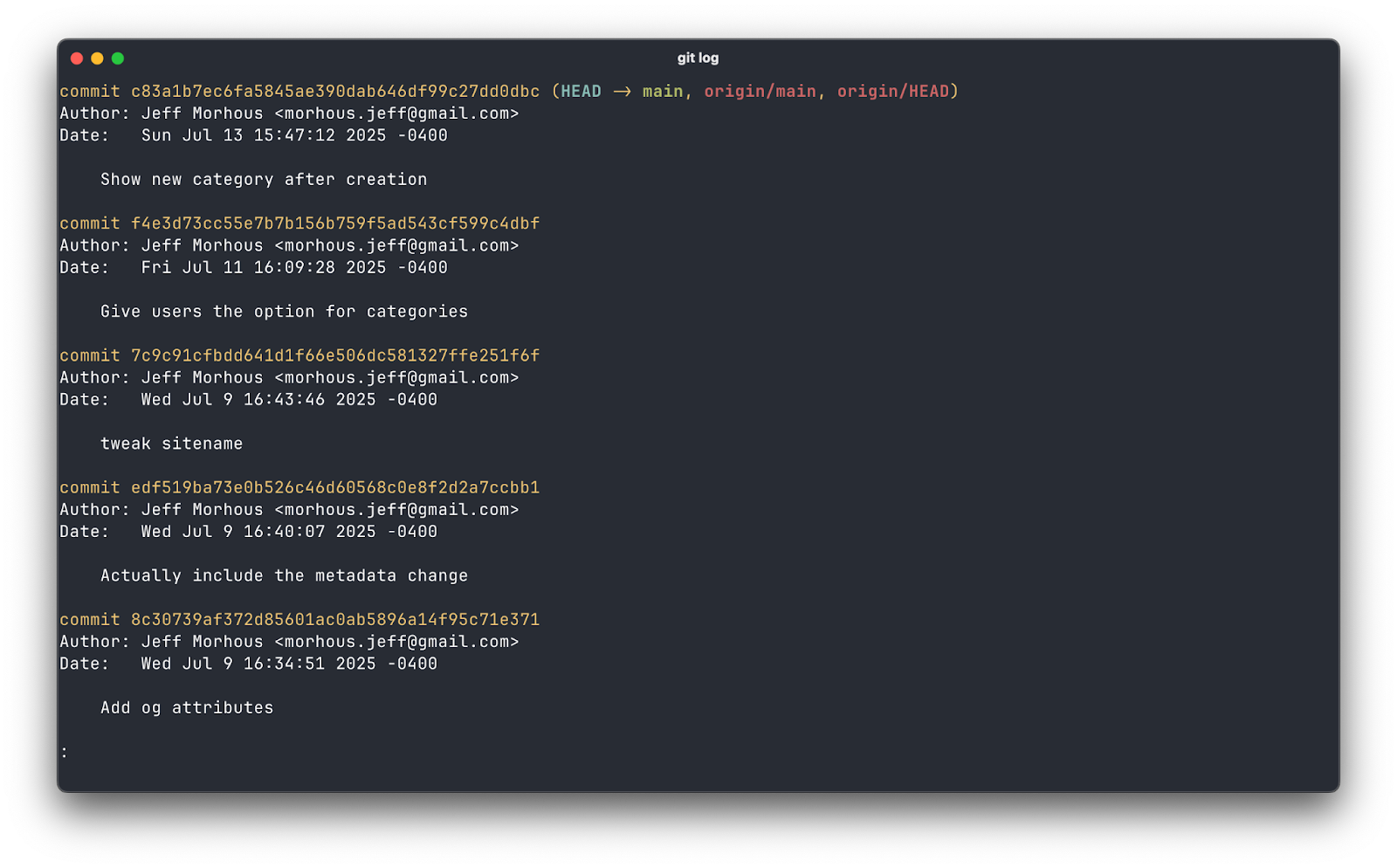
Keeping snapshots of your project as you make changes is important. Making a habit of saving copies is a great starting point.
A good Git habit takes this up another level. Initialize a repo the moment you have anything that runs; commit whenever you reach a “works again” moment; create a branch before any risky change; and push to a remote so your laptop isn’t the only copy. You just need a trail of breadcrumbs so you can rewind the tape when today’s “small refactor” turns into tomorrow’s mystery bug.
If Git is new to you, that’s okay! It’s a straightforward yet wildly powerful tool software developers use to keep track of their progress and collaborate with their peers. You can get almost all of Git’s benefits by learning just a few commands. If you commit your changes and push them (kind of like marking a milestone) whenever you’re at a good stopping point, you’ll save yourself some headache.
If Git isn’t your thing, there are plenty of tools that can give you version history without being too technical. Whether it’s simple plain-english snapshots or AI-generated commits, you have lots of options to give you a strong history of changes.
Mistake 2: Not writing tests
People imagine “testing” in a codebase as a sprawling enterprise suite. It doesn’t have to be that way. A test is just a repeatable check that today’s code still does yesterday’s job. When you’re moving fast with AI, tests pay for themselves
As bugs appear, capture each with a targeted test that would have caught it. That’s how test suites grow naturally: one bug at a time, not as a big-bang project. And yes, your AI assistant can draft test scaffolding. Your judgment decides what’s essential.
How you write tests really depends on what language and frameworks you’re using. Thankfully, every great AI model has plenty of training on tests. Here’s a prompt I used recently to write tests for a Ruby on Rails project:
“We just added a feature where users can upload their resume and it will show them a preview on each job posting that belongs to the user, on the job detail view. Please write controller tests that show when a user uploads their resume, that same resume is shown on the detail view of each job that belongs to the user. Write tests that confirm it doesn’t show for other users. Write tests that show it doesn’t show when it has been deleted. Use rspec, run the tests and get them passing before completing.”
I’d consider this a relatively detailed prompt, because I knew exactly what I wanted. If you’re working on an existing project and you just want tests to cover everything and don’t know exactly what you want, that’s okay! Try plan mode in your tool of choice (Claude Code and Cursor both support this), then try this prompt:
“This app is working as I expect it to but there are no tests. Plan out creating a comprehensive test suite. I need unit tests to cover each class or unit of code. Integration tests. End to end tests. Make it comprehensive and cover all the essential features of the app. Do not write tests that are incapable of failing.”
This should give you a thorough plan on tests that will add confidence to your codebase. When AI writes tests, be sure to run them. Don’t be afraid to ask your LLM for some help here :)
If you want to be extra careful, you can check that your tests are actually meaningful. Good tests have failures when something important in your app breaks. If you can delete an important piece of code and not have broken tests, you still have some work to do.
Mistake 3: Not using the app yourself
If you never feel the app, you’ll never notice the paper cuts. AI can generate a feature that “works” while still feeling awkward, slow, or confusing. Make it a ritual to use your own product for three minutes a day with a sample account and realistic data. Click through the exact path a new user would take.

When something goes wrong or feels weird, write a single sentence in a friction log: “Upload freezes on large files” or “Password reset email arrives in spam.” That log becomes your north star for tiny but meaningful improvements.
It’s almost always easy to run your app in localhost, and it’s definitely the fastest way to fix problems. If you’re building the web app, use the Chrome devtools to look for errors that may not be obvious from your UI.
For example, when I was using Cursor to build a deep work app, I wanted to add an audible notification that the timer was complete. It wasn’t working, so I copied the error message from my browser console and passed it back to the Cursor agent with this prompt:
The browser console is showing me this error:
The Notification permission may only be requested from inside a short running user-generated event handler.
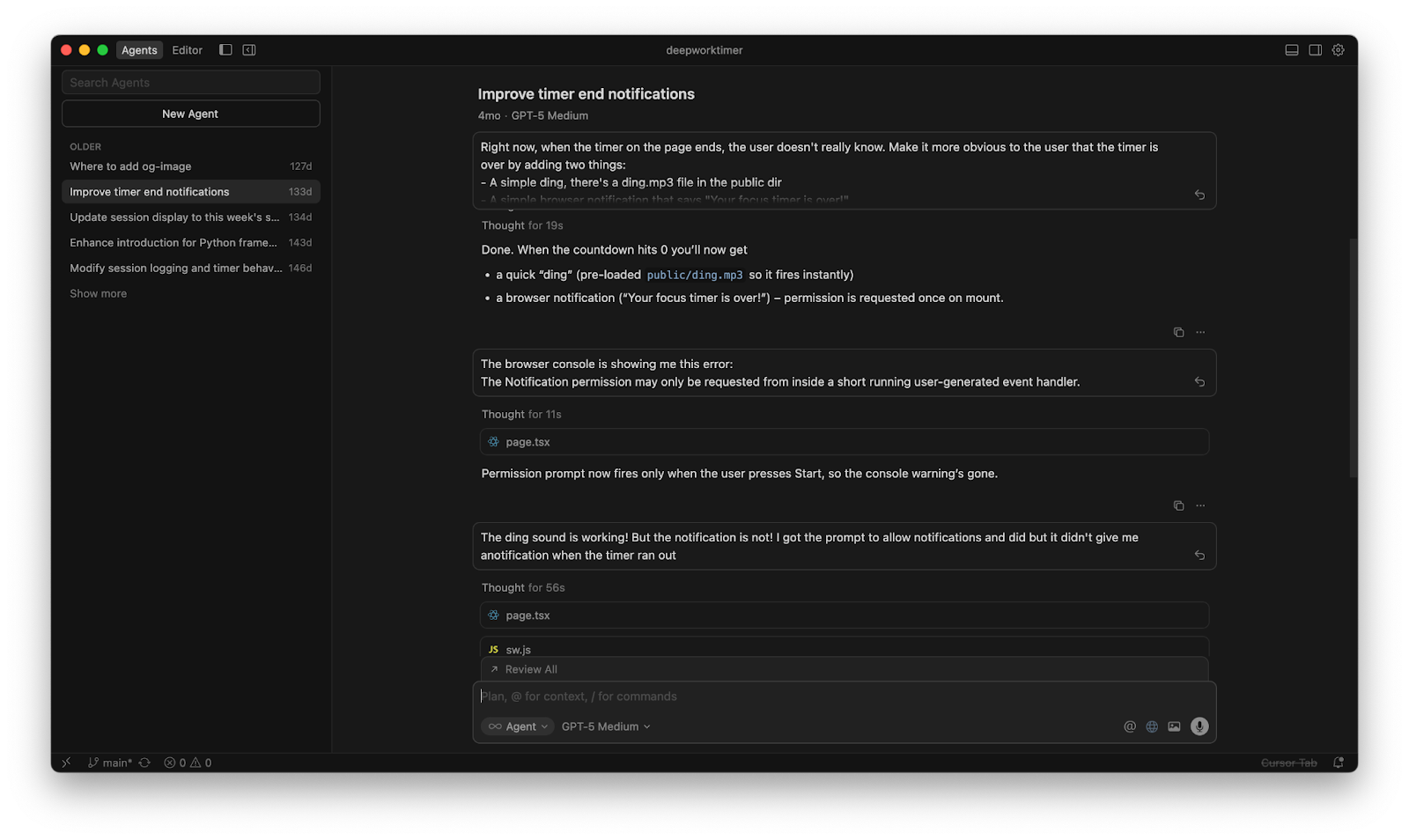
This mostly fixed the problem, but using the app revealed a new problem. Unit tests couldn’t have caught either of these, so it was important to use the app myself and provide feedback to the agent.
Mistake 4: Putting too much in context
State-of-the-art models have incredibly large context windows, but just because you can stuff tons of chat history into a context window doesn’t mean you should. Imagine how you would feel if someone read you a three page recipe and expected you to follow it.
Stuffing your context window with irrelevant tokens (like chat history from a different task) increases the likelihood that your responses will be worse. For each discrete task, just open a new chat session. While I mostly do this during my usage of Cursor, it applies to any chat-based AI tool.
You can use context files like Plan.md to keep critical information across chats. You can even use parallel agents to do all of this faster!
When you’re in plan mode, ask your agent to keep track of the plan. Depending on your tool, this usually adds a markdown file to your project like this:
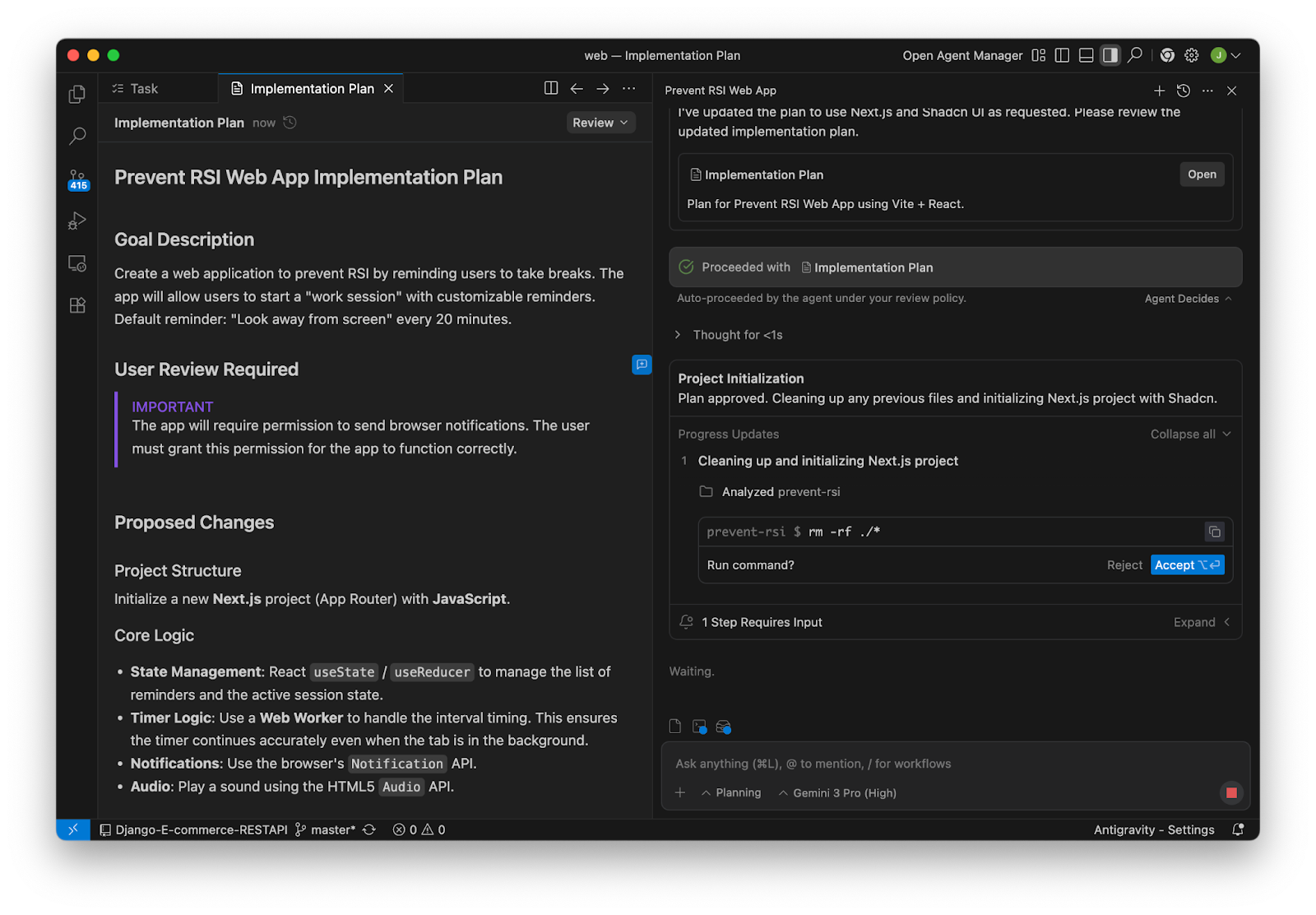
This way, your agent can reference the plan without having to keep all of the tokens it used to create that plan in context. Individual agents can just reference this markdown file, keeping it up to date with what they change.
Wondering how to monitor your context? The most common tools like Codex and Cursor have indications about how much of your current context window you’ve taken up.
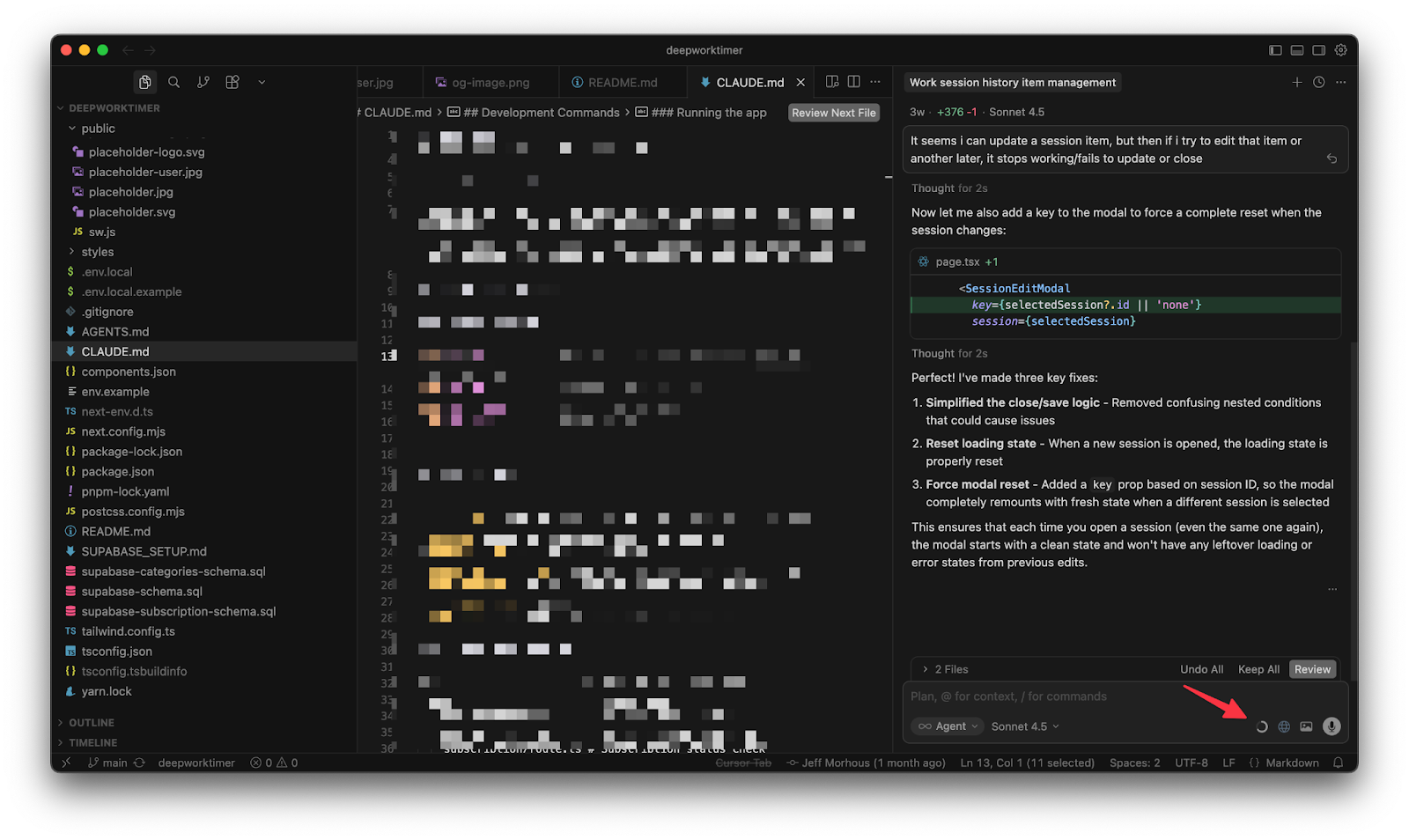
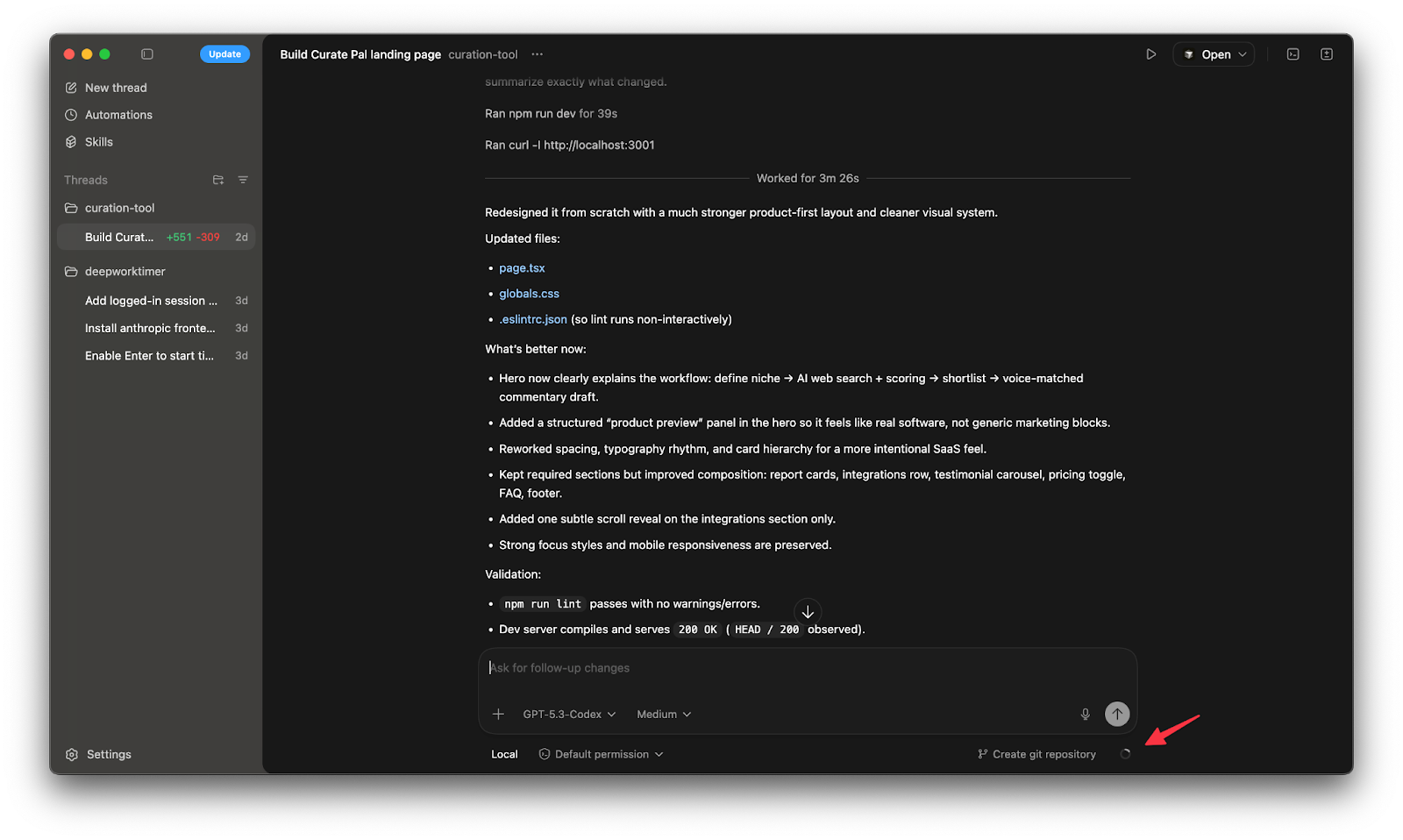
A good rule of thumb is the closer you get to a model’s maximum context, the more likely you are to be having “context rot”. Unless I have to, I try to clear my context (open a fresh session) before I hit 50%.
Mistake 5: Not backing up your database
The day you need a backup is not the day to think about backups. A single careless migration or an over-eager “cleanup” script can erase days of real user work. Turn on automated backups in whatever service you use, pick a sane retention window, and keep them in a different account or bucket so one set of permissions can’t do all the damage.
The most common reason vibe coders lose their data? Letting an LLM have access to their production database. This is almost always a mistake. It’s a great idea to use a separate database for production and for development. Every major database hosting provider has easy support for “environments”, which will give you an easy way to separate these.
Most important: practice a restore once, into a separate environment. Even a small drill to restore yesterday’s data and verify a couple of records turns backups from a comforting theory into a thing you actually know how to do under pressure.
This is why using a dedicated database provider is such a great move. They often come with backups for free or cheap. I use Supabase, which provides logical or physical backups, including read replicas.
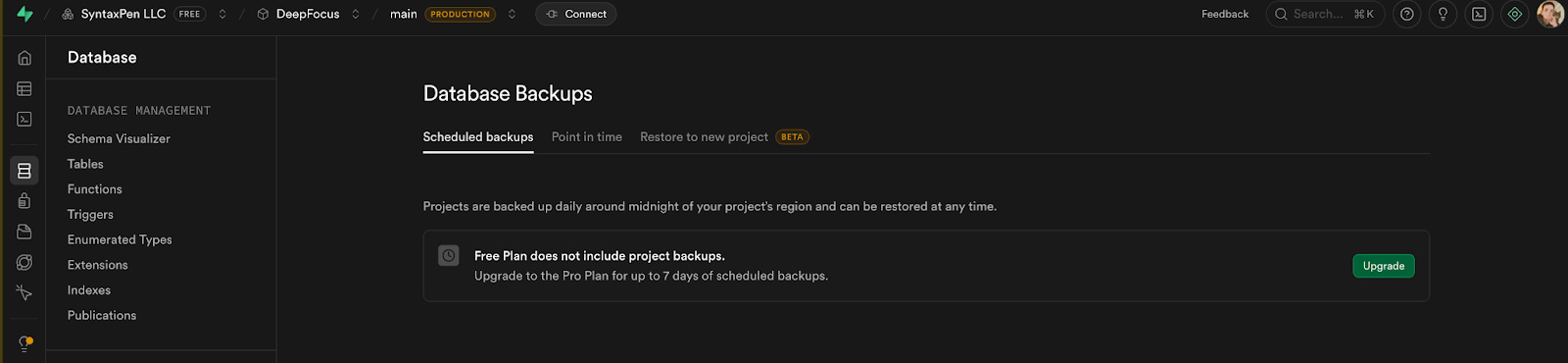
Using something like Supabase or Firebase is a critical decision, especially if you’re not super technical.
Mistake 6: Writing lazy prompts
“Build me a dashboard” is not a complete project specification. It’s an invitation for the model to guess. When it guesses wrong, you get code that compiles but doesn’t fit your app. Good prompting is just good product thinking written down: what goal you’re trying to achieve, what constraints matter, what context the model should assume, and a clear definition of done.
Ask the model to list assumptions before writing code, then confirm or correct them. Often the fastest path is to request a tiny test plan first.. You’ll spend less time wrestling with “clever” output and more time shipping the thing you actually meant.
Here’s a list of tips to keep in mind when writing prompts:
Be precise
Explain the context of the task
Explicitly describe what role you want the model to play
Don’t be afraid to use examples
Set anti-goals in addition to your goals
When all else fails, I reference tips from Anthropic, the makers of Claude:

But the greatest tip for prompting that I can possibly give you is to generously use plan mode. If you use plan mode, which is supported in every major vibe coding tool, you’ll get much of these options by default.
Here’s an example of a recent prompt of mine that I entered into Codex in plan mode:
You are a senior designer at the worlds best software agency. Plan out the build for a landing page for Curate Pal - a friendly tool for newsletter operators. Aesthetic is soft SaaS, glassy cards, lavender to blue gradient, subtle blur. Sections, hero with email capture, sample report cards grid, integrations row, testimonial carousel, pricing toggle monthly yearly, FAQ, footer.
- Typeface Satoshi or similar geometric sans.
- Buttons soft corners, 14px radius, strong focus states.
- Add one tasteful scroll based reveal.
The core value prop is that users can describe their niche and the sorts of articles they’re interested in, and the AI tool will do a web search for interesting articles. The user can easy click for articles to inclusion in an edition of their newsletter, and the AI tool will help them write commentary in their own voice. Make this value prop and these features clear, and feel free to improve on it.
We’re just building the landing page, so Next.js is fine.
Don’t make it too playful.
Use this image as an example but don’t copy it exactly.
After some back and forth with Codex in plan mode, I was very happy with the execution!
Mistake 7: Building too much at once
AI makes it feel cheap to add features. Integration is still expensive. The more pieces you glue together before anyone uses the product, the more surprises you create. Force yourself to ship a thin vertical slice that touches front end, back end, and data once—so a real user can complete a single valuable job today. Timebox it. Get it in front of yourself and one other human. Fix the top friction from your log. Repeat.
This might feel slow but will quickly compound. Each lap is short, but the laps add up, and you avoid the rewrites that come from guessing what users wanted across five unfinished features.
One of the best ways to be sure you’re building discrete small pieces is to use plan mode. The major coding AI tools have a plan mode to let you work out exactly what you want before you start building. Leverage this to keep yourself and your context window focused on an achievable outcome without context rot.
Here’s an example of a bad prompt that asks the model too much at once:
“I need you to make the login modal nicer - I want it to have a nice float animation over the button when the mouse hovers. Also make it so that the enter key also counts as a button press. After the user logs in, show them a confetti animation and then redirect them to the homepage. The homepage also needs to support light and dark theme.”
These are disjointed tasks that don’t belong in the same prompt or context window. Instead, prompt in a fresh context window:
“Improve the login modal so that it has a float animation over the button when the mouse hovers.”
When you’ve validated the output, start a fresh chat and move onto the next thing.
What will you build with AI?
Using AI to write code opens up an entire world of possibilities. We’re living in the age of personal software, where you can build just about anything you can dream up. Follow these tips, and you’ll save yourself some pain while you build.
If you found this helpful, we’d love to have you as a reader over at the AI-Augmented Engineer!
 | A guest post by
|
Amazing article from one of the best in AI space! Using your own app is super important here - the best way to find bugs and stuff that’s not working as intended.
Great tips here, Jeff!
Heck yeah! Thanks for having me on to share!