



In episode 17 of One Shot Show, I finally showed the second brain setup I have been using behind the scenes.
My setup is super simple: I use Obsidian, Claude Code, and a small set of commands to turn saved articles, podcast transcripts, and half-formed thoughts into connected wiki pages.
Dheeraj Sharma also added his own version from the producer side. His setup is more about inboxes, subscribers, sponsorships, YouTube comments, and business operations. Mine is more personal: things I read, ideas I collect, and thoughts I am trying to understand.
That difference ended up being one of the best parts of the episode.
Because the real second brain is only useful if it reflects the material you actually think with.
But the part I keep thinking about after the session is the Reflect command. Before we go there, though, let’s first explore how my AI second brain actually works.
💡 This livestream session comes from my second brain post, which adopts Andrej Karpathy’s method for building LLM wiki pages. If you want a full folder copy, along with prompts, skills, and file templates that you can download and use to start building your own second brain, you can grab it in this post:

Most Notes Just Sit There
I have been journaling for around five years.
Like a lot of people, I save things because I do not want to lose them. Articles. Podcast ideas. Quotes. Random thoughts during a run. Something someone says in a conversation that feels worth keeping.
The problem is that saving something does not mean you have understood it.
Before AI, most note systems still asked me to do the hard part manually. I had to file the note, tag it, link it, remember it existed, and then come back later to make meaning from it.
I know some people love that process. I respect it. But for me, the maintenance was always the part that broke.
I could collect ideas.
I was not always turning them into some insights or productive outputs.
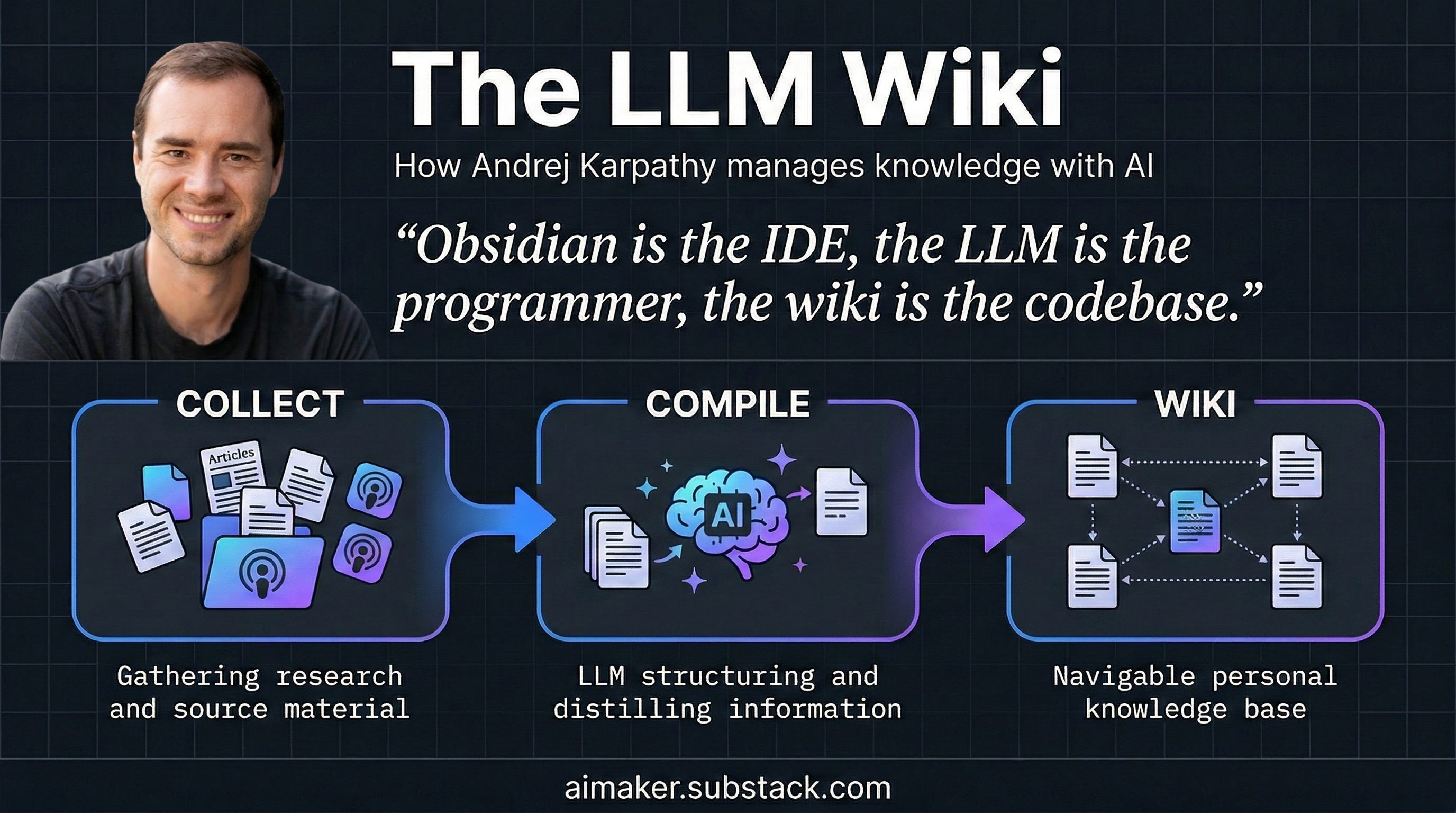
That is why Andrej Karpathy’s LLM Wiki idea stuck with me. The basic pattern is simple: collect raw material, let an LLM turn it into wiki pages, and let those pages connect to each other over time.
Obsidian becomes the place where I view and navigate the notes. Claude Code becomes the agent that processes the material. Markdown becomes the format both of us can read.
Pretty simple in theory.
But the reality needed more restraint than I expected.
My Setup Has Three Layers
In the episode, I walked through the three layers I use:
Sources: articles, podcast transcripts, book notes, YouTube captures, and my own quick thoughts.
Wiki pages: summaries, people pages, concept pages, related ideas, and cross-links.
Rules: a
CLAUDE.mdfile that tells Claude Code how this second brain should behave.
The first two are self-explanatory, but the third deserves more explanation.
Without rules, Claude can make connections too easily. It will happily link everything to everything if you let it. That looks cool for five minutes, but the more wiki pages you have, the longer it takes Claude to make connections—and it can also make connections that aren’t entirely relevant anymore.
So I added guardrails.
I cap the number of links. I don’t let every person or podcast become its own page if they’re only mentioned once. I make Claude read the index before diving into every full note, because reading everything every time wastes tokens and makes the system heavier than it needs to be.
I also use a weekly cleanup command to find broken links, loose pages, and weak idea connections.
This is where the second brain became more useful for me. The AI still creates summaries, but what keeps me using it is that it builds a small, readable network of ideas that I can revisit whenever I want to deep dive into specific topics of interest, whether it’s human psychology, AI, personal productivity, business, etc.
The Five Commands That Run It
I showed five commands during the episode:
Ingest URL: I give Claude Code an article link. It fetches the source, saves it, summarizes it, and connects it to related wiki pages.
Process Inbox: I drop quick thoughts into an inbox, then Claude Code decides where they belong.
Ingest Podcast: I save a podcast or YouTube transcript, then Claude Code turns it into pages for the guest, episode, ideas, and related topics.
LintWiki: I run this as a health check to clean up weak links and fix structural issues.
Reflect: I give Claude Code a vague thought, and it interviews me until the idea becomes clearer.
In my previous post, I spoke about number 1, 2 and 4, but I recently added 3 and 5 as part of improvement of my second brain process.
Let me explain for each of them.
Ingest Podcast
I like to watch podcasts on YouTube.
Whenever I find an interesting episode, I download the transcript using an Obsidian plugin and extract the insights with Claude Code, then generate wiki pages that contain the show name, episode, guest, and related ideas mentioned in the podcast.
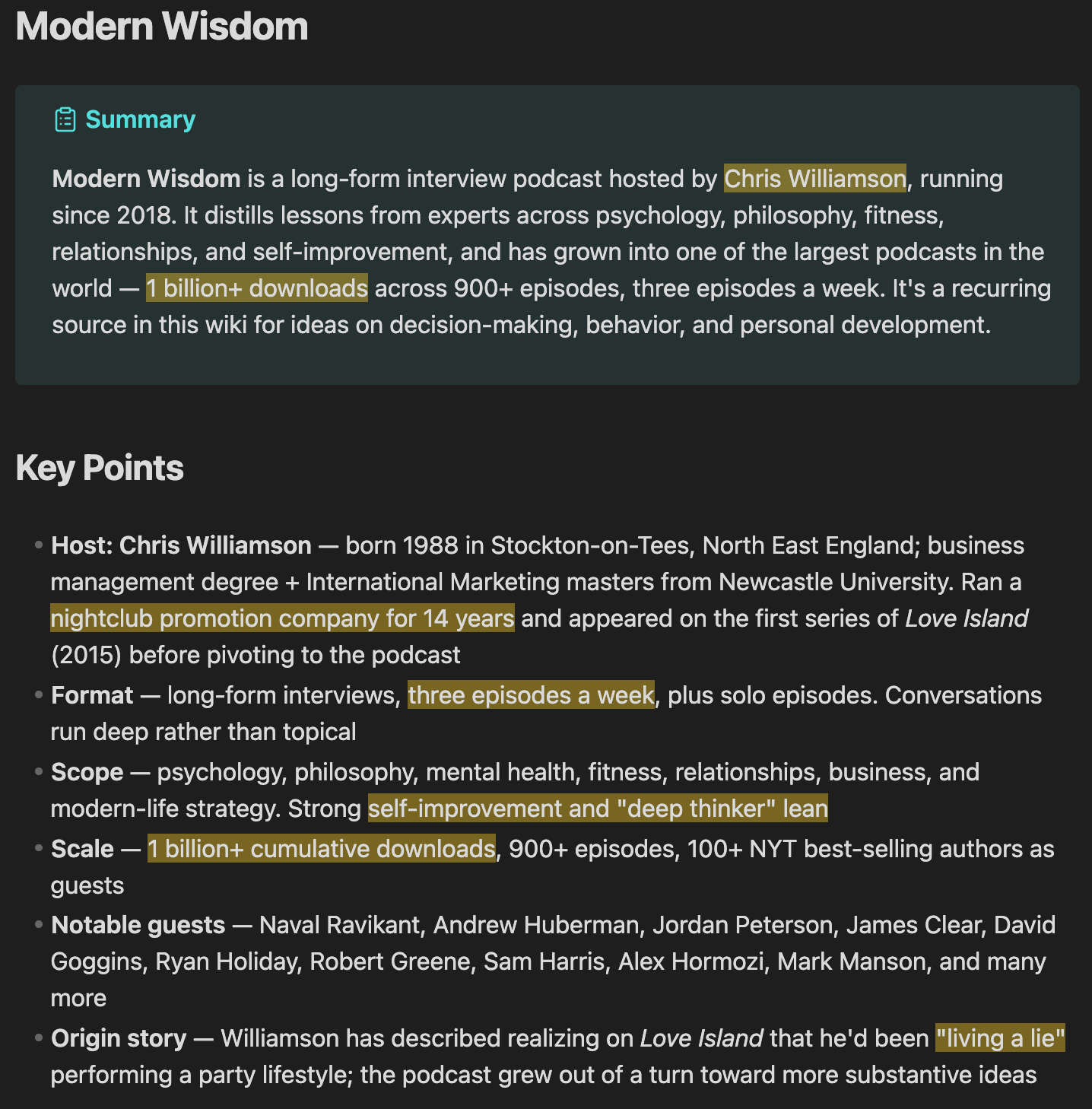
When I run the /ingest-podcast command, it summarizes the key highlights of the episode, generates a wiki page about the show, and lists all relevant episodes. In my demo example, I use Modern Wisdom, which has its own page and a list of episodes I’ve watched. It’s easier for me to use that page as a reference to explore the episode later if I want to go deeper.
Reflect
Reflect is the command that makes the system work like a real AI thinking partner, capturing my thoughts with the goal of generating insights from them.
For example, I showed a thought I had saved: “AI is a reflection of its human.”
On its own, that is not a real idea yet. It sounds like something that could become an essay, but it is still too vague.
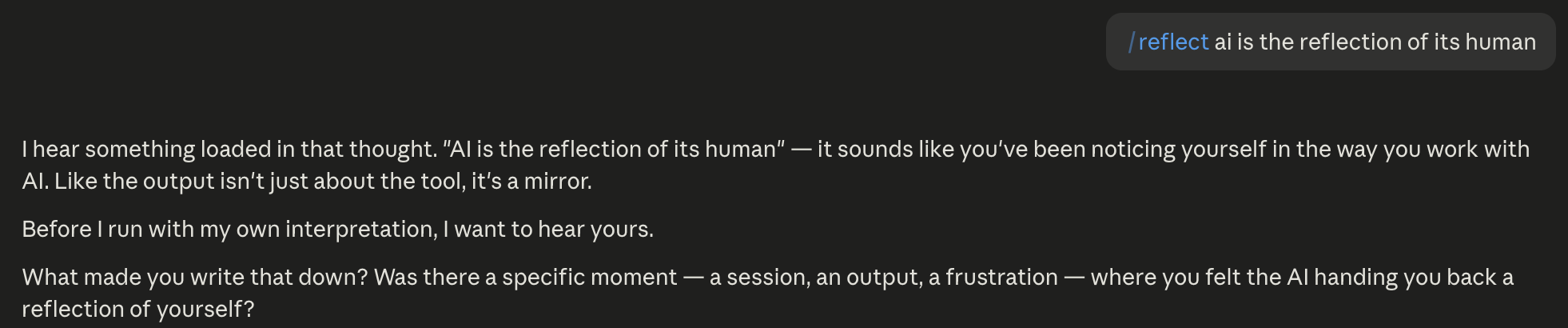
When I run Reflect, Claude does not immediately turn it into a polished note. It asks questions first. What do I mean by reflection? Am I talking about prompting skill, taste, judgment, patience, or the way I work with the tool?
Then I answer from experience.
The back-and-forth continues until the thought has enough shape to become a wiki page. In this case, it became a page around AI as a mirror for thinking: the idea that the quality of AI output often reflects the whole human thinking loop around the model.
That is the kind of thing I would probably lose if I only saved the sentence and moved on.
And this is one of my favorite ways to use AI, because I can just talk using Wisprflow to have real conversations and eventually learn more about why I said the things I said. It gives me real clarity about where it is coming from and what it is supposed to mean for my life.
Dheeraj’s Version Was Completely Different
Dheeraj brought in a useful counterpoint.
He does not use his second brain mainly for articles and personal thoughts. He uses it more like a business operating layer.
His sources are things like Gmail, Substack DMs, YouTube comments, sponsorship conversations, subscriber intelligence, and people profiles. He also mentioned using a triage command to process those inputs and connect them back to the right areas.
That made the episode better because it showed two very different versions of the same pattern.
My version starts from learning and reflection.
His version starts from relationships, operations, and business signals.
Someone in the chat asked whether they should build a dedicated second brain for a specific investment advisor. I said they could add that person into a broader second brain, especially if they want to connect the advisor’s principles with other investing ideas. One of audience also mentioned NotebookLM as a possible fit for that kind of deep source collection.
Here’s how I think about it:
If you want to study one person’s thinking deeply, NotebookLM may be enough. If you want that person’s ideas to connect with your larger body of notes, then a broader wiki-style second brain starts making more sense.
Where I Would Start
If you want to try this, I would not start by building the full version I showed.
I would start with one input stream.
Pick the thing you already collect but rarely revisit:
Articles you save and forget.
Podcast notes you never process.
Voice memos or quick thoughts.
Subscriber replies or customer messages.
Research notes around one person, topic, or project.
Then ask one question: what do I want this material to help me do?
If the answer is “remember what I read,” build around sources and summaries.
If the answer is “understand my own thinking,” build around reflection.
If the answer is “manage relationships or opportunities,” build around people and inbox triage.
A useful second brain stores your information, but it also reveals what you keep returning to, what you are still unsure about, and where your thinking is changing.
The LLM can handle the maintenance.
You still have to bring the judgment.
Show Details
Show: One Shot Show
Episode: 17
Topic: Wyndo’s AI second brain with Obsidian and Claude Code
Live schedule: Wednesdays at 10:00 AM ET on Substack
Timestamps
00:00: Episode intro and topic setup
01:10: Why Karpathy’s LLM Wiki idea sparked this setup
04:00: Dheeraj frames the digital twin idea and why starting small matters
05:42: Wyndo explains journaling and capturing fleeting thoughts
07:41: The three layers: source, wiki, and
CLAUDE.md15:28: How one link becomes a connected wiki page
19:37: The five commands that run the system
21:03: The Reflect command and Socratic dialogue
26:01: Guardrails that stop the wiki from over-linking
30:24: Why Obsidian and Markdown work well with Claude Code
31:37: Ahad’s maintenance question and Dheeraj’s Markdown-only version
33:29: CLI versus MCP and token usage
35:01: Live walkthrough of Wyndo’s second brain folders
38:58: Capturing a YouTube podcast into Obsidian
42:04: Turning “AI is a reflection of its human” into a wiki page
48:46: Dheeraj’s business OS version
50:23: Minders asks about building a second brain for an investment advisor
56:01: Dheeraj returns and explains PARA-style organization
01:00:21: Des Kennedy asks whether ingest and reflect are slash commands or skills
01:02:18: Wrap and next episode
Resources Mentioned
Obsidian: The note app I use to view and navigate my Markdown-based second brain.
Obsidian Mobile / Sync: Mentioned as the reason I can capture thoughts on mobile and process them later on desktop.
Obsidian Web Clipper / extension: Used in the demo to save YouTube podcast material into Obsidian.
Claude Code: The agent tool I use to process notes, run commands, create wiki pages, and maintain links.
Claude / Claude Desktop: Discussed as the AI layer behind the workflow.
CLAUDE.md: The instruction file that tells Claude Code how the second brain should behave.Markdown: The file format that makes the notes easy for AI tools to read and edit.
VS Code: Mentioned as another way to view Markdown files.
Cursor: Mentioned as another possible editor for the files.
Notion: Compared with Obsidian. Useful for many things, but less native to this exact Markdown workflow.
Evernote: Mentioned as an older note-saving app where saved material can sit unused.
MCP servers: Discussed as a connection layer that can use more tokens than lightweight CLI tools.
CLI tools: Discussed as a lighter way for Claude Code to interact with local tools.
Tavily: Mentioned by Dheeraj as an example of a tool that can be connected through CLI.
NotebookLM: Mentioned by Ahad and Wyndo as a good candidate for studying one advisor or source collection deeply.
YouTube: Used as a podcast source in the demo.
Spotify: Mentioned as another podcast source option.
Gmail: Part of Dheeraj’s inbox triage setup.
Substack DMs: Part of Dheeraj’s subscriber and relationship intelligence flow.
YouTube comments: Part of Dheeraj’s producer-side input stream.
WhatsApp: Mentioned when Wyndo checked on Dheeraj after he disconnected.
Andrej Karpathy’s LLM Wiki idea: The inspiration behind the AI second brain pattern.
Dan Koe: Mentioned as an example of a source whose writing ideas could connect with other notes.
Paul Graham: Used in the demo as an example of an article and author page.
Modern Wisdom: Podcast used in the demo.
Chris Williamson: Host of Modern Wisdom, mentioned in the podcast examples.
Mark Manson: Guest example from a Modern Wisdom podcast Wyndo had ingested.
Arthur Brooks: Another Modern Wisdom episode example already in the wiki.
David Friedberg: Podcast guest used in the live ingest demo.
Warren Buffett: Mentioned as an example of an investment advisor someone might study deeply.
Tiago Forte: Mentioned by Dheeraj as the creator of PARA.
PARA method: Projects, Areas, Resources, Archive. Dheeraj used it to explain his organizing structure.


