



This week’s One Shot Show started with a job search problem, but it quickly became something more useful than that.
Pawel Jozefiak joined me and Dheeraj Sharma to show the job finder agent he built for his friends and family. It searches across job sources, scores roles against a personal profile, sends a morning email, lets the person reply with feedback, updates the profile, and saves history in a tracker.
For context, Pawel writes Digital Thoughts, where he shares AI experiments and future-of-work notes with the mistakes included. He describes himself as a curious tech enthusiast, which fits what I liked about the session where he was showing a real build that came from trying to help people close to him instead of another polished theory.

I also recommend checking out these three pieces from Pawel:
What I liked most in this demo was how real it felt.
This was not a vague “AI can help you find jobs” demo. Pawel had built the thing around actual people close to him, with all the small details that make a tool usable: a morning report, fit explanations, concerns, feedback, history, and a way to keep improving the search.
The part that stayed with me was the profile.
Before the dashboard, before the email, before the tracker, the system needed to know what a good job actually means for one person.
That is what this post is about: how to build an AI job finder that does not just give you more listings, but helps you spot the roles that are actually worth opening.
The problem is not finding jobs
Most job search tools solve the obvious problem.
They help you find more listings.
But Pawel said something early in the demo that felt much closer to the real problem. The hard part is finding a role that is actually aligned with the person, not only aligned with the title.
A “marketing manager” role can mean ten different things depending on the company. One company might mean brand, positioning, and writing. Another might mean lifecycle email. Another might mean paid acquisition, dashboards, events, sales support, or whatever nobody else owns.
The title is not enough.
That is why Pawel’s job finder started with a profile. Not a resume. Not a LinkedIn export. A profile that explains the person’s experience, target roles, salary floor, location rules, company preferences, and what they actually want next.
That matters because the agent needs something to judge against.
If the profile says, “I want AI jobs,” almost anything can look relevant. If it says, “I want remote AI workflow roles where I build internal tools for small teams,” the agent has a real filter.
This is the first lesson I would take from Pawel’s build: The job finder is only as good as the profile it reads.
What Pawel built: A job finder AI agent
Pawel’s full version has a lot of pieces.
The morning flow looks roughly like this:
The agent reads a personal profile.
It searches across multiple job sources.
It scores each role against the profile.
It sends a short morning email with five to ten roles.
Each role includes the company, link, why it fits, concerns, and next steps.
The recipient can reply with feedback.
The agent updates the profile or state files for future searches.
A job tracker shows what was found, saved, applied to, and rejected.
The impressive part was not only the automation. It was that Pawel built around the people using it.
He started with email because everyone knows how to open an email. Then he added a tracker because email alone was easy to forget. He made the system accessible through a local app, then later moved toward a server so people could access it more easily.
To be honest, I didn’t expect this. I thought he was going to show me how he ran the job-finder agent inside Claude Code’s terminal. Instead, he built a proper UI and dashboard that people can see visually and click through. I think it was awesome.
And he shared his agent secret with me!
What this walkthrough will help you build
After the live session, I kept coming back to one practical question:
“What is the smallest version of Pawel’s job finder that an AI Maker reader could actually run this week?”
Not as a polished product. Not as a dashboard for other people. Just as a useful daily job finder inside Claude Code, Codex or Cowork.
Thanks to Pawel for generously sharing his agent template with me.
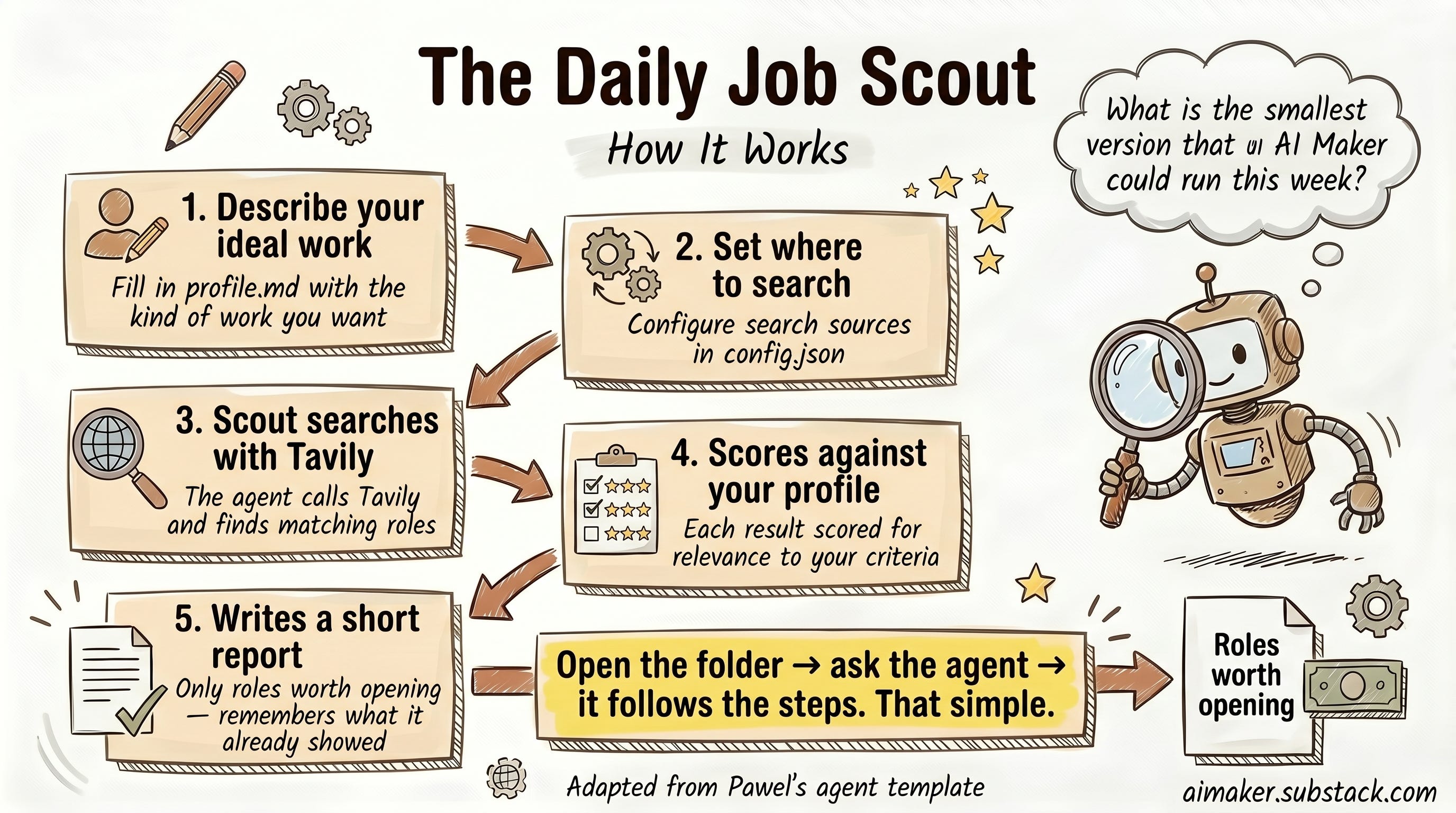
So I adapted the idea into a skill-based folder. You open the folder, ask the agent to run the scout, and it follows the steps from there. The agent reads the files, calls Tavily, scores the results, writes the report, and remembers what it already showed.
The outcome is simple:
You describe the kind of work you want in profile.md.
You describe where to search in config.json.
The scout searches with Tavily.
It scores each result against your profile.
It writes a short report with the roles worth opening.
That is the version I want you to leave with.
I called this version the Daily Job Scout.
Not an agent that applies for jobs. Pawel was clear about this too. The agent should reduce noise. The human still decides.
Job applications involve your time, reputation, preferences, and future. I do not want the agent pressing submit for me. I want it to bring me a short list good enough to inspect.
The report you are building toward looks like this:
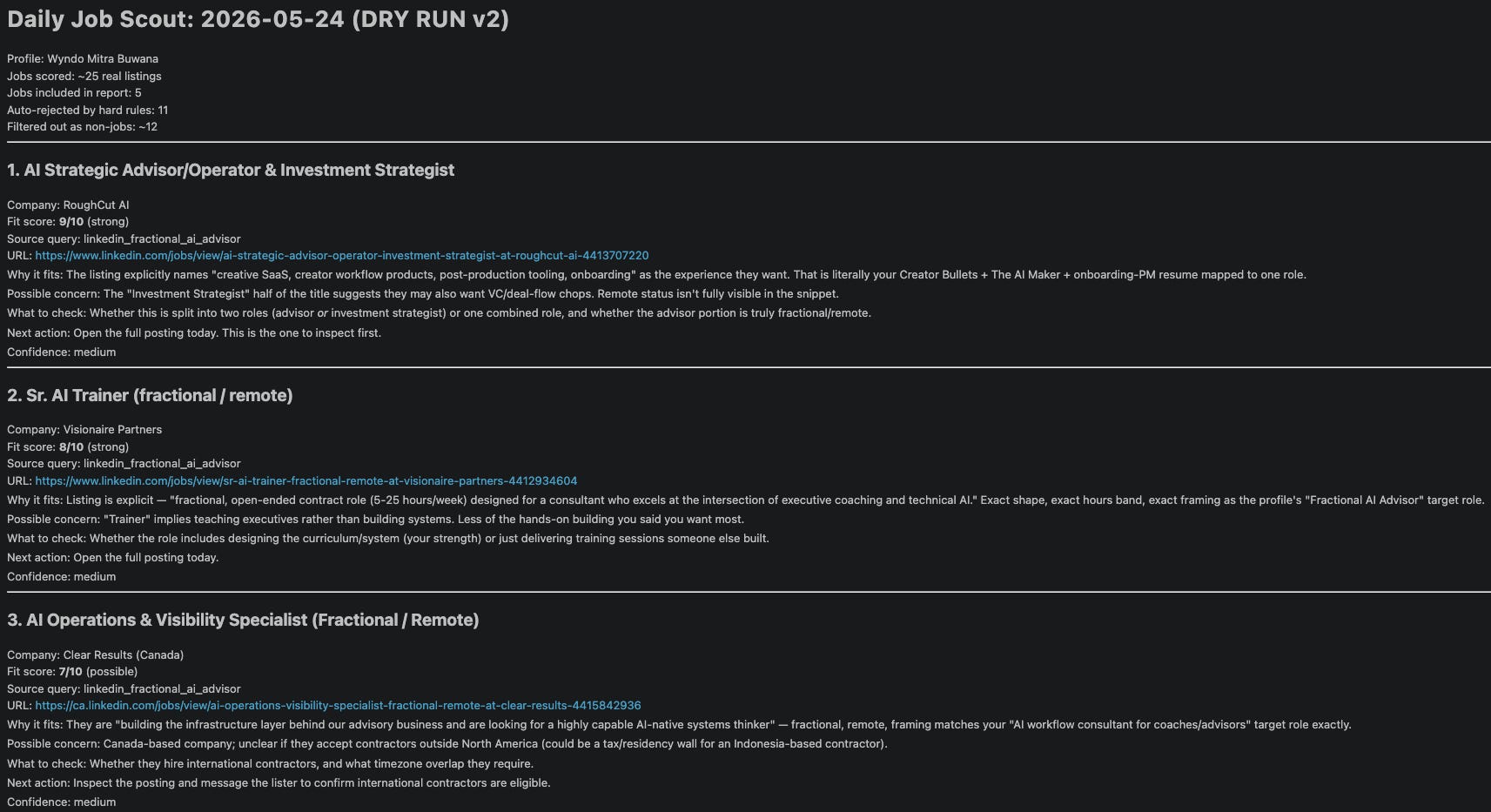
That is the whole value of Daily Job Scout.
It delivers jobs that actually suit you, based on who you are and the criteria you’re looking for.
And the bigger lesson is reusable beyond job search.
You can apply lessons here to turn a messy recurring decision into an agent loop:
Give the agent a profile.
Give it a search plan.
Give it a scoring rule.
Make it produce a small report.
Use the report to improve the profile and search plan.
That pattern can show up in job search, client research, lead sourcing, grant discovery, freelance opportunities, competitor tracking, or anything else where personalized results or quality matter more than quantity.
For this post, we will keep it concrete: a Daily Job Scout that runs inside Claude Code, Cowork, or Codex.
The build: Six files inside AI agent skill folder
Here is the file structure that you can download in this post and run it yourself:
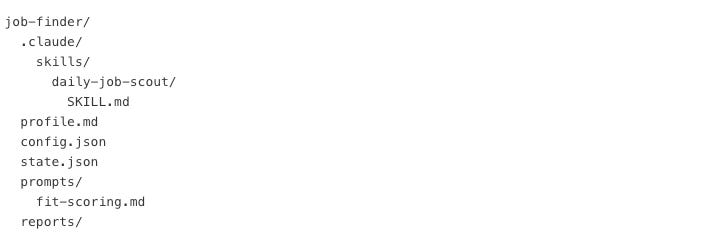
What you need to pay attention to is the SKILL.md. It tells Claude Code, Cowork, or Codex how to run the scout: read the profile, read the config, call Tavily, score the results, write the report, and update state.
Now let’s explore what they’re built for, and how to use and customize them for your needs.
File 1: profile.md
This is the most important file.
It should answer:
Who are you?
What roles do you actually want?
What rules should reject a job immediately?
What signals make a job more interesting?
What signals make a job suspicious?
What strengths should the agent look for in the posting?
What matters this month?
Here is the shape:


