



For Episode 8 of One Shot Show, Dheeraj Sharma and I came back to the idea that started the whole season: building an AI research agent.
In Episode 1, Dheeraj showed a Claude Code agent that could take a topic, research competitor content, pull sources, and create a brief for a new article. That was useful because it solved the painful part most people know too well: staring at a topic and wondering what angle has already been covered.

This episode pushed the idea one step further.
Instead of asking an agent to research one topic on demand, Dheeraj built a competitor intelligence agent in Claude Cowork. The agent watches a competitor list, runs weekly scans, finds content gaps, ranks opportunities, and keeps logs so the next run does not start from zero.
That last part is the whole story for me.
The interesting shift goes beyond “AI can research competitors.” We already knew that. The more useful shift is that research can start compounding. The agent can compare this week’s scan against last week’s scan, remember your corrections, notice patterns over time, and change its recommendations based on what already happened.
That distinction matters because most AI research still resets every time you open a new chat. You get a useful answer, then the next session begins cold again.
💡 Quick related note…
If you use Claude long enough, you’ll hit the usage limit. I did. My friend Ruben Hassid figured out the fix: 23 habits that cut his token waste so much he now hits the limit once a month instead of by 2 pm.
Free guide → How to stop hitting Claude usage limits - by Ruben Hassid
Back to the bigger research problem.
That works for one-off research. It starts to break down when the job is monitoring change over time.
Why One-Time Research Is Starting to Feel Limited
Most AI research workflows still work like this:
You have a topic.
You ask Claude, ChatGPT, Perplexity, or another AI tool to research it.
You get a brief.
You write the thing.
Next time, you start again.
That is already better than manually opening ten tabs and piecing the picture together yourself. I still do plenty of one-off research because sometimes that is all I need.
But competitor tracking is different.
If you run a newsletter, blog, product, agency, or any business where timing matters, today’s competitor posts are only part of the picture. You need to know what changed. Which topics keep coming back. Which gaps you ignored. Which recommendations the agent already made two weeks ago that you never acted on.
Dheeraj used his travel blog as the example. His site covers Himalayan travel, road trips, seasonal route updates, and practical guides. For a travel site like that, freshness matters. If a competitor publishes a route-opening update before him and he waits three weeks, he loses the timing advantage.
That is the weakness of one-time research. It can answer “what should I write about this topic?”
It cannot easily answer “what did I miss, what changed, and what should I stop delaying?”
That is what this competitor intelligence agent was built to do.
The Architecture Matters Because It Changes the Question
Before we get into what the agent found, I think it helps to understand the shape of the system.
Dheeraj published the full technical walkthrough on his newsletter, so I am not going to recreate the build guide here. If you want the exact files, folder scaffold, and setup steps, read his version. What I want to pull out is the architecture because that is the part anyone can learn from even if they never build this exact agent.
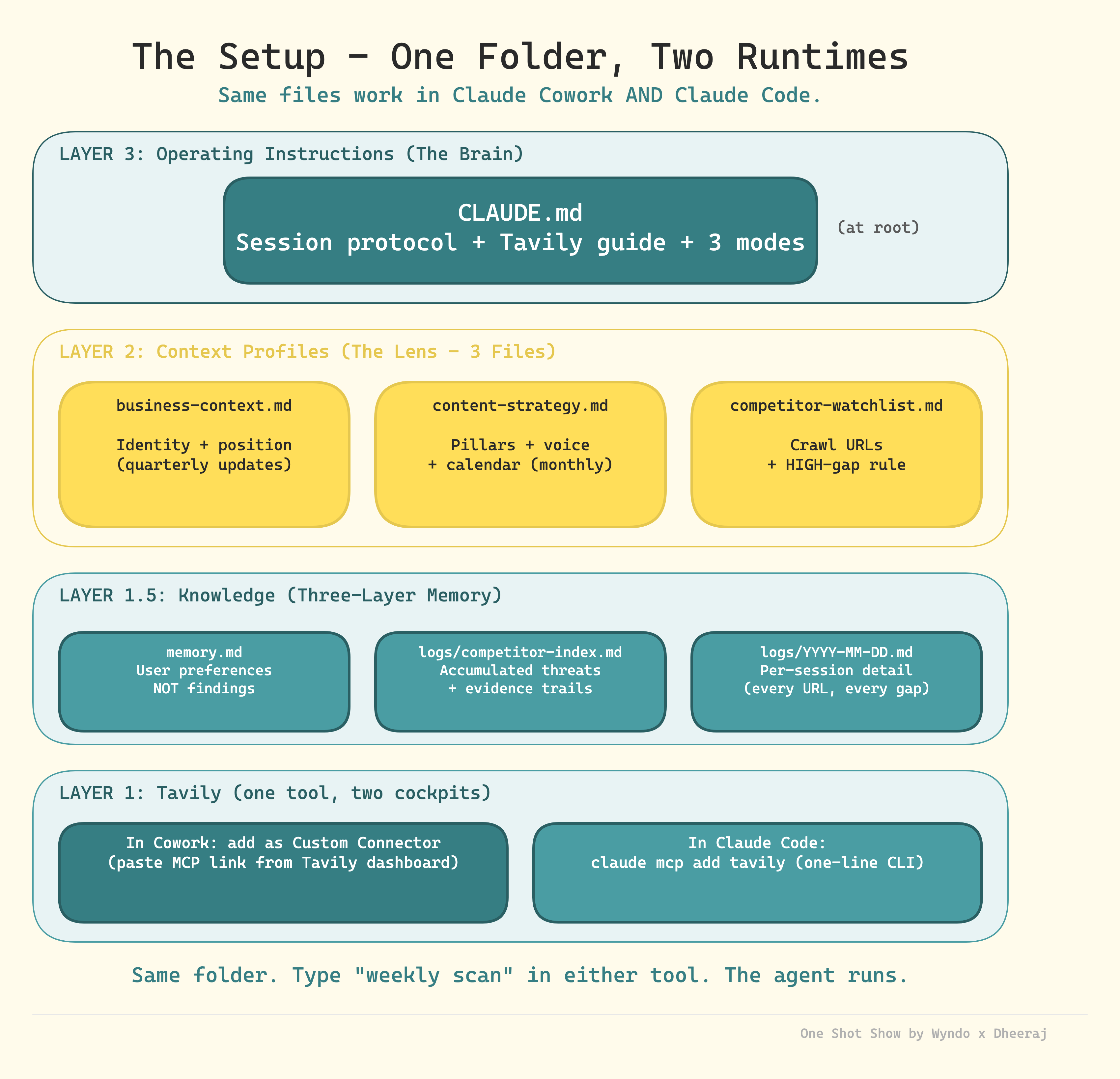
The agent has four practical layers:
Tool layer: what the agent can use to reach the web. In this demo, Tavily handled search, extract, crawl, map, and deeper research.
Knowledge layer: what the agent remembers between runs. Corrections, patterns, scan history, and lessons from past failures live here.
Context layer: what the agent knows about the creator. Business context, audience, content pillars, current calendar, competitor list, and what counts as a meaningful gap.
Operating layer: how the agent should behave. Weekly scan, monthly review, topic white space check, output format, cost rules, and when to update memory.
That is the practical lesson. A useful agent needs more than a prompt with web access. It needs a small decision system around it. When those layers work together, the question changes.
The Folder Structure Worth Copying
Dheeraj’s full post includes the exact project folder. I think this is useful as a reference because it shows how the abstract layers turn into files.
The structure looks roughly like this:
competitor-intelligence/
├── CLAUDE.md                          ← The operating brain
├── memory.md                          ← Blank to start, updates itself
├── context-profiles/
│   ├── business-context.md            ← Who you are
│   ├── competitor-watchlist.md        ← Who you watch
│   └── content-strategy.md            ← What gaps matter
├── logs/
│   └── competitor-index.md            ← Blank, populated after first scan
├── templates/
│   ├── weekly-scan-template.md
│   ├── topic-whitespace-template.md
│   └── monthly-review-template.md
└── output/
    ├── weekly-scans/
    │   └── _example-weekly-scan.md    ← Real format example
    └── topic-checks/
        └── _example-topic-check.md    ← Real format example
Here are some details for each file and folder:
CLAUDE.mdis the operating brain. This is where the agent learns how to behave, which scan modes exist, how to use Tavily, how to format output, and when to update memory.memory.mdis where the agent stores corrections and patterns that should survive between runs.The context-profiles/folder is the taste layer. business-context.md tells the agent who you are. competitor-watchlist.md tells it who or what to watch. content-strategy.md tells it what matters, what to ignore, and what is already planned.The logs/folder is the trail. It gives the agent a way to see what happened across previous scans instead of treating each run as new.The templates/folder keeps the outputs consistent. Weekly scans, topic checks, and monthly reviews should not all come back in a different shape.The output/folder is where the work lands. Over time, this becomes the source material the agent can compare against.
That is the part I would copy from Dheeraj’s build: the pattern of operating brain, memory, context, logs, templates, and output. The travel niche and exact competitor list are just his version of it.
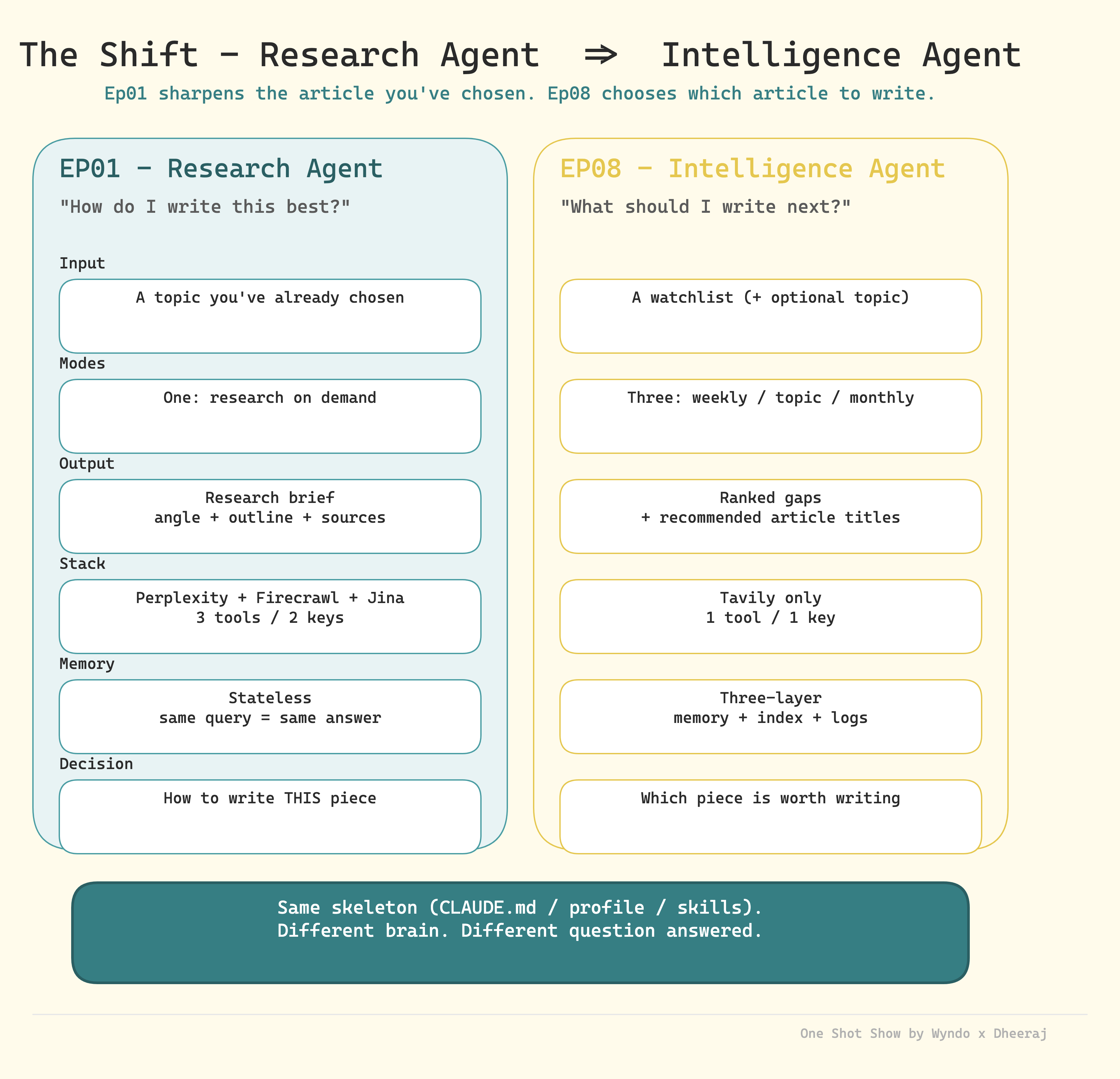
The old research agent started with a chosen topic. You gave it something like “research Ladakh travel,” and it returned a brief, sources, angles, and an outline.
The new competitor intelligence agent starts with a watchlist. It already knows the competitors. It already knows Dheeraj’s content pillars. It already knows what his travel site covers, what he avoids, which audience he writes for, and what counts as a meaningful gap.
So instead of asking, “How should I write this piece?”
The agent asks, “Which pieces are worth writing at all?”
During the demo, Dheeraj showed three core modes:
Weekly scans: Check the competitor list and surface high-priority gaps.
Monthly scans: Look for broader patterns over a longer period.
Topic white space checks: Ask whether a specific idea has a real opening, such as solo women riders on Himalayan roads.
This changes the whole ouput. Instead of producing a research brief, the agent now generates ranked gaps, suggested article ideas, and follow-up recommendations.
That sounds like a small difference, but it changes how the agent fits into the creative process.
For those of you who find it easy to get ideas for what to write about, I bet many of you find it hard to prioritize. There are always too many possible topics, too many signals, too many interesting things to chase. The agent’s real job is not to add more ideas; it is to help decide which ideas deserve attention now.
The Memory Layer Is What Made It Feel Different
The biggest addition from Episode 1 was the memory layer.
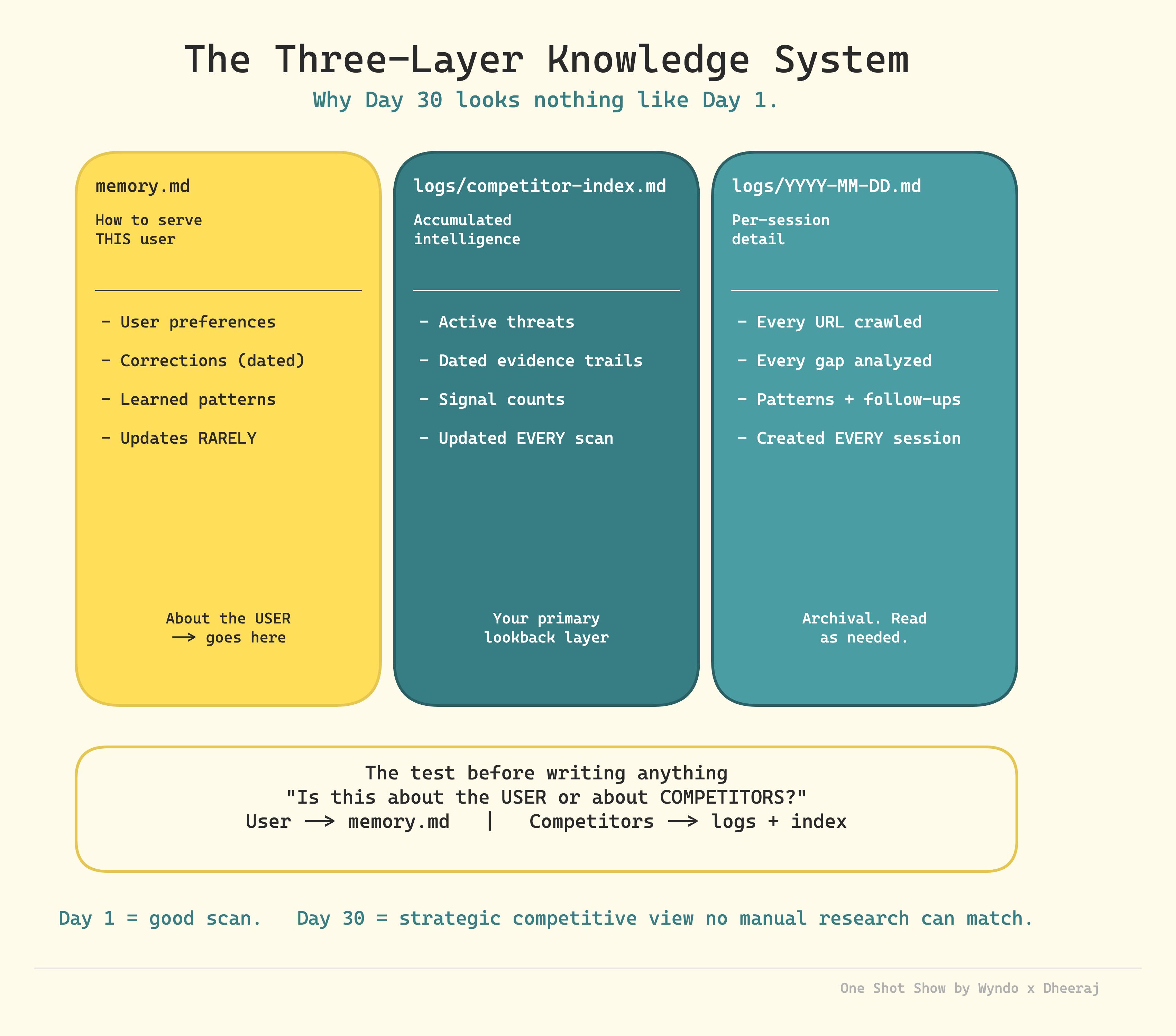
Dheeraj had the agent read a memory.md file, output logs, competitor indexes, and scan history. The point was simple: the agent should not treat every run like a fresh conversation.
It should know what happened last time.
For example, after one scan, the agent might surface a high-priority article idea because a competitor published a timely road update. If Dheeraj ignores it, the next scan can notice that the same gap is still open and raise the urgency.
That is a very different kind of recommendation from “here are five content ideas.” It has memory of the recommendation. It has evidence that the recommendation was not acted on. It can compare the current scan against past scans and say, in plain English, “You should probably stop delaying this.”
I added a similar point during the live because this is how I think about research for AI Maker too. If I run AI research every week, isolated summaries are only the beginning. I want the system to notice that AI agents have been showing up repeatedly across the last four scans, or that a specific theme keeps returning, or that my own content plan keeps dodging a topic readers probably need.
The value comes from the pattern across reports.
That is why the logs matter. They turn research from a snapshot into a trail.
I wrote in-depth post about it here:

Of course, there is a caveat. More memory does not automatically mean better output. Dheeraj said his memory file is still something he manages manually, and the logs need a rolling window so they do not get too heavy. I agree with that. If the agent reads every old file forever, it eventually becomes slow, noisy, and expensive.
The craft is deciding what deserves to be remembered.
Tavily Replaced Three Tools in the Research Layer
Another practical shift in this episode was the research tooling.
In Episode 1, Dheeraj used Perplexity, Firecrawl, and Jina AI together. Perplexity handled synthesis, Firecrawl handled scraping, and Jina AI acted as a fallback.
For this competitor intelligence agent, he moved toward Tavily as the primary research connector.
That made sense to me because Tavily covers several jobs in one place: search, crawl, extract, map, and deeper research. When you are building a recurring agent, fewer moving pieces can matter more than having the flashiest individual tool for each job.
I mentioned during the stream that this was a big mover for me too.
My frustration with Perplexity inside an agent is that it adds another reasoning layer. Claude asks Perplexity. Perplexity runs its own agentic search and summary. Then Claude reads that output and reasons over it again.
Sometimes that is useful. Other times, I just want Claude to get closer to the raw internet data and make the judgment itself.
I am not saying everyone should switch. I am still testing where Tavily fits best in my own setup. The bigger lesson is that the agent should let you swap the research tool without rebuilding the whole system. The blueprint stays familiar. The tools change when the job changes.
Where the Agent Started Showing Judgment
This is where the demo stopped feeling like a competitor tracker and started feeling closer to editorial judgment.
The useful part was not that the agent could search the web. Lots of tools can do that now.
The useful part was that it had enough context to decide what the search meant.
Taste Before Search
The best part of the demo happened before the agent ever ran a scan. Dheeraj had already written down his business context, content strategy, competitor watchlist, memory rules, and operating instructions.
That is what makes the output useful. Without those files, a competitor scan is just a summary of what other people published. Helpful, but generic.
With those files, the scan can answer a better question: “Given who I am, what I write, what I already cover, and what I want to avoid, what should I pay attention to?”
That distinction matters because most AI research output feels bland for the same reason. The model does not know your taste, constraints, off-brand angles, or seasonal timing.
The context files give the agent taste before it touches the web.
Constraints Before Ideas
During the demo, Dheeraj asked whether he should write about solo women riders on Himalayan roads.
The agent skipped the easy answer: “Yes, there is a gap. Write it.”
It flagged a constraint: Dheeraj should not publish that guide without first-hand experience or a co-author who actually fits the topic. Since he is not a solo woman rider, the agent suggested finding someone from his community or network who could bring real experience.
That was my favorite moment in the whole session.
A basic content tool would call the gap an opportunity and move on. This agent connected the topic to credibility, reader trust, and what kind of source would make the article worth publishing.
That is the difference between content ideas and editorial judgment.
I do not want agents that only tell me what can be written. I want agents that tell me what should not be written yet because the evidence is not good enough.
That is harder to build, but it is much more useful.
The Less Fun Part: Connectors Can Get Expensive and Noisy
The Q&A brought up something people do not talk about enough: connectors and MCP servers can quietly eat a lot of tokens.
One of audiences asked which actions use more credits for agents: searching local files, accessing Google Drive, accessing Notion, and so on.
Dheeraj’s answer matched my experience. Local file search is usually lighter. Once you trigger MCP connectors, token usage can climb quickly because the model has to inspect tool schemas, tool results, and extra data from those services.
That is why Dheeraj disabled every connector he did not need for the run. Gmail, Calendar, Drive, Notion, and other tools stayed off. Tavily stayed on.
That sounds boring, but it is important.
Agents get worse when they have too many irrelevant tools available. They consume more context, take longer to decide, and sometimes wander into services that have nothing to do with the task.
My rule is getting stricter here:
Turn on only the connector needed for the job.
Prefer direct API or CLI access when it is available and reliable.
Avoid connecting everything just because the tool makes it easy.
Treat MCP access like a budget decision, not a default setting.
This is one of those unglamorous operational details that separates a working agent from a demo. The demo looks better when everything is connected. The real system works better when the agent has fewer ways to get distracted.
What Happens If the Agent Learns the Wrong Thing?
Another audience asked the most important safety question near the end: what happens if bad data enters the system and starts corrupting the agent’s future decisions?
That is a real risk.
If your logs contain hallucinated information, stale competitor data, or wrong conclusions, the agent may keep building on top of that bad foundation. The more “memory” you add, the more you need a way to audit and roll back.
Dheeraj’s answer was practical: use Git or some other version control for the folder. If the agent edits memory files, logs, or indexes in a bad way, you can inspect the diff and roll back.
I would add one more thing: start with plan mode when the action matters.
If the agent is only writing a research report, the downside is small. If it is editing files, updating indexes, changing memory, or touching business data, I want to see the plan first. Claude Cowork’s to-do list helps here because you can interrupt, redirect, or stop the run if the plan looks wrong.
Hooks can also help block dangerous actions in Claude Code. Dheeraj mentioned using hooks to prevent file deletion. But hooks are not magic. If you are working with important files or live data, you still need backups, permissions, and human review.
This is the part of agent building that feels less exciting but matters more over time.
The smarter the agent gets, the more boring your safety habits need to be.
How to Use This in Your Own Work
Dheeraj used a travel blog as the example, but the structure works anywhere you need to notice change over time.
The useful move is copying the shape:
What should the agent watch? Competitors, customers, job listings, research papers, product updates, support tickets, internal docs, or social conversations.
What should the agent care about? Your goals, audience, constraints, deadlines, quality bar, and what counts as important.
What should the agent remember? Past recommendations, ignored opportunities, recurring risks, repeated questions, and corrections you made.
How often should it run? Weekly scan, monthly review, or topic-specific check when a question comes up.
For a creator, this could surface topics competitors keep covering that you have ignored.
For a business owner or entrepreneur, it could track customer complaints, competitor offers, and recurring buying objections so your next offer is not based on the loudest message from yesterday.
For a sales team, it could watch competitor positioning and flag when prospects keep asking about the same objection.
For an operator, it could review recurring process issues and tell you which problems keep coming back after you thought they were fixed.
The output should not be “here are 10 things I found.” That is how you get more noise.
The better output is closer to:
“This pattern showed up three times this month.”
“You already acted on this, so do not treat it as new.”
“This looks urgent, but the evidence is thin.”
“This keeps getting ignored, and the cost of waiting is rising.”
“This is worth doing now because it matches your current goal.”
That is the practical value: less information overload, more pressure on the decisions that matter.
The Takeaway
The practical takeaway from Episode 8 is simple:
If your AI research starts fresh every time, you are leaving value on the table.
You do not need Dheeraj’s full competitor intelligence setup to test the idea. Start smaller: pick one watchlist, one strategy file, and one memory file. Then run the same research process once a week and save the output. After a month, ask the agent to compare the latest scan against the earlier ones.
The first report will probably be ordinary.
The fourth report is where the pattern starts to show.
That is the real promise here. The agent does not need to be perfect on day one. It needs to preserve enough useful history that each run has more judgment than the last one.
I am still cautious about over-automating this. A bad content calendar generated faster is still a bad content calendar. But I am convinced the compounding layer matters.
The future of AI research includes better search, but the bigger unlock is research that remembers what it already learned.
One Shot Show Details
This was Episode 8 of One Shot Show, Season 1. We go live every Wednesday at 10:00 AM EST on Substack.
Season 1 episode list:
Episode 1: Building a Content Research Agent with Claude CodeEpisode 2: Google Opal vs n8n vs MakeEpisode 3: Substack Competitive Analysis Using Claude CoworkEpisode 4: n8n vs Claude Code and CoworkEpisode 5: Claude Channels vs OpenClaw vs DispatchEpisode 6: Notion AI AgentEpisode 7: Claude Skills with Ilia from ProsperEpisode 8: Competitor Intelligence Agent with Claude CoworkEpisode 9: How to Turn 1,000 Podcast Clips Into a Living Knowledge Base with Claude Code
Timestamps:
00:00: Welcome to Episode 8 and recap of the season
01:51: Dheeraj introduces the competitor intelligence agent
03:40: Research agent vs intelligence agent
05:46: Watchlists, weekly scans, monthly scans, and topic checks
06:35: Moving from Perplexity, Firecrawl, and Jina AI to Tavily
07:34: Wyndo on why Tavily can simplify the research layer
09:02: Adding the memory layer
10:57: Business context, content strategy, competitor watchlist, and operating instructions
12:06: Claude Cowork setup begins
16:24: Startup protocol check and context loading
22:13: Business context and audience files
23:58: Content strategy file and calendar
25:13: Competitor watchlist file
26:31: Tavily connector setup
29:35: Wyndo asks about instructing the agent to use Tavily
31:33: Running the weekly scan
34:00: Agent adapts after an initial zero-result search
35:00: Memory management and rolling logs
36:48: Terry asks how the agent gets better over time
39:35: Wyndo on connecting current research to past patterns
40:34: Weekly scan output and follow-up suggestions
41:50: Topic white space check for solo women riders
44:03: The agent flags the need for first-hand experience
45:29: Updating memory to skip medium-ranked gaps
46:22: Scheduled tasks and Dispatch
48:10: Pierre asks about credits and connector usage
49:44: Wyndo on MCP token usage and tool sprawl
53:24: Terry asks about corrupted data and hallucinations
54:33: Git, plan mode, and safer agent runs
55:07: Wyndo on accurate context files reducing hallucination risk
56:00: Hooks and dangerous actions
58:12: Closing notes and Season 2 preview
Resources Mentioned
Claude Cowork: The Claude interface Dheeraj used to run the competitor intelligence agent through a visual project session. Included in Claude’s product family.
Claude Code: Anthropic’s terminal-based agent tool. Dheeraj said he usually prefers it because it gives him more direct control.
Claude Desktop / Claude app: The broader Claude interface where Cowork lives, including chat, projects, connectors, and model selection.
Claude Sonnet: The model Dheeraj selected for the demo. No pricing was discussed during the session.
Claude Opus: Mentioned during the cost discussion as expensive when used through direct API calls.
Claude Skills: Reusable instruction packages discussed as part of previous One Shot Show episodes. Dheeraj referenced them while showing the Cowork UI.
Skill Creator: Mentioned indirectly through the previous episode with Ilia, where skills were created and tested.
Tavily: The main research connector used in this agent. Dheeraj and I discussed it as a way to handle search, crawl, extract, map, and deeper research in one tool.
Perplexity: Used in the first research agent architecture. We discussed it as useful, but sometimes an extra reasoning layer when connected to Claude.
Firecrawl: Used in Episode 1 for scraping competitor pages. In this episode, Tavily replaced part of that role.
Jina AI: Mentioned as a backup or fallback layer from the earlier research agent setup.
MCP: The connector protocol behind many Claude integrations. We discussed how MCP servers can increase token usage when too many are enabled.
Tavily MCP / Tavily connector: The specific connector Dheeraj enabled in Cowork for live internet research.
Claude built-in web search: Mentioned as something the agent should avoid when Tavily is intended to be the only research tool.
Gmail connector: Mentioned as a connector Dheeraj disabled because it was not needed for this run.
Google Drive connector: Mentioned during the connector and token usage discussion.
Google Calendar connector: Mentioned as a connector Dheeraj disabled for the demo.
Notion API / Notion connector: Mentioned as a possible data source and as Dheeraj’s own place for maintaining a content calendar.
Chrome connector: Mentioned in the Cowork connector list as something Dheeraj disabled for this session.
Excalidraw connector: Mentioned in the connector list as something Dheeraj disabled.
Visual Studio Code: Dheeraj said he often uses Claude Code with VS Code.
Dispatch: Claude Cowork’s mobile companion. Dheeraj described it as a way to trigger a topic white space query from a phone.
Scheduled Tasks: Cowork feature Dheeraj showed for running weekly or monthly scans automatically.
Routines: Mentioned as another Cowork feature, though Dheeraj said he probably would not use a routine for this specific agent.
LaunchCTL: Mentioned as the kind of scheduled job Claude Code might set up on a Mac when asked to automate recurring tasks.
Git: Recommended as version control for agent folders so corrupted memory, logs, or data can be inspected and rolled back.
Hooks: Mentioned as a way to block dangerous actions, such as unwanted file deletion, especially in Claude Code.


