



Dheeraj Sharma has been teaching n8n for a year and a half. He built a 47-lesson course on it. He knows every node, every data mapping trick, every JSON expression shortcut.
So when we sat down for Episode 4 of One Shot Show this week to compare Claude Code and n8n, I expected him to defend his home turf. He did, in some areas. But then he said something I wasn’t prepared for:
“I’m using Claude Code to manage the entire server of n8n, including the backups, regular sanity checks, health checks of the server, security updates, patching. Everything is done by Claude Code for my server.”
The person most qualified to champion visual automation tools is quietly using a conversation-based AI to handle the hardest parts of running them.

n8n vs Claude Code, What Are These Tools?
If you’re already familiar with both, skip ahead. But if either name is new to you, here’s the short version.
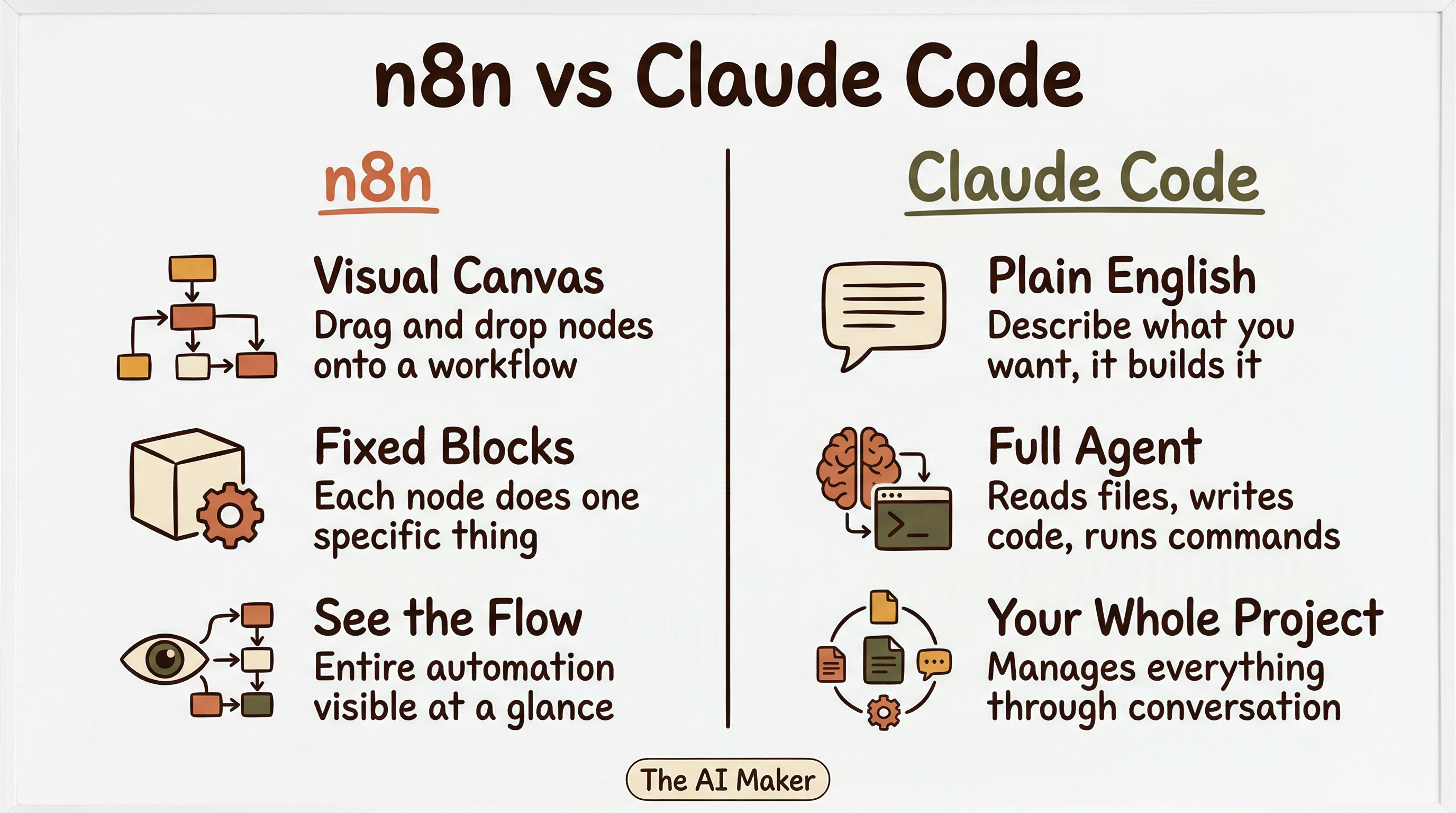
n8n is a visual workflow automation tool. Think of it like a digital assembly line where you drag and drop boxes (called nodes) onto a canvas, wire them together, and each box does one thing: send an email, call an API, process data, trigger a notification. It’s in the same category as Make.com and Zapier. You build automations by connecting these blocks visually, and then they run on a schedule or when something triggers them. It’s popular because you can see the entire flow at a glance.
Claude Code is Anthropic’s AI coding agent. You open a terminal (or the desktop app), describe what you want in plain English, and Claude builds it. It reads your files, writes code, runs commands, connects to external tools through MCP (Model Context Protocol), and manages your entire project. It was originally built for software engineers, but turns out it works just as well for anyone who want to build automations, agents, and apps without learning to code themselves. I run my entire newsletter operation through it.
If you want to learn more about Claude Code, I wrote two in-depth posts to help you kickstart your project with Claude Code:
So the question is: if you want to automate your work with AI, which path do you take? The visual builder or the conversational agent?
Why This Comparison Matters Right Now
If you’ve spent any time in AI automation communities on Reddit or YouTube, you’ve seen the debate. Visual workflow builders like n8n, Make.com, and Zapier on one side. Claude Code and similar AI coding agents on the other. People asking: which one should I learn?
The common answer has been pretty consistent: learn n8n (or Make) because it’s visual, it’s easier to debug, and you can hand it off to clients. Claude Code is for developers.
Dheeraj and I wanted to test that assumption. So he rebuilt the exact same AI research agent from Episode 1 in both Claude Code and n8n, and we walked through both live.
Same Agent, Two Very Different Paths
Here’s what jumped out immediately when Dheeraj showed both versions side by side.
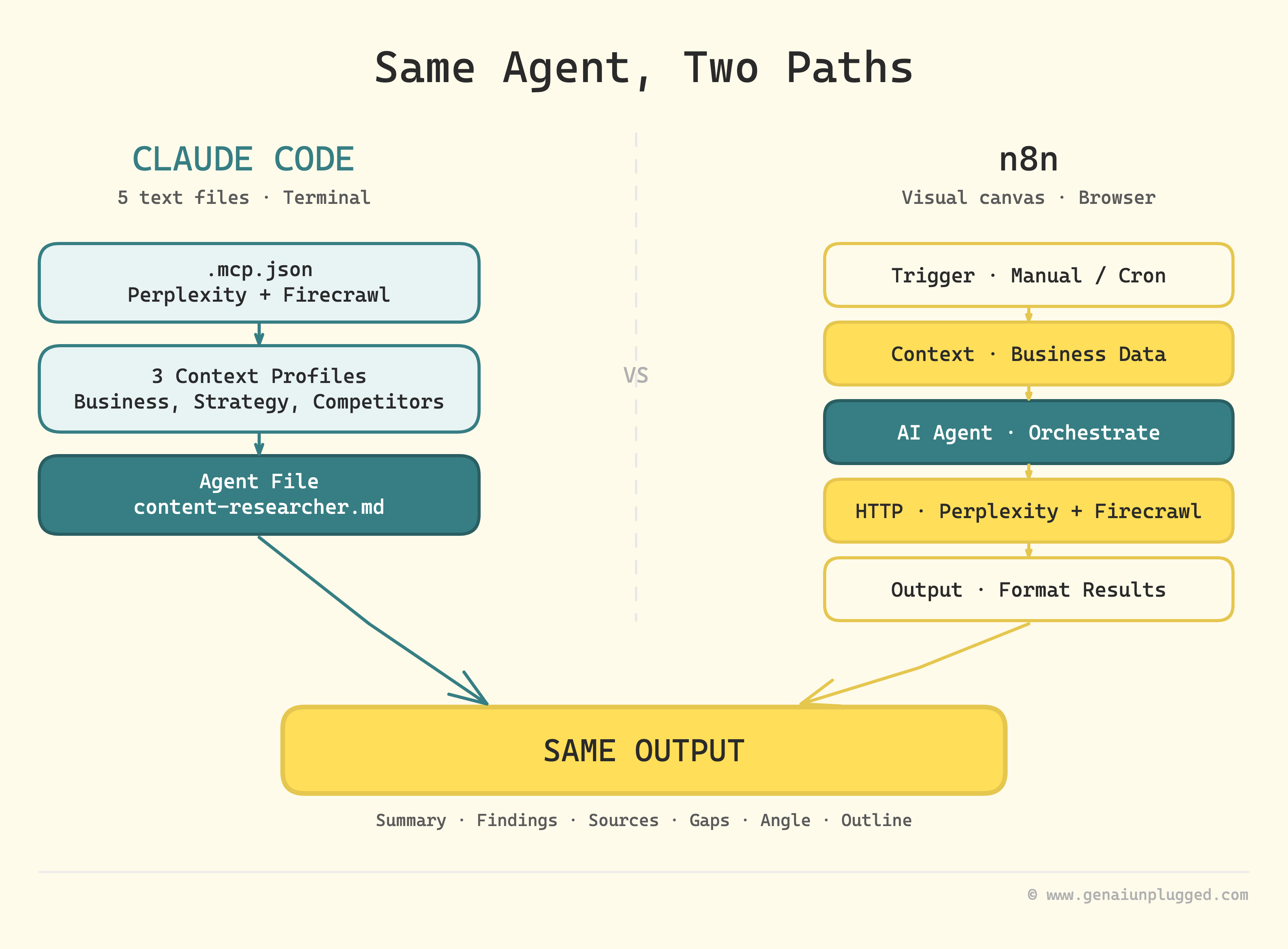
The Claude Code version was a collection of markdown files written in plain English. The agent file described the goal, the research profiles, the process, and the tools to use. To run it, you type something like “run a research on bike tours to Ladakh in 2026” and it starts working.
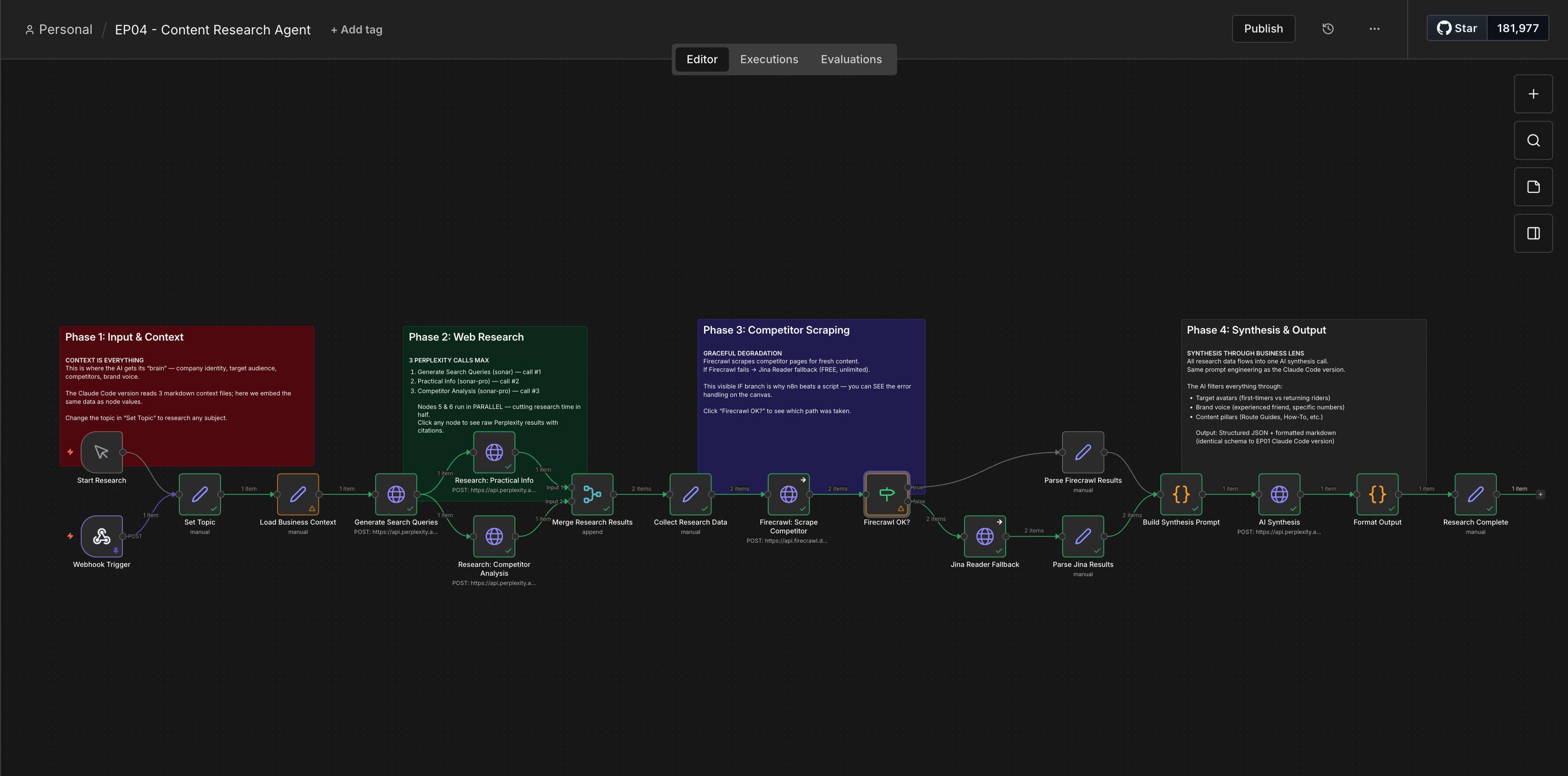
The n8n version was a visual canvas full of nodes. Input nodes, context nodes, HTTP nodes for Perplexity API calls, Firecrawl for scraping, Jina AI as a fallback, merge nodes, synthesis prompts, formatting nodes. You could see the whole flow mapped out, which looked impressive.
But Dheeraj pointed out something important:
“If someone is creating an n8n workflow, you have to know about all these nodes. You have to understand the intricacies. You have to yourself define Firecrawl, the backup, the fallback. You are implementing as a human.”
In Claude Code, we just wrote in plain English:
“Use Perplexity for research. If Firecrawl is out of credits, fall back to Jina AI.”
That was it. No plumbing.
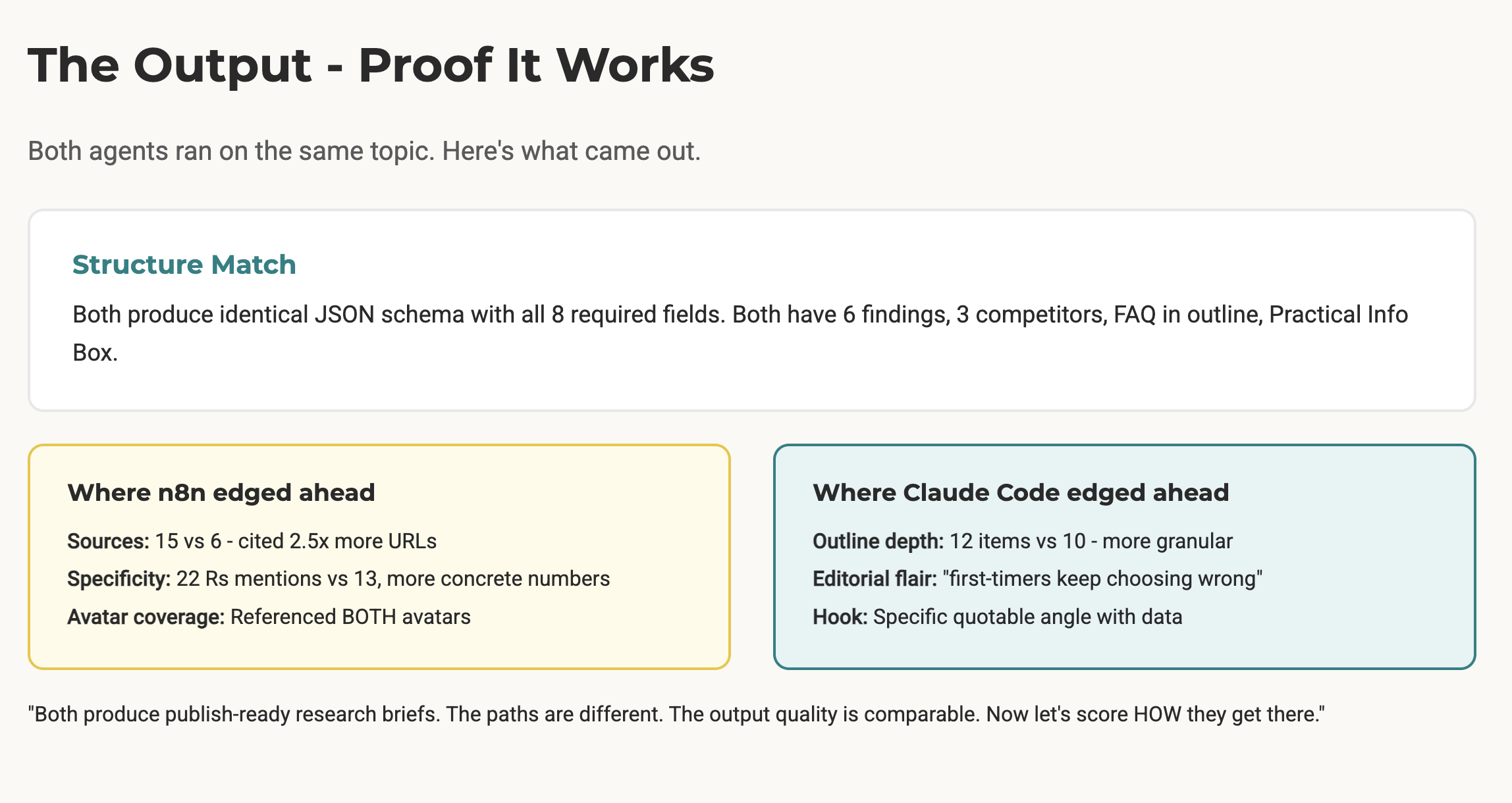
The output quality was comparable. Both produced structured research briefs with summaries, findings, sources, content gaps, and angle suggestions. N8N had slightly more cited sources in one run (15 vs 6), but Dheeraj acknowledged that was probabilistic since the queries were slightly different.
But one thing I realized was that the difference wasn’t in the output; it was in the effort to get there.
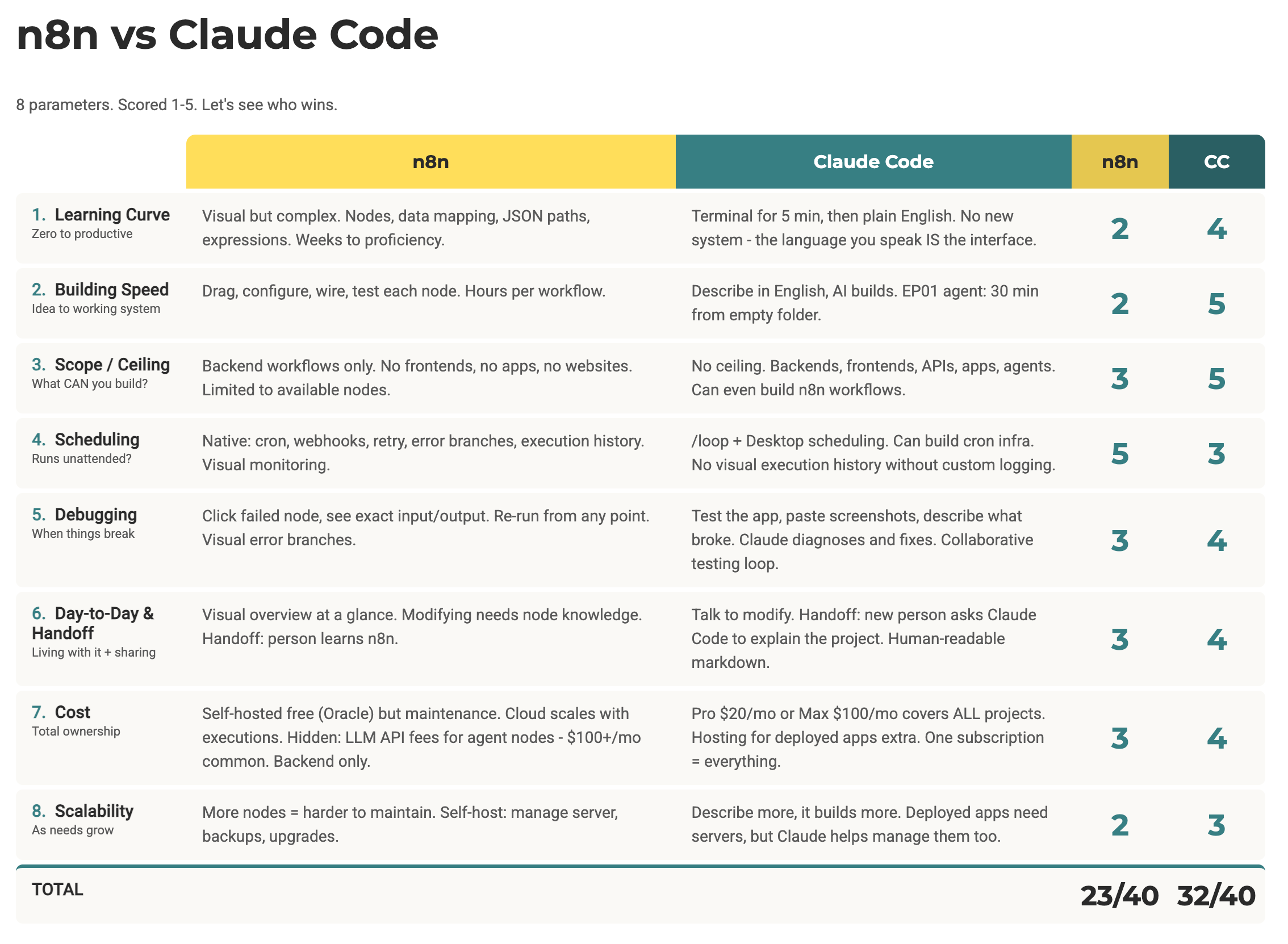
The 8-Category Scorecard (Claude Code vs N8N)
We scored both tools across eight categories, rating each from 1 to 5. Here’s how it played out:
1. Learning Curve
N8N requires learning nodes, data mapping, JSON paths, and expressions. Dheeraj’s own course is 30+ hours of training. Claude Code has its own curve (understanding the terminal, context management, file structures), but once you get past the initial intimidation of the terminal, you’re just writing in English. And if you get stuck, you can ask Claude Code itself to help you figure it out. That’s a kind of learning curve that bends back in your favor.
2. Building Speed
This one was stark. Dheeraj estimated the n8n workflow took “at least a couple of hours” to build, and he knows n8n inside and out. The Claude Code version from Episode 1? We built it live in roughly 30 minutes while also talking through concepts with the audience. When you combine Claude Code with voice dictation tools like WisprFlow, you’re literally just talking and building.
3. Scope and Ceiling
This was Dheeraj’s “favorite part” to discuss. N8N can build backends and deterministic automations. That’s its world. If you need a custom node, you need to be an engineer. If you need a code workaround, you’re leaving no-code territory. Claude Code has no ceiling. You can build agents, full-stack apps, deploy to servers, manage infrastructure. Dheeraj put it simply: “You can even build n8n workflows with Claude Code.”
4. Scheduling and Triggers
This is where n8n (and Make.com and Zapier) genuinely wins today. Built-in cron jobs, webhooks, retry logic, visual monitoring of executions. I have a Make.com automation that runs every day to curate AI news for me. It just works in the background without me touching it. Claude Code is getting there with loops, channels, and scheduling features, but it’s still catching up in this area. N8N was built for this from day one.
5. Debugging
This is where Dheeraj pushed back against the popular opinion. The common argument is that visual workflows are easier to debug because you can click a failed node and see the exact input and output. True.
But Dheeraj’s counter:
“Here you are doing all the legwork. There is no AI behind it. In Claude Code, you are working with a partner.”
You paste a screenshot or describe the error, and Claude Code runs its own investigation. It’s found tricky bugs that would take humans much longer to replicate manually.
6. Day-to-Day Use and Handoff
N8N gives you a visual overview at a glance. But modifying anything still requires n8n knowledge. Claude Code projects can be handed off with readme files, and the person receiving them just needs to know how to talk to Claude Code. Dheeraj showed a fun example: if someone uses the research agent project and asks about plumbing instead of travel, Claude Code will notice the mismatch and flag it. N8n would just run whatever you configured.
7. Cost
Claude Code Pro is $20/month, Max is $100/month. But Max covers the LLM costs for everything you build. N8n cloud starts at $24/month with 2,500 executions (which runs out faster than you’d think).
Self-hosting is “free” but comes with server management overhead. And on top of n8n’s cost, you’re still paying separately for LLM API calls, which can be 20x more expensive than a subscription.
The key differentiator: Claude Code’s subscription covers vibe coding, app building, agent creation, and automation all in one price.
8. Scalability
Both have caveats. N8N at scale requires understanding server architecture, caching, and parallel instances. Claude Code at scale requires understanding deployment basics (Railway, Vercel, Supabase). But for personal workflows, Claude Code runs on Anthropic’s infrastructure, so you don’t worry about your pipeline’s performance. N8N self-hosted means you’re responsible for everything.
Two Details That Stood Out
Here are two key takeaways I realized from our conversation that you can use as a reference to decide which option you should choose, even though you already know the clear winner at this point:
Claude Code Built the n8n Workflow
The n8n workflow Dheeraj showed during the live session was built with Claude Code. He set up an MCP server connection and talked to Claude Code in plain English, and it generated about 90% of the workflow. He had to jump in and tweak a few things manually (Claude Code tends to output code nodes instead of native n8n nodes, so you have to ask it to use native nodes instead). But even with that back and forth, it was still faster than building the workflow by hand.
Think about what that means. The tool being compared is also capable of building its competitor’s workflows. That’s a different category of capability.
Transferable Skills vs Platform Lock-in
Something I brought up during the show that I keep thinking about: the skills you build using Claude Code transfer to other AI agents. If you learn how to structure context, write clear instructions, and manage files for Claude Code, you can apply that same approach to Codex, Gemini CLI, OpenCode, or whatever comes next. You’re learning how to work with AI agents, period.
N8N skills work in n8n. Make.com skills work in Make.com. Zapier skills work in Zapier. If any of those platforms change direction or a better option appears, you’re starting over.
I’m not saying this to dismiss those platforms. I still use Make.com for scheduled automations. But if I had to pick one skill to invest in right now for long-term returns, it would be learning how to communicate clearly with AI agents. That’s the skill that compounds.
What I’d Recommend Based on Where You Are
If you’re brand new to all of this, start with Claude Projects or Claude Cowork. Get comfortable giving AI context about who you are and what you need. Learn how project knowledge works. That foundation transfers directly to Claude Code when you’re ready.
If you already know n8n or Make.com and have workflows running, don’t abandon them. But consider setting up Claude Code to help you manage and optimize what you’ve already built. That’s literally what Dheeraj does.
If you’re deciding what to learn next, I’d go straight to Claude Code. Yes, the terminal looks intimidating for about five minutes. There’s also a desktop app now that’s nearly at feature parity. The learning curve is real, but it bends back in your favor because you can ask Claude Code itself to help you learn. Try that with a visual workflow builder.
And if you’re an agency or freelancer building automations for clients, this is worth paying attention to. The “visual workflows are easier to hand off” argument holds up only when the client has learned n8n. A well-structured Claude Code project with clear readme files and plain English instructions might actually be easier for a non-technical client to interact with.
One Shot Show Details
Episode 4, Season 1 | Live every Wednesday at 10:00 AM EST on Substack
Previous episodes:
Episode 1: Building a Content Research Agent with Claude CodeEpisode 2: Newsletter Repurposing Engine with Google OpalEpisode 3: Claude Coworks + Substack Competitive AnalysisEpisode 4: Claude Code vs N8NEpisode 5: Claude Channels vs OpenClaw (next week)
Timestamps:
00:00 - Welcome and recap of previous episodes
00:40 - Today’s topic: Claude Code vs n8n
06:06 - Claude Code research agent walkthrough
09:28 - Same agent in n8n: visual node comparison
17:07 - Side-by-side output comparison
24:27 - The 8-category scorecard begins
25:33 - Learning Curve comparison
31:35 - Building Speed comparison
34:02 - Scope and Ceiling comparison
37:17 - Scheduling and Triggers comparison
41:44 - Debugging comparison
46:17 - Day-to-Day Use and Handoff comparison
49:00 - Cost comparison
54:31 - Scalability comparison
58:56 - Final score reveal: 23 vs 32
59:07 - The verdict and recommendations
1:04:25 - Viewer Q&A
1:06:30 - Next episode preview
Resources Mentioned
Claude Code (Anthropic) - AI coding agent, $20/mo Pro, $100/mo Max
n8n - Visual workflow automation, free self-hosted or $24/mo cloud
Make.com - Visual automation platform, similar category to n8n
Zapier - Automation platform, similar category to n8n and Make
Perplexity - AI search API, used in both implementations (Sonar Pro model)
Firecrawl - Web scraping tool, used for competitor content analysis
Jina AI - Free web scraping alternative, used as Firecrawl fallback
WisprFlow - Voice dictation tool for hands-free Claude Code interaction
Claude Desktop App - Desktop version of Claude, alternative to terminal
Claude Cowork - Collaborative Claude environment with agent capabilities
Claude Channels - New Claude Code feature for persistent agent communication
Claude Dispatch - Scheduling feature for Claude Code
Manus - AI agent platform
Perplexity Computer - Perplexity’s computer-use agent
Gemini CLI - Google’s command-line AI agent
MCP (Model Context Protocol) - Protocol for connecting AI agents to external tools
Oracle Cloud - Free tier server for self-hosting n8n
Cloudflare - Used for server management and security
Railway, Vercel, Supabase - Deployment platforms mentioned for Claude Code apps


