



A few months ago, I wrote about something I had started calling an agentic AI workspace.
The idea was simple, but it changed how I looked at almost every AI tool I was using.
For a long time, my AI lived in a chat window. My real work lived somewhere else. I used to save my content calendar and ideas in Notion. Newsletter drafts went into Google Docs. Research lived in NotebookLM. When I needed to post on X or LinkedIn, I still had to visit each platform and publish manually like a caveman. And I saved my post analytics in a Google Sheet I then forgot to check.
AI helped me think, but I was still the one moving the work around.
That was the copy-paste tax.
The promise of AI was supposed to be that it could help me move through my work. But in practice, I was still carrying everything from room to room.
That was the question underneath the agentic AI workspace idea:
What would it look like if AI lived closer to the work itself?
This week’s One Shot Show felt like a continuation of that question.
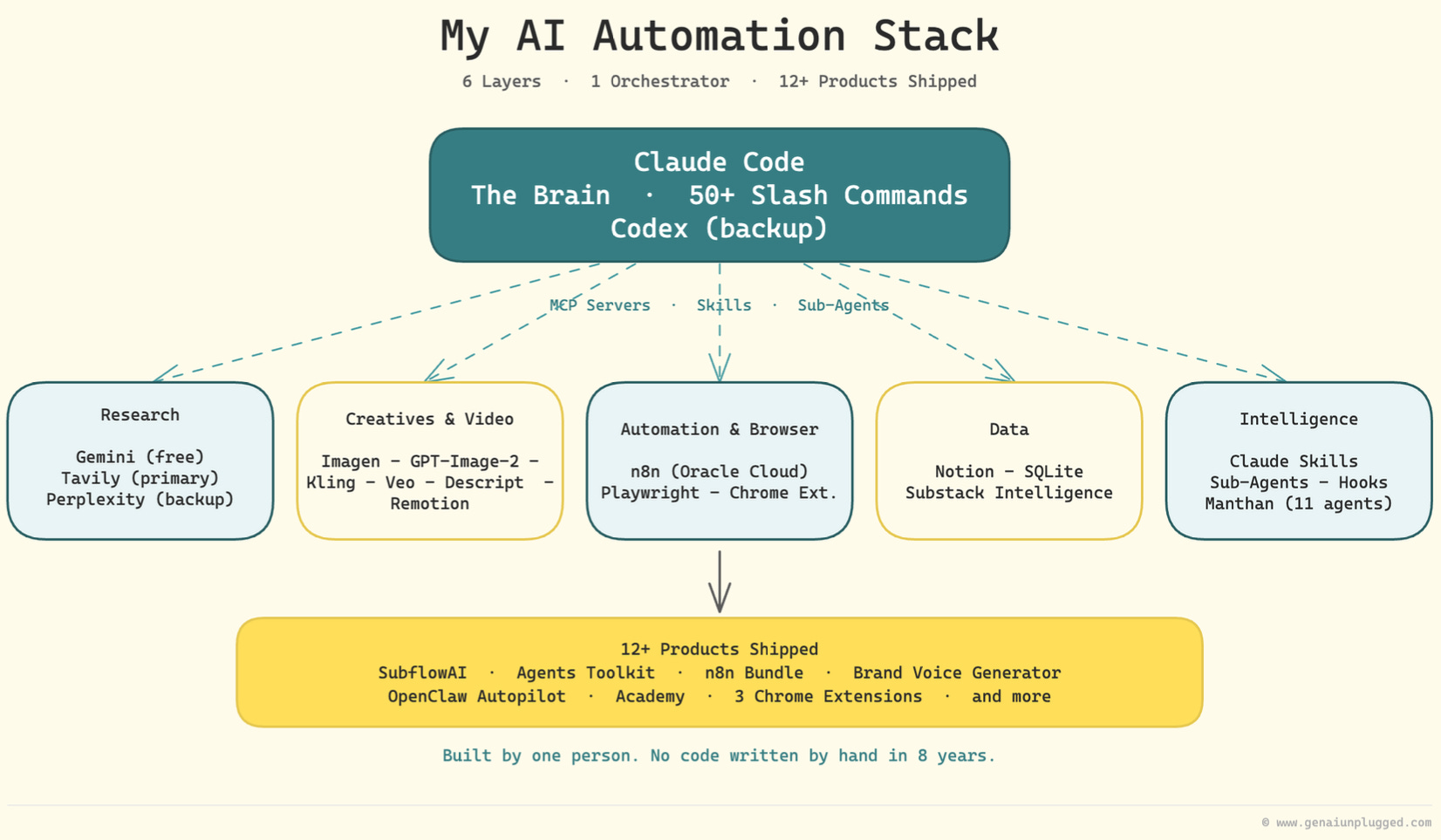
Dheeraj Sharma shared his full AI automation stack with us. Not a polished diagram of how agentic work might look someday. A real setup he is using right now to run research, writing, creative work, video production, distribution, data, approvals, and even server maintenance.

It was a lot.
And honestly, that is why I found it useful.
Most examples of AI workflows are too clean. One tool. One prompt. One magical before-and-after. Dheeraj’s setup was messier, wider, and more interesting because it showed what an agentic AI workspace starts to look like when someone keeps building on top of it for months.
I can assure you that his AI stack is worth studying for.
That is the thing I want to unpack.
From AI Tool Stack to AI Work Environment
Season one of One Shot Show was mostly about foundations.
Dheeraj and I talked about Claude Code, Claude Cowork, n8n, research agents, competitor intelligence, skills, and a bunch of other pieces that all live somewhere around the same question: how do you make AI useful beyond a single chat?
Season two starts from a different place.
Instead of asking whether one tool is better than another, we are trying to show the actual work environments people are building around AI.
Because we believe that by sharing this, we can help more people understand what’s happening behind the scenes and how people actually use AI.
If you look at Dheeraj’s setup as a list of tools, it can feel overwhelming:
Claude Code
Codex
MCP servers / CLI
Skills
Sub-agents
Gemini
Tavily
Perplexity
GPT Image
Nano Banana
Kling
Veo
Descript
Remotion
Playwright
Chrome extensions
n8n
Notion
SQLite
Oracle Cloud
That is a lot of names.
But the more useful way to look at it is as a set of layers.
Each layer has a job. Claude Code coordinates. Research tools fetch and compare information. Creative tools generate visuals and video assets. n8n handles always-on distribution. Notion holds structured planning and human review. SQLite holds searchable data and subscriber state. Dheeraj still steps in where the system needs judgment.
That is the part worth studying.
Because the stack includes so many tools, each with its own role in Dheeraj’s workflows.
The Brain Layer: Claude Code Runs the System
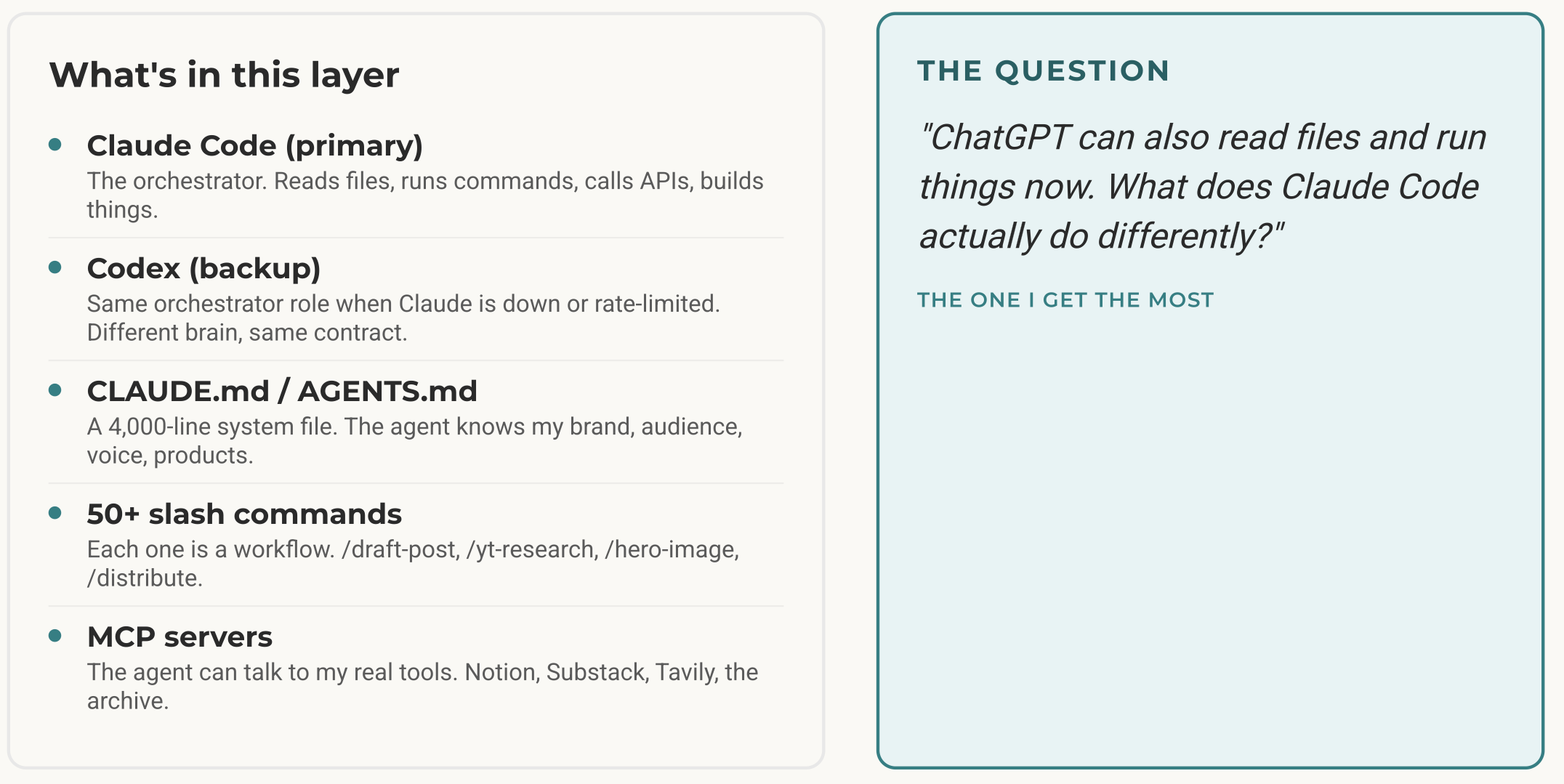
At the top of Dheeraj’s setup is Claude Code.
That is his main operating layer. He has stayed there for the past few months because, in his words, it was already doing what he needed. He never fully migrated to Claude Cowork because Claude Code was comfortable enough and flexible enough for the work he was doing.
Around Claude Code, he has built the pieces that make it feel less like a chatbot and more like a working environment:
MCP servers for external tool access.
Skills for repeatable workflows.
More than 50 user-invoked commands or skills.
Around 30 sub-agents, each with a narrower responsibility.
A few orchestrators for bigger flows like video and content pipelines.
Hooks for safety and automation.
Codex as a backup and future complement.
This is where the agentic part starts to show.
Claude Code answers questions, but it also reads files, chooses skills, calls tools, sends work to other systems, generates assets, checks logs, and decides what to do next based on the task.
For example, during his demo, Dheeraj showed a hero image workflow. He can reference a post ID from Notion. Claude Code looks up the metadata, finds the related article file, loads the hero image skill, reads the content, builds the image prompt, calls the image generation script, and produces a Substack cover image using his recurring monk avatar and background style.
This is what it means to have a truly agentic workspace: AI automates the end-to-end workflow while only requiring you to set the goal. It can see the work, understand the rules, and act inside the same places the work already lives.
The Part Nobody Wants to Talk About: Progressive Disclosure
One of my favorite parts of the whole session was also one of the least flashy.
Progressive disclosure is the idea that your agent should not read every instruction, file, rule, and example every time it starts a task.
It should start with a small set of routing instructions, then load the deeper material only when the task calls for it.
Because if you dump everything into one giant instruction file, the agent gets slower, more expensive, and often worse. It sees too many rules at once. It can mix requests together. It can load material that has nothing to do with the job.
The better pattern is closer to a simple router:
Keep the root instruction file small.
Tell the agent how to recognize the task.
Point it to the right support files.
Load only the rules, examples, and source material needed for that job.
Leave everything else alone.
In practice, that might look like this:
AGENTS.md or CLAUDE.md explains the main routes.
A newsletter request sends the agent to the newsletter rules, draft examples, and style guide.
A LinkedIn request sends it to LinkedIn examples and the platform rules.
A Substack Notes request sends it to the best-performing Notes and the Notes rules.
A technical build request sends it to the project files, setup notes, and implementation rules.
The root file is the front desk. The support files are the rooms behind it.
You do not want the agent walking into every room just because the doors are open.
Dheeraj described a similar habit. When his root instruction file gets bloated, he trims it back and pushes the deeper details into more specific files or skills.
The more capable your system becomes, the more important routing becomes. More tools, more files, and more automations do not automatically make the agent smarter. Sometimes they just give it more ways to get confused.
This is boring infrastructure. But boring infrastructure is usually what makes agentic systems usable.
It is easy to make a demo where the agent has access to everything.
It is harder to make a system where the agent knows what to ignore.
If you want to learn more about how progressive disclosure works in your Claude Code setup, I’ve written a running series you can start learning from right away:
From Blank Folder to Working System: How to Set Up Any Project in Claude Code
How an Agent Harness Made My Claude Code Setup 10x More Reliable
The Complete Guide to the Context Folder That Changed How I Work With AI Agents
The Research Layer: Cost Almost Nothing
Dheeraj’s research layer also had a useful pattern.
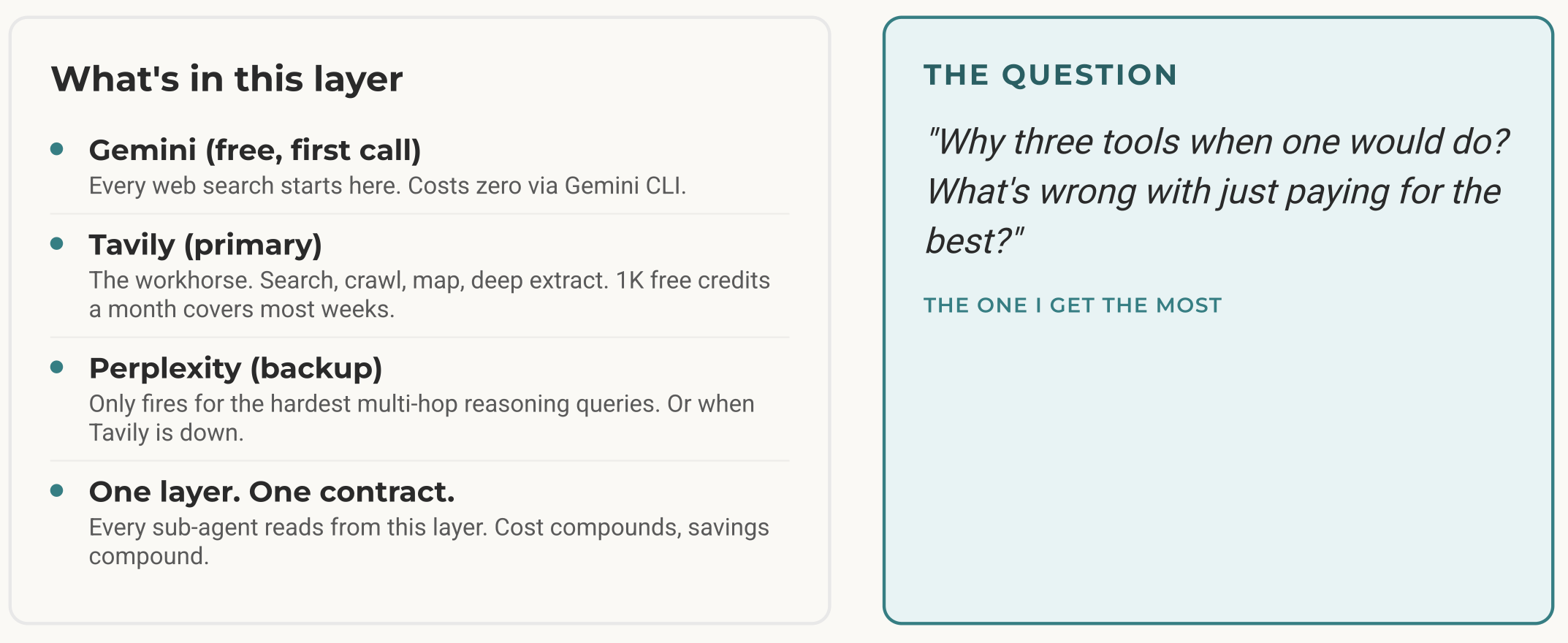
He does not go straight to the most expensive or powerful option for every query. He has layers.
At the first level, he uses built-in web search and Gemini CLI for cheaper or simpler research tasks. One example he gave was Reddit research. If Claude’s fetch tools get stuck, Gemini can sometimes pull enough of the page to keep the workflow moving.
Then Tavily handles more serious research work. Dheeraj said he moved toward Tavily because the free credits are useful and because it can cover many research jobs in one place.
Perplexity is still there as a backup when needed.
This is a small design choice, but I like it because it treats research as a routing problem.
Not every question deserves the expensive path. Some tasks need a quick search. Some need structured extraction. Some need deeper synthesis. Some need a fallback because the first tool fails.
And the best part is that all of this costs you almost nothing.
The Creative Layer: How Integrated Do You Want It to Be?
The creative layer was where the conversation got more interesting for me personally.
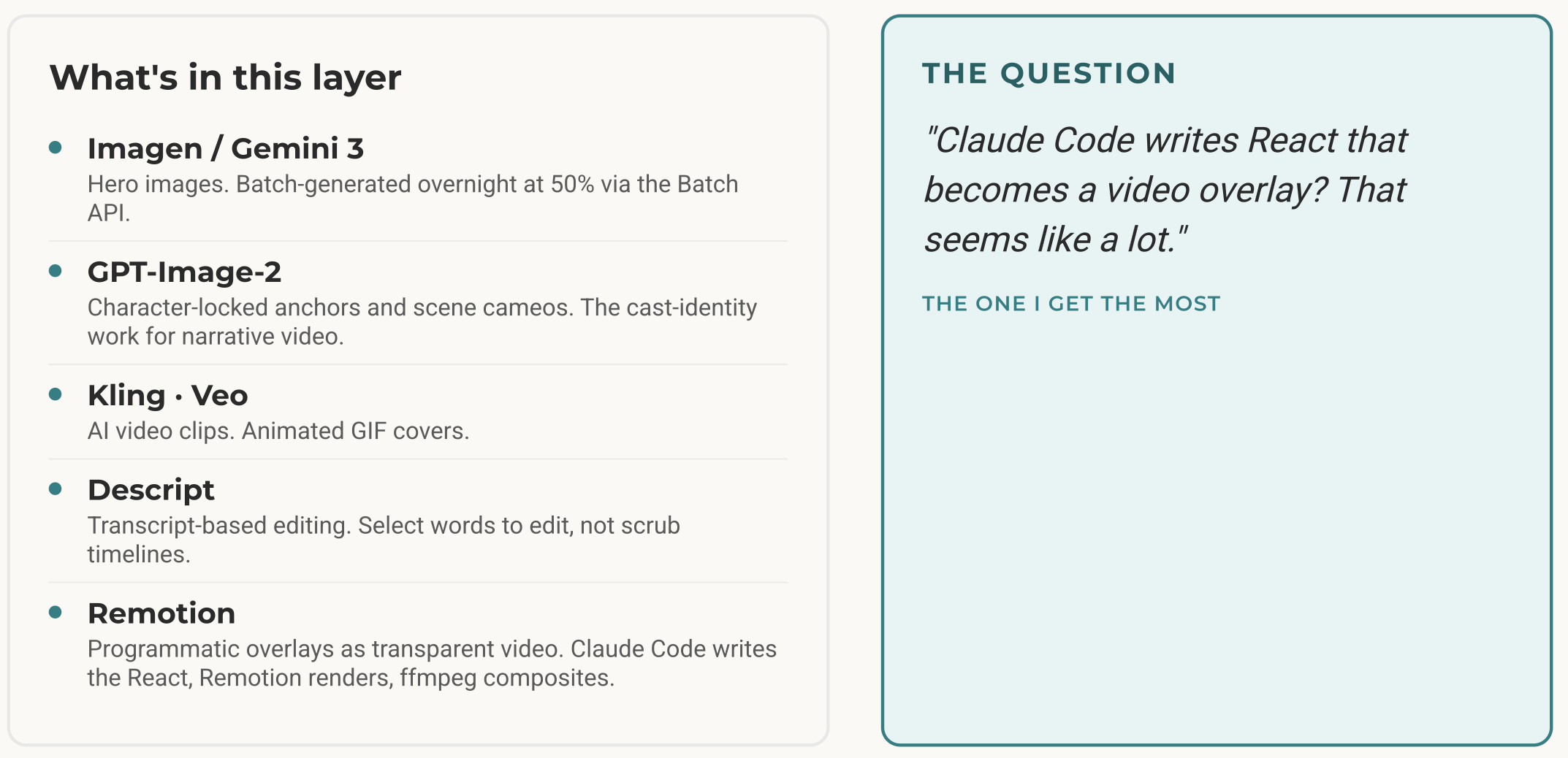
Dheeraj uses GPT Image, Nano Banana, Kling, Veo, Descript, and Remotion in different places.
The important part is not just which model he prefers. It is how those tools fit into the larger system.
For Dheeraj, the creative workflow runs through Claude Code as much as possible. Claude Code does not replace the image model, video model, or editing tool. It coordinates them. It sends the right prompt, calls the right script, passes the project ID, and keeps the creative step connected to the rest of the work.
He has been leaning more toward GPT Image for some visual work because the output feels warmer and closer to what he wants, especially for oil-painting style images and infographics. He also mentioned using the Batch API to reduce cost, with roughly a 50% discount discussed during the stream.
For video, he uses Kling for lighter animation tasks like animating a cover or thumbnail, and Veo for clips that need more quality inside a video.
Descript is part of his editing flow. He uses its MCP server to talk to Underlord, Descript’s AI assistant. The basic pattern is: record a video, upload it to Descript, get the project ID, hand that ID to Claude Code, and run a skill that asks Underlord to do a first cleanup pass.
Then there is Remotion.
That was one of the more concrete demos. Dheeraj showed animated overlays and text effects generated with Claude Code and Remotion. These can sit on top of his videos, support product storytelling, or become part of a faceless video format he is experimenting with.
I shared my own setup here too.
For my thumbnails and infographics, I have been using Glif for months. Most of AI Maker thumbnails and One Shot Show thumbnails have been made there.
I do not have a serious video creative workflow yet. But if I wanted to add one, I would probably still start with Glif because it gives me one place to work across multiple creative AI models.
The tradeoff is that I still need to open the website, write or refine the prompt, and make the creative decision myself. It is not as deeply wired into my agentic workspace as Dheeraj’s Claude Code setup.
But it also means I do not need to manually integrate GPT Image, Nano Banana, video models, and other creative tools one by one.
That has been impactful for me. Glif has streamlined the creative layer without forcing me to build a full creative automation system around it.
So the question is not only, “Which creative model is best?”
The better question is: how do you want creative work to fit into your agentic workspace?
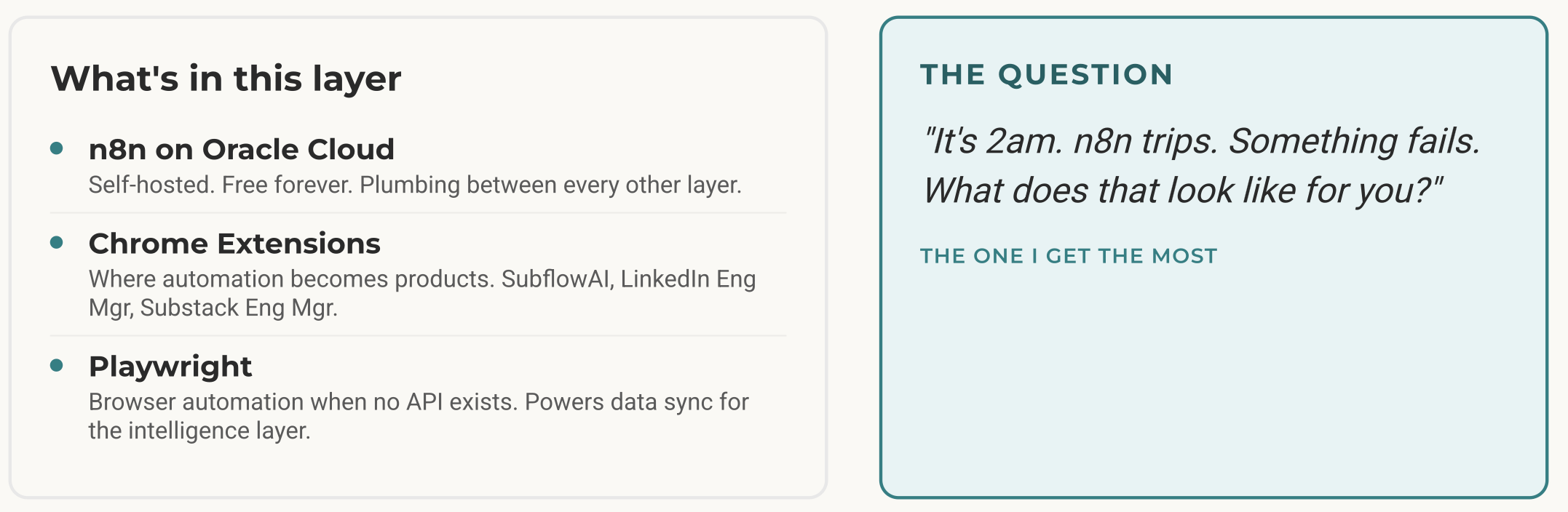
The Automation Layer: He Did Not Move Everything Into Claude Code
This was probably the most practical lesson from the episode.
Dheeraj used to be deep in n8n. He taught it. He built workflows in it. A lot of his older automation work lived there.
Over the past few months, he moved much of the thinking, generation, and orchestration into Claude Code.
But he did not migrate everything.
He kept n8n for the parts where it still makes sense:
Distribution across TikTok, Twitter/X, Facebook, Instagram, and other channels.
Posting clips from Substack Live.
Generating branded PDFs from content.
Running workflows on a server when his local machine is off.
Handling app integrations that are already reliable.
That is worth saying clearly because a lot of AI people, including me sometimes, can get too obsessed with tool purity.
If Claude Code can do something, the temptation is to move everything there.
Dheeraj did the more sensible thing. He kept the parts that already worked.
For example, his PDF workflow in n8n was already tuned. Page breaks. Tables. Headers. Formatting. All the annoying details. He could rebuild it inside Claude Code, but why spend that time when the old workflow still works and Claude Code can just send content to it?
Same with distribution.
When Substack generates live clips, he can process them locally, upload them to a server, and let n8n take care of distribution. He mentioned that he has not logged into LinkedIn for a long time because that part is handled by the system.
This is what a mature agentic setup looks like to me.
The Data Layer: Files Are Not Always Enough
The data layer was another place where the episode pushed beyond my own default bias.
I like plain files. A lot.
My own newsletter system works because so much of the work lives in Markdown files that Claude Code can read and edit directly. My Obsidian setup works for the same reason. The fewer walls between the agent and the work, the less I have to carry in my head.
Dheeraj uses files too, but he does not stop there.
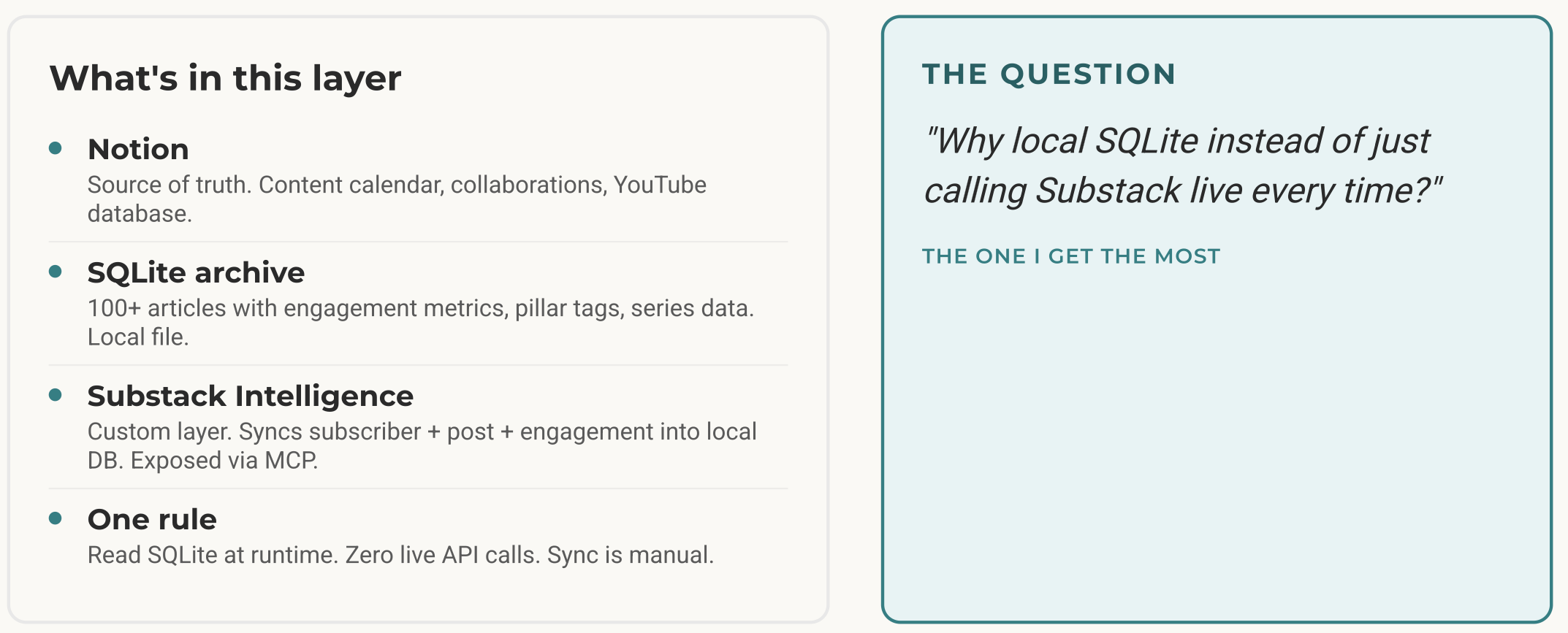
His planning system lives in Notion. His content calendar, YouTube content calendar, review states, and approval points are structured there. He connects Notion to Claude Code through the API rather than the Notion MCP server because the MCP path was using too many tokens.
That was a useful distinction.
Sometimes MCP is convenient. Sometimes direct API access is cleaner.
Then there is SQLite.
I asked why he needed a database instead of just storing everything in files.
His answer was practical. SQLite gives him fast text search, a structured place to store Substack content, analytics, subscriber information, and data for tools like magic links. He can host the database on his Oracle Cloud server and use it as the data layer for several projects.
That includes:
A searchable archive of his Substack content.
Substack analytics collected through his own Substack Intelligence layer.
Subscriber data for validating access.
Magic links for tools.
Data for GenAI Unplugged and cohort work.
This is where the agentic workspace becomes more than “a folder Claude can read.”
Files are great for writing, rules, drafts, notes, and context the model needs to inspect.
Databases are better when the system needs structure, speed, authentication, and repeatable queries.
That does not mean everyone needs SQLite. I do not think most people should start there.
But it helped me see the larger pattern: an agentic AI workspace can include files, databases, APIs, and human review surfaces; it doesn’t make one approach better, you still have to choose what suits your current need instead of overcomplicating things by adding extra integration layers.
Notion vs Obsidian Is Really About How You Work
One of audience asked a good audience question: why not use Obsidian as the data repository?
Dheeraj’s answer was basically that Notion still works better for his needs.
He likes structured databases. He likes being able to approve things from his phone while sitting in his son’s class. He likes publishing pages publicly and sharing guides with embedded resources. He also has team or audience-facing use cases where Notion makes more sense.
I shared my side too.
I use both, but I am now much more on Obsidian because I like the file-based structure and the way agents can work across plain Markdown. If I want to ask what I should think about for the next post this week, the agent can scan the ideas, drafts, and notes in the vault and surface possible angles.
But I understand why Notion works for Dheeraj.
The simple version is:
Obsidian feels better for single-player, file-based thinking.
Notion feels better for structured planning, phone review, sharing, and team visibility.
That is not a universal rule. Every person has their own preferences. I’m just speaking from a tradeoff perspective.
And again, this is why copying someone else’s stack too literally is risky.
Dheeraj’s setup makes sense because of his work. My setup makes sense because of mine.
The Human Layer: The Last 20% Is Still Hard
Near the end, Dheeraj said the thing that probably matters most.
AI gets you 80% of the way in 20% of the time.
That feels incredible.
It is also where a lot of people get fooled.
The last 20% still takes a lot of time. Sometimes it takes most of the time. That last stretch includes edge cases, error handling, weird API responses, performance issues, security issues, and all the odd little failures that do not show up in a demo.
Dheeraj gave a painful example from one of his products. He built the app over a weekend and thought it was ready. Then someone hit it with a denial-of-service attack, the system crashed, and credits burned. He spent another weekend hardening the security layer.
That is the difference between demo and reality.
I think this is the part people need to hear when they look at a stack like his.
The point is not “look how easy AI makes everything.”
The point is closer to: AI makes it possible to build more than you could before, but then you inherit more systems that can break.
That changes the work. It does not remove the work.
The same thing is true in content.
You can generate a lot of articles with AI. But if they do not sound like you, if you do not validate them, if you are putting your name on something you would not actually say, then the automation has not solved the real problem.
Dheeraj made a similar point about social platforms. You can automate posting, but if you are not actually participating, commenting, replying, and building relationships, the platform will not magically reward you.
AI can move the work.
It cannot care on your behalf.
That is still your job.
What I Would Copy From Dheeraj’s Setup
I would not start by copying the full stack.
That would be the wrong lesson.
If you are still paying the copy-paste tax, a huge system like this will probably create more overhead than relief. You do not need 30 agents, 50 skills, a SQLite database, a self-hosted server, n8n, Remotion, and multiple research fallbacks just to make AI more useful.
But I would copy the shape.
Here is the version I would start with:
Pick one control layer. For me, that is usually Claude Code or Codex. For someone else, it might be Notion agents, Gemini inside Google tools, or a simpler Claude setup.
Put real work where the agent can reach it. Drafts, notes, rules, examples, project files, research, and outputs should not all be trapped in separate apps.
Write down the routing rules. The agent should know which files to read for which task.
Use skills for repeated work. If you do the same workflow more than a few times, turn it into a reusable instruction or command.
Keep old automations that already work. If n8n, Make, Zapier, Typefully, or a custom script is reliable, let the agent call it instead of rebuilding everything.
Add a data layer only when files stop being enough. Do not start with SQLite because it sounds advanced. Use it when you need structured search, subscriber state, analytics, or repeatable queries.
Keep a human review point. Approvals, publishing, security, and judgment should not disappear just because the workflow can run.
That is a much saner starting point.
The agentic AI workspace grows from repeated friction.
It does not need to arrive fully formed.
The Possibility This Revealed
What I liked about this episode is that it made the abstract idea visible.
When I first wrote about agentic AI workspaces, I was mostly writing from my own experience. I had moved my newsletter into one repository. I had connected Claude Code to my writing system. I had started using Obsidian as a place where AI could read across my plans, notes, and decisions.
That gave me the first version of the idea.
Dheeraj’s setup shows a much larger version.
His system helps him write, but it also researches, creates images, prepares video assets, cleans up recordings, generates overlays, distributes clips, manages planning data, queries analytics, validates subscribers, runs server tasks, and debugs failures.
Again, not perfectly.
Not magically.
But enough that the direction is obvious.
The next phase of AI work will still include better chats and prettier automations, but the bigger shift is environmental. AI starts moving through the same systems your work already depends on.
That is why I keep coming back to the question:
Where should your AI live?
For Dheeraj, the answer is a layered setup around Claude Code, Notion, SQLite, n8n, creative tools, research tools, and a lot of hard-earned operating rules.
For me, the answer looks more like a newsletter repo, Obsidian, Claude Code, Codex, and a growing set of skills.
For you, it might be much smaller.
It might be one project folder.
It might be one Notion database.
It might be one Google Drive folder where your client work actually lives.
You do not need the biggest stack. Instead, what you need is one real place where AI can work with the material your day already depends on.
That is when the compounding starts.
One Shot Show Details
This was the opening episode of One Shot Show, Season 2. We go live every Wednesday at 10:00 AM EST on Substack.
Timestamps
00:00: Welcome and Season 2 setup
02:50: What viewers will learn from Dheeraj’s AI automation stack
04:00: Dheeraj introduces the six-layer stack
06:00: Claude Code as the main brain
06:57: MCP servers, skills, slash commands, agents, and hooks
07:51: Research layer with Gemini, Tavily, and Perplexity
08:19: Creative layer with image and video tools
09:06: GPT Image vs Nano Banana for image generation
10:35: Kling and Veo for different video jobs
11:04: Descript MCP and Underlord
13:10: Remotion for animated overlays and faceless video
13:52: Playwright, Chrome extensions, and browser automation
14:22: n8n as the distribution and PDF layer
18:02: Clip distribution to LinkedIn and other channels
19:15: Twitter/X video posting and Playwright fragility
20:46: Notion as the structured planning layer
21:45: Why SQLite exists alongside files
25:20: The six-layer system in one view
26:29: Root instruction file size and progressive disclosure
29:55: Lee asks why not Obsidian
34:36: Why use multiple research tools
38:32: Wyndo on using Glyph for creative work
41:23: Remotion overlay demo
43:30: Voiceover, ElevenLabs, and faceless video experiments
45:18: What happens when something fails at 2 a.m.
46:34: Hero image skill demo
50:23: Debugging and the 80/20 trap
51:52: Demo to dependable
53:18: Automation does not replace platform participation
55:33: Audience question about image generation models
56:07: Season 2 wrap and next episode preview
Resources Mentioned
Claude Code: Dheeraj’s main operating layer. It coordinates files, skills, agents, MCP servers, hooks, scripts, and external tools.
Claude Cowork: Mentioned as part of Season 1 and as a less technical option, though Dheeraj said he stayed mostly with Claude Code.
Codex: Mentioned as Dheeraj’s backup layer and a likely future topic for Season 2.
MCP servers: Used to connect Claude Code with tools like Descript, n8n, and other services.
Claude Skills / user-invoked skills: Dheeraj has more than 50 command-like skills for repeated workflows.
Sub-agents: Dheeraj mentioned around 30 agents with narrower responsibilities.
Hooks: Part of the Claude Code extension layer for automation and safety.
Gemini CLI: Used as a lower-cost research layer and fallback when web fetch gets stuck.
Tavily: Dheeraj and I both discussed it as a stronger research layer. The free credits were mentioned as useful.
Perplexity: Used as a backup research option when Tavily credits or other paths are not enough.
GPT Image 2: Dheeraj’s current preferred image model for some workflows, especially warmer visuals and infographics.
Nano Banana / Nano Banana Pro: Compared against GPT Image for image generation.
Batch API: Mentioned as a way to reduce image generation cost by about half.
Kling: Used for lighter video animation tasks such as animated covers or thumbnails.
Veo: Used for higher-quality video clips, with Dheeraj noting it is more expensive than Kling.
Descript: Video editing tool Dheeraj uses, partly through its MCP server.
Underlord: Descript’s AI assistant, which Claude Code can interact with through the Descript MCP setup.
Remotion: Open-source tool for creating programmatic video overlays, text effects, slides, and faceless video assets.
Playwright: Used for browser automation, especially when API access is limited or fragile.
Chrome extensions: Dheeraj builds extensions for tasks he wants automated in the browser.
n8n: Dheeraj’s always-on automation and distribution layer, still used for social posting, PDFs, and workflows that already work well.
Oracle Cloud: Dheeraj hosts parts of his system on an Oracle Cloud instance so workflows can run even when his computer is off.
Notion: Dheeraj’s structured planning layer for content calendars, review states, approvals, and shared pages.
Notion API: Dheeraj prefers direct API access over the Notion MCP server because of token usage.
SQLite: Used for searchable Substack archives, analytics, subscribers, magic links, and structured data.
Substack Intelligence: Dheeraj’s name for the layer that collects Substack data into his SQLite database.
Substack Live: Source of clips that Dheeraj processes and distributes through his automation setup.
Obsidian: Discussed as an alternative file-based system, especially for single-player thinking and agent-readable Markdown.
Glyph: The creative AI tool I use for The AI Maker thumbnails, infographics, and One Shot Show visuals.
Typefully: My current tool for posting and scheduling LinkedIn carousels from Cloud Code outputs.
Google Drive: Mentioned as one possible place to host video files for downstream automation.
Twitter/X API: Discussed because video posting through the API may require a more expensive developer tier.
LinkedIn, TikTok, Facebook, Instagram, YouTube: Social and video channels Dheeraj’s distribution layer touches or supports.
CapCut: Mentioned as a manual editing tool Dheeraj still uses for placing video overlays.
ElevenLabs: Mentioned as the likely voice cloning or voiceover layer for future faceless video automation.
Reddit: Mentioned as a research source where Gemini can sometimes help when other fetch paths struggle.
GenAI Unplugged: Dheeraj’s newsletter and broader AI education work.


