

How an Agent Harness Made My Claude Code Setup 10x More Reliable
Memory, hooks, agents orchestration, and eval loops for people who care about high quality output.


I’ve written about Claude Code a few times now, and each post came from a different stage of my own learning curve.
The first big one was my complete Claude Code guide. That post was mostly about showing what Claude Code can actually do: read files, run commands, work with MCPs, use Skills, create agents, manage projects, and turn one folder into something closer to a personal AI operating system.
That post did well because it answered the first question most people had: why should I care about Claude Code at all?
Once people saw what was possible, the next question showed up almost immediately.
How do I actually set this up for myself?
That was the blank folder problem. You open Claude Code, point it at a project, and suddenly you have to decide what goes inside the folder:
What goes in CLAUDE.md?
Which files should Claude read first?
What should become a command?
What should become an agent?
How do you build enough structure without creating some overcomplicated setup you never use?
So I wrote the blank folder setup guide. That post moved from “here is what Claude Code can do” to “here is how to give it a useful project to work inside.”
But after using this kind of setup every day, I ran into the next problem: the setup worked, then it plateaued.
The next ceiling after running your first Claude Code setup
At first, the improvement was obvious. Claude knew where my newsletter drafts lived. It knew my LinkedIn posts had a different style than my long-form essays. It knew I had free versus paid rules. It knew I cared about voice, not just clean writing.
That alone made the output much better. But after a few weeks, the same little problems kept coming back:
Drafts got close, but still sounded a little too polished.
I kept correcting the same voice issues in different sessions.
Repurposing sessions blurred together, so LinkedIn, Notes, and Twitter started sounding like versions of the same essay.
Research and drafting sessions carried too much of the wrong context into each other.
Claude could create a draft, but I was still the quality gate every time.
That was frustrating because I had already done the setup work. I had CLAUDE.md. I had rules. I had commands. I had agents.
So I did what I usually do when something feels almost right: I tried to make the instruction files better. I added more rules, made the wording stricter, and explained the voice more clearly.
That helped a little, but it did not fix the deeper issue. The starter setup gave Claude instructions. What I needed next was a system around those instructions.
That system is what I mean by agent harness.
What agent harness means in plain English
Agent harness sounds more technical than it needs to. The simple version: it is everything around the model that decides what it remembers, what it checks, which task gets which context, and who reviews the output.
For my newsletter work, that means:
Repeated corrections should stick across sessions.
Mechanical style checks should run even when Claude forgets.
Different writing jobs should not bleed into each other.
A draft should get reviewed before I spend my attention on it.
That last part is the big shift. Most people stop once Claude can create the first version. But the first version is only the first layer.
If you care about quality, voice, and repeatability, the better question is: what happens after Claude writes the first version?
Does the system remember what went wrong last time? Does it check for obvious violations? Does it keep each task in its own lane? Does another agent review the output before you do?
That is the level I wish I had built earlier.
What this makes possible
My newsletter repo is the clearest example because this is where the harness has to do more than generate text.
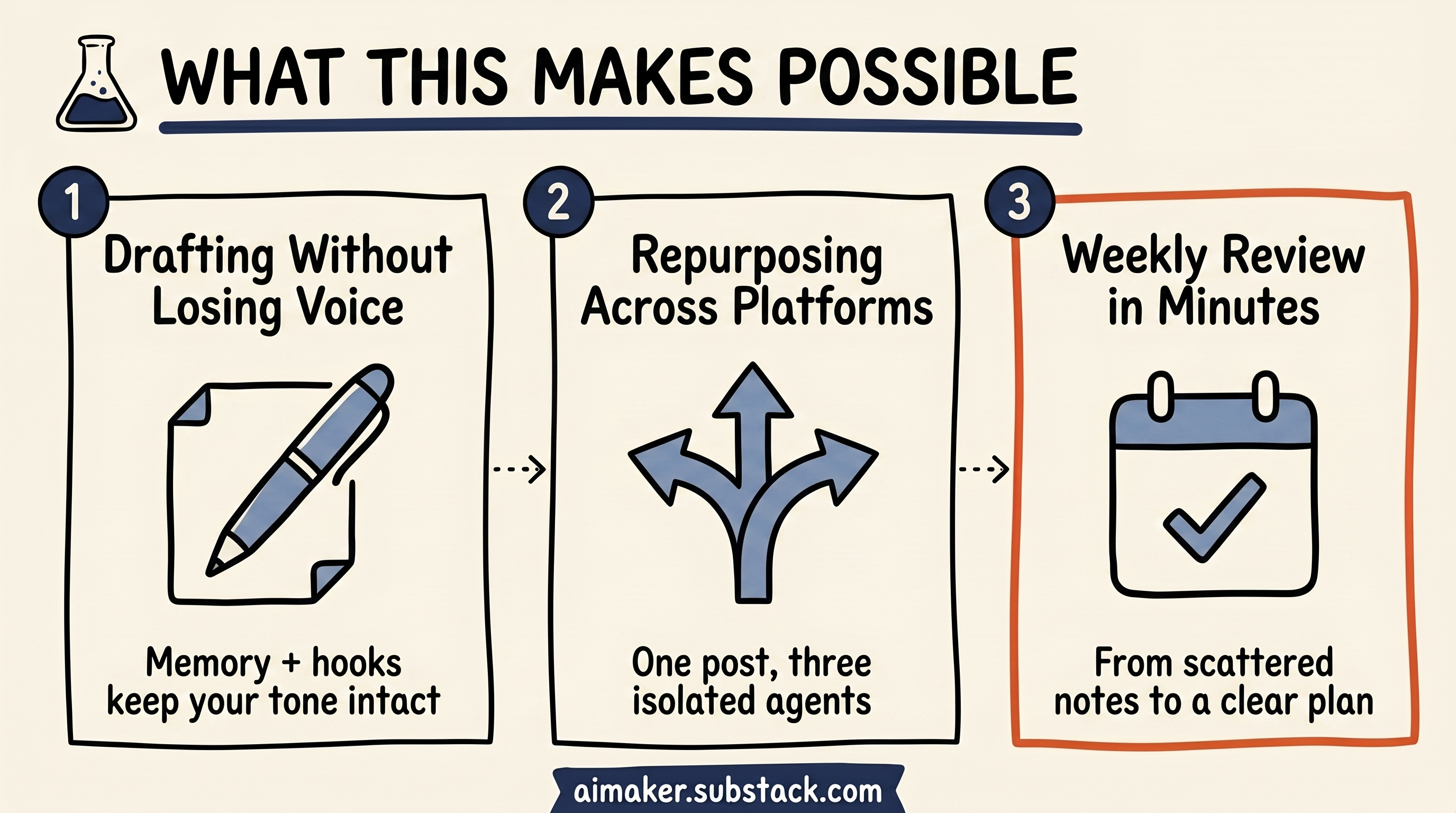
1. Drafting paid posts without losing the voice
When I draft a paid post, Claude does not just read one generic instruction file and start writing. It needs to know the newsletter voice, the free versus paid boundary, the topic history, the reader survey, and the repeated corrections I have made over time. If the draft starts sounding too polished, I want that caught. If I mention metrics without caveats, I want that flagged. If a paid post has strategy but not enough implementation, I want the system to notice before I do.
That is where memory and hooks matter. Memory keeps the repeated corrections from disappearing between sessions. Hooks catch the obvious violations that Claude might forget when the task gets complex.
2. Repurposing one newsletter without blending every platform
When I repurpose a finished newsletter, the problem is different. One command can run three agents in parallel: one turns the newsletter into LinkedIn, one turns it into a Twitter thread, and one extracts Substack Notes. But those agents cannot all think the same way. LinkedIn needs a rawer, sharper cadence. Notes need short, but inspiring thinking. Twitter needs one tight thread arc instead of a compressed version of the whole essay.
That is where agent is important. Each platform gets its own context instead of one long conversation where every format starts sounding the same.
Then there is the review layer. A draft agent can create the first version, but another agent should check whether it sounds like me. Another can check whether the paid boundary is clear. Another can flag weak claims, missing caveats, or sections that feel too abstract.
That is the evaluation loop. Claude is not only generating the work. It is helping inspect the work before I spend my own attention on it.
3. Turning scattered notes into a weekly review I can trust
The same pattern shows up in project management. My /weekly-review command does not just ask Claude to summarize my Obsidian notes. It pulls decisions from the week, checks annual goals, compares quarterly priorities against the current sprint, drafts next week’s plan, then runs a review pass before I use it.
The harness matters because each part has a different job. Memory keeps my planning rules alive: do not create too many priorities, separate decisions from ideas, and flag anything with clear action and deadline. Hooks can catch missing dates, empty next steps, or tasks with no project. The command coordinates the inputs. A reviewer pass asks whether the plan actually matches the goals or whether Claude ranked something confidently for the wrong reason.
That review used to take around an hour on Sunday. Now it takes a few minutes, with the caveat that I still sanity check the priorities myself. But the starting point is much better because Claude is not only summarizing notes. It is checking the plan against the rules that matter.
None of this came from one magical prompt. It came from four layers I skipped at the beginning.
What you will be able to build
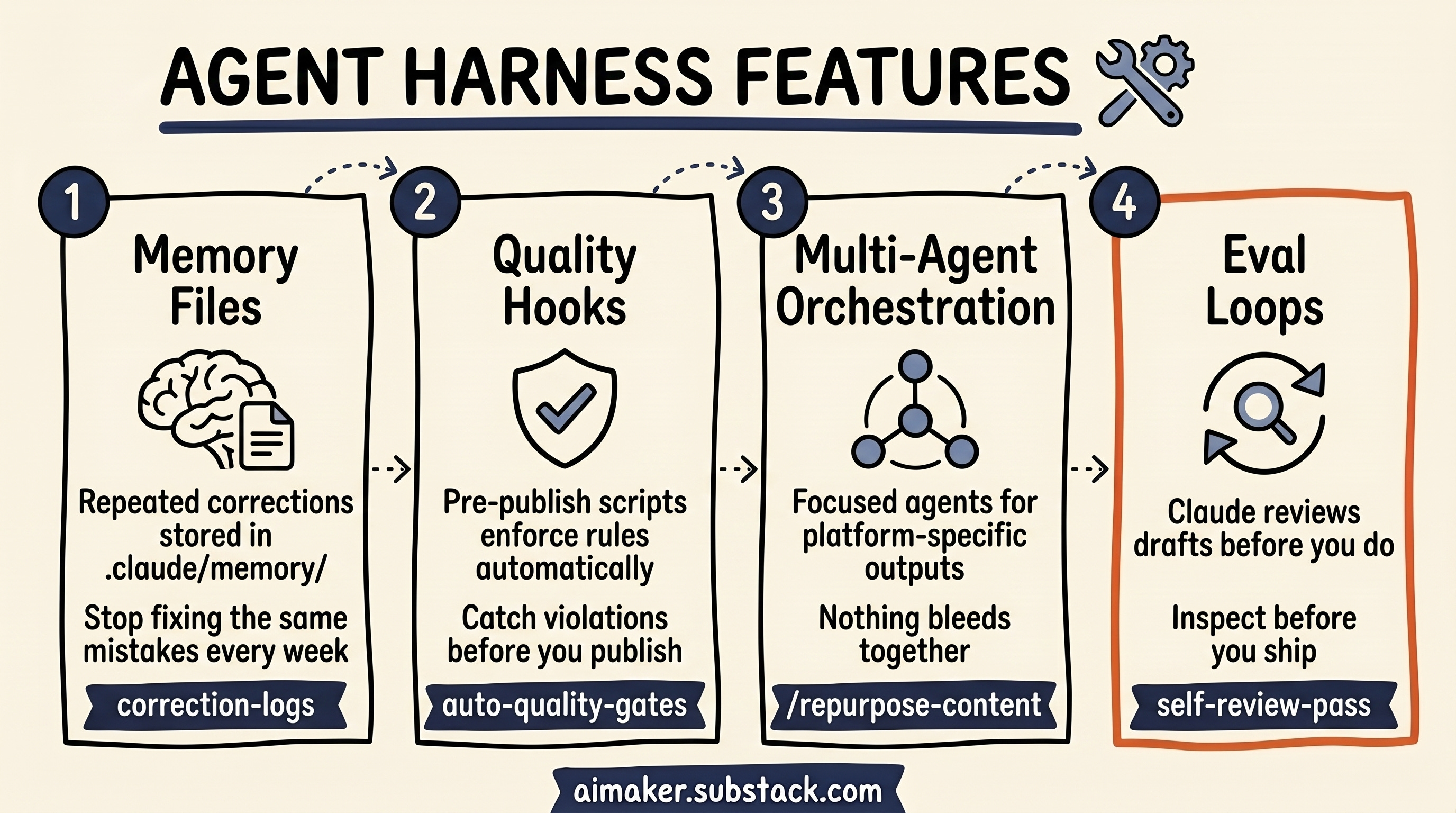
By the end of this post, you should be able to take a normal Claude Code project and turn it into a more reliable working system.
Not perfect. Not fully autonomous. But meaningfully better than a folder with instructions.
You will have a way to:
Turn repeated corrections into memory, so Claude stops making the same mistakes across sessions.
Add mechanical checks with hooks, so predictable issues get caught while the work is happening.
Connect agents with one command, so multi-step workflows stop depending on you as the operator.
Add evaluation loops, so outputs get reviewed, repaired, and checked again before they reach your final judgment.
The examples are built around my newsletter workflow because that is where I have the clearest scar tissue. But the pattern applies beyond writing.
If you use Claude Code for research, product work, project management, coding, or content operations, the same problem shows up eventually: Claude knows enough to help, but not enough to reliably manage the process around the work.
That is where the harness begins.
Layer 1: Memory that turns corrections into system rules
Here is what made memory click for me: not every instruction I put in CLAUDE.md changed Claude’s behavior reliably.
I had rules in there like no em dashes, no contrived rhetorical patterns, and no generic AI endings. Claude would follow them sometimes. Then the same mistake would come back in another draft.
At first I thought the rule just needed stronger wording. So I made the instruction clearer. Then stricter. Then more detailed.
That helped a little, but it did not fully solve the problem.
The bigger shift happened when I started turning repeated corrections into memory. When a mistake kept showing up during real work, I saved the correction there instead of only rewriting the project rules.
That changed the feel of the system. Claude did not stop making every mistake forever, but it repeated fewer of the same ones. The correction started carrying across sessions in a way that felt more durable.
That is when I realized CLAUDE.md and memory are not the same tool.
CLAUDE.md is for stable project rules:
What the project is.
Where files live.
What voice rules apply everywhere.
What the main workflows are.
Memory is for the corrections you only discover after Claude has worked with you for a while:
“When a LinkedIn post ends by restating the thesis, replace the recap with a sharper final punch or a direct question.”
“When reviewing voice, compare against recent daily LinkedIn posts before suggesting rewrites. Do not judge from the generic brand rules alone.”
“If a newsletter draft sounds too polished, look for the missing messy part: what failed, what I changed, or what I am still unsure about.”
“When a paid post explains the strategy but skips the setup details, flag the missing blueprint pieces: steps, templates, failure modes, and checks.”
Those are not abstract principles. They are bruises. They come from moments where the setup almost worked, but missed something important.
That is why memory is powerful.
There are two ways I create memories
The manual way is simple. Whenever I notice friction during the work, I ask Claude to save the correction into memory.
The second way is auto memory. Claude Code can notice corrections during the conversation and save them automatically.
That does not mean I blindly trust whatever gets saved.
Every so often, I open /memory, look at what Claude stored, and clean it up. Some memories need sharper wording. Some are temporary and should be deleted. Some are useful, but belong in a different file.
That’s why this review process is important. You need to be detailed here and make sure every memory serves its purpose, does not contradict the others, and is supported by really specific instructions.
Where Claude Code stores memory
One thing that confused me at first: this memory folder does not live inside your project by default.
Claude Code stores project memory in its own project-specific folder. For this newsletter, mine lives here:
/Users/wyndomb/.claude/projects/-Users-wyndomb-Downloads-AI-Maker-Newsletter/memory/
The long folder name comes from the project path. If your project is somewhere else, your folder name will be different. The easiest way to find it is to open:
~/.claude/projects/Then look for the folder that matches your project path. In my case, /Users/wyndomb/Downloads/AI Maker Newsletter becomes:
-Users-wyndomb-Downloads-AI-Maker-NewsletterInside that memory/ folder, Claude keeps the memory index and the individual memory files.
The four memory types
I would not treat memory as one big bucket. There are four types of memory. They matters because it tells Claude how stable the information is and how to apply it: