



For Episode 3 of One Shot Show Season 2, Dheeraj Sharma and I started what will become a small Codex and Claude series.
The session started with a simple topic: how to use Codex.
I walked through the Codex app, projects, plugins, skills, MCP (Model Context Protocol), file previews, browser use, automations, goals, and how I use it next to Claude Code. Dheeraj pushed on the comparisons, especially where Codex feels more like Claude Cowork even though the underlying job is closer to Claude Code.
But the more useful lesson was bigger than a tool comparison.
I’ve realized that regardless of which models you use—OpenAI or Anthropic—it’s no longer as important, because each model keeps getting better over time. The competition is so tight that locking into a single model limits my ability to reach my full workflow potential and keeps me from understanding the nuances of which models to use at different points to best fit my workflow.
So, I have been shifting back and forth between Codex and Claude Code because GPT 5.5 changed the tradeoff for me. Before GPT 5.5, I mostly avoided GPT for this kind of work. I did not like the writing as much, and it did not feel as agentic as Opus for the way I work.
That has changed enough that I keep reaching for Codex now.
Not for everything. I still use Opus for planning, brainstorming, designing, and some coding work because it often understands the broader context of a project better. And Opus has a better design taste. But for typical knowledge work, especially writing, documents, files, and daily operating tasks, GPT 5.5 inside Codex has become good enough that I do not treat it as a backup tab anymore.
Let’s explore what Codex can do for you as your new alternative to Claude Code.
🚨 A quick break from sponsor…
Ever shipped an AI hallucination? Cuey sends one prompt to ChatGPT, Claude & Gemini in one tab, so you can cross-check answers before you hit publish. Built for makers who can’t gamble on one answer.
The Friction That Made Codex Worth Testing Again
The reason this series exists is pretty practical, but usage limits are only part of it.
Dheeraj opened the session by saying what a lot of heavy Claude users have felt lately. The limits can be erratic. Sometimes they work in your favor. Sometimes they stop you right when you were finally making progress.
That happened enough that many of us started building backup routes.
But for me, there was another reason Codex became worth testing again.
When Opus 4.7 launched, I was disappointed by it. The answers often felt lazy. Sometimes it did not generate the complete output I asked for. And the writing style did not work well for me. It could feel mechanical, and sometimes it did not sound like my voice.
That was frustrating because I had been using Claude Code heavily for my newsletter work. It was where I brainstormed, wrote, built skills, and shaped a lot of AI Maker system.
Then I started hearing that Codex 5.5 had improved for knowledge-work tasks.
So I tried it again.
I started moving small pieces of newsletter work into Codex first. Brainstorming. Writing newsletter. Testing the same kinds of tasks I normally ran through Claude Code.
And so far, it has worked better than I expected.
That is why Codex caught my attention this time. GPT 5.5 improved enough for the work I actually do, and the Codex app made that work feel easier to keep close to the files, skills, and outputs I already use.
Codex Feels Different Because The Work Stays Close
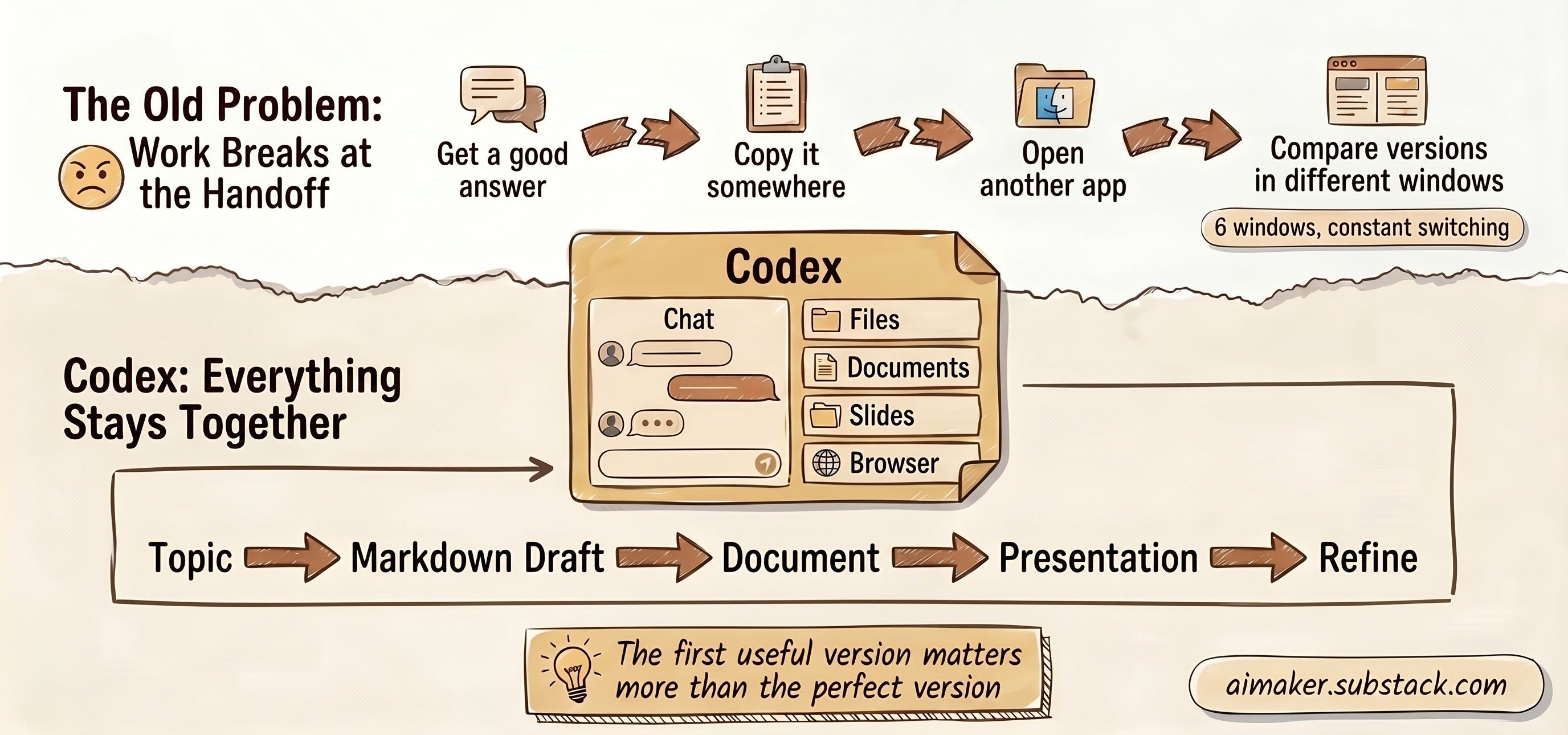
The first thing I showed was the Codex app itself.
It has a simple chat area, pinned chats, projects, and a right-side panel where you can inspect files, documents, spreadsheets, presentations, browser sessions, and changes. That sounds basic, but in practice it changes the feeling of the work.
When I use Codex inside my AI Maker Newsletter folder, the app can see the files I am already working with. I can open a markdown draft, ask Codex to turn it into a document, generate a presentation from it, inspect the output on the side, and keep refining without jumping between six tabs.
That matters because a lot of AI work breaks at the handoff point.
You get a good answer, then you have to copy it somewhere. You ask for a file, then you have to open Finder. You generate slides, then you have to inspect them somewhere else. You want to compare versions, then the conversation and the artifact are no longer next to each other.
Codex reduces some of that friction.
I showed an example from my One Shot Show brief skill. I can give it a topic, generate a markdown episode brief, ask Codex to turn that into a document, then ask for a presentation. The outputs show up on the side, and I can keep talking to the same agent about the same artifact.
The default slide was not perfect. I would still edit it before using it publicly. But the result was readable enough from a very simple prompt, and that is the point.
For a lot of knowledge work, the first useful version matters more than the perfect version.
Plugins, Skills, And MCP Are Different Jobs
One thing I tried to make clear in the session is that Codex has a few different layers that people can easily mix up.
The naming is still a little weird. You click “plugins” and then you also see “skills.” I do not think that label helps new users much.
But here are three key features you need to understand when you click “plugins” in the Codex app:
Plugins connect Codex to apps. Google Calendar, Gmail, Google Drive, Chrome, spreadsheets, slides, and other tools belong here.
Skills tell Codex how to do a repeatable job. A skill can encode your process, format, judgment rules, and output shape.
MCP is the more manual connection layer when the built-in app connection through plugins is not enough.
I’m sure OpenAI will fix this UI/UX problem, because I don’t think many people realize they can access the skills they already have or add more MCP connections, similar to how Anthropic handles this with its custom connectors feature.
Codex Makes The Claude Code Folder Easier To Reuse
This is the part I think matters most if you already use Claude Code.
Codex does not force you to rebuild everything from zero.
If you open an existing Claude Code project folder inside Codex, it can bring over a lot of the structure you already built. Your CLAUDE.md instructions can become an AGENTS.md file. Your skills inside the folder can show up inside Codex. Your files, drafts, outputs, and project structure are already there because Codex is reading the same folder.
For my newsletter, that matters a lot. I already have instructions, skills, drafts, source files, and output folders for AI Maker. If I had to recreate all of that just to test Codex, I probably would not bother. The friction would be too high.
But when I can open the same folder and Codex understands enough of the structure to get going, the experiment becomes much easier.
This is why I feel like Codex makes the migration process frictionless and portable. I no longer have to worry about moving between Claude Code and Codex because I can work with both of them at the same time.
Additionally, if you choose the CLI to connect with external apps, then you will find no problem moving to Codex. If an app works through a CLI, then a skill can often call it from Codex the same way it can call it from Claude Code. That makes tools like Google Workspace CLI, Tavily, Twitter, or Todoist easier to carry across.
But it becomes a different story if you use MCP.
If you already configured MCP servers inside Claude, Codex does not automatically import those for you. You still have to set them up again. That is the part that does not travel cleanly yet.
So the honest version is this:
Folder instructions transfer more easily.
Skills inside the folder transfer more easily.
CLI-based tools can transfer more easily.
MCP servers still need manual setup.
That is the main reason Codex felt interesting to me. It gave me a lower-friction way to test GPT 5.5 on the newsletter system I already built in Claude Code.
This makes experimentation with your own project folder much easier.
Codex Also Has Automations And Mobile Access
One of the practical features we showed was automation.
This is similar to scheduled tasks in Claude Desktop. You can create a workflow in Codex, then schedule it to run on a regular basis. In the session, I created a simple AI news skill: gather AI news from the last 24 hours with Tavily, summarize the results, then schedule the skill to run every morning at 9 a.m.
One of the audiences asked a good question near the end: can you get the news, then have the agent generate topic options from the news, then turn that into writing ideas?
Yes, that is possible. Dheeraj described a more complete version he calls Content Radar, where the agent filters news through brand guidelines, audience fit, content calendar, urgency, and whether something is evergreen or time-sensitive.
Codex also has mobile access. I showed the iPhone connection in settings, and there is an option to keep the Mac awake so Codex can keep running while you access it from your phone.
That is similar to how Claude has Dispatch. You still need your computer running, but you can continue or monitor work from mobile instead of being tied to the desktop screen.
The Browser Demo Showed The Boundary
I also showed how Codex can use an in-app browser.
The browser can open pages inside the Codex app, which makes it easier to watch what the agent is doing. In the demo, I used Substack Notes analytics as the example.
The workflow was pretty simple:
I asked Codex to visit my Substack profile.
Codex went through my last five Substack Notes from yesterday.
It collected the data I wanted: impressions, clicks, and comments.
It put that data into a Google Sheet.
That part worked.
The issue was impressions.
To get impressions, Substack needs to know that I am logged into my own account. If the in-app browser opens Substack without my login state, Codex can still visit the profile, but it cannot see the private analytics data behind my account.
So right now, the practical version is: open the Codex browser, log in to Substack first, then ask the agent to collect the data.
Eventually, I think the browser should store the user’s authentication state. If I log in to X, Substack, LinkedIn, or another account inside the Codex browser, I should not have to log in again every time I ask the agent to visit that site. The browser should remember that I am authenticated, the same way a normal browser does.
That is the boundary the demo showed.
There is a big difference between an agent browsing the public web and an agent operating inside your private accounts.
The second version is more useful, but also riskier.
But I can see OpenAI will keep improving this feature over time, because it makes sense for users to deploy multiple agents to browse the internet for them while they are doing something else.
Security Is Boring Until It Matters
Someone asked about guardrails and security when connecting apps with your credentials.
I am glad they asked, because this is where agent workflows can get weird fast.
When you connect Google, Gmail, Calendar, Chrome, or any other account, you are trusting the platform and the permission system behind it. If the connection uses OAuth, you can often choose what access to grant. That matters.
If an agent only needs to read your calendar, do not give it permission to edit your calendar. If an app comes from a random GitHub repo and you do not trust it, do not install it just because it looks useful.
Dheeraj also brought up prompt injection, especially around email. That is a real concern. If an agent reads incoming emails and acts on them, a bad email can try to influence the agent’s behavior.
Here are some guardrail suggestions I can share:
Use trusted app connections when possible.
Grant the least permission that still lets the workflow run.
Keep human approval on actions that can send, delete, publish, or change important files.
Split risky workflows into smaller agents or checks.
Keep the agent in a more restricted mode when the downside is high.
I am still figuring out my own comfort level here.
For now, I feel safer using major platforms like OpenAI and Anthropic than connecting sensitive work through tools I do not understand. That does not make the risk disappear. It just makes the tradeoff clearer.
My Current Codex And Claude Split
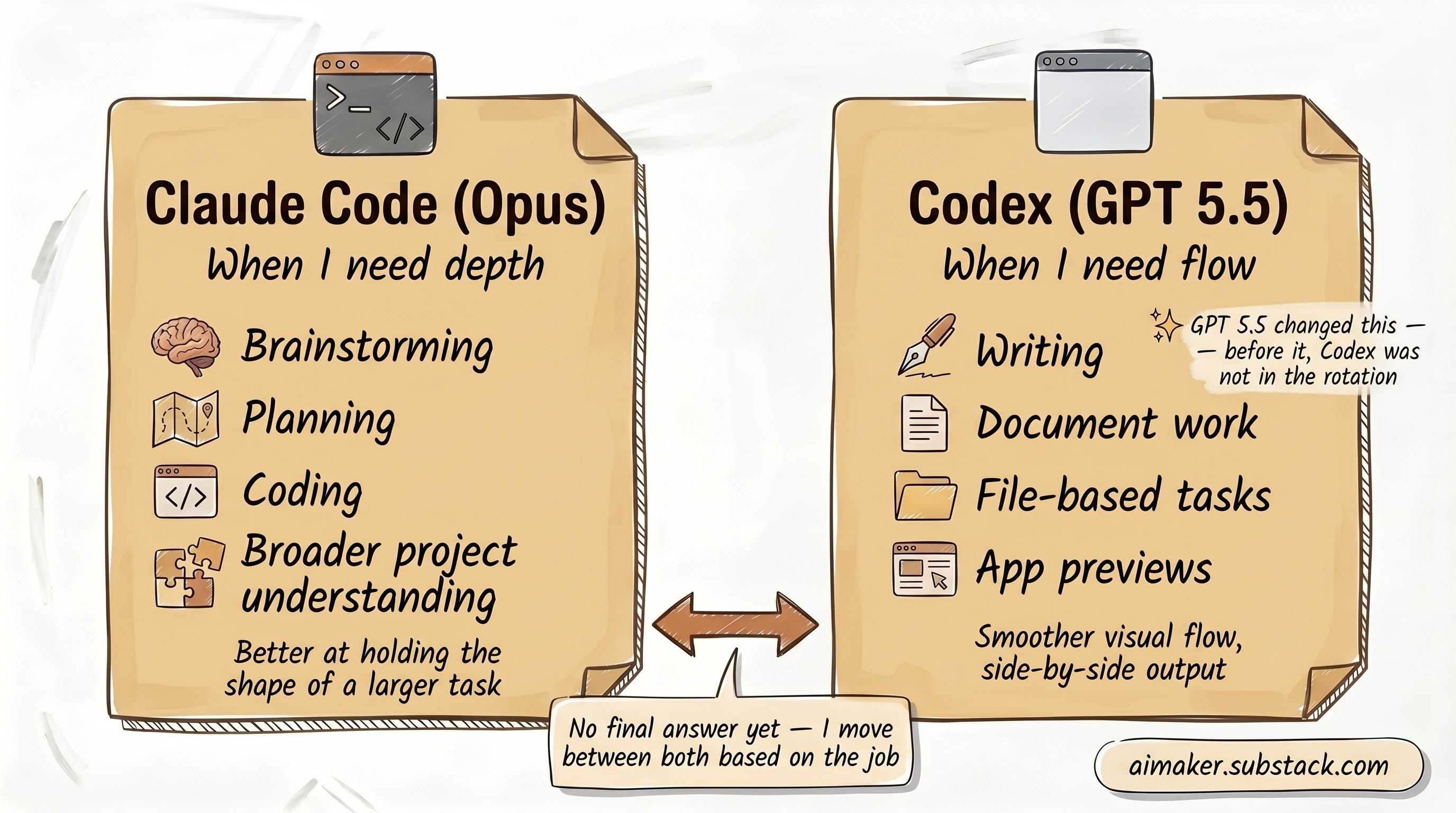
The honest version is that I do not have a final answer yet.
Right now, I use Claude Code and Codex differently.
For brainstorming, planning, coding, and broader project understanding, I still often prefer Opus. It usually feels better at holding the shape of a larger task in its head.
For writing, document work, file-based tasks, app previews, and anything where I want a smoother visual flow, I am using Codex more often.
GPT 5.5 is the reason that changed. Before this version, I did not enjoy using GPT for much of my serious writing or agent work. Now it is good enough that I keep moving between both tools based on the job.
That might be the more practical future anyway.
I do not think the goal is to find one tool and stay loyal forever. The goal is to build your work so it does not collapse when one tool hits a limit, changes pricing, moves a button, or gets worse at the exact moment you need it.
That means the layer around the model matters:
Your project instructions.
Your skills.
Your handoff files.
Your logs.
Your app connections.
Your CLI tools.
Your safety rules.
That is what I would build before overthinking which model wins this month.
The Takeaway
The practical takeaway from Episode 3 is simple:
Build your AI workflow so it can survive one model’s mood, limits, or interface.
Start with the layer you can carry.
For me, that means keeping more of my work in folders, markdown files, skills, handoff notes, and tool commands that can move between Codex and Claude Code. It is not perfect. There is still setup friction. MCP migration is still annoying. Some app connections need to be rebuilt. Some outputs still need another model to review them.
But that is better than being trapped.
Codex is getting good enough that I can use it for real knowledge work now. Claude is still strong enough that I do not want to leave it. So I am trying to build a setup where both can help.
So, would you give Codex a try? If you have tried it, what sort of experience have you had? Share it with me in the comments section.
Best,
Wyndo
One Shot Show Details
This was Episode 3 of One Shot Show, Season 2. One Shot Show goes live every Wednesday at 10:00 AM EST on Substack.
Season 2 One Shot Show:
Episode 1: What I Learned From Dheeraj’s Agentic AI Workspace
Episode 2: How To Build An AI Job Finder Agent That Finds Roles Worth Opening
Episode 3: Why I’m Moving Some of My Work From Claude Code to Codex
Episode 4: How to Build Your Own Newsletter RSS Feed
Timestamps:
00:00: Welcome to Season 2, Episode 3 and why Codex matters now
00:37: Claude usage limits and the need for backup routes
02:17: Why I started using Codex for knowledge work
03:56: Codex as an introductory session for agentic tools
05:13: My current split between Codex, GPT 5.5, Opus, and Claude Code
06:13: Codex app overview: projects, chats, folders, and pinned work
07:56: Plugins, skills, and the confusing naming layer
08:42: Plugins as app integrations
10:23: Skills inside folders and why Codex can discover them
11:28: Managing plugins, skills, MCP, and marketplace options
12:03: Adding MCP servers manually
13:02: Connecting Codex to mobile and keeping the Mac awake
14:22: Starting a new chat inside a project folder
14:51: Full access, permissions, GPT 5.5, and high reasoning
15:40: Mentioning documents, spreadsheets, browser, and files in chat
16:38: Memory, personality, and path options
18:00: Goals and long-running agent loops
20:03: Using goals for article quality checks, brand voice, SEO, and verification
22:03: Running handoffs between Codex and Claude Code
22:24: Adding a new folder and generating AGENTS.md from an existing Claude setup
24:30: Skills import from folders and the MCP migration limit
25:46: One Shot Show Brief skill example
26:51: Viewing markdown outputs inside Codex
27:27: Turning a brief into a document
28:00: Turning a brief into a presentation
29:10: In-app previews for documents, slides, apps, and outputs
31:16: File browsing, side panels, and folder inspection
31:57: Side chat while an agent is running
33:28: Opening terminal inside Codex and using Claude Code inside the same folder
34:30: Handoff skill and shared files between Codex and Claude
36:47: Skill Creator and Skill Installer
38:04: Creating an AI news skill with Tavily
38:44: Scheduling a skill as an automation
39:52: Browser use inside Codex
41:52: Browser login limits and when Chrome access matters
43:35: Usage limits on the $20 plan
45:44: Codex usage compared with Claude usage
46:40: GPT image generation inside Codex
48:02: Preview of the next Codex versus Claude episodes
49:06: Codex as OpenAI’s move toward a larger work app
50:24: Why tool bridges matter when usage limits interrupt momentum
50:54: MCP migration friction
51:09: Why CLIs can make skills more portable than MCP servers
52:48: Nick asks about open-weight models
54:31: Sensei asks about chaining news collection into topic ideas
55:53: Viewer question on credentials, guardrails, and security
56:24: Prompt injection risk and email-reading agents
58:44: Trusted apps, OAuth, least permission, and restricted mode
60:04: Closing notes and next episode preview
Resources Mentioned
Codex: The OpenAI app I demonstrated for file-based agent work, documents, slides, browser use, automations, and project folders. I use it on the $20 plan, though usage limits can still vary based on model and reasoning settings.
GPT 5.5: The model version discussed during the session. I framed it from my own usage: it has become much better for knowledge work and writing than earlier GPT versions I avoided.
Claude Code: Anthropic’s coding and agent tool. I still use it heavily, especially when I want Opus for planning, broader project understanding, or coding work.
Claude Cowork: Referenced as the Claude interface that Codex can feel similar to from a usability perspective, especially for people who prefer visual workflows.
Claude Desktop / Claude app: Mentioned as the broader Claude environment where connectors and related tools live.
Claude Opus: The model I still prefer for some planning, brainstorming, coding, and broader project understanding.
Claude Sonnet: Mentioned during the open-weight model discussion as a strong model that can still create workflow friction compared with Opus in some cases.
Plugins: Codex app integrations for tools like Google Calendar, Google Drive, Gmail, Chrome, spreadsheets, slides, and other services.
Skills: Reusable instruction packages that teach Codex how to perform a repeatable job, such as generating a One Shot Show brief or running an AI news workflow.
MCP: A manual connection layer for tools that are not covered by built-in plugins. We discussed it as useful, but more annoying to migrate across apps.
AGENTS.md: The Codex instruction file that can act as the folder brain, similar to how CLAUDE.md works for Claude Code.
CLAUDE.md: The Claude Code instruction file that can be replicated or translated into AGENTS.md when moving a folder into Codex.
Handoff skill / handoff.md: A portable bridge file that summarizes what one agent did so another agent can review, continue, or challenge the work.
Computer Use: A Codex plugin that can let the agent interact with local Mac apps.
Chrome plugin: Mentioned as useful when Codex needs to access a browser where the user is already logged in.
Codex in-app browser: The browser panel inside Codex. Useful for visible browsing, but limited when private account login is required.
Google Calendar: Mentioned as an installable Codex plugin.
Google Drive: Mentioned as an installable Codex plugin and connected app.
Gmail: Mentioned as an app connection and as a higher-risk source if agents read untrusted incoming email.
Google Sheets / spreadsheets: Mentioned as a Codex output and connected tool for structured data.
Slides / presentations: Mentioned as a Codex output type. I showed a presentation generated from an episode brief.
Documents / Word docs: Mentioned as a Codex output type. I showed a document generated from a markdown brief.
Goals: A Codex feature for long-running tasks where the agent works, checks, and continues until the target condition is met.
Memory: A Codex option that can help the system learn from repeated friction and prior instructions.
Automations: Scheduled Codex tasks. I showed a daily AI news skill running at 9 a.m.
Skill Creator: A Codex skill for creating new skills.
Skill Installer: A Codex skill for installing available skills.
One Shot Show Brief skill: My example skill for turning a session topic into a structured episode brief.
Tavily: The search and research tool I used in the AI news skill example. Pricing was not discussed.
Google Workspace CLI: Mentioned as a CLI approach that can make agent skills more portable across Claude Code and Codex.
Todoist: Mentioned as a tool I can access through a CLI-based skill.
Notion CLI: Mentioned by Dheeraj as another example of apps moving toward CLI access.
Substack Notes analytics: Used as an example browser automation target that may require logged-in browser access.
Google Sheets: Mentioned as the destination for structured Substack Notes analytics.
GPT image generation: Discussed as a way to generate images inside the OpenAI side without paying for a separate image model in some cases.
Nano Banana / Gemini image tools: Mentioned as image generation tools Dheeraj had paid for before using GPT image generation more.
Open-weight models: Nick asked about models like Qwen and Kimi. I said I have not explored them deeply because I am currently optimizing for less friction.
Qwen / Gwen: Mentioned in Nick’s question as an open-weight model family. The transcript pronunciation is unclear.
Kimi: Mentioned in Nick’s question as another open-weight model.
OAuth: Mentioned during the security discussion as the common permission flow for app connections.
GitHub installs: Mentioned as something to be cautious with when installing third-party app connections or tools.
Prompt injection: Discussed as a risk when agents read untrusted sources like email.


