

Claude Got Skills! Here's How I Used It to Automate My Entire SEO Workflow (And More)
You can retire your prompting playbook—and use Skills instead.

I’ve been manually optimizing my newsletter content for SEO for months. Every single post, same tedious process:
Check URL slugs. Research keywords. Optimize headings. Rewrite meta titles and descriptions. Add alt text. Build internal links. Make sure I’m not stuffing keywords and killing my voice.
Two hours minimum. Every time.
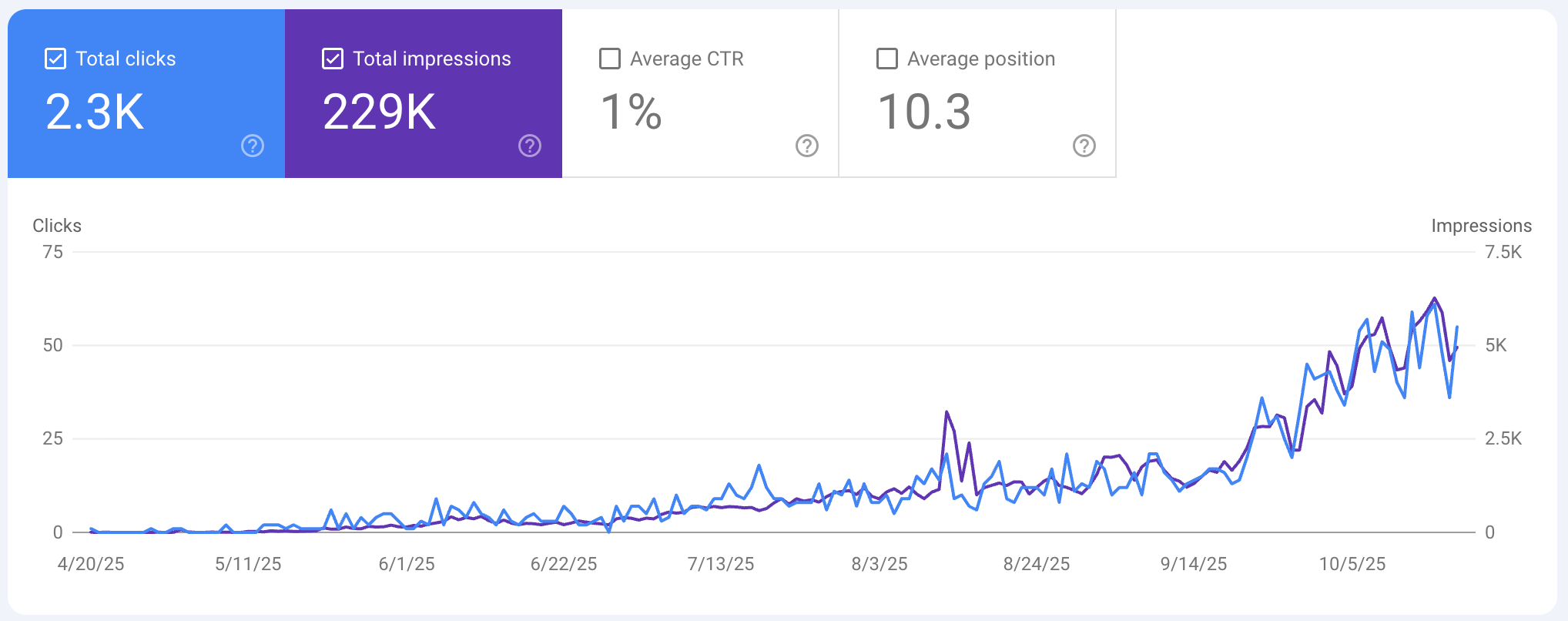
And yes, my SEO has been growing slowly, then suddenly.
My Claude Project knows my writing style, my SEO principles, my framework for content optimization. It can help me think through strategy. We can brainstorm keyword angles together.
But when I need to actually execute the optimization? It still required me to walk Claude through every step:
“Now check the headings.”
“Now optimize the meta description.”
“Don’t forget internal linking recommendations based on content length.”
Here’s what I finally realized: I was asking Projects to solve a problem they were never designed for.
Projects isn’t designed for highly specialized, repeated tasks—and that’s where Claude’s new feature comes in.
Enter Skills - Claude’s newest feature that replaces prompting playbook entirely
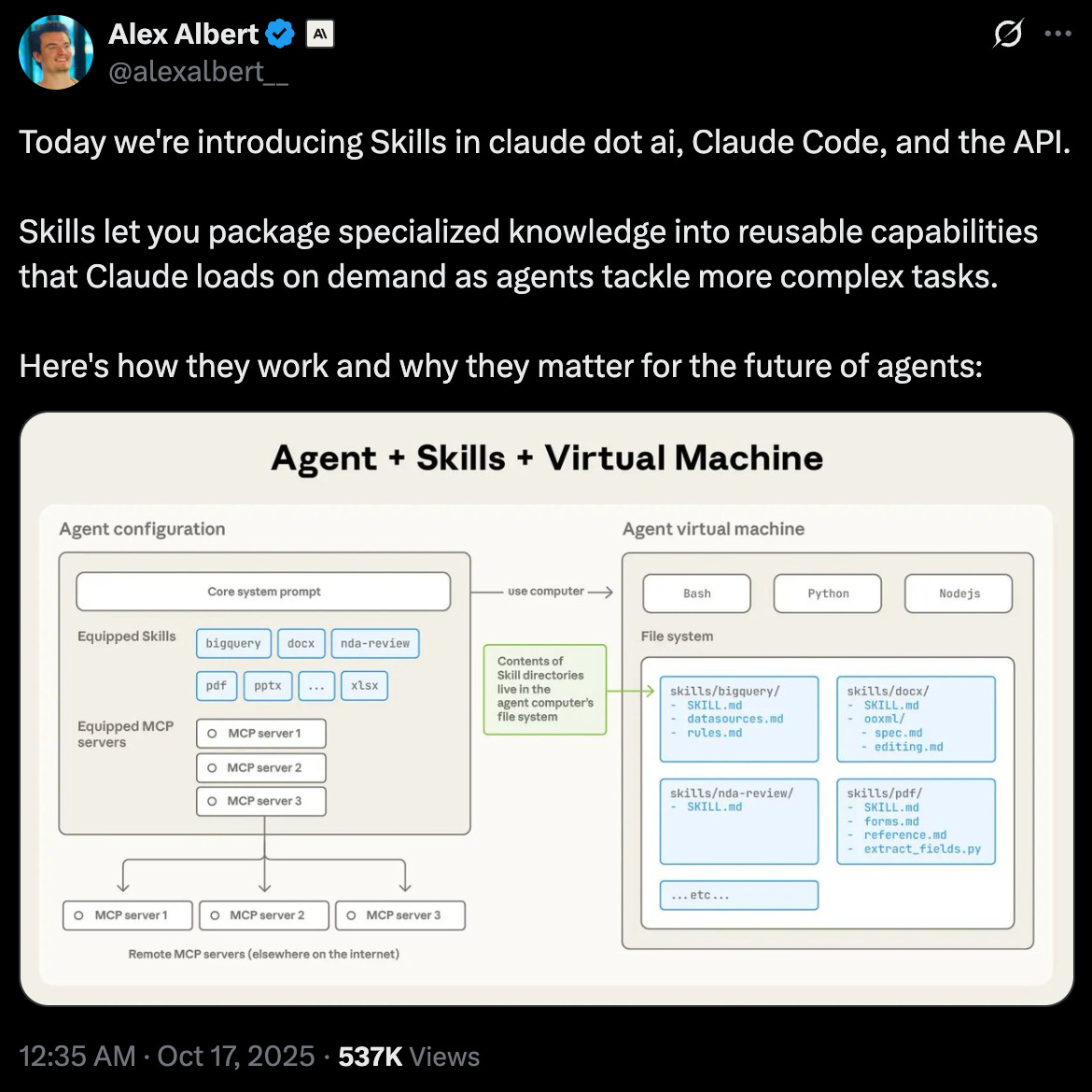
A week ago, Anthropic launched a new feature called Skills.
When the news dropped, I spent nearly a day messing around with it.
Built an SEO Content Optimizer Skill that does that entire 2-hour workflow automatically.
Just paste content, say “optimize this for SEO,” and Claude executes the complete workflow.
But Skills isn’t just another feature. It’s the convergence of everything Claude has been building - and most people are missing why it matters.
My thesis: Skills replace the prompting playbook with reusable, task‑level systems.
Before we have a deep dive, let me show you how we got here.
Claude’s evolution nobody talks about
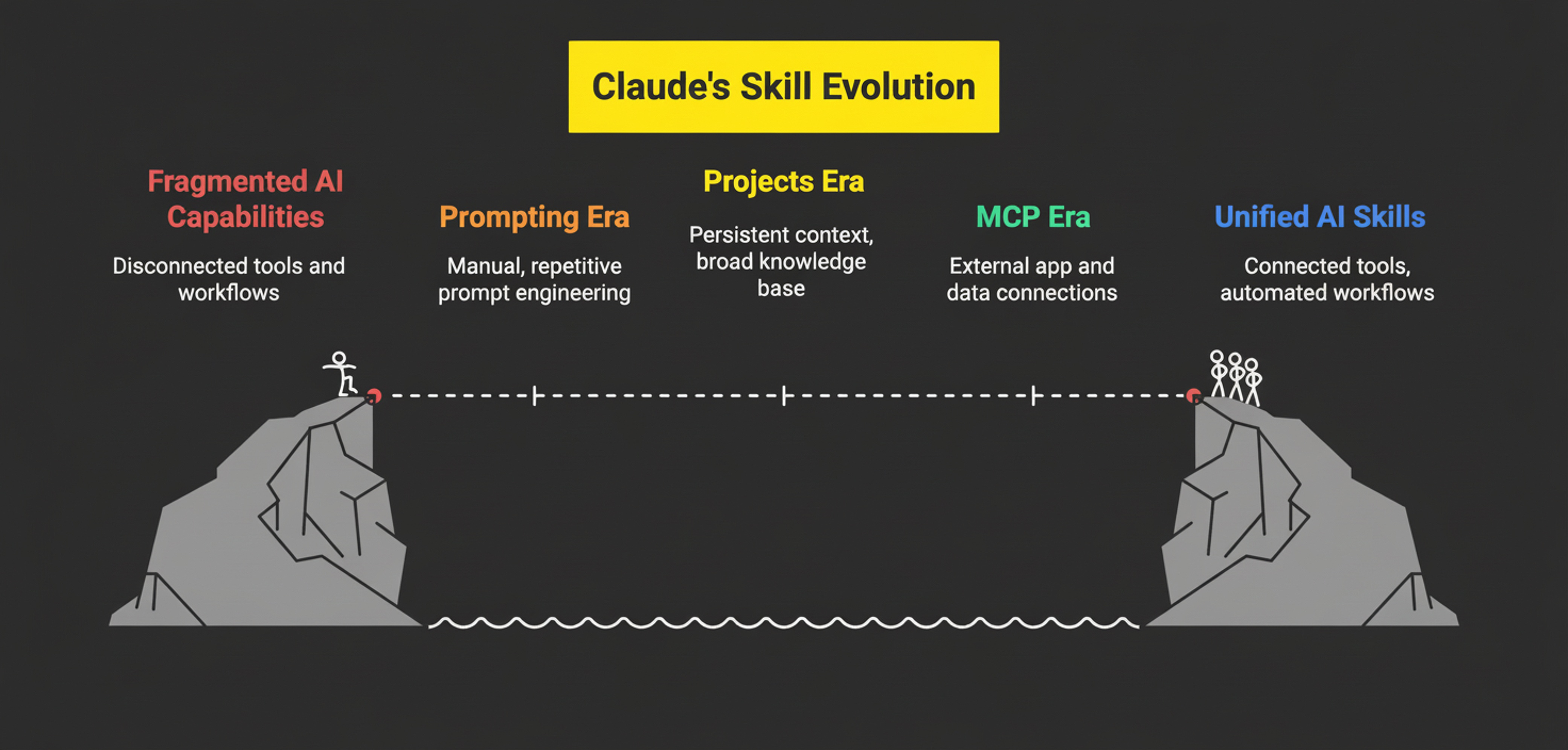
Let’s trace how Claude has been evolving - because Skills only makes sense when you see it as the convergence of everything we’ve been experimenting with.
1. The prompting era
You know what this time was, right?
Pure manual labor—hard work at its finest. Sweat, frustration, anger, a trace of tears.
Every conversation started from zero. You need to explain clearly what you want. Break down your tasks. Write your goals in detail. Describe your framework and strategy. Again. And again.
Then you switch chats and the AI forgets: who you are, what you do, how you work.
It’s nonsense.
2. The projects era
Then projects changed that.
Suddenly Claude had persistent context about who we are and how we think. Projects became our second brain - dynamic knowledge bases we keep updating, master prompts we keep refining. They’re phenomenal for brainstorming, strategic thinking, working with Claude as a thought partner.
But the more I used it, the more I realized that Projects are designed to be your co-worker, not your specialist.
They’re not built for fast execution of repeated specialized tasks.
When I need to optimize content for SEO, I don’t need a brainstorming partner. I need a specialist who knows the exact workflow and just executes.
3. The MCP era
Then MCP (Model Context Protocol) arrived - letting Claude connect to external apps and data sources. Notion, GitHub, your CRM, whatever.
Suddenly Claude wasn’t trapped in a chat interface.
Claude finally can speak to the outside world.
And it was mind-blowing to me because I can connect AI to my favorite apps to optimize my work.
But MCP is so slow and clunky; I wouldn’t use it if speed is the goal.
4. The Claude Code era
Then Claude started to become more agentic.
It lives in computer terminal, can read and edit computer files, and knows everything about my work. This was my first true agent experience.
Claude Code introduced more pieces:
Custom slash commands - Quick shortcuts to trigger specific workflows. Type
/analyzeand boom, Claude knows exactly what to do.Sub-agents - Autonomous agents that run with their own context and instructions, executing complex tasks without constant supervision.
And code execution gave Claude the ability to run actual coding scripts to build real apps
We had all these pieces. But they felt fragmented. Projects for context. MCP for tool access. Slash commands for shortcuts. Sub-agents for autonomy. Code execution for actual apps building.
Nobody connected them.
Then Skill arrived.
What Claude Skills actually is
After messing around with Skills for couple of days, it finally clicked: Skills is the integration layer that packages all these capabilities into specialized, executable modules.
Here’s my best analogy:
Skills are like mini Projects that can run autonomously with their own specialized instructions - but they can also orchestrate MCP connections, execute code, and trigger like slash commands.
Think of it this way:
Projects = Your co-worker you brainstorm with (broad, dynamic, collaborative)
Skills = Your specialist you delegate to (narrow, fast, executable)
Let me show you what this looks like in practice.
Claude’s Skills examples
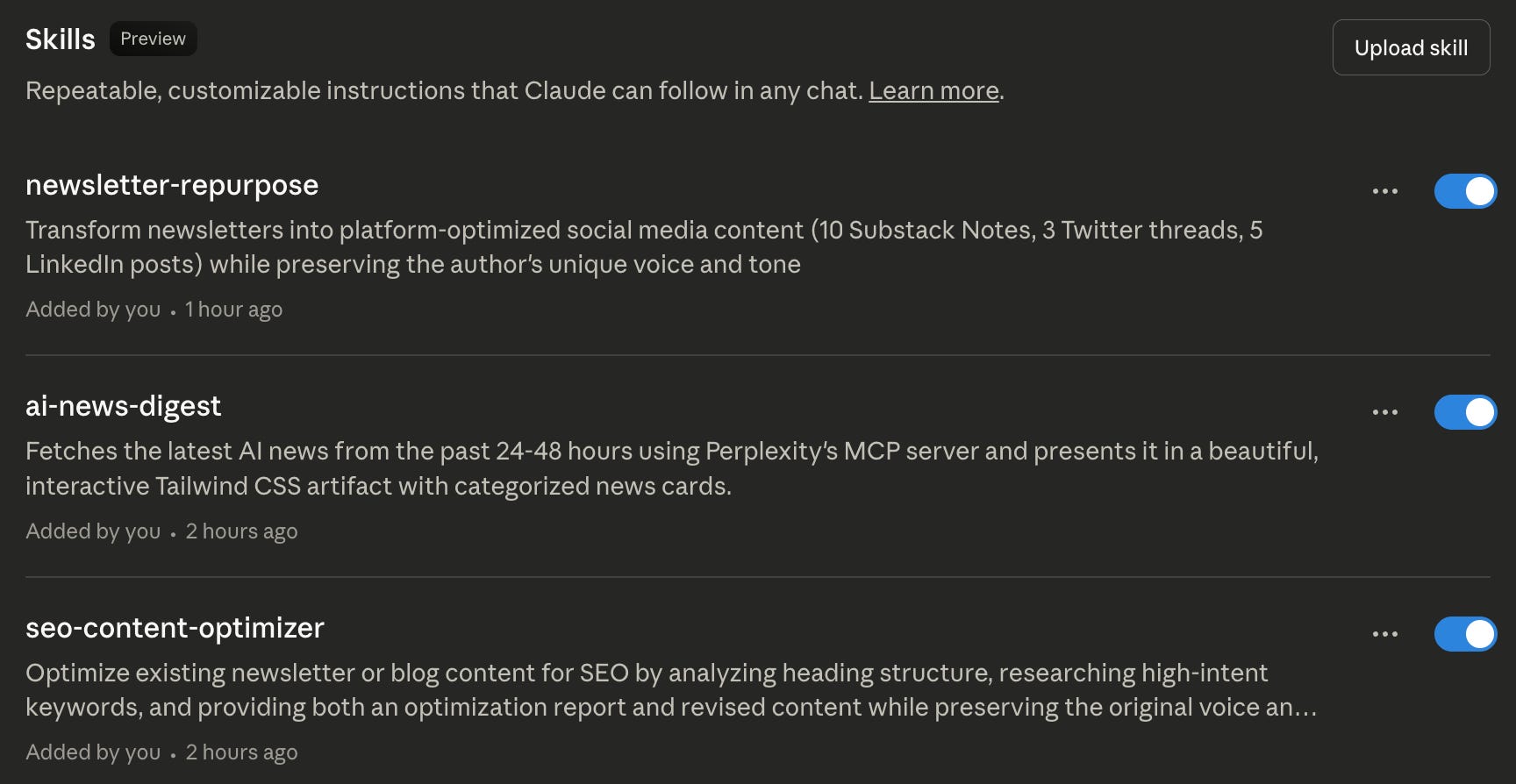
I built three skills: SEO Content Optimizer, Newsletter Repurposing, and AI News Digest.
For example, here’s how the SEO Content Optimizer works. When I ask it to optimize any piece of content by sharing my post link, it automatically:
Fetches content inside my newsletter post URL
Runs URL slug optimization with content-type formulas
Researches 9 high-intent keyword types with smart prioritization
Internal linking with content-length-based recommendations
Image alt text optimization
Heading structure optimization
Meta description optimization
Preserves my voice and tone throughout
All while doing intelligent keyword research through web search
Not just keyword stuffing. A full SEO workflow, equivalent to 2+ hours of junior writer time, packaged into a single Skill that delivers in minutes.
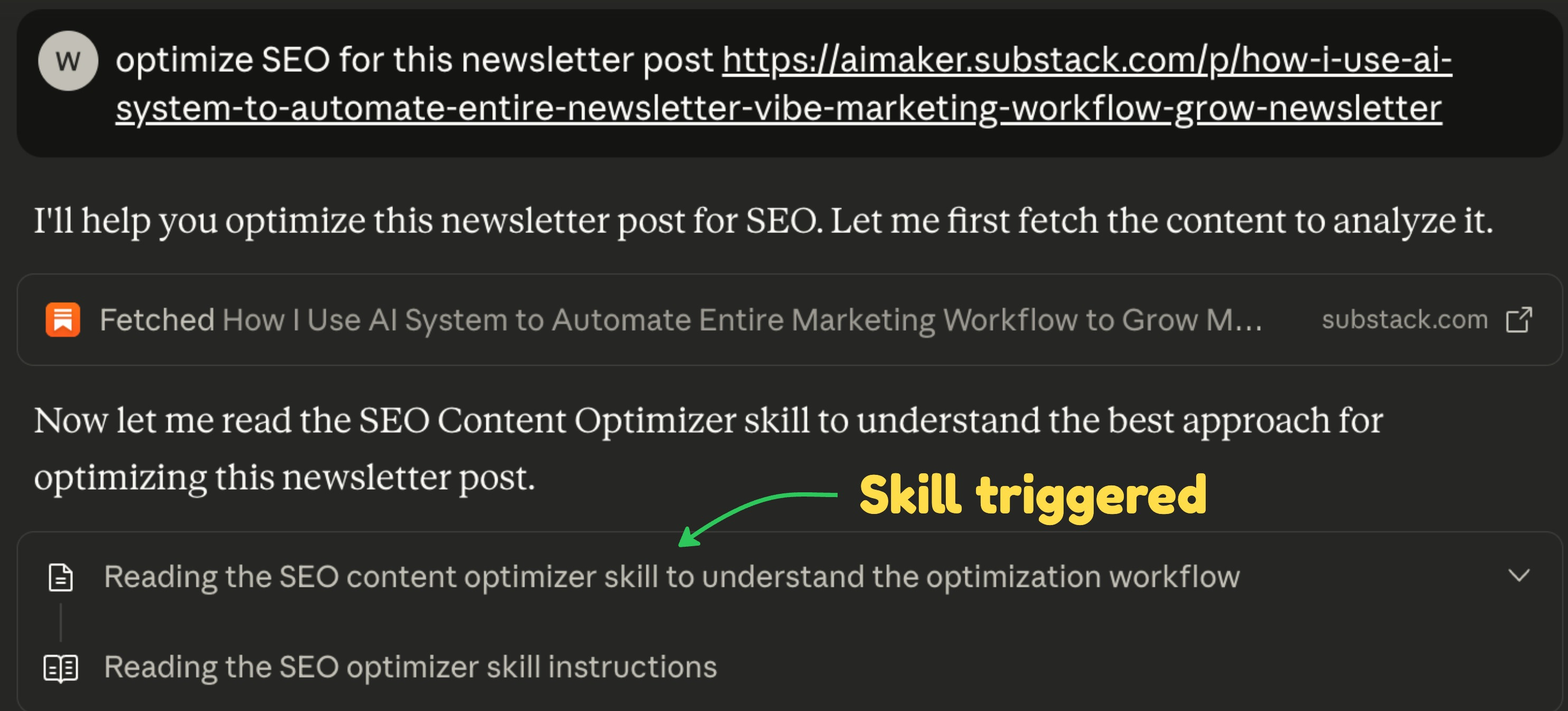
I just paste content and say “optimize this for SEO.” Claude loads the Skill, runs the entire workflow, and creates an SEO‑revised version, as well as reports on what has been done and what you could improve later.
I no longer need to switch projects. I don’t have to explain anything I need, and there’s no manual process I need to do. It all runs automatically.
That’s what Skills enables. Complex, specialized workflows that orchestrate multiple capabilities into one coherent execution.
🎁 Special gift for AI Maker Labs members: You can get this SEO Content Optimizer Skill on Maker Access page. Download the ZIP file, upload it to your Claude account, and share the newsletter URL you want to optimize. Boom, you’ll get the result you want!
Claude Skill’s main difference
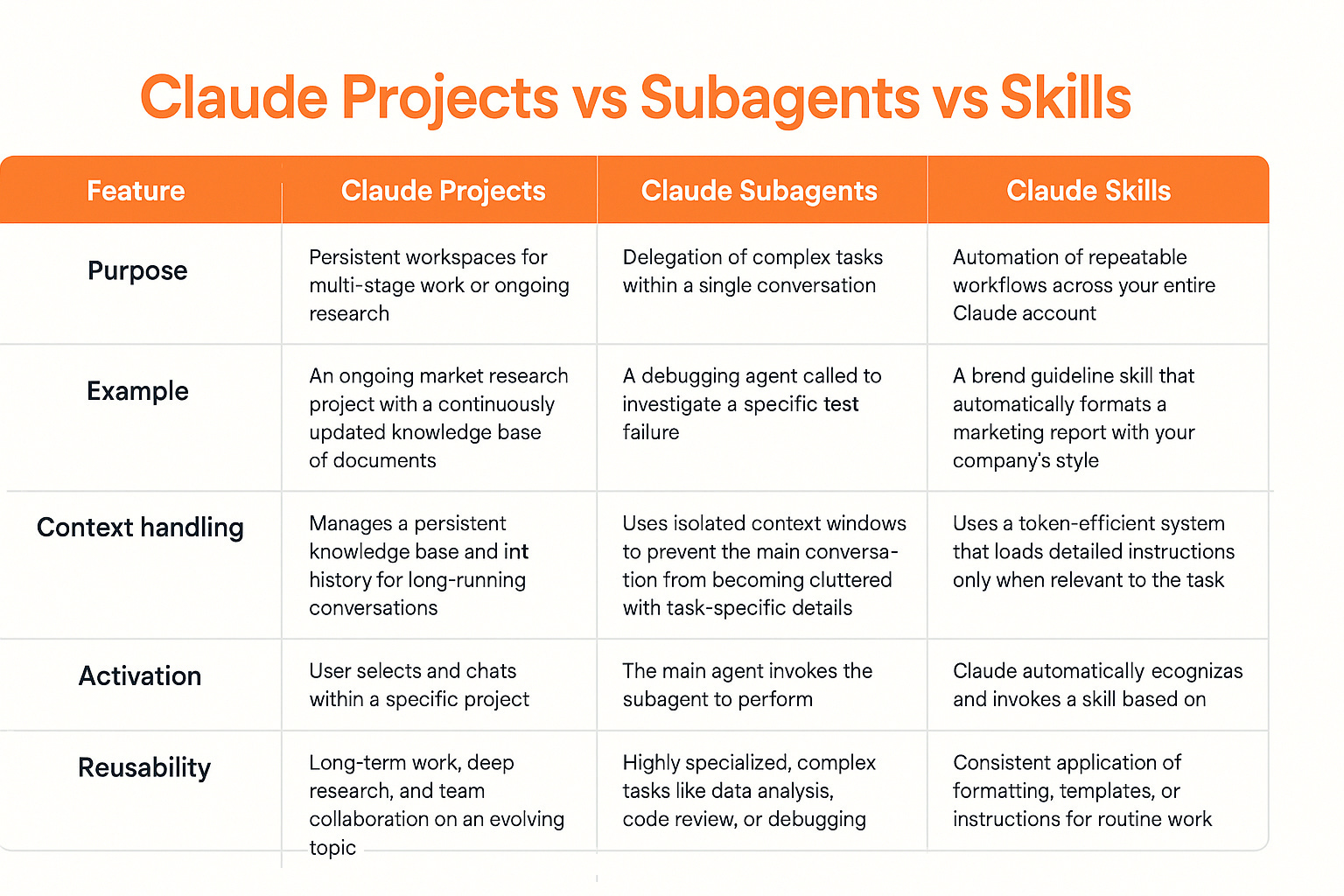
I know some of you are still figuring out the main difference with Claude’s Skills vs Projects vs Subagents.
Here’s how I think about it:
Projects = Claude works WITH you
Subagents: Claude works THROUGH you
Skills = Claude works FOR you
Put simply:
Projects are your brainstorming partner.
Subagents are your on‑call specialists.
Skills are your execution specialists.
And Skills work everywhere. Any chat. Any Project. Through the API. Multiple Skills can stack together for even more complex workflows.
The SEO optimizer is just one example. Think about what else becomes possible:
Research synthesis that connects to your knowledge base via MCP, analyzes patterns, and outputs formatted reports
Data analysis that pulls from your databases, runs calculations, and generates visualizations
Newsletter repurposing across platforms with platform-specific frameworks
It’s the convergence of everything Claude has been building toward.
How to build your first skill
Building your first skill is easy. Tweaking it is the hard part.
Here’s what you need to do:
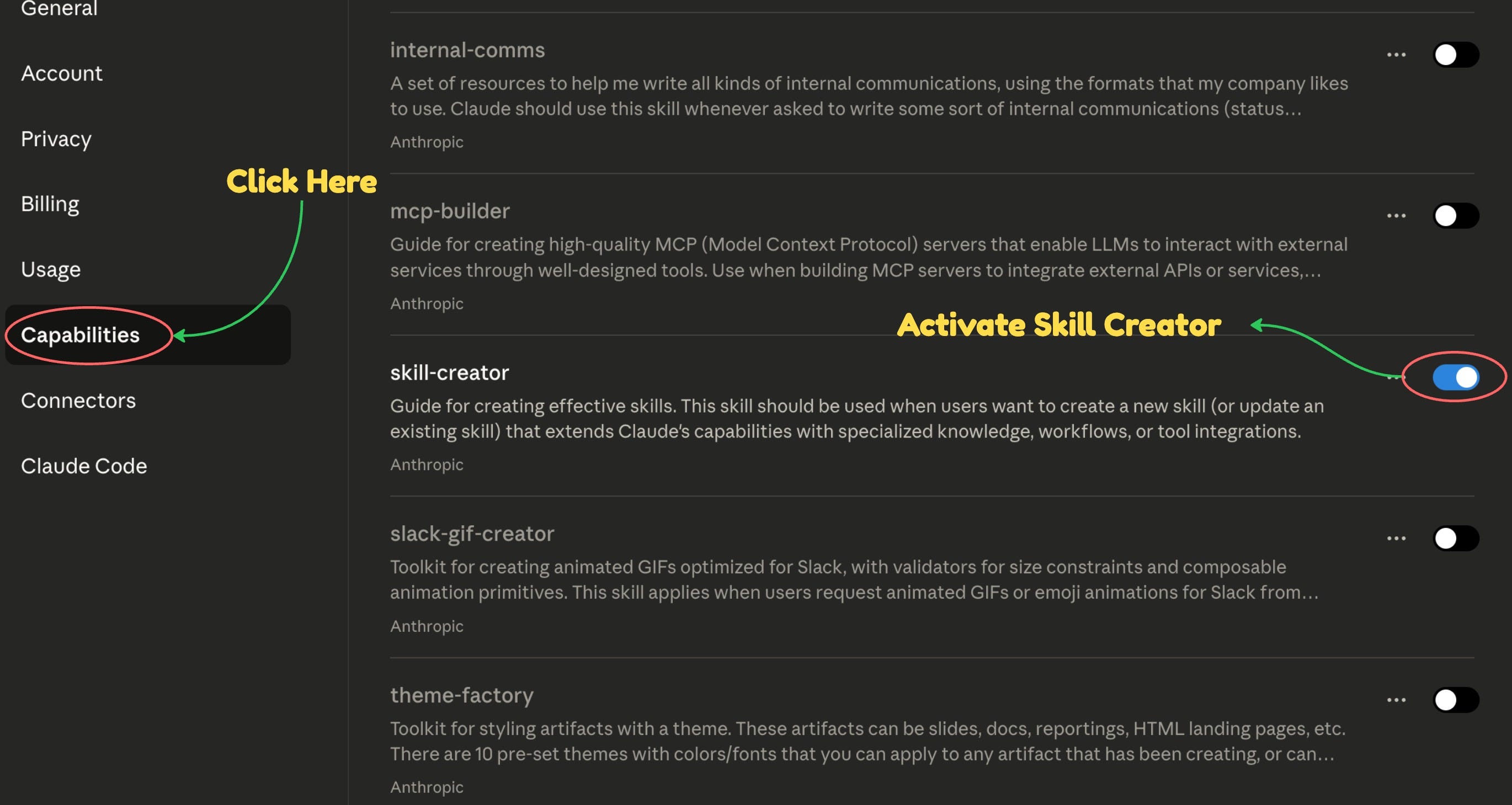
Open Claude’s settings.
Click the “Capabilities” menu.
Scroll to the “Skill” section and toggle on “Skill Creator.”
You can also activate default skills built by the Anthropic team to test them.
Now go back to Claude’s chat and ask: “Help me build a new Claude skill.”
Soon, you’ll learn the output of Skill is actually a Markdown file called Skill.md inside a ZIP file, where all your instructions go. To use it, go back to the Capabilities menu, upload your ZIP Skill file, and trigger them again in a chat.
Using Skills on ChatGPT
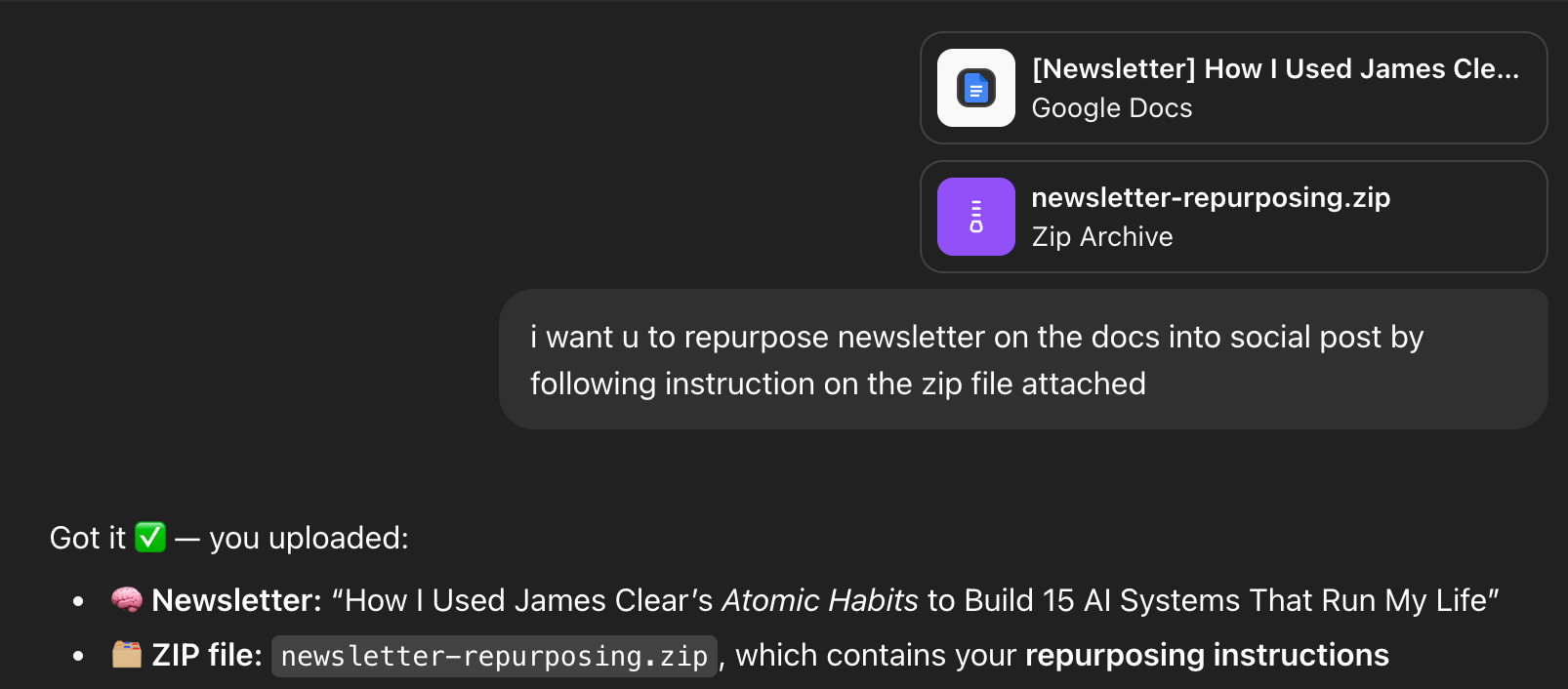
What makes Skills more interesting is that you can also use them with ChatGPT.
Simply upload the Skill ZIP file into a ChatGPT conversation and tell it to follow the instructions. In other words, the Skill is transferable to other AIs.
However, you must explicitly tell ChatGPT to follow the instructions, while Claude does this automatically. You also need to toggle ChatGPT’s thinking mode because it sometimes skips the instruction.
Some pushbacks against Skills
Now here’s where I got pushback: “Wait, Skills are just Markdown files? That’s it?”
Yes. And that’s exactly the point.
I’ve heard this mostly from developers who’ve used Claude Code - they already know how to structure instructions and orchestrate workflows. For them, Skills might feel like “nothing new.”
But for everyone else? This is game-changing.
Here’s why: You can deploy your mini brain directly in any chat without repeating instructions or navigating through Projects individually. It’s a shortcut that bypasses all the friction.
Think about what you had to do before:
Build a complex Project with master prompts
Navigate to that specific Project every time
Explain what you need
Manage the context manually
With Skills:
Build it once
Use it anywhere with a simple prompt
Claude loads it automatically when relevant
Zero context switching
The simplicity is the feature, not the limitation. Markdown files are portable, shareable, version-controllable, and anyone can edit them. No proprietary formats. No platform lock-in.
Community resources Skills you can copy
You don’t have to build Skills from scratch. There’s a growing community of people sharing Skills.
Anthropic has an official Skills repository on GitHub with examples you can adapt:
Document creation (Excel, PowerPoint, Word, PDF)
Data analysis workflows
Content formatting
And more being added regularly
Here are some cool resources you can explore to find Skills you might need:
- has curated list of Skills you can explore here
NotebookLM fans might also like this: Claude Code <> NotebookLM Skills
Popular Reddit threads on Claude Skills
The beauty is you can copy these, customize them for your workflow, and deploy immediately. No complex setup. Just download, adjust to your needs, and use. The problem I see in the community is that most Skills are too technical, so I want to offer ones that are more relevant to you.
🚨 Pro tip: The best way to edit and tweak Skills is with Claude Code. Extract the ZIP file into Folder and open them in Cursor or VS Code, then run Claude Code in the terminal and ask it to improve.
🎁 Some bonuses for Maker Labs Member
I’m giving my paid subscribers three complex Skills I built that you can steal and deploy immediately.
Not a basic custom slash command that turns brain dumps into notes or runs web search. These are multi-step Claude Skills designed for a specific output, wired to web search, content fetching, MCP connection, and a Tailwind CSS coding workflow.
Here are the details:
1. AI News Digest Skill
Powered by Perplexity MCP, it ingests daily (last 24-48 hours) AI headlines, extracts the key takeaways, and renders a polished, card-based HTML digest with Tailwind CSS—categorized and scannable—so you stay updated without Twitter threads or missed releases every damn time.
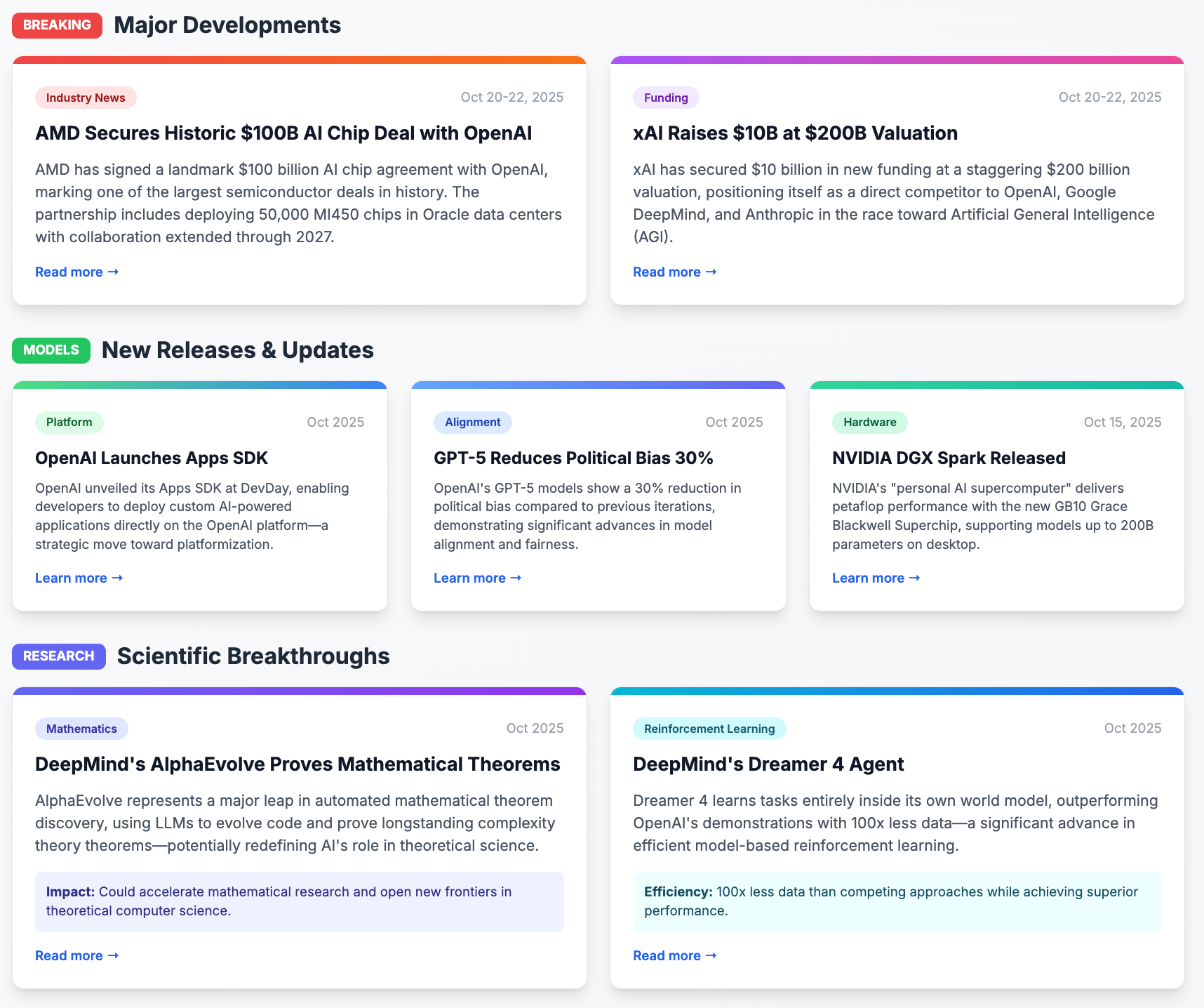
You can simply ask Claude: “Run AI news digest.”
And the output will appear as shown in the screenshot above.
You can only run this on Claude Desktop, not on the web, because it requires a Perplexity MCP connection that is available only in the Desktop app.
2. Newsletter Repurpose to Social Skill
Paste one newsletter URL and get:
3 Twitter threads (with proper hooks and structure)
10 Substack Notes (optimized for the platform)
5 LinkedIn posts (with professional framing)
All from a single prompt: “Repurpose this newsletter into socials.”
All preserving your voice and adapting to each platform’s requirements.
3. SEO Content Optimizer Skill
As noted earlier in this post, this Skill helps you optimize existing content to follow all SEO best practices.
All Skills include complete setup instructions, troubleshooting guides, and customization options so you can adapt them to your specific needs.
Get them on the Maker Access page when you upgrade.
My honest take after a week of building Skills
Skills aren’t magic.
They’re only as good as your understanding of your own workflows. If you can’t clearly articulate the steps, edge cases, and decision points in your process, you can’t build a good Skill.
That’s actually the hidden value. Building these Skills forced me to think harder about my SEO optimization process than I had in months:
What do I check first? Why? What’s the prioritization logic? When do I break my own rules?
The Skill became better because I became clearer about my own methodology.
And yeah, I’m probably over-rotating on this right now. That’s what I do—find something promising and experiment until I understand where it breaks. But I genuinely think this convergence moment matters.
We’ve been collecting these capabilities—Projects for context, MCP for connections, code execution for building—and Skills finally gives us the packaging layer that makes them actually usable for repeated workflows.
So here’s what I’d recommend:
Don’t build Skills for everything. Build them for the specialized, repeatable workflows that you:
Execute frequently enough to justify the setup time
Understand deeply enough to document clearly
Need consistent quality on every time
Start with one workflow that frustrates you. The thing you repeat weekly that always takes longer than it should. Document it. Build the Skill. Test it. Break it. Fix it.
That’s how you actually learn whether this convergence moment is real or just another feature that sounds better in theory than practice.
What specialized workflow would you turn into a Skill if you could automate it completely?
Reply and let me know—I’m genuinely curious what workflows people are thinking about beyond my content optimization bubble.
What next for Maker Labs member?
I’m currently building three more Skills that solve even more expensive time problems:
Newsletter Performance Analyzer - I’m sure you have Google Sheets that store all your newsletter performance data. I want to build a Skill that runs through it and generates a performance report with visual insights and optimization recommendations.
Lead Magnet Builder: I’m dissecting best practices for building a lead magnet through copywriting, design, and user experience so you can build a lead magnet for your marketing campaign instantly using Claude Code.
Project Deck Presentation: Separately, for client-facing purposes, I’m building a deck presentation framework that suits my brand and the services I offer. So whenever new clients come in, I can easily tweak my deck and let Claude handle the rest without involving me at all.
All right, that’s all for today! 👋🏻
Until next week,
Wyndo
P.S. - If you’re a Maker Labs member, grab those three Skills on the Maker Access page. If you’re not, consider upgrading—these implementations will save you hours every week once you deploy them.
Thanks for this! After reading this, I realized what I had created as a project (weekly meal plan generator) might do better as a skill within the project. But I wasn't sure: the boundary between project and skill is still a little squishy for me. So I started instead by asking Claude whether/how I should adapt it to a skill. I had a great experience with its response, pasting in case this thought process is useful for anyone else:
The Clear Split
What should stay in the Project:
Banned foods list
Available equipment
Food preferences by category
Past meal examples you've liked
Flavor brainstorms and meal ideas
Any evolving preferences or discoveries
What should move to a Skill:
The thorough instructions for generating the plan
The specific output format (plan structure, shopping list format, batch cooking steps, recipe ordering)
The workflow: analyze constraints → generate balanced meals → consolidate shopping list → create batch cooking schedule → format recipes chronologically
Consistent formatting rules
The Benefits
With this separation, you'd get:
Simplicity: Just say "generate new weekly plan" and the Skill handles the entire workflow
Consistency: Every plan follows the same structure without you re-explaining it
Cleaner Project: Your Project becomes a growing knowledge base of preferences and examples, not cluttered with procedural instructions
Reusability: If you ever wanted a separate meal prep project (say, for travel meals or meal prep for someone else), you could reuse the same Skill with different context
Maintenance: When you want to adjust the format or workflow, you update the Skill once rather than repeating instructions weekly
Automation works best when it forces clarity before efficiency.