


A few weeks ago, I started seeing the same idea everywhere. As I live and breathe AI news, I can sense that something is happening — more than what would normally be expected.
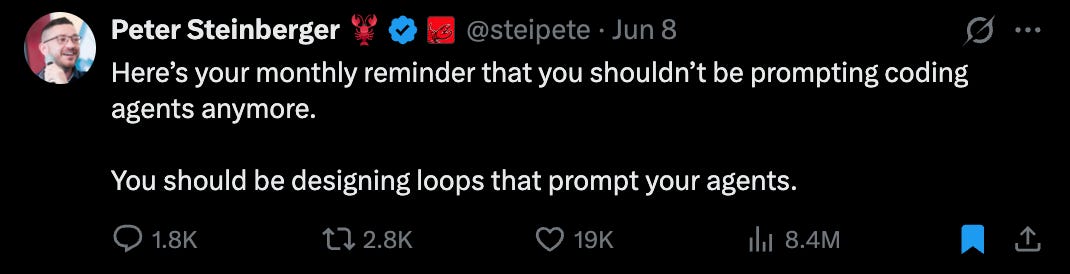
Peter Steinberger, co-founder of OpenClaw, tweeted: “You shouldn’t be prompting coding agents anymore. You should be designing loops that prompt your agents.”
Then Boris Cherny, who built Claude Code at Anthropic, said something similar: “I don’t prompt Claude anymore. I have loops running. They’re the ones prompting Claude and figuring out what to do. My job is to write loops.”
As someone who hadn’t used Loop before, I was hooked. It made sense to me technically; it could work and remove humans as the bottleneck between AI and the work AI does. So I understood why these were taking over the internet for the last few weeks.
They make loops sound like the next step after prompting:
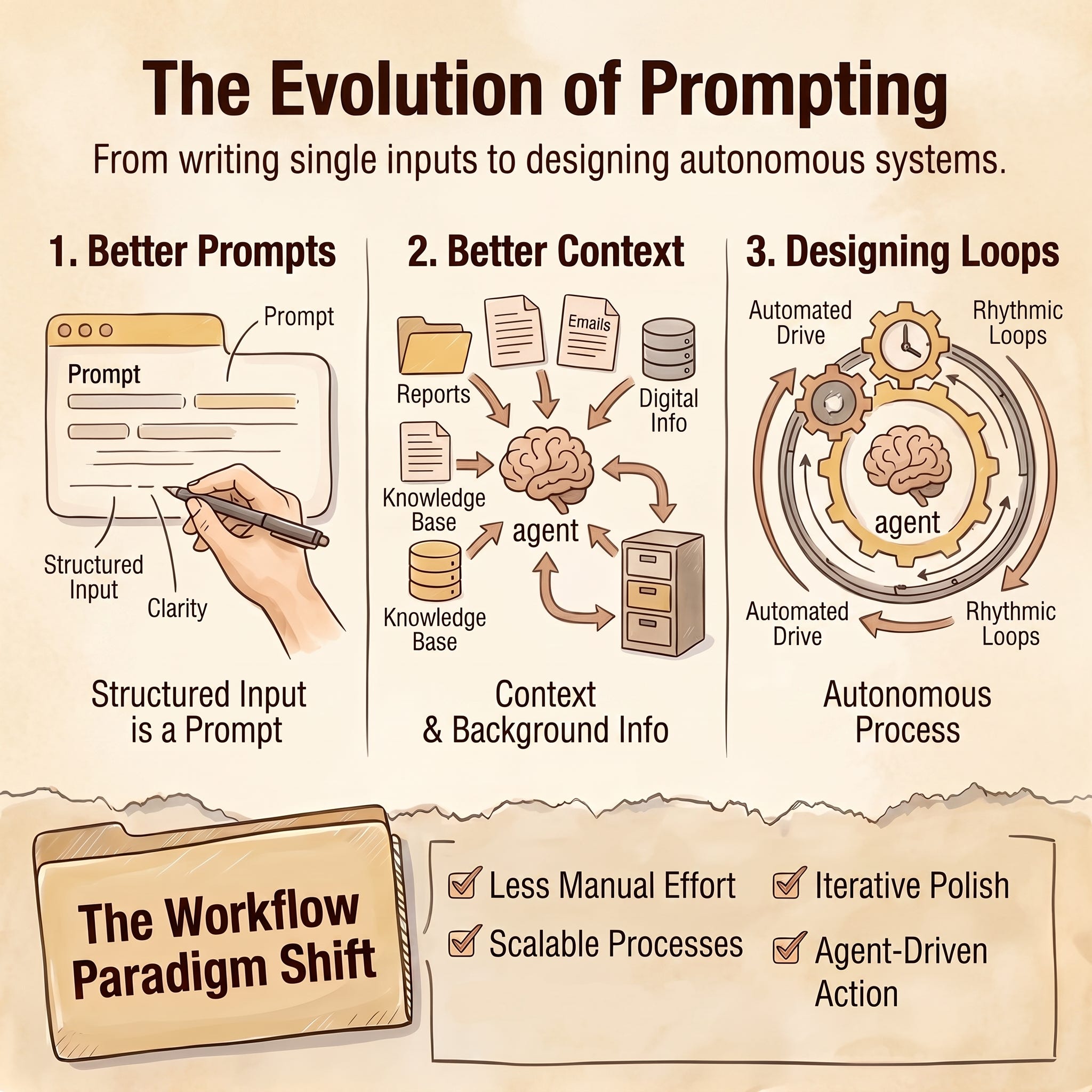
First we wrote better prompts
Then we gave agents better context
Now the job is to design the process that prompts the agent for us.
And honestly, that sounds exciting.
It also made me nervous.
Because once you let an agent keep going, you are trusting it to know three things: what to do next, how to check its own work, and when to stop.
If those three things are clear, a loop can be useful.
If they are vague, the loop can keep burning tokens while making changes that feel active but do not actually move the work closer to done.
That is the part I kept getting stuck on.
When I was trying to learn more about Loop, another problem came up. Most of the examples I found were about coding: fix the test, review the PR, improve the score, run until the check passes.

Those make sense because coding has a clearer feedback loop:
The test passes or fails
The review score goes up or it does not
The page renders correctly or it breaks
But I do most of my work in drafts, pages, images, presentations, and research notes, and some of them also involve websites.
So my question was simpler:
“Where does a loop actually help with knowledge work?”
At first, I was searching for big use cases. I read a bunch of articles about Loop and watched YouTube videos, hoping to find something impressive—something that felt like a new way to work. I wanted to see how people were using Loop to build something from scratch.
But the more I looked, the more I realized I was asking the wrong question.
The question is not whether a loop can build something from scratch. It can, especially when the scope is small or you do not care much about the details.
The better question is:
“In which cases in my work can I trust Loop to do its job?”
For my kind of work, the answer comes only after there is already something real to inspect—something like a draft, landing page, research brief, product spec, or messy first version.
That is when a loop has something to compare against. It can read the current artifact, run one improvement pass, check whether the pass helped, and decide whether another pass is needed.
So I would not use a loop to write a newsletter from nothing.
I would use it after the draft already exists.
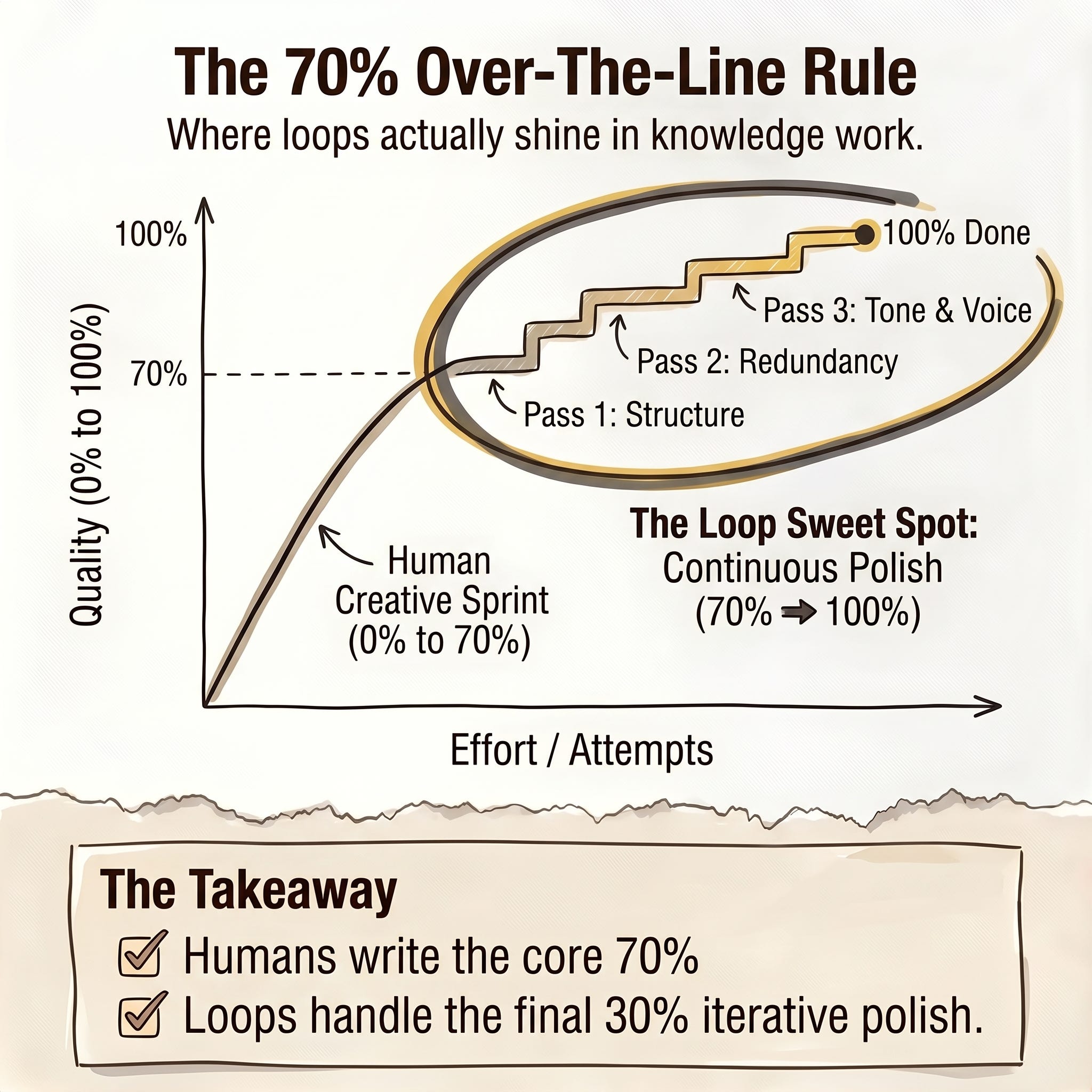
When the draft is 70 or 80 percent there, but the final stretch still needs multiple passes: remove repeated points, sharpen the argument, check the voice, fix banned patterns, make sure every section has a job, and stop when the checklist passes.
That is where /loop started to make sense to me.
Not as a replacement for judgment.
As a way to handle the repeated improvement passes I was already doing manually—and to brute‑force my work to completion.
What A Loop Actually Is
Before we go deeper, let’s take a step back and understand what Loop actually is at its core.
A loop is not a magic agent mode. The simplest version is:
Give the agent a job
Set when it should come back
Let it inspect the current state
Let it take one useful action
Let it log what changed
Repeat until a stop condition is met
Essentially, /loop is Claude Code's time-based command. It comes back on an interval, like every 5 minutes, 10 minutes, or 20 minutes, and runs the prompt again.
When I say “loop” in this post, I mostly mean the practical behavior I want: Claude returning to an existing artifact, checking what changed, improving one layer, and stopping when the checklist passes.
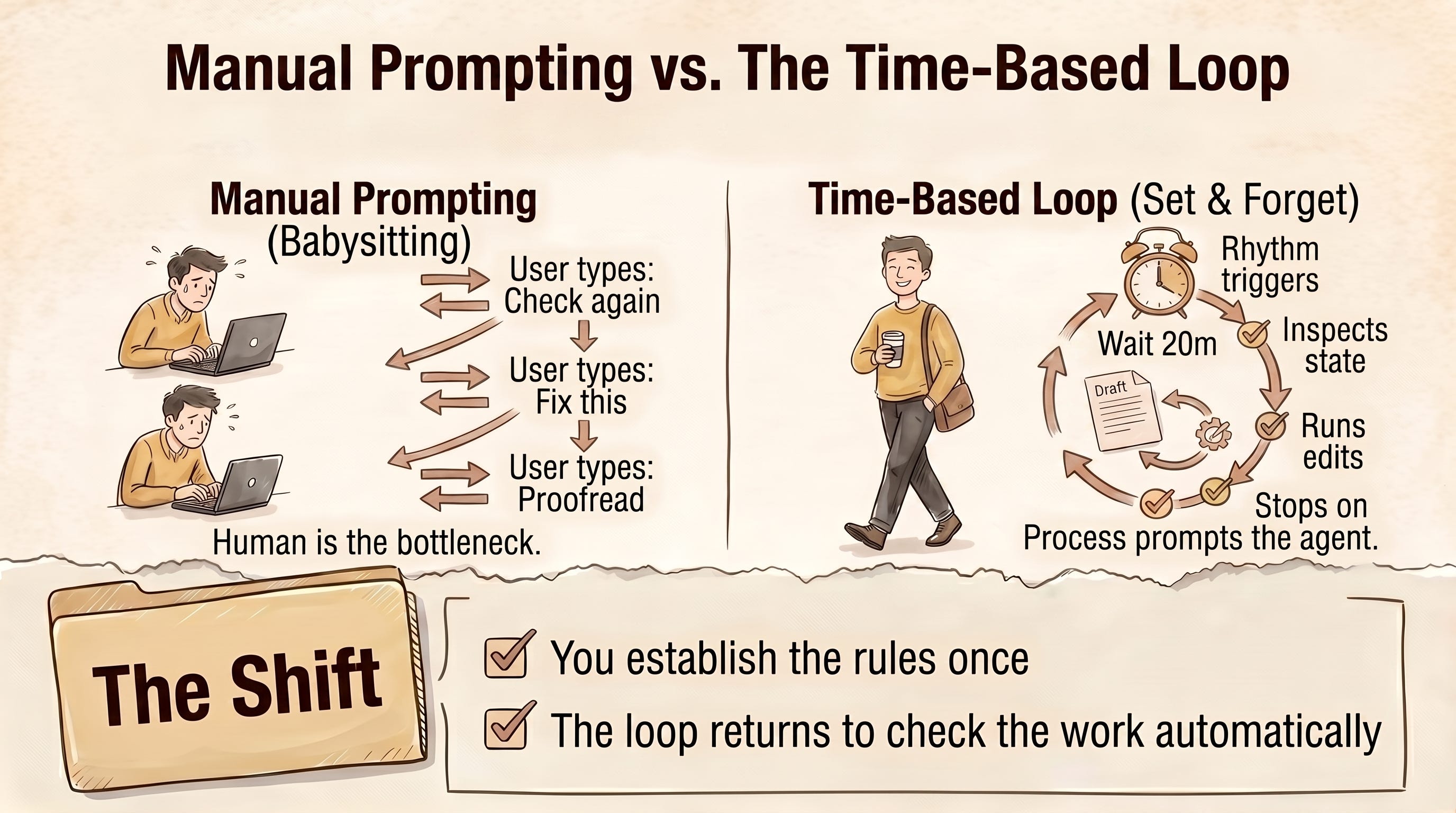
So instead of you returning to Claude and saying, “Okay, now check the draft again,” the loop does that for you.
It comes back, reads the current state, decides what pass to run, makes a change if the rules allow it, and checks whether it should stop.
That is a loop.
In coding, this is easier to understand.
But loop mechanics can also happen outside the coding space, even though the checks have to be more carefully designed.
For a newsletter draft, the check might be:
No two sections repeat the same point
Every section has one job
The draft keeps the original argument
The draft removes banned phrases
The final version includes a change log
For a landing page, the check might be:
The page has one clear CTA.
All buttons are clickable
Every required section exists.
The offer is explained in the first screen.
The page is readable on mobile.
Without checks like that, the loop is just the agent taking another swing. And this is where I think people need to be careful:
If the task is vague, the loop scales vagueness.
If the artifact is too early, the loop makes too many assumptions.
If the stop condition is weak, the loop can waste time and tokens.
So, the challenge is how to ensure that the agent improves things with each pass and also knows when to stop.
That is the difference between a useful loop and an expensive slot machine.
Goal vs Loop
Now that you already know about Loop, if you are like me and have read my previous post on goals, Loop raises a new set of questions:

And this is where I got confused at first.
Because technically according to Anthropic, /goal is also a loop. It keeps working until a verifiable condition is met.
Then, what is the main difference between /goal and /loop?
After testing both of them multiple times, I think I have a better way to differentiate them. Here’s a better question to think about whenever you want to use /goal vs /loop:
“Do I need Claude to keep working until a condition is true? Or do I need Claude to come back on a rhythm and check the work again?”
The way I currently think about it is this:
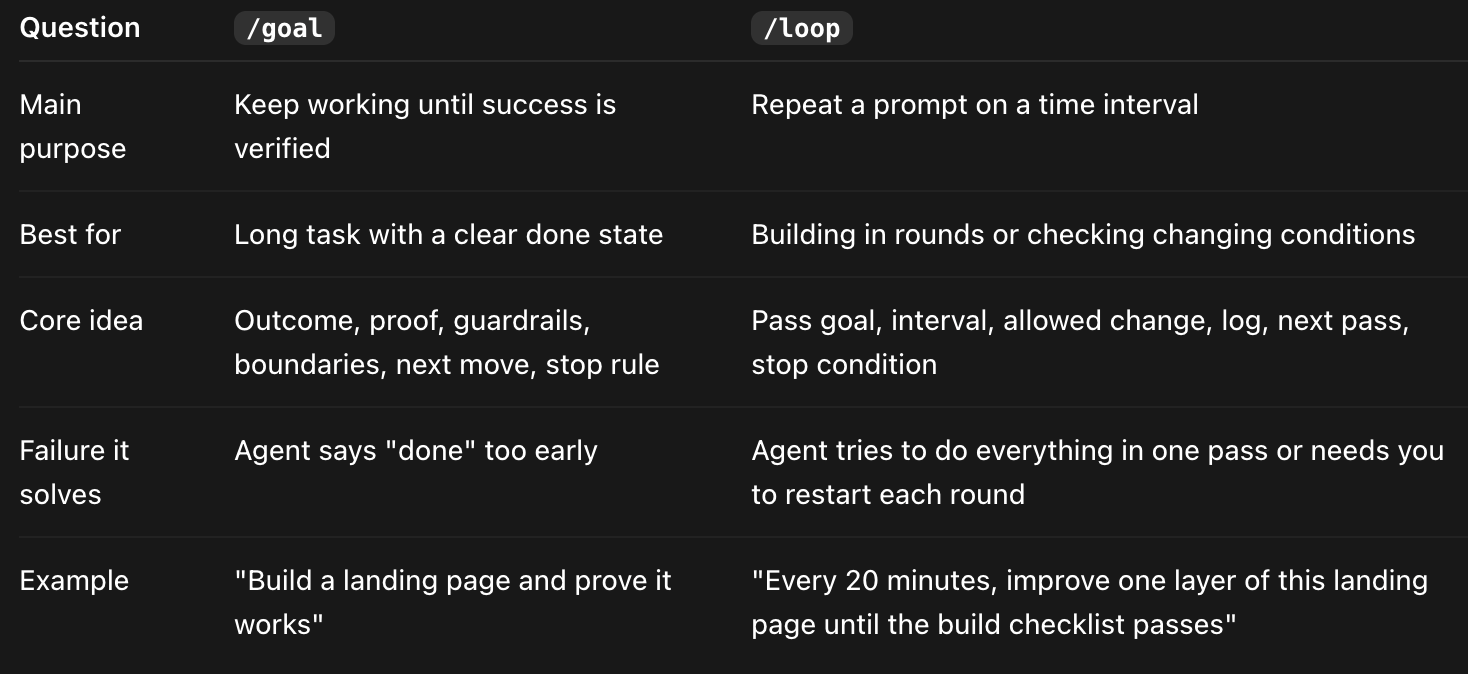
A goal-based loop is the finish-line version.
A time-based loop is the check-back version.
For example, if I am working on a newsletter draft, the goal might be:
Make this draft publishable while preserving the main argument and passing the style checklist.
That is useful because it tells Claude what done means.
But the Loop version adds a different layer:
Every 10 minutes, inspect the draft and improve one layer: structure, redundancy, evidence, voice, or final rule cleanup. Log what changed. Stop when the checklist passes.
This works because editing takes time and effort to keep improving, and it won’t be done in a single pass. At least for me, editing is usually a sequence of smaller passes.
A goal can tell Claude where to end.
A loop can tell Claude how to keep returning to the draft without trying to solve every problem at once.
That is the part that made the concept click for me.
The Four Things Every Useful Loop Needs
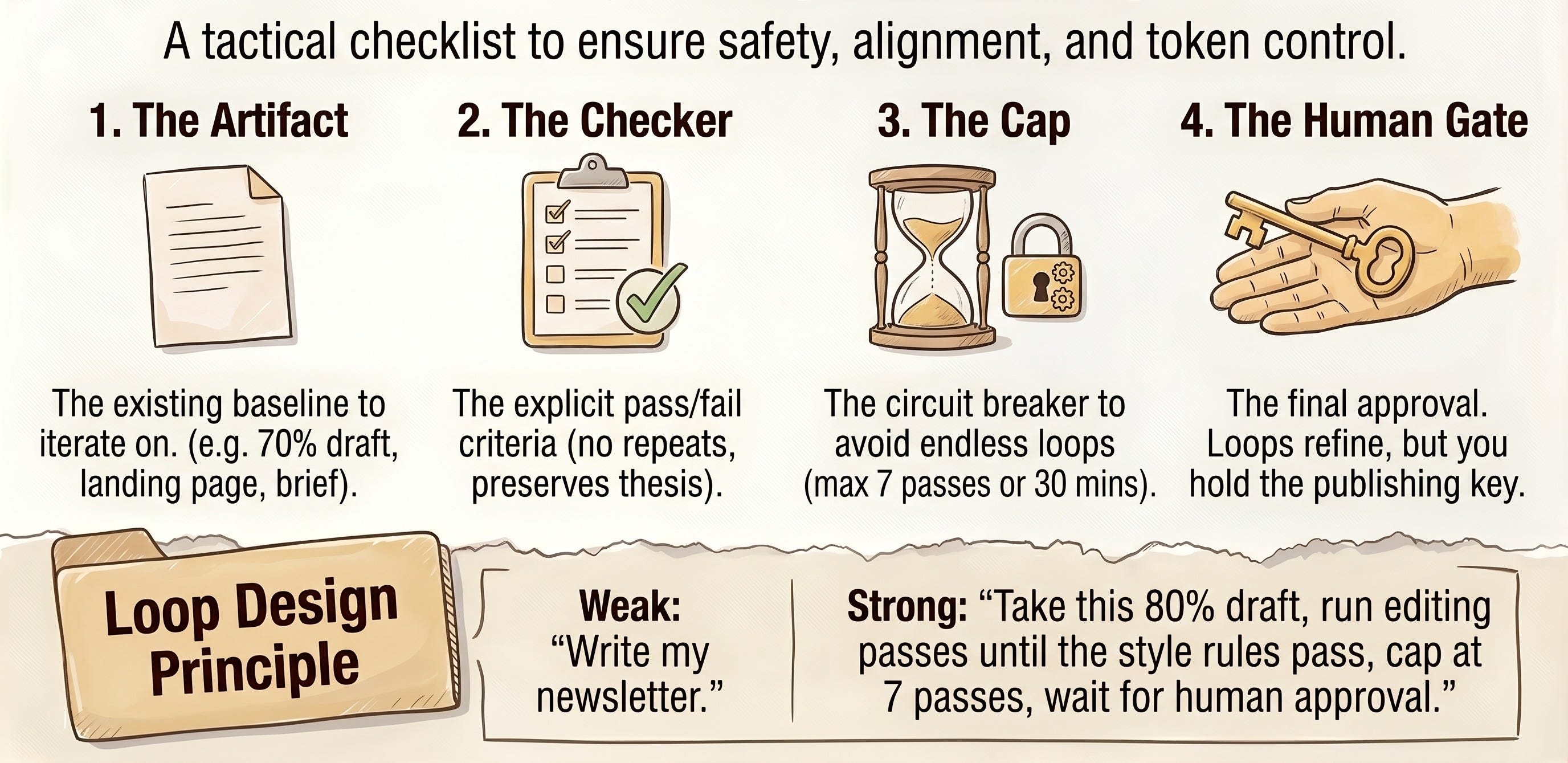
Now, let’s explore what actually makes Loop work. This is where the loop started to feel less abstract to me.
A useful loop needs four things:
A clear artifact
A checker
A cap
A human gate
Let me explain for each one.
1. The artifact is the thing the loop is improving
That could be a draft, a landing page, a brief, a research note, a sales page, or a product spec. The important part is that something already exists. The loop needs a current version to inspect.
2. The checker is how the agent knows whether the pass helped
For a newsletter draft, the checker might be: no repeated sections, every section has one job, the argument still holds, and the draft follows my style rules.
For a landing page, the checker might be: one clear CTA, no placeholders, required sections present, mobile readable, and no unsupported claims.
Without a checker, the loop is just asking Claude to keep trying.
3. The cap is what keeps the loop from running forever.
That might be five passes, seven passes, 30 minutes, or a token limit. I do not want the agent quietly spending more and more just because the task was fuzzy. If the loop cannot improve the thing within the cap, that is information. It means the task probably needs a human decision.
4. The human gate is the final judgment.
This matters most for knowledge work. Claude can remove repetition, find missing sections, flag unsupported claims, and tighten a rough draft. But I still want to decide whether the argument feels right.
So the loop can improve the artifact, but it should not quietly publish, send, or finalize the work without me.
That gives me a cleaner test.
A weak loop task is:
Write my newsletter.
A stronger loop task is:
Take this 80 percent draft and run editing passes until the checklist passes. Improve one layer per pass, log what changed, stop after seven passes, and leave the final decision to me.
That is the version I trust more.
The loop is not useful because it keeps running. It is useful when it repeatedly improves a real artifact against a clear checker, with a cap and a human gate.
What We Are Building From Here
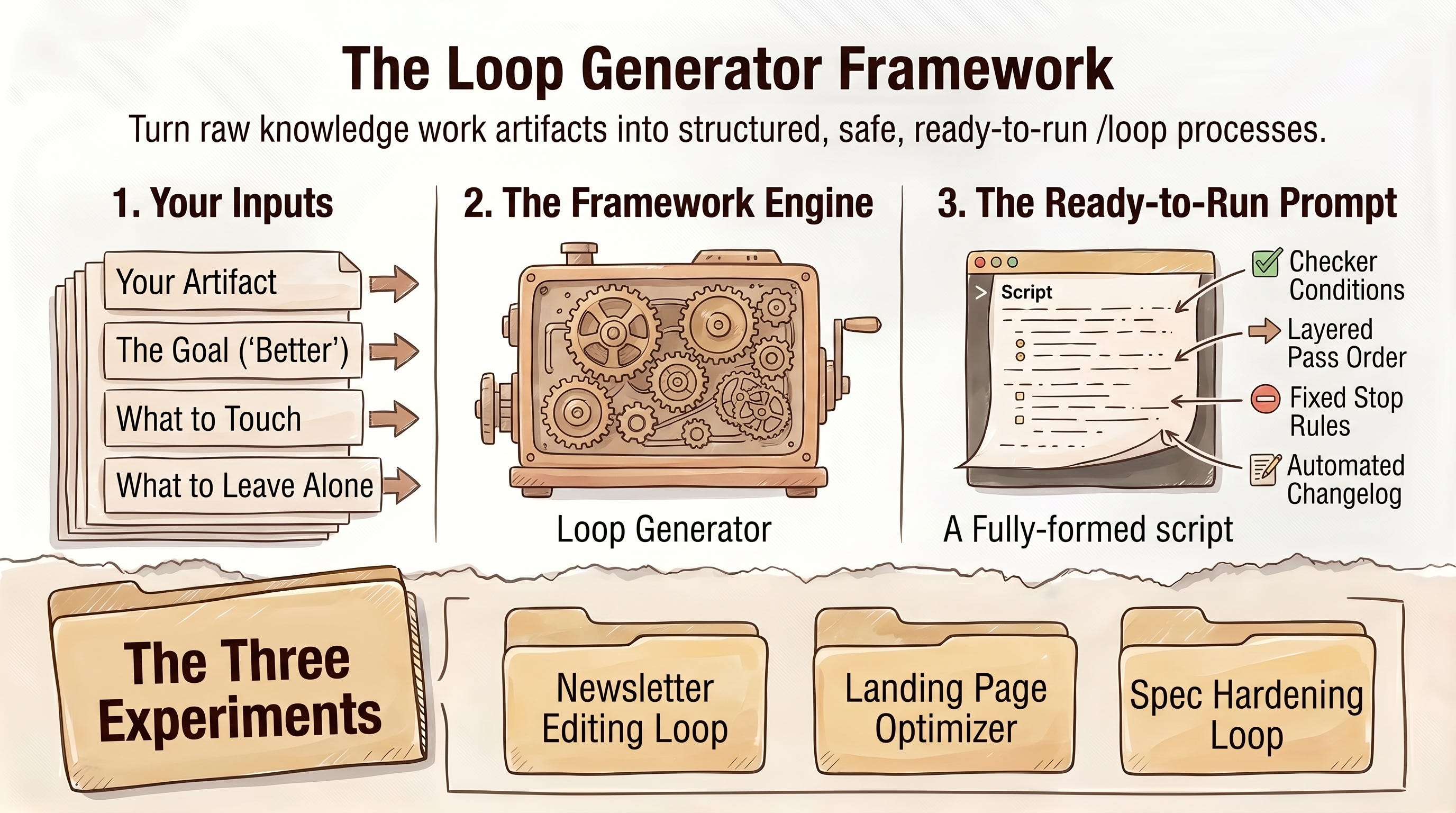
The rest of this post is the practical version of that test.
I do not want to treat /loop like a command trick you try once because it sounds interesting. I want to see if it can become a small working setup for the kinds of things I already improve in passes: drafts, landing pages, briefs, specs, and research.
So from here, we are going to build the loop around four pieces:
The artifact Claude is allowed to improve.
The checker it uses to decide whether the pass helped.
The cap that stops it from wandering.
The human gate that keeps the final judgment with you.
That is the part most loop examples skip over. They show the agent running again and again, but the useful work is deciding what counts as progress before the loop starts.
There will be three use cases where we will experiment with Loop here:
Newsletter Editing Loop
Landing Page Improvement Loop
Brief or Spec Hardening Loop
That is the outcome I want by the end of this post: a repeatable way to turn “make this better” into a loop that knows what to inspect, what to change, what to leave alone, and when to come back to you for any type of knowledge work you do on a daily basis.
🎁 I am also including the piece I wish I had before testing this: a Loop Framework Generator skill.
You give it the artifact you want to improve, the current state, what “better” means, what Claude can touch, what it should leave alone, and where the loop should stop. It turns that into a ready-to-run /loop prompt with a checker, pass order, stop rules, and a change log.
I also created a video walkthrough that shows you how to run the Loop Framework Generator and the resulting Loop I use for my newsletter editing process.
Let’s dive in.
Use Case 1: Newsletter Editing Loop
The first place I would test this is newsletter editing. Not the blank page part. The messy final stretch.
I would not use /loop when I still do not know what the post is trying to say. That is too early. If the core idea is still unclear, using /loop will probably make you even more confused about the topic you are writing.
But once the draft exists and the argument is mostly there, the remaining work often becomes a series of narrow checks:
Does each section have one job?
Are two sections making the same point?
Does every section move the argument forward?
Do the claims need examples, caveats, or softer wording?
Does the voice still sound like me?
That is already how I edit. I just usually restart the process manually.
A newsletter editing loop makes those processes automated and explicit.
The basic version has the four pieces from above:
Artifact: the existing newsletter draft, plus any outline or style rules Claude should follow.
Checker: structure, redundancy, argument, evidence, voice, and final rules.
Cap: stop after seven passes, or earlier if the checklist passes.
Human gate: Claude can improve the draft, but I still decide whether the argument, examples, and final voice feel right.
🚨 But there is one more thing I would add before trusting this: loop state.
The loop needs to know what it already did.
Otherwise, Claude might come back five minutes later, reread the draft, and run the same kind of pass again. That would look active, but it would not necessarily move the draft closer to done.
So the change log is not just a note at the end. It becomes the control panel for the loop.
Before each new pass, Claude should read the log, see which pass already happened, decide what the next useful pass is, and stop if the same issue keeps coming back.
This is where the Loop Framework Generator becomes useful.
Instead of asking you to design all of this from scratch, the generator starts with your intent. You tell it something like, “I want to use /loop to improve this newsletter draft.” Then it interviews you for the missing pieces: what artifact exists, what better means, what Claude can read, what it can edit, what it must protect, what checks matter, where the loop should stop, and which decisions should come back to you.
From that, it gives you a detailed /loop prompt you can run instantly.
For the newsletter edit, I used this post as the artifact to improve. The generated prompt might look like this: