

How I Use Newsletters As A Signal System, Not A Reading List
A research agent that reads the newsletters I follow, finds repeated signals, and helps me decide what is worth acting on.


On a recent One Shot Show session with Mark Miller, Mark opened a blank folder, talked Claude Code through what he wanted, and had a working RSS reader running by the end of the livestream.
That part was impressive.
The app pulled in feeds. It showed recent posts from the sources he cared about. It gave him a real place to read the blogs and newsletters that usually get scattered across tabs, email, and apps.
That is already useful, but as I watched it, I kept thinking about the next problem. An RSS feed reader can show you what is new. It does not automatically tell you what is important.
It cannot tell you which update connects to the project you are building, which question your readers are starting to ask, which product change is worth testing, or which headline is just loud for 24 hours and safe to ignore.
That is the gap I want to work on here.
A while ago, I built a Make.com automation to fix the first half of that problem.
I was subscribed to too many newsletters, blogs, and AI update feeds. I wanted to stay informed, but the reality was a mess. Some updates landed in my inbox. Some lived in Substack. Some were buried in bookmarks. Some were product blogs I kept meaning to check and never did.
So I built a system that pulled those sources into one AI-generated digest.
And honestly, it helped.
I stopped opening 30 tabs just to feel caught up. I had one place to check. The system pulled the sources together, summarized them, surfaced patterns, and sent me something I would actually read.
For my setup, that was already a big improvement. I was no longer relying on things I need to remember or a random Sunday catch-up session to know what was happening in the AI space.
But after using it for a while, I noticed the next problem.
The digest helped me stay updated. The harder part was figuring out what each update meant for the work I was already doing.
So the system solved the intake problem.
But it left the judgment problem mostly untouched.
And it started to affect me a lot as someone who writes for a living. I would read the summary, see a few interesting AI updates, maybe save one or two links, and then still have to do the harder part myself. I still had to figure out which updates connected to my current projects, which ones were useful for my readers, which ones were just noise, and which ones could become a real post.
For example, if an AI tool keeps showing up in newsletters I trust, I want to know whether it should change anything about my own setup. This is a very important part of my research process when deciding which posts to write next.
Why I Am Moving This Into Agentic Workflow
The Make.com version was great at moving information around. That was the right first step.
But as you probably know, I’ve been using agentic AI a lot with Claude Code and Codex. My drafts live here, along with my notes, including rules, post archive, and paid vs. free criteria. The agent can see all the source material I already use to make decisions.
This makes a huge difference when I’m trying to build a research process with my agent.
Instead of sending me a digest and making me synthesizing everything manually, I can ask the agent to compare new updates against my own work.
That is the upgrade I am building in this post.
What Changes When The Agent Can See The Work
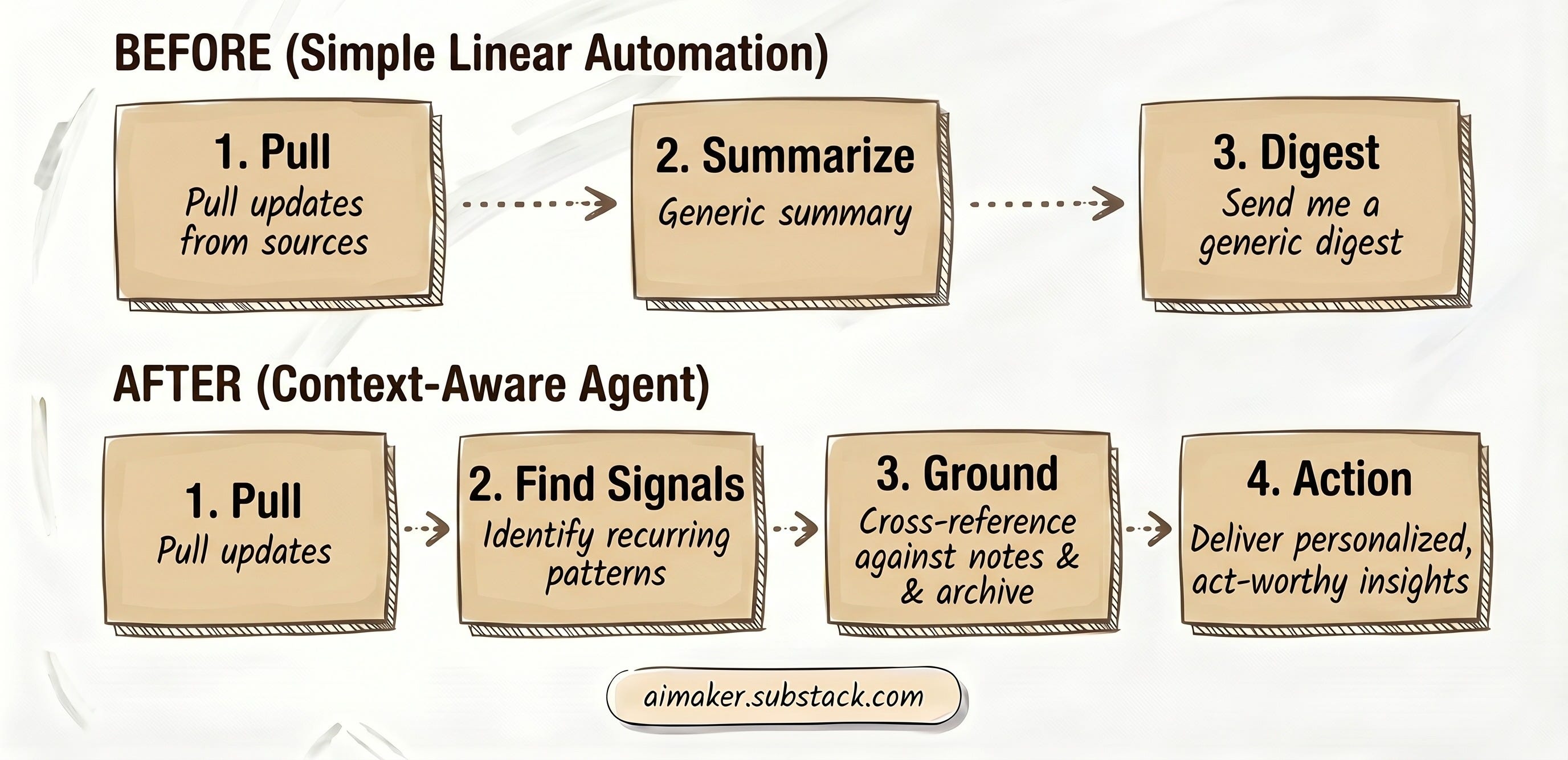
Here’s my first Make.com version that worked:
Pull updates from sources I follow.
Summarize them.
Send me a digest.
Here’s how the new version works:
Pull updates from sources I follow.
Find the recurring signals.
Compare those signals against my own archive, notes, projects, and criteria.
Tell me what might be worth acting on.
This is where the new version becomes more personalized to my work and moves me closer to turning the research into productive output for writing my next posts.
This Works Beyond Newsletter Writing
Before you assume this only applies to newsletter writers, I want you to know it can work far beyond writing newsletter posts.
For example, of course, if you write online, it might mean finding a better angle for your next essay or newsletter. If you run a business, it might mean noticing a shift in your market before it becomes obvious. If you work in a specific field, it might mean turning scattered updates into a short weekly brief you can actually use.
The same system can serve different jobs because the core loop is the same: monitor the field, extract the signal, compare it against your own context, then decide what deserves attention.
For me, the writing use case is the one I feel most directly.
Instead of asking, “What should I write about?”, I can ask: “What is my field already paying attention to, and what have I not said about it yet?”
That question is more useful because it has pressure from both sides. It looks outward at what is happening, then inward at what I have already covered.
This is why the new version offers more value: the output is no longer just “here’s what happened this week,” but a short list of possible decisions:
Write about it if you publish in that field.
Bring it into a meeting if it affects your team.
Add it to a project if it changes what you are building.
Turn it into a client brief if people you advise need to understand it.
Save it as a research note if the signal is interesting but early.
Test it if the claim sounds useful but unproven.
Ignore it for now if it is loud but not relevant.
That last one matters more than I expected.
One of the hidden benefits of a system like this is that it gives you permission to ignore more things. When every update arrives in your inbox by itself, everything can feel equally important. When the agent reviews the week as a whole, patterns start to separate from noise.
In the rest of this guide, I will show you how I am building the working version: the source list, the Tavily scan, the optional email path, the archive check, the scoring rules, and the weekly output that turns a pile of updates into something I can actually use.
The System We Are Building
What we are building in this post is a Newsletter-based Industry Radar Agent.
The simplest version is a weekly research agent that monitors the sources you care about, pulls out the useful signals, compares those signals against your own work, and gives you a short list of decisions to make.
And this system also focuses on what happens after the information comes in.
By building this, you will learn how to:
Choose sources that are worth monitoring instead of dumping every feed into one list you don’t care about.
Use Tavily, RSS feeds, and optional email sources as inputs.
Give the agent your own archive, current projects, and decision rules so it has something to compare against.
Turn a weekly pile of updates into a ranked set of signals.
Decide whether each signal deserves writing, research, testing, discussion, project work, or nothing.
After setting this up, You should be able to open one daily/weekly file and see:
What changed in the field you are tracking.
Which topics or questions are showing up repeatedly.
Which updates connect to your current work.
Which ideas you have already covered.
Which signals may deserve a post, brief, project, meeting, experiment, or follow-up.
Which updates are probably safe to ignore.
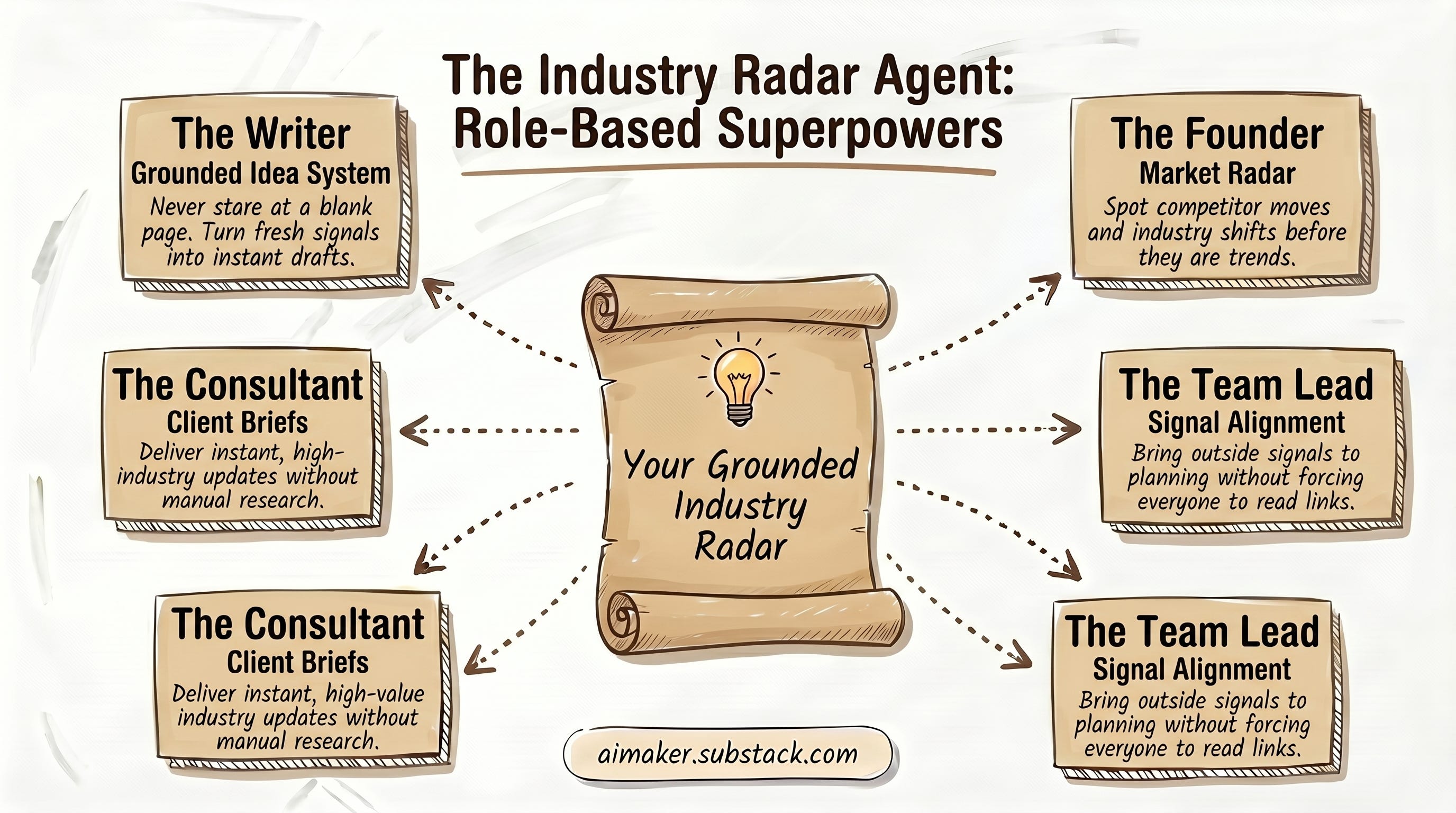
For writers, this can become a grounded idea system. For founders, it can become a market radar. For consultants, it can become a client brief generator. For researchers, it can become a weekly field scan. For team leads, it can become a way to bring useful outside signals into planning without asking everyone to read the same pile of links.
The weekly flow looks like this:
Pulls recent updates from selected RSS feeds, Substack feeds, public URLs, and optional email newsletters.
Uses Tavily to fetch or research sources when RSS is not enough.
Extracts titles, topics, claims, reader problems, formats, and recurring themes.
Compares those patterns against your archive, current projects, and decision criteria.
Returns 5 to 7 ranked signals or ideas.
Labels each item as write, build, research, discuss, save, or skip.
Optional: For Substack writers, adds a free vs paid post recommendation when relevant.
Now, let’s dive in!
The Agent Folder Setup For The Newsletter-Based Industry Radar Agent
Before we get into the details, here is the folder we are going to use. Download them below: