



In Episode 5 of the second season of One Shot Show, Dheeraj Sharma and I wanted to compare Claude Code and Codex in a way that was more practical than another feature-by-feature discussion.
I have been moving between both tools a lot lately. Codex has become the place I reach for more often when I am writing, especially because the writing style feels better to me right now. Claude Code is still where I spend most of my time for coding, design, brainstorming, and more agentic work.
So the original question was simple: where are they actually different?
But the more useful question showed up during the demo: what happens when you stop treating Claude Code and Codex like rivals, and start treating them like two agents that need a clean handoff?
That was the part I kept thinking about after the session.

Why This Comparison Matters Now
Most AI tool comparisons push you toward a decision.
Use this one for coding. Use that one for writing. Pick this model if you want speed.
That kind of comparison is useful to a point, but it can also create another layer of mental overhead. You already have too many AI tools to choose from. Now you also have to decide which agent should touch which project, which app should hold the conversation, and what happens when one tool runs out of usage or gets stuck.
Dheeraj framed this well at the beginning of the session:
Codex feels closer to one app. You open it, pick a folder, start a thread, and work.
Claude feels more like a suite. You choose between chat, CoWork, and Code before you even begin.
But that does not make one better in every case. It just changes the amount of friction when you’re about to use each of them.
For me, Codex feels easier to open. It also feels more like a super-app that can do many things. Claude Code desktop still feels extremely useful, but the app is confusing because it has too many features. Even though there are many differences between them, I don’t think I’m ready to use only one of them right now.
The Demo Was Really About Handoff
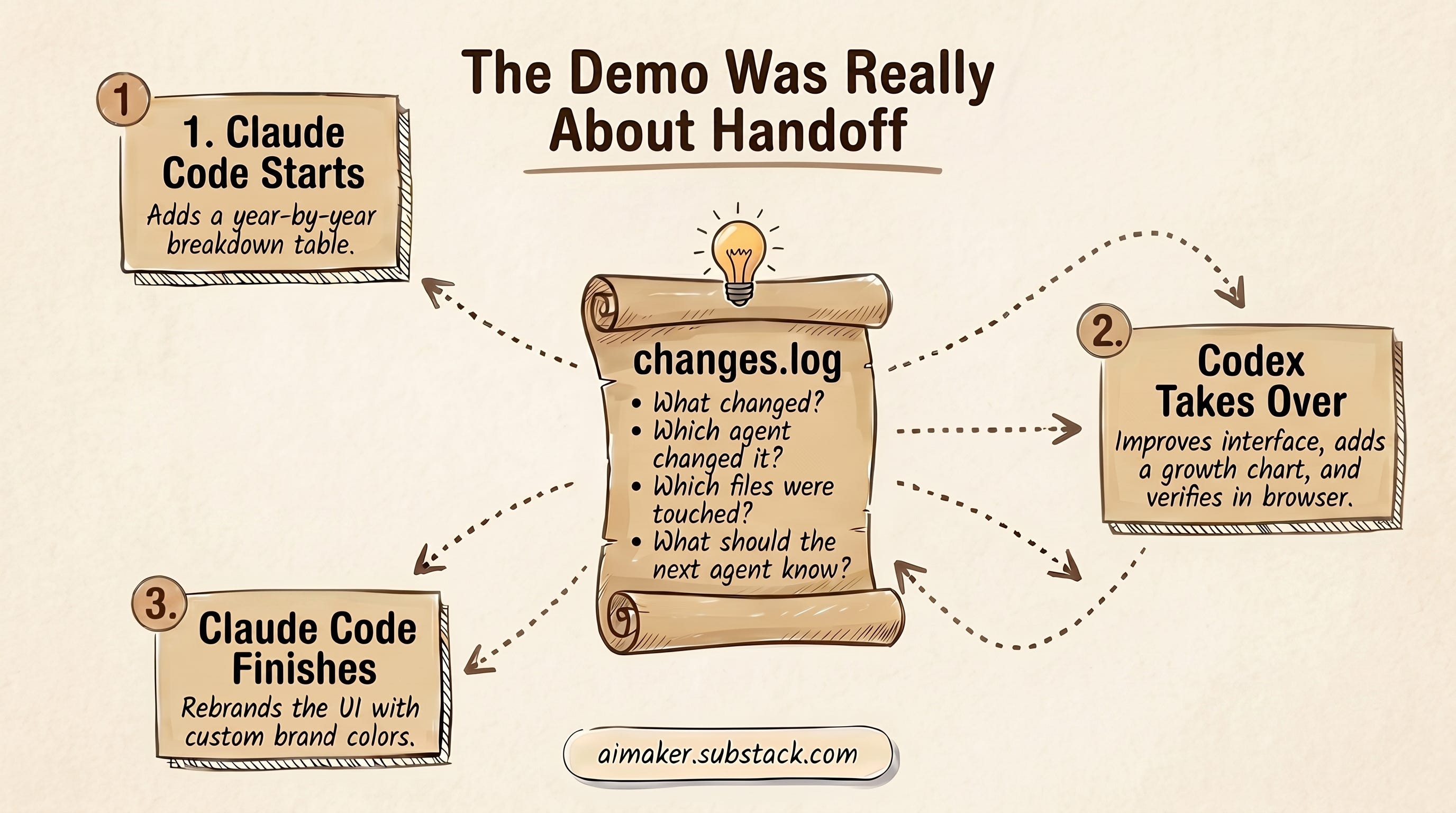
Dheeraj used a very simple compound interest calculator for the live demo.
That was a good choice because the app itself was not the point. It had an initial deposit, a monthly contribution, an interest rate, and a final balance. Pretty basic.
The useful part was the shared handoff system behind it.
Dheeraj created a changes.log file that both Claude Code and Codex had to read before starting work and update after finishing work. Claude Code had instructions in Claude.md. Codex imported those instructions into AGENTS.md when the project was opened in Codex.
So instead of relying on memory, vibe, or a long chat thread, both tools had one shared place to check:
What changed?
Which agent changed it?
Which files were touched?
What should the next agent know before continuing?
Claude Code went first and added a year-by-year breakdown to the calculator. Then Codex picked up the same project, read the handoff file, improved the interface, turned the breakdown into a growth chart, and verified it in the browser. Then Claude Code came back in, read the latest state, and rebranded the whole calculator with Dheeraj’s Gen AI Unplugged colors.
That is the actual insight for me.
Even though during the demo the interest calculator showed a properly working table with a nicer UI, the bigger lesson was that the work could move between tools without everyone pretending the previous session never happened.
Where They Felt Different And Where They Felt The Same
Before the handoff demo, Dheeraj and I tried to separate the obvious differences from the deeper overlap.
The biggest difference was how to get started with each app:
Codex felt closer to one app. You open it, pick a project folder, start a thread, preview work in the browser, control parts of it from mobile, and generate images in the same general flow.
Claude felt more split. You choose between chat, CoWork, Claude Code, Chrome, VS Code, and the terminal depending on the job. That can create more starting friction, but it also gives you more specialized surfaces when you know what you want.
That difference helped me more than a feature-by-feature comparison. The question is not only what each tool can do. It is how much thinking you have to do before you can start doing the work.
At the same time, they are similar in a lot of important ways. Both can work with project folders, run agentic coding tasks, use terminals, follow computer-control patterns, handle GitHub pull requests, manage cloud tasks, access remote servers, schedule work, use skills, and support MCP-style integrations.
But there’s one big difference: Codex has an in-app browser, so you can ask it to browse the internet and watch it work live. Claude, on the other hand, requires Chrome to browse the internet, but you can still see it in action by having it take over your Chrome tabs.
Image generation was another clear difference. Dheeraj uses Codex CLI to generate images through his subscription instead of paying per image through a separate API every time. He mentioned that API image generation had cost around 15 to 18 cents per image in some setups, while batch or delayed generation could bring that closer to 8 or 9 cents depending on the model and route.
For my own workflow, I also talked about using Codex with Paper Design or Magic Path to create HTML banners, then generating an image inside the same flow and dropping it into the design. That is one of the places where Codex feels useful because the app can move between writing, coding, browser preview, and image generation without making me jump through too many tabs.
The confusing part was integrations. Both tools have some version of connectors, plugins, skills, apps, and MCP servers. But the naming gets messy fast. In Codex, a plugin can include app connections and skills. In Claude, similar things show up under connectors, plugins, CoWork, or project setup depending on where you are.
That is probably less important once everything is configured. But when you are starting, naming and interface shape matter because they decide how quickly you can learn how to use them.
The Handoff Became The Review Process
The more I think about the demo, the less it feels like a tool comparison.
The bigger lesson was that using two agents can create a natural review loop, but only if the handoff is clear enough for the second agent to understand what happened.
That is the part most people might have missed at first.
When Claude Code finishes a task, Codex can pick up the project and inspect what Claude Code actually did. It can look for flaws, missing pieces, rough interface choices, or places where the first agent followed the instruction too literally.
Then the same thing can happen in reverse. Claude Code can come back after Codex and inspect the changes, adjust the implementation, or bring the project back toward the original intent.
That is where the handoff becomes more than a status update.
A useful handoff gives each agent enough awareness to do more than continue the task. It gives the next agent something to judge.
That judgment needs a few simple pieces:
What changed?
Why did it change?
Which files matter?
What is unfinished?
What should it be careful not to undo?
Without that, two agents can create more confusion than one agent. With it, the second agent can review the previous pass, catch blind spots, and improve the work instead of restarting from scratch.
That was the part I found real useful.
What I Would Try First
If you already use Claude Code and Codex, I would not start by designing a complicated multi-agent setup.
I would start with the smallest true version:
Pick one low-risk project where both tools can access the same folder.
Add a
changes.logfile.Add instructions to both tools to read the latest log entry before starting.
Add instructions to both tools to append a new entry after finishing.
Run one small round trip between the two tools.
That is enough to feel the difference.
That round trip can be simple. Claude Code builds the first version, Codex checks the interface, then Claude Code picks it back up. Or Codex drafts the asset, Claude Code wires it into the project, and both tools leave notes for the next step.
The mistake would be trying to make the handoff perfect before you have seen whether it helps.
For me, the better question now is not “Claude Code or Codex?”
It is: which part of the work needs a second agent, and what does that agent need to know before touching it?
That is a much more useful decision.
If you want the Calculator Demo and the handoff kit shown in the livestream session, you can grab them here:
Show Details
Show: One Shot Show
Season: Season 2
Episode: Episode 5
Topic: Claude Code and Codex handoff workflow
Hosts: Wyndo and Dheeraj
Live schedule: Wednesdays at 10:00 AM EST on Substack
Timestamp Notes
00:00:09: Episode 5 introduction and agenda
00:00:21: Reference to Episode 3 Codex deep dive
00:00:32: Wyndo explains why he has been using Codex more for writing
00:03:19: Dheeraj frames the session as how Claude Code and Codex can work together
00:04:24: Wyndo explains using one model to review the other model’s output
00:07:02: Discussion of Codex as one app versus Claude as a suite of apps
00:13:08: Wyndo asks whether Dheeraj still uses chat or CoWork
00:14:33: Dheeraj explains using CoWork for non-technical research workflows
00:17:50: In-app browser differences between Codex and Claude
00:21:43: Codex mobile app and GPT Image discussion
00:23:15: Wyndo describes using Codex with Paper Design or Magic Path for banners
00:25:14: Similarities between Claude Code and Codex
00:26:52: Plugin, connector, MCP, and skill naming confusion
00:30:22: Dheeraj introduces the shared
changes.logbridge00:32:36: Compound interest calculator demo begins
00:36:32:
Claude.mdhandoff instructions explained00:40:17: Claude Code adds a year-by-year breakdown
00:42:43: Codex improves the UI and creates a growth chart
00:45:03: Codex imports Claude instructions into
AGENTS.md00:48:36: Codex verifies the chart in the browser and adjusts the output
00:50:18: Claude Code picks up after Codex and rebrands the calculator
00:51:04: Wyndo points out that Claude can run inside the Codex app terminal
00:55:18: Dheeraj explains when to use both tools
00:58:12: Viewer question from Des Kennedy about image generation with Codex and MCP
01:03:05: Session wrap and next episode note
Resources Mentioned
Claude Code: Agentic coding tool from Anthropic. Dheeraj used it in VS Code and Terminal for the calculator demo.
Claude app: Anthropic desktop/app experience with chat, CoWork, and Code sections. Discussed by both hosts.
Claude Chat: Used by Dheeraj for quick advice or research on the go, less than 5% of his monthly usage by his estimate.
Claude CoWork: Used by Dheeraj for easier non-technical research workflows and scheduled tasks. No exact pricing discussed.
Claude in Chrome: Browser integration Dheeraj described for using logged-in Chrome sessions.
Claude VS Code extension: Mentioned by Wyndo as a way he uses Claude Code. Dheeraj had not tested it deeply yet.
Opus: Claude model Dheeraj selected during the demo because his usage limit was available.
Codex: OpenAI agent app used for writing, coding, browser preview, and the second step of the calculator demo.
Codex CLI: Mentioned by Dheeraj as part of his image generation workflow.
Codex mobile app: Mentioned by Dheeraj as a way to control sessions from mobile.
ChatGPT: Mentioned by Wyndo in the context of possible merging into Codex.
GPT 5.5: Mentioned as the model release that made Codex more reliable for Wyndo and Dheeraj’s workflows.
GPT Image 2: Mentioned by Dheeraj as a major Codex advantage for image generation.
GPT image generation: Discussed as included in a $20 Codex subscription in Dheeraj’s setup.
Nano Banana: Image model mentioned in the viewer question and by both hosts.
Nano Banana Pro: Mentioned by Dheeraj as a pay-as-you-go image route.
Midjourney: Mentioned in the viewer question and Dheeraj’s image routing example.
Gemini CLI: Dheeraj suggested using Gemini CLI documentation to build a direct wrapper.
Gemini API reference documentation: Suggested by Dheeraj as source material for building an image-generation wrapper.
Glif: Wyndo mentioned using Glif often for image generation.
Ideogram: Wyndo suggested it as a possible MCP route because it can connect to multiple image models.
Leonardo.ai: Mentioned by Dheeraj as another image tool with a subscription cost.
Paper Design: Wyndo mentioned connecting it with Codex through MCP to generate HTML banners.
Magic Path: Wyndo mentioned using it for banner design workflows.
Canva: Mentioned as an example app inside creative production/plugin workflows.
Figma: Mentioned as an example creative production app.
VS Code: Dheeraj used it to open the calculator project and run Claude Code in an integrated terminal.
Terminal: Used by Dheeraj to run Claude Code.
Integrated terminal: Discussed as the way Dheeraj prefers to run Claude Code inside VS Code.
Codex in-app browser: Used to preview and verify the calculator UI.
Chrome: Used in the discussion of Claude in Chrome and logged-in sessions.
LinkedIn: Used as an example of a site Claude in Chrome could check while logged in.
X: Mentioned as a site Codex could browse in a logged-in browser session and as a research source.
Amazon: Mentioned as an example of a tab an agent could browse.
Telegram: Mentioned as one way to initiate Claude Code through channels.
Discord: Mentioned as an app where agents could eventually do work.
Slack: Mentioned as a connector/app example.
Gmail: Mentioned as an app connector and data source.
Google Calendar: Mentioned as an app connector.
GitHub: Mentioned as a connector and for pull requests.
GitHub pull requests: Mentioned as a shared capability.
Amplitude: Mentioned inside the Data Analytics plugin/app list.
Deepnote: Mentioned inside the Data Analytics plugin/app list.
Reddit: Mentioned by Dheeraj as a research integration.
Hacker News: Mentioned by Dheeraj as a research integration.
Substack: Mentioned as the publishing platform and as where generated images were embedded into articles.
YouTube: Mentioned by Dheeraj as a place where generated images are used for video b-roll or assets.
Data Analytics plugin: OpenAI plugin Wyndo showed as an example of bundled connectors and skills.
Creative Production plugin: OpenAI plugin discussed as a bundle of creative apps and skills.
Product Design plugin: Mentioned in the Codex plugin discussion.
Small Business Legals plugin: Mentioned by Dheeraj as a Claude CoWork plugin example.
Plugins: Discussed as bundles that may include connectors, apps, and skills.
Connectors: Discussed as app integrations, especially in Claude’s naming.
Apps: Discussed as Codex naming for integrations.
MCP: Mentioned throughout as the integration layer behind some connectors and workflows.
Skills: Mentioned as reusable workflows inside plugins and projects.
Hooks: Mentioned by Dheeraj as the stricter way to enforce updates to
changes.log.Git worktrees: Mentioned as a way to let multiple agents work in isolation on larger projects.
Cloud tasks: Mentioned as a shared capability where tasks can run without keeping the local machine open.
Remote or SSH: Mentioned as a shared capability for accessing servers.
changes.log: Shared handoff file Dheeraj used to coordinate Claude Code and Codex.Claude.md: Claude Code instruction file used in the demo.AGENTS.md: Codex instruction file created when Codex imported the Claude setup.Compound interest calculator: Demo app used to show Claude Code and Codex handing off work.


