



In this week’s One Shot Show, we invited Jonas Braadbaart to walk through the sales engine he built with Claude Code.
This was Season 2, Episode 6 of the show. Dheeraj Sharma and I have spent the last few weeks talking about Claude Code, Codex, and different agent harnesses, but this session felt different because the workflow was tied to a very specific business problem.
Sales admin.
For those who work in sales, I’m sure you can relate to this. You already know how tiring and time‑consuming it is to run a sales process—from researching the right ICP (Ideal Customer Profile) all the way to reaching out, getting a sales call, and converting prospects into clients.
Jonas showed a system that starts with company data from Apollo, filters companies based on his business fit, researches the ones worth looking at, creates records in Attio CRM, prepares a report, and drafts outreach messages for review.
The part I liked most was that he didn’t pretend the agent should own the entire sales process. The agent handles the heavy admin work, while Jonas still decides which companies to reach out to and what kinds of messages to craft for them.
That feels like the right shape for a sales agent.
Why This Caught My Attention
I am not a sales expert.
That is partly why I wanted Jonas on the show. I understand the AI side, the agent side, and the systems side, but sales has its own rules. You can build something technically impressive and still make the actual outreach worse if you automate the wrong part.
Jonas came at it from a more experienced angle. He has been building AI systems for 12 years, led AI teams at H&M Group, writes The Circuit on Substack, and does executive coaching around Claude Code systems.

If you want to learn about what Jonas writes about on his Substack, check out his latest posts:
He also built this for a real business need. He wanted to sell AI strategy, workshops, coaching, and implementation work without depending entirely on recruiters, brokers, or intermediaries.
So the question was simple:
“Could he use Claude Code to handle the repetitive sales admin without turning the whole thing into spam?”
The answer was yes, but with a lot of human judgment around the edges.
The Sales Agent Starts With A List
The first step in Jonas’s system is a company list.
He used Apollo to pull company data. From there, the system could look at things like industry, location, headcount, revenue, and revenue per employee. Jonas was looking for mid-sized, services-heavy companies where AI strategy or AI product work might actually make sense.
I think this process is important because most people don’t really know what type of company they want to offer their services to, so they just blast out DMs aimlessly. But Jonas knew exactly which companies were a good fit for the service he’s offering.
That explains why his sales process started with prescreening. It began with Jonas manually filtering the companies he thought would be a great fit. Then he downloaded a CSV of those companies and let Claude help score and filter them locally against his own criteria.
That included basic signals from Apollo and the kind of subjective judgment that is hard to express inside a sales tool UI:
Does this company look like a serious fit?
Is there enough operational complexity?
Is the company services-heavy enough for his offer?
Is there a reason AI strategy or agentic product work could help?
Is there an obvious reason to skip them?
Jonas mentioned that he had used different ICPs across different rounds, so this process could keep changing as his idea of the right customer evolved.
Then The Agent Does The Research
After the prescreening step, Jonas picks a smaller list to work through.
In one example, he talked about choosing around 50 companies for a week. For those companies, the agent runs a deeper lead sourcing workflow.
This is where the system becomes more interesting.
The workflow researches the company, identifies who to contact, combines public research with Apollo enrichment data, and creates records in Attio. Jonas showed a lead source skill that could run for one company or many companies in parallel.
The research layer uses Perplexity through a custom MCP server. Apollo gives company data, but Jonas pointed out that Apollo does not have everything. The agent uses public research to understand things like:
What the company does.
How it makes money.
What its AI strategy appears to be.
Where its operational bottlenecks might be.
Which decision-makers might be relevant.
That used to be the kind of work a sales rep would do with a lot of browser tabs open.
Jonas said traditional sales research could take hours per company. With the agent, a lot of that gets compressed into background work. The output becomes a set of files, CRM records, and outreach prep that he can reuse later.
That is the part I kept thinking about.
The agent is moving the sales process forward, one prepared handoff at a time.
The CRM Handoff Is Where It Gets Practical
Jonas’s system doesn’t stop at research — it goes further. After the company research is done, the agent creates company and people records in Attio. This is important because you want the research information updated for each company, giving you more context and enriched data you can use later when you’re about to cold outreach them.
Jonas chose Attio partly because it had a mature first-party MCP server. That made it easier for Claude Code to create and update records without having to do it manually by hand.
The workflow also generates a personalized report handout. The report ties the company research back to Jonas’s four service offers, so he can quickly see possible collaboration ideas before reaching out.
He experimented with sending those reports directly in cold outreach, then decided it worked better not to do that upfront.
That was a very practical sales lesson.
The report looked useful, but if you send a polished PDF to someone cold, it can feel like phishing. So Jonas now mostly uses the report for himself. It helps him understand the company, the likely bottleneck, and the reason for reaching out.
Again, the agent prepares the work. The human decides how to use it.
The Agent Drafts Outreach And Stops Before Sending
The system can draft LinkedIn and email messages.
For Gmail, Jonas used an MCP setup so the agent could create drafts. For LinkedIn, he copies and edits manually. Either way, he was very clear about the boundary: he reviews the report and rewrites the messages before sending.
That boundary matters.
Jonas shared a previous experience with automated cold outreach where he sent a large batch and got almost nothing useful back. One reply was basically “your AI sucks,” and another was a clear no. The messages sounded robotic, and the whole thing did not work.
So this version is different. It is still a sales agent, with a clear human review step before anything goes out.
The workflow helps with:
Finding companies.
Filtering the list.
Researching the company.
Identifying decision-makers.
Creating CRM records.
Preparing reports.
Drafting outreach.
But the last mile stays human.
Jonas said something that stuck with me: human-to-human communication should remain human. I agree with that, especially for cold outreach. The more AI-generated messages I receive, the easier they are to spot.
The low-effort ones feel low-effort immediately.
What The Results Looked Like
The numbers from Jonas’s setup were useful because they were specific, but he kept them tied to his own case.
He said the first time he ran it, he contacted 80 companies and got one sale. That may not sound huge if you are used to inflated AI promises, but for cold outreach it seemed like a solid result from a small, focused run.
He also said that with the automation in place, he got the review and message prep down to around one minute per lead. Without the system, he estimated the same work could take one to two hours per lead, depending on how much research and preparation was needed.
That is the real gain.
The cost was also pretty grounded. Jonas estimated around 120 euros for the setup he described: roughly 60 euros for Apollo, 60 euros for LinkedIn All In One, plus a small amount for Perplexity credits and a separate email setup through Instantly. He already had a Claude plan, so he did not count that as a new cost for this specific workflow.
Those numbers will change depending on your tools, your list size, and what you already pay for. But the point is that this was a small enough sales stack for a solo operator to run.
The Sales Agent Map
Here is the simplest way I understood Jonas’s system:
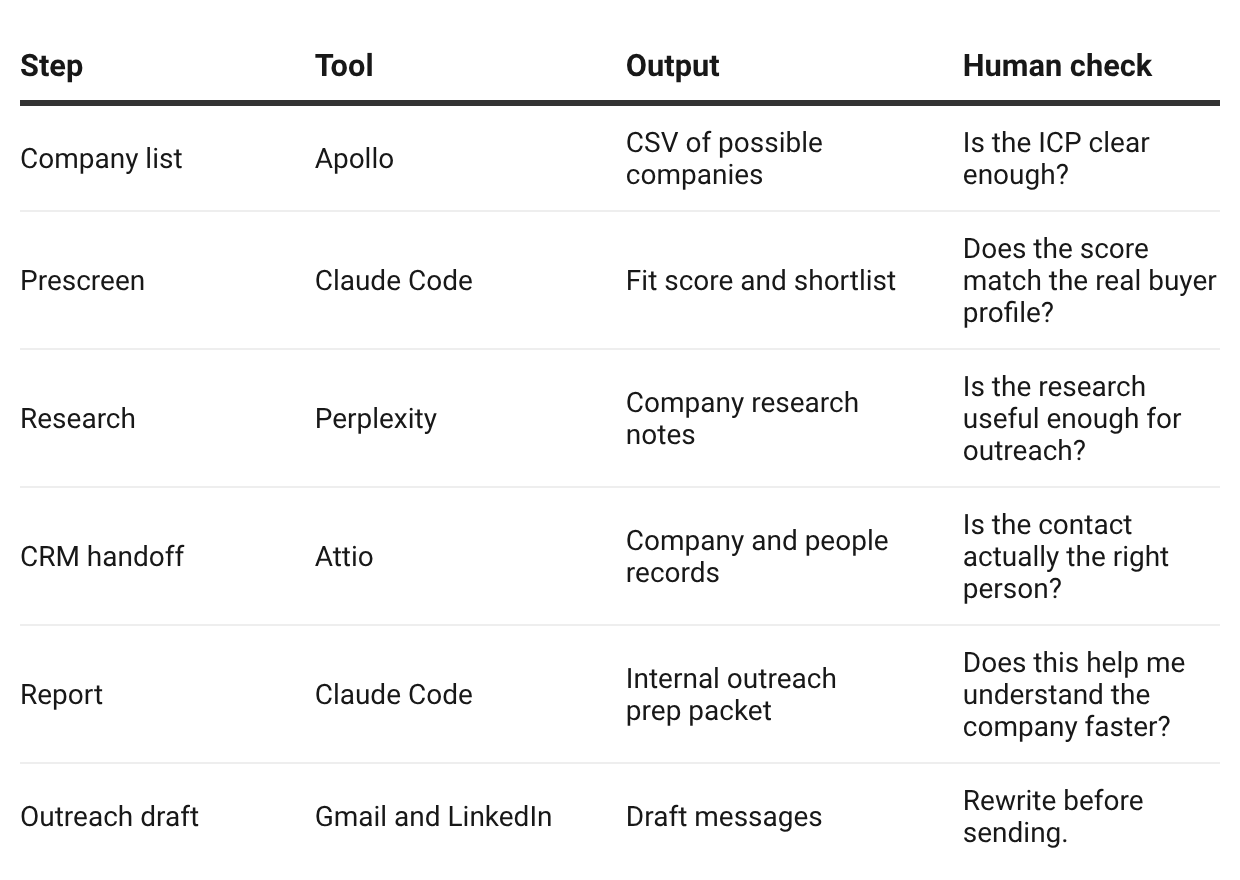
That table is also why the system felt practical to me. Each step had a job. Each output moved the lead one step forward. And every risky moment still had a human check before it touched the prospect.
The Smallest Version I Would Build First
If you want to copy the idea, I would not start with the full setup.
I would start with one manual version:
Export 20 companies from Apollo or another company database.
Write your ICP in plain language.
Ask AI to score the companies against that ICP.
Pick the top five.
Run deeper research on those five companies.
Write one LinkedIn message and one email draft.
Review and rewrite everything yourself.
Only after that would I connect a CRM, Gmail drafts, or custom MCP servers.
The danger with sales agents is that it is easy to automate before you understand the selling motion. Jonas avoided that by keeping himself in the loop and updating the criteria as he learned.
That is the part I would copy first.
The exact stack matters less than the sequence.
Show Details
Season: Season 2
Episode: Episode 6
Topic: Claude Code sales engine
Guest: Jonas Braadbaart, writer of The Circuit
Hosts: Wyndo and Dheeraj
Key Timestamps
00:01:31 Season 2, Episode 6 introduction.
00:02:01 Why Jonas was invited and what his sales engine does.
00:04:13 Jonas introduces himself and The Circuit.
00:05:32 Jonas explains his current Claude Code setup.
00:13:46 The discussion shifts into the sales engine.
00:14:35 Why Jonas built it in Claude Code instead of n8n or Make.
00:17:01 The business context behind the sales engine.
00:20:17 Why ICP definition matters before automation.
00:24:52 Apollo list strategy and company filtering.
00:26:46 The workflow map: Apollo, prescreening, research, Attio.
00:29:04 Perplexity research and lead sourcing.
00:34:14 Creating company research files and CRM records.
00:35:40 Personalized reports and outreach drafts.
00:39:46 Gmail drafts and LinkedIn review.
00:40:24 Why fully automated cold outreach failed.
00:42:49 Jonas explains why he now prefers augmentation for this work.
00:44:37 The hard human work behind defining the customer profile.
00:46:17 Why human communication should stay human.
00:51:41 Cost breakdown.
00:58:56 Des asks about results and daily time spent.
00:59:05 80 companies contacted, one sale.
00:59:34 Around one minute per lead with the system in place.
01:01:43 Wrap and next week’s topic.
Resources Mentioned
Claude Code: Jonas’s main agent harness for building and running the sales workflow. Mentioned throughout by Jonas, Wyndo, and Dheeraj.
Codex: Discussed near the start as a strong alternative to Claude Code, especially for writing and project-aware knowledge work. Wyndo mentioned using it alongside Claude Code.
Cursor: Jonas used Cursor for about two years before relying more heavily on Claude Code. Wyndo also mentioned using Cursor for coding.
Antigravity: Jonas tested it against Claude Code and Codex and was disappointed. Wyndo and Dheeraj discussed it in relation to Gemini access.
Gemini Pro: Mentioned because Antigravity access can come through the Gemini Pro plan.
GPT 5.5: Discussed as a strong model, especially in Codex.
Anthropic: Mentioned as Jonas’s preferred model company for coding confidence.
OpenAI: Mentioned in the context of Codex and model competition.
Fable 5: Mentioned during the opening discussion as part of recent model drama.
Apollo: Used to pull company lists, company data, and enrichment data. Jonas mentioned around 60 euros for the Apollo use in his setup.
Perplexity: Used through a custom MCP server for desk research on companies. Jonas said costs were small for his usage, with larger runs adding more API cost.
Attio: The CRM Jonas used because it had a mature first-party MCP server. The agent creates company and people records there.
Gmail: Used for outreach drafts through an MCP setup. Jonas did not let the agent send messages unsupervised.
LinkedIn: Used for first-touch relationship building and manual outreach review. Jonas mentioned LinkedIn All In One at around 60 euros in his cost breakdown.
Instantly: Used to set up a separate Google account for cold outreach so Jonas did not pollute his main email domain.
Make: Mentioned as a tool Jonas still uses for some automations, though he chose Claude Code for this sales system.
n8n: Mentioned as a familiar automation tool, but Jonas said this kind of flexible, changing workflow was easier for him in Claude Code.
Obsidian: Jonas built a small plugin so he could run Claude Code natively inside Obsidian for knowledge work.
VS Code: Jonas uses VS Code with Claude Code for engineering work.
Gamma: Jonas uses Gamma for presentations after Claude Code helps generate the slide outline.
Google Slides: Mentioned as slower for Jonas’s presentation workflow compared with Gamma.
NanoBanana: Mentioned as an image-generation MCP server Jonas had used, with API costs that could add up.
Hunter.io: Dheeraj mentioned it as a lead enrichment platform.
ZoomInfo: Dheeraj mentioned it as another lead enrichment platform.
The Circuit: Jonas’s Substack newsletter.
H&M Group: Jonas mentioned leading AI teams there.
Lodestone Digital: Jonas’s AI agency context behind the sales engine.


