



In Episode 16 of One Shot Show, Dheeraj Sharma and I talked about something that keeps coming up for people using Claude Code seriously:
Usage limits.
If you use Claude Code for small tasks, maybe this does not hit you often. But if you use it for coding, writing, research, content systems, or long-running projects, you eventually run into the same wall.
You are in the middle of real work. You feel productive in your session. Then the context gets heavy, the usage limit starts creeping up, and suddenly you are thinking more about tokens than the task at hand.
That is annoying.
Now you need to think creatively about how to work more efficiently with your agent. You start considering a few tricks: use /clear, use /compact, turn off MCPs, and pick a cheaper model.
All of that helps.
But the deeper point from the episode was this: a lot of token waste happens because Claude is carrying or searching through things it does not need.
That is the part I think is most important, yet not many people realize it. Saving tokens is not only about being careful with every message. It is also about helping Claude know where to look, where not to look, and when the current conversation is done.

Why Usage Limits Start Feeling Random
Dheeraj opened the session with a simple explanation that made the whole topic clearer.
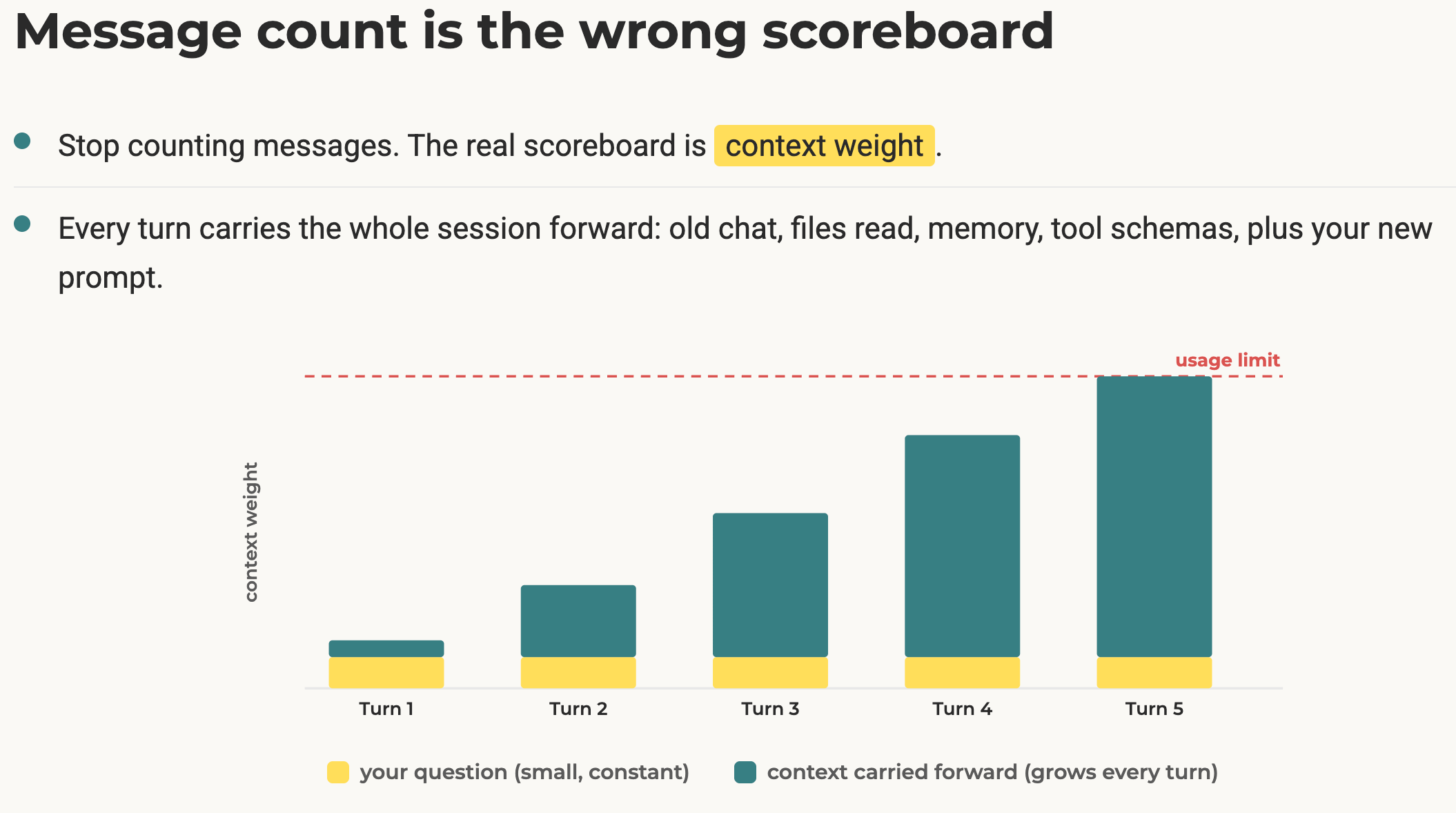
Most people think usage gets expensive because they send too many messages. That is partly true, but it misses the bigger issue.
Every new message carries the weight of the conversation behind it.
If the conversation is clean, that is fine. But if the conversation is fragmented, full of old directions, discarded ideas, unrelated files, and half-finished experiments, every new chat you request can become heavier than it looks.
That is why a short message can still feel expensive because you are not only sending the words you just typed. You are also asking Claude to keep working inside everything the session already collected.
This is where I think a lot of us get into trouble.
We start with something vague, then add a detail, correct it, remember a file, ask it to search the folder, change direction, and finally ask it to revise based on something from 40 minutes ago.
That flow feels natural because it is how we think.
But in a long Claude Code session, that natural flow can become a cost.
That’s why, to save on costs, we need to reduce the amount of unnecessary guessing Claude has to do.
That one idea explains most of the tips we covered.
Now, let’s dive in.
1. Clear The Session When The Task Changes
The first habit is simple: when the task is done, stop carrying it.
In Claude Code, that usually means using /clear. In Claude chat or a project, it means starting a new chat when the next thing is not related with your current tasks and conversations.
Dheeraj made this point early in the session. If your article is written, your bug is fixed, or your research task is done, do not keep using that same conversation for the next unrelated thing.
I know why people do it. I do it too sometimes. You are already there. The session already feels warm. Starting fresh feels like extra friction.
But the old context becomes baggage fast.
If I just finished working on a newsletter draft, and then I ask Claude Code to help me plan a sales email in the same session, I am making it carry the previous draft, edits, decisions, and style notes into a task that probably does not need them.
That is wasted context.
So the rule is pretty straightforward:
Same task, same session is usually fine.
New task, new session is usually better.
If you are not sure, ask whether the previous context actually helps the next answer.
If it does not help, clear it.
2. Compact Before The Session Gets Too Heavy
The second habit is /compact.
Dheeraj’s rule is to compact before the session gets close to the edge. He mentioned doing it around 60 to 70 percent of the context window instead of waiting until Claude is forced to compact automatically.
The important part is that he does not run a blank compact.
He runs compact with instructions.
I think not many people actually do this. They just trust the compacting rules without personalizing them. The problem with default compacting rules is that they can sometimes drop things you still need. If you gave important writing rules, file decisions, source links, or next steps early in the session, those can disappear or get flattened into a weaker summary.
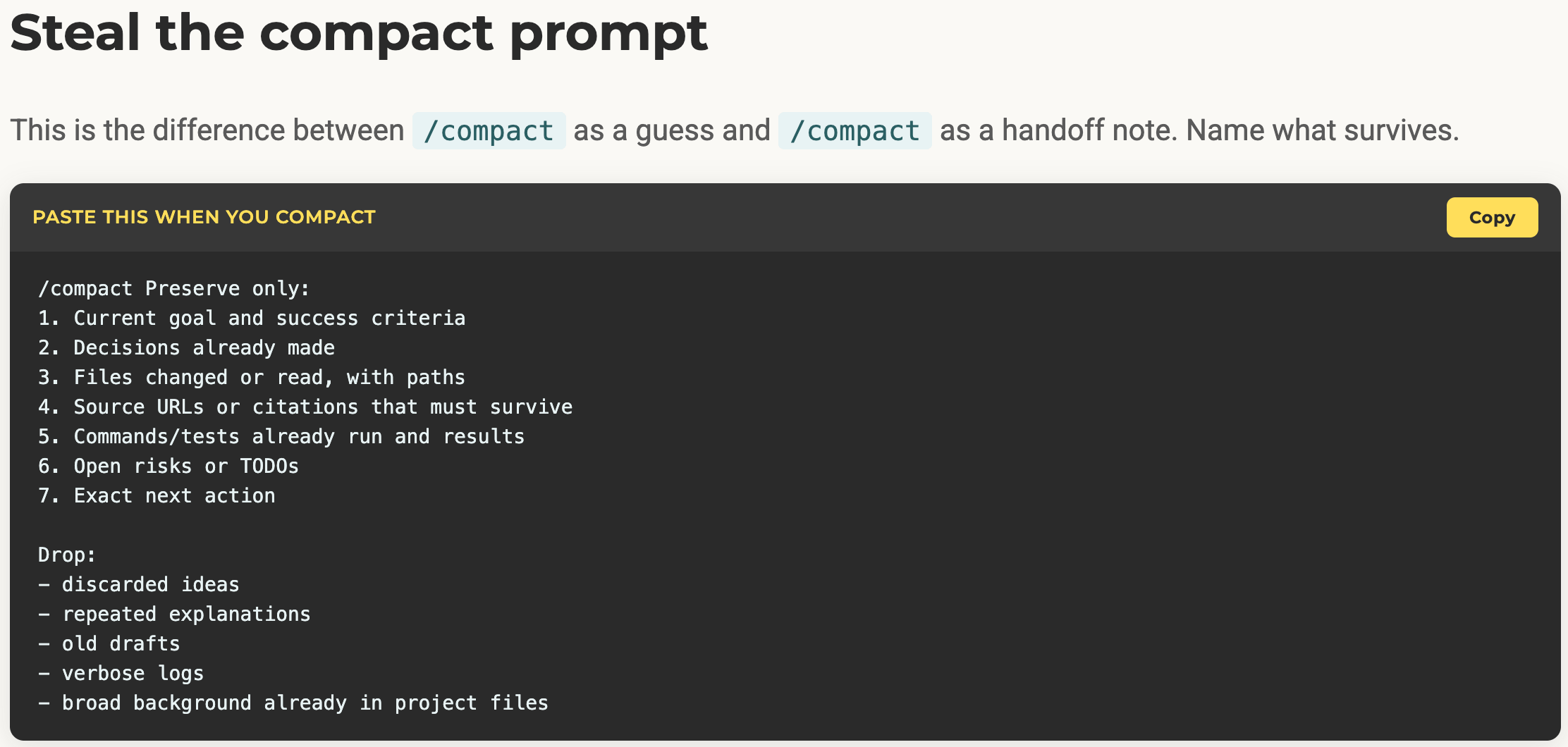
So Dheeraj uses the compact instruction to tell Claude what to preserve:
Current goal
Success criteria
Decisions already made
Files changed or read
Source URLs
Open tasks
Exact next action
He also tells it what to drop:
Discarded ideas
Repeated explanations
Old drafts
Verbose logs
Broad background that already lives in files
I do not use this for every small content task. If I am doing a quick edit or a short draft, it can feel like more process than I need.
But for long coding sessions, multi-step builds, or tasks that need to continue across multiple passes, it makes sense. The session gets lighter without losing the thread.
And if the task is truly done, I would still rather clear than compact.
Compact helps you continue. Clear helps you stop carrying the old thing.
3. Point Claude At The Exact Files
This is the biggest one for me.
If I already know which file or folder matters, I tell Claude directly.
When I am writing a newsletter draft, I do not want Claude Code searching through every folder in my AI Maker project. I want it looking at the draft, the newsletter rules, and maybe the audience or voice files if the task needs them.
That saves tokens, but it also improves the answer.
Claude does not need to guess which folder I mean, scan unrelated files, or read LinkedIn rules when I am writing a Substack note.
During the episode, I said this is one of the most important habits in my own process.
If I know the file, I mention the file.
If I know the folder, I mention the folder.
If I know the section, I mention the section.
This is especially important in big content projects because it sets the right intention, making Claude more efficient and preventing it from searching through irrelevant files it doesn’t need to execute your requests.
So the token-saving move is also a quality move:
Do not make Claude search the whole project when you can point it at the right shelf.
4. Keep CLAUDE.md Lean
This connects directly to the file-pointing habit.
Dheeraj mentioned keeping CLAUDE.md lean. I said the same thing from my own setup. The reason is simple: the file loads into the session, so whatever you put there becomes part of the cost.
The mistake most people make is trying to put everything into CLAUDE.md.
Voice rules. Technical rules. Product strategy. Content process. Audience profile. SEO process. Formatting rules. Tool preferences. Personal constraints. Everything.
At first, you might think this is helpful because the agent has more information.
But after a certain point, it just becomes noise.
5. Route to supporting files only when needed.
The better way to do this is routing.
Your CLAUDE.md should know where the important files live. It does not need to contain every detail from those files.
For example:
If the task is newsletter writing, read the newsletter rules.
If the task is Substack Notes, read the Notes examples.
If the task is LinkedIn, read the LinkedIn style file.
That is the part I care about most.
The file should route Claude to the right context. It should not dump the whole project into every session.
You can test this by watching what Claude reads when you start a task. If it keeps opening irrelevant files, your routing is probably too vague. If it goes straight to the right files, your setup is doing its job.
This is why I think usage limits are often a project-structure problem before they are a model problem.
When the structure is messy, Claude spends tokens figuring out what it should already know. When the structure is clearer, the model can spend more of the session doing the actual work.
If you want to learn more about how to build your CLAUDE.md with the right context routing strategy, read my post below:

6. Turn Off The MCPs You Are Not Using
This was one of the more practical parts of the episode.
MCP connectors are useful, but they can quietly make sessions heavier.
Dheeraj showed how his setup had several connectors available, and we talked about disabling the ones that do not matter for the current task. Canva, Notion, PayPal, Substack, Descript, and other connectors came up as examples.
But we’re not saying MCP is bad.
It’s just that every connected tool should earn its place in the session.
If I am writing a newsletter draft, I probably do not need Canva, PayPal, or a video editing connector loaded. If I am researching something, I may need a search tool. If I am updating a database, I may need Notion or another data source.
But leaving everything enabled by default can create hidden cost.
This is especially true when you use Claude Desktop or Cowork with connectors attached. If those connectors are available, they can become part of what the system has to account for.
So here’s the simplest thing you can do:
Before a focused session, check which connectors are enabled.
Disable the ones that do not matter.
Re-enable them only when the task needs them.
This can feel like it’s adding more work at first, but if reducing token cost is your number one priority, it can definitely save you a lot of tokens.
7. Use CLI Plus Skills When MCP Is Too Heavy
Dheeraj and I also talked about replacing some MCP usage with CLI plus skills.
This is not for everyone. If you are not comfortable with command-line tools, MCP might still be easier. That is fine.
But if a CLI already exists for the tool you use often, wrapping that CLI in a skill can be much lighter than keeping a full connector running all the time.
Dheeraj mentioned using CLI workflows for Google apps. We also talked about Notion CLI and Tavily CLI as examples where a command-line path can sometimes be cleaner than an always-on connector.
The difference is mostly about when the tool becomes available.
With MCP, the tool is connected into the session.
With a CLI wrapped in a skill, the agent only needs the process for when you call that skill.
That can make the session feel lighter.
Again, I would not turn this into a religion. If the MCP is useful, use it. If the CLI is painful, do not force it. But if you keep hitting limits and one connector is always sitting there unused, it is worth asking whether another alternative would work.
8. Match The Model To The Job
The final habit is model choice.
Dheeraj’s model split was something you can apply now:
Use Haiku for classification, extraction, tagging, formatting, short rewrites, and mechanical cleanup.
Use Sonnet for most execution work.
Use Opus for planning, hard reasoning, and complex development work.
If you are on a plan where Opus usage matters, his suggestion was to plan with Opus, then switch to Sonnet for the execution.
That makes sense to me.
Not every task needs the strongest model. If the job is sorting comments, formatting output, extracting fields, or committing a simple change, using the expensive model is probably a little bit overkill.
So, it’s important to understand the type of tasks you’re requesting and ask the right model to do them.
9. Use /context And /usage To Find The Real Culprit
One of the best parts of the episode was watching Dheeraj use /context and /usage.
These commands lets you see the token cost details clearly:
/contexthelps you see what is taking up the current session: messages, files, tools, skills, memory files, and available space./usagehelps you understand where your usage is going over time.
You don’t need to run them in every task, but at least you need to know how your token are spent so you know where to optimize. Because in some cases, the problem you thought were the root cause could be not
You might think the problem is one long chat, when the real issue is a connector you always leave on. Or you might think the problem is Claude Code itself, when the real issue is a sub-agent running with Opus for a simple recurring task.
Dheeraj found that one of his automated WordPress workflows was consuming a large share of his usage. Without the usage view, that would have been hard to notice.
That is the point of these commands.
They do not save tokens by themselves. They show you where the leak is.
Then you can decide whether to clear more often, compact earlier, split a task, disable tools, change the model, or fix the project routing.
The Bigger Lesson
If I had to compress the whole episode into one idea, it would be this:
“Claude Code gets expensive when the session has to carry too much or guess too much.”
Some of that is conversation behavior. You keep adding corrections, old ideas, and unrelated next steps.
Some of that is project structure. Claude does not know which files matter, so it searches more than it needs to.
Some of that is tool setup. Connectors stay enabled even when the task does not need them.
The fix is not one magic command.
It is a set of small habits:
Clear when the task changes.
Compact with instructions when the task continues.
Point Claude at exact files.
Keep
CLAUDE.mdlean.Route to supporting files only when needed.
Disable unused MCP connectors.
Use CLI plus skills when that is lighter.
Match the model to the job.
Check
/contextand/usagewhen the limits feel confusing.
But, to be clear, none of these are magic bullets that can significantly reduce your token usage. At least you can start gradually by doing these things:
If you are doing short tasks, start with
/clearand better file references.In case you are doing long coding sessions, add compact instructions and a handoff log.
Or, if you use many connectors, audit your MCP setup.
Please remember not to make your workflow more complicated just to save tokens. Just make sure you stop paying for context that Claude didn’t need in the first place.
Show Details
Show: One Shot Show
Episode: Episode 16
Topic: Claude Code usage limits and token-saving habits
Hosts: Wyndo and Dheeraj
Schedule: One Shot Show goes live every Wednesday at 10:00 AM EST on Substack
Key Timestamps
00:00: Episode 16 introduction and why usage limits matter.
00:02: Dheeraj frames the problem as Claude usage limits and workflow friction.
00:04: The agenda: clear, compact, session diet, model matching, and the working loop.
00:05: Why message count is really about repeated context, not only number of prompts.
00:08: Use
/clearor a fresh chat when a task is done.00:09: Use
/compactaround 60 to 70 percent instead of waiting for the session to hit the edge.00:10: Why compacting with instructions preserves the important parts.
00:14: What to preserve and what to drop during compaction.
00:16: Putting the session on a diet with a cleaner first brief.
00:19: Point Claude at files and sections instead of pasting large blocks.
00:21: Wyndo explains why exact file and folder references matter for newsletter work.
00:22: Keep
CLAUDE.mdlean and use routing files.00:24: Wyndo explains routing by task type: Substack Notes, newsletters, LinkedIn, sales email, brainstorming.
00:26: Disable unused MCP servers.
00:28: Use
/contextto see what the session is carrying.00:29: Use
/usageto inspect where usage is going.00:32: Why unused MCP connectors can become a hidden token cost.
00:34: Notion, Tavily, and CLI alternatives.
00:35: Moving from MCP to CLI plus skills when it makes sense.
00:36: Match Haiku, Sonnet, and Opus to different jobs.
00:39: Plan before big edits to reduce fragmented correction chains.
00:40: Dheeraj’s WordPress automation example and the hidden Opus cost.
00:42: Wyndo’s habit of starting a new session after the context gets too high.
00:44: The working loop: scope, load files, execute, verify, hand off.
00:45: How the same habits translate to Claude chat, projects, and Cowork.
00:47: Wyndo’s biggest takeaways: remove unnecessary MCPs, use CLI and skills, fix routing.
00:53: Sunny asks what Claude can and cannot automate about compacting and clearing.
00:55: Wrap-up and next episode preview on second brain workflows.
Resources Mentioned
Claude Code: Main tool discussed for coding, writing, and agentic work. Mentioned by Wyndo and Dheeraj. Pricing was discussed only at the plan level, with no exact current details verified.
Claude Desktop / Claude chat / Claude Projects / Cowork: Alternative Claude surfaces where similar habits apply. Mentioned by Dheeraj. Pricing not discussed in detail.
Codex: Mentioned as a related tool and prior fallback when Claude usage limits become a problem. Mentioned by Wyndo and Dheeraj. Pricing not discussed in detail.
Opus: Claude model discussed for hard reasoning, planning, and complex development work. Mentioned by Dheeraj. Usage details should be verified before publishing current plan claims.
Sonnet: Claude model discussed as a strong execution model after planning. Mentioned by Dheeraj. Pricing not discussed.
Haiku: Claude model discussed for classification, extraction, cleanup, short rewrites, formatting, tagging, and simple Git commits. Mentioned by Dheeraj. Pricing not discussed.
/clear: Claude Code command for clearing the session when a task is finished. Mentioned by Dheeraj./compact: Claude Code command for compacting a session. Dheeraj recommended using it with instructions./context: Claude Code command for inspecting what is using the context window. Mentioned and demonstrated by Dheeraj./usage: Claude Code command for seeing where usage is going. Mentioned and demonstrated by Dheeraj./mcp: Claude Code command used to inspect or manage MCP servers. Mentioned by Dheeraj./model: Claude Code command for switching models. Mentioned by Dheeraj.MCP servers / connectors: Tool connection layer discussed as useful but potentially heavy when unused connectors remain enabled.
Canva MCP: Example connector Dheeraj had disabled. Pricing not discussed.
Notion MCP: Discussed as a heavy connector, with Notion CLI suggested as a possible lighter path. Pricing not discussed.
PayPal MCP: Example connector mentioned in Dheeraj’s connector list. Pricing not discussed.
Substack MCP: Example connector mentioned in Dheeraj’s connector list. Pricing not discussed.
Descript MCP: Example connector Dheeraj uses for video editing work. Pricing not discussed.
Notion CLI: Suggested as a lighter alternative to Notion MCP in some setups. Mentioned by Dheeraj.
Tavily CLI: Suggested as a lighter alternative to Tavily MCP in some setups. Mentioned by Wyndo and Dheeraj.
Google apps CLI: Dheeraj mentioned using CLI for Google apps instead of MCP. Pricing not discussed.
Claude Skills: Discussed as a way to wrap CLI processes and keep repeated workflows lighter.
WordPress Autopilot / travel blog automation: Dheeraj’s example of a recurring task that consumed more usage than expected because of model choice and context size.
Git repository: Mentioned as a simple task category where a smaller model can be enough for commits.
Log file / bridge file: Mentioned as a way to preserve handoff decisions between sessions or tools.
LLM wiki pages / second brain workflow: Preview of the next episode, based on Wyndo’s idea-capture and thinking workflow.
Andrej Karpathy: Referenced as inspiration for LLM wiki pages. Mentioned by Wyndo.
Anthropic: Mentioned in the context of Claude usage limits and behind-the-scenes limits. Current policy details were not verified for this draft.
Reddit forums and X timeline: Mentioned as places where people discuss usage-limit frustration. Pricing or product claims should be verified separately before publication.


