

The Complete Guide to Building Your First Agentic System (That You Can Actually Trust)
Less babysitting, more work gets done.


Over the last four months, I have been running Q&A sessions with paid members of AI Maker.
Here are some type of questions that I’ve received so far:
How do I create a master prompt that understands my writing?
Can I turn client call transcripts into LinkedIn ideas?
Where should my research live?
Should I use Claude Code, Cowork, Codex, or another agent?
How do I build reports and decks that are reliable enough to use with clients?
But the more I think about it, the more I realize these questions are just two versions of the same problem.
First, some people create a new AI project for every kind of work.
One Claude Project for writing, another for research, another for a client, another for a new business idea. Then a few custom GPTs, saved prompts, half-finished skills, and too many MCP tools connected because they looked cool but aren’t actually useful.
This can help for a while. But every project will evolve and develop its own instructions, files, prompts, and corrections. Soon, the person has to remember which project contains the latest rule, where the best reference file lives, and which version of the process produced the result that meets their standards.
Second, other people have not defined a strong process yet.
They know how to do the job through experience, but the steps, required input, and quality bar still live mostly in their head. When they ask an agent to help, they give it the task without explaining how to do it properly.
In one case, the process is scattered across too many places. In the other, the process has never been written down clearly enough for an agent to follow.
Both lead to the same problem: bad outputs that you can’t really trust.
That is why I keep returning to one question:
“How do I turn the way I work into a process an agent can repeat and I can trust?”
At a high level, that process needs six parts:
One repeated job with a clear starting point
The real input the agent needs
A process the agent can follow
A reviewable output
A written standard the output must pass
Whatever that goes into the job can be completely different.
What do I mean by that is a creator may start with a rough idea and end with a newsletter draft. A consultant may start with a client call and end with a proposal. A manager may start with weekly updates and end with a team brief. A researcher may start with a question and end with a report.
The input, process, output, and standard will change, but the basic shape stays the same.
Whether you use Claude Code, Cowork, Codex, or another agent, you still need to make those decisions before the agent can repeat the work reliably.
How do you make an AI agent workflow more reliable?
Reliable output requires more than a good prompt or a capable model.
Every run will be different. The research changes. Client information changes. The process gets adjusted. The output changes depending on the situation. Even your quality bar should get sharper as you learn more about your work.
Reliability comes from making those moving parts clear enough to inspect. Before each run, the agent should know:
What information it needs before starting
Which process and decision rules currently apply
What it is responsible for producing
Which standards the result needs to pass
Where your corrections should be saved for the next run
REQUIRED INPUT
        |
        v
CURRENT PROCESS AND DECISION RULES
        |
        v
REVIEWABLE OUTPUT
        |
        v
CURRENT QUALITY CHECK
Once those pieces are clear, you can compare one run with the next. If the result changes, you can see whether the source material changed, the process was updated, the output requirement shifted, or the quality standard became clearer.
Your work keeps evolving, but the changes become deliberate and traceable. That is what makes the system more reliable over time.
Start with one repeated task for your AI agent
To turn one repeated job into a process an agent can follow, I would begin with four questions:
1. Work
What repeated job do you want the agent to handle?
Keep this simple and don’t overthink. “Help me run my business” is difficult to define. But, a job that starts with a recognizable input and ends with a reviewable deliverable is small enough to build.
For example, creating a newsletter post from a brain dump of ideas, building a high‑quality report deck from research data, or turning a client transcription into a proposal deck.
2. Input
What does the agent need before it can begin?
This might include research, notes, transcripts, client documents, datasets, meeting updates, or brief.
3. Output
What should exist when the work is finished?
A newsletter draft. A client session plan. A weekly team brief. A research report. The output needs a clear format and a place where the agent should save it.
4. Key standard
What must be true before you would accept the result?
For writing, the standard might be preserving your argument, voice and verifying current claims. For consulting, every recommendation may need to trace back to the client’s information. For research, facts, inferences, and recommendations may need to remain clearly separated.
Write those four answers down in one place:
WORK
The repeated job I want the agent to perform.

INPUT
The files or information that begin the job.

OUTPUT
The deliverable that should exist when the job is complete.

KEY STANDARD
The most important requirement the output must pass.
And let’s look at this from a broader perspective based on the job type:
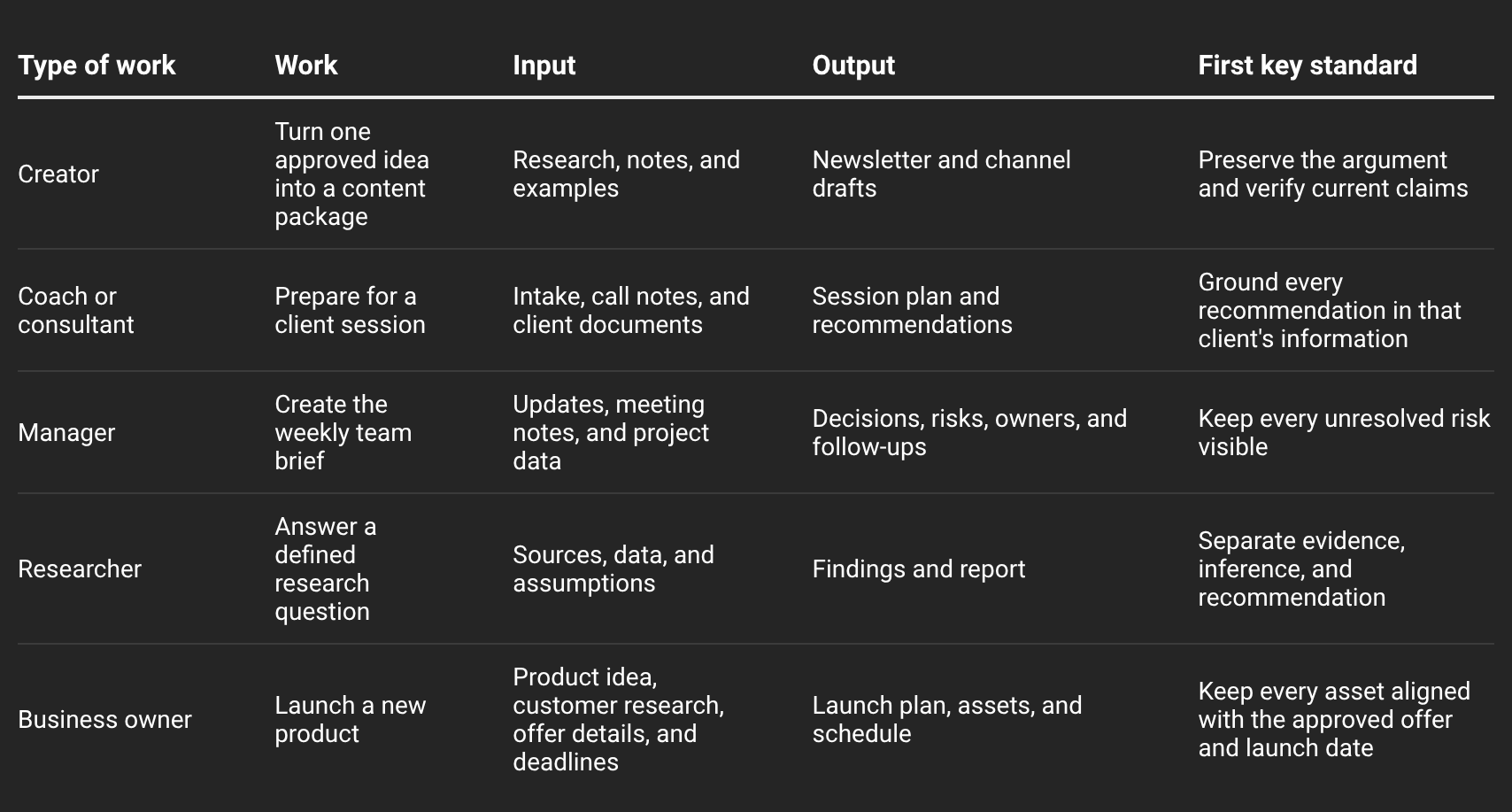
Notice that the details change across each kind of work, while the shape stays the same. Every job begins with specific input, produces a defined output, and has one standard the agent can use to judge the result.
What should an AI agent folder include?
Once the job is clear, you can give each part a place in a local computer folder that your agent can find and use again.
Here is the basic folder:
your-agent-job/
├── CLAUDE.md   --> the project direction for Claude
├── AGENTS.md   --> the project direction for ChatGPT/Codex
├── input/      --> real sources material
├── output/     --> the finished deliverable
├── standards/  --> quality requirement to generate outputs
└── .claude/
    └── skills/ --> specific task level instruction for Claude
└── .agents/
    └── skills/ --> specific task level instruction for Claude
Allow me to explain for each of them:
The main folders
The main folders, input/, output/, and standards/, give your work a place to live.
The
input/folder contains the real source material the agent needs before it starts.The
output/folder gives the finished deliverable a clear place to go.The
standards/folder contains the quality requirements the agent should use to review that output.
The instruction file
Without the instruction file, the main folders are still just a collection of folders and files. The agent needs something that explains how those pieces fit together and what it should do when a request comes in.
That is the job of CLAUDE.md or AGENTS.md.
The instruction file tells the agent what this project is for, where the inputs and standards live, where it should save the outputs, and which Skill to use when a certain request comes in. This is what ties the folders together so the agent does not have to guess what to read or what to do next.
Skills for specific tasks
Skills sit one level below that.
Skill is important because sometimes a simple prompt isn’t enough to generate reliable output. Some tasks require a more specific process the agent needs to follow. It can be time-consuming if you have to write everything by hand every time you want the agent to do repeatable tasks.
That’s why we need Skill. A Skill is like a saved instruction that the agent needs in order to generate reliable results repeatedly by following a specific process.
For example, you might ask the agent to turn one newsletter into a LinkedIn post, a Substack Note, and an X thread. The instruction file tells the agent where to find the source newsletter and the standards for each channel. A content repurposing Skill gives it the exact steps for turning that source into three different outputs.
If you are a researcher, the instruction file might tell the agent where the research questions, source rules, and report templates live. A research Skill can then tell it how to search the internet for a topic, review the sources, separate evidence from inference, and generate the final report in the format you already defined (html, ppt, docs, etc).
Use this Skill when you want a task executed properly with a minimal margin of error.
External access through MCP or CLI
If the job needs information outside the local folder, MCP or command-line tool can give the agent access to it.
For example, MCP might let the agent read a document from Google Drive. Or you could ask the agent to read all of your Gmail inbox, X bookmarks, create tables in Notion, and build you a banner for your marketing campaign.
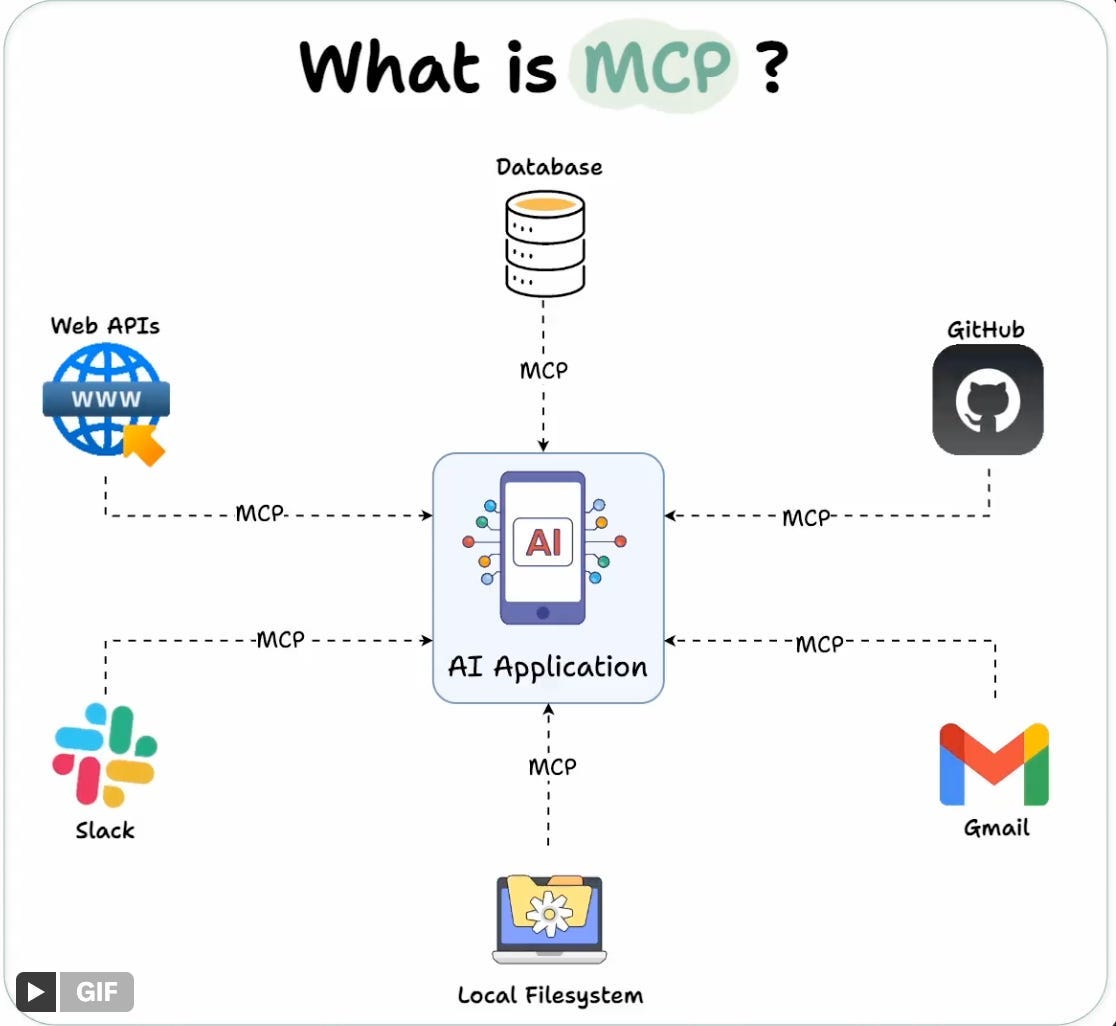
Without MCP or CLI connections, the agent can’t reach out to the outside world to interact with the apps you use on a daily basis. This keeps all your work trapped on your local computer and still requires you to copy and paste everything manually.
I know you don’t want that.
With MCP or CLI, the agent can do all of this for you and execute on your behalf.
Build the first working version
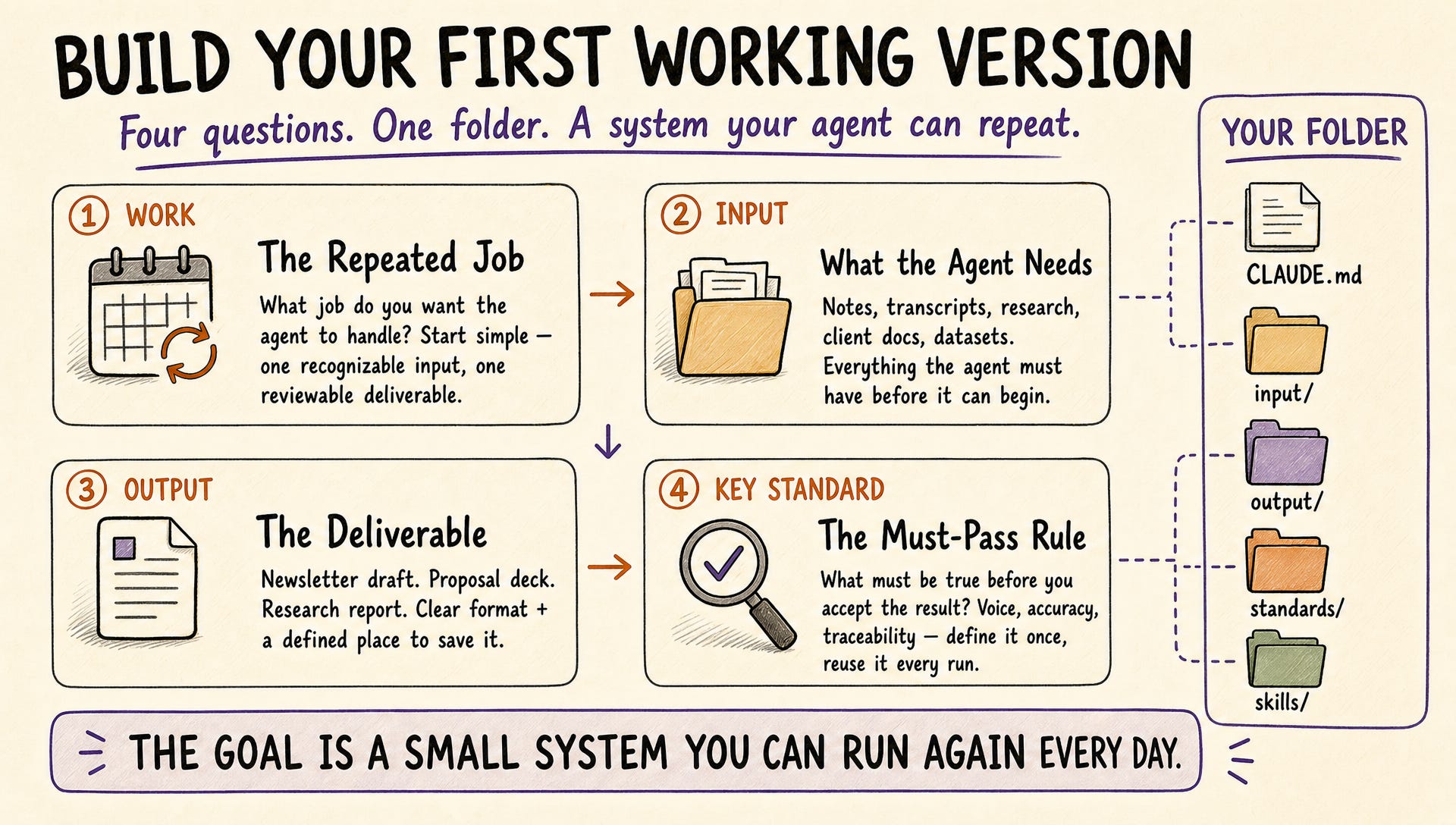
In the rest of this post, you will start with a blank job system and fill it with your own Work, Input, Output, and Key Standard.
At each step, I will show how this works across multiple job types—creators, consultants and coaches, managers, researchers, and business owners—including templates that use those five folder shapes.
By the end, your folder will be able to take one real input, follow a defined process, create a reviewable output, and check it against a written standard.
The goal is a small system you can run again every day.
In the end, you’ll end up in the place where you spend less time babysitting the agent so you can deploy 5-10 agents to do more work and eventually become more productive than you ever be.
🚨 Before continuing, this post is a little bit different from my usual ones, where I normally share skills, agent setups, or new AI features to use. But given how many people still haven’t fully embraced the agentic system I’ve been living in for the past year, I think it’s important to go back to the fundamentals and build the right foundation for working with AI agents.
Because, trust me, when you’ve built your agent setup right, it starts compounding. The agent gets better over time as the model improves and as it learns more about your work in detail. That’s why I want to transfer this knowledge into this post so you can start building your own.
This post expands on my previous writing. You may want to review these related posts before and even after diving into this one:
Choose the folder shape that matches how your work repeats
You may already have Claude Projects, saved prompts, and partial systems scattered across different places. I’ll assume that you have now defined one job, the input it begins with, the output it should create, and the standard it needs to pass.
What we need to do now is giving those pieces a folder structure the agent can follow.
Choose the example closest to how you work, then rename or remove anything you don’t need.
I am showing the Claude Code version below to keep the trees readable. If you use ChatGPT/Codex, replace CLAUDE.md with AGENTS.md and .claude/skills/ with .agents/skills/.